
Descrizione
Asgaros Forum è il plugin WordPress perfetto per te se vuoi estendere il tuo sito web con un forum di discussione leggero e ricco di funzionalità. È facile da configurare, super veloce e si integra perfettamente in WordPress.
Supporto, demo e documentazione
Caratteristiche
- Semplice Gestione dei Contenuti
- Profili e Lista degli iscritti
- Notifiche e feed
- Editor potente
- Orientato alla SEO
- Reazioni
- Caricamenti
- Cerca
- Sondaggi
- Widget
- Statistiche
- Pubblica come ospite
- Approvazione, ban e segnalazioni
- Moderatori, permessi & Gruppi utente
- Tema responsive personalizzabile
- Multilingue
- Istanze multiple
- Compatibile multisito
- integrazione my CRED
Installazione
- Una nuova pagina forum è creata automaticamente durante l’installazione
- Aggiungi questa pagina al tuo menu in modo tale da poter accedere al forum.
- È tutto!
Screenshot

Panoramica del forum 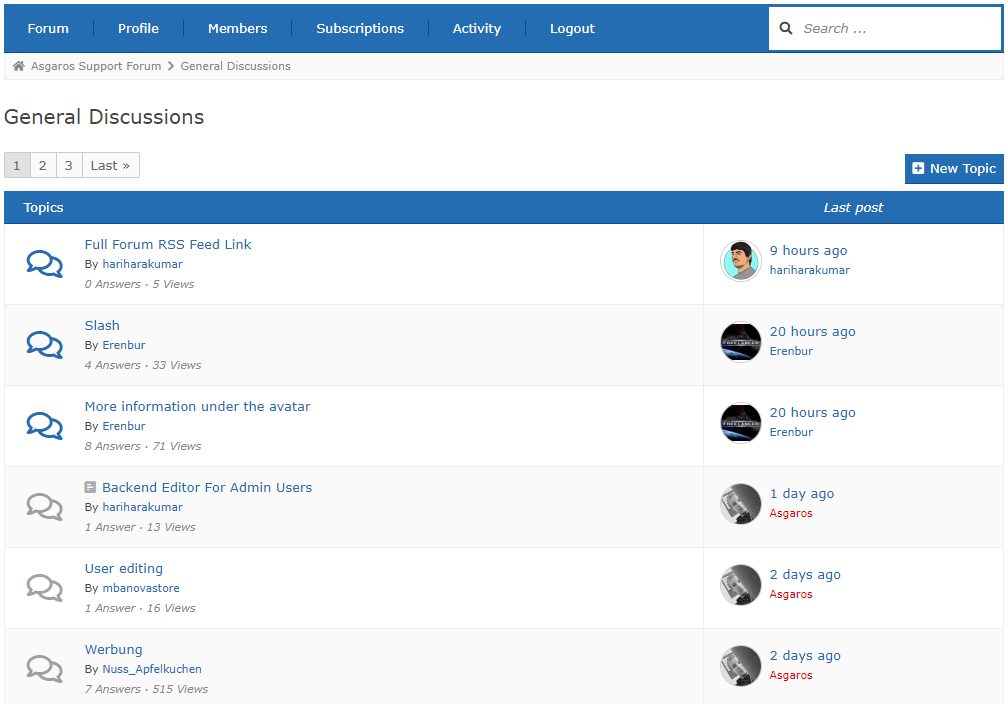
Panoramica dei topic 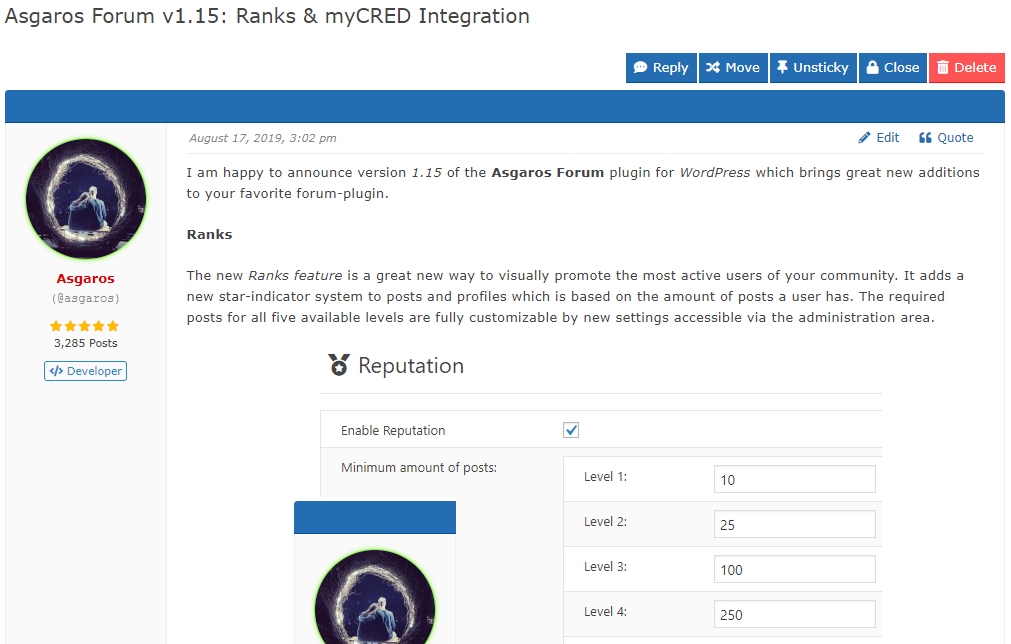
Vista del topic 
Creazione di un nuovo topic 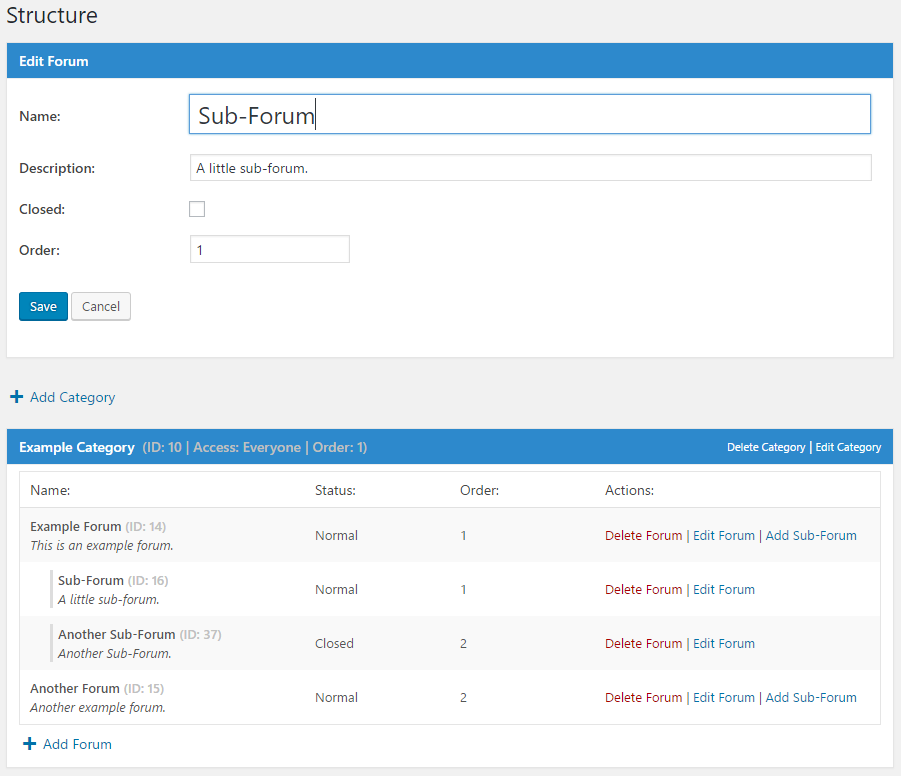
Gestione dei forum nell'area di amministrazione 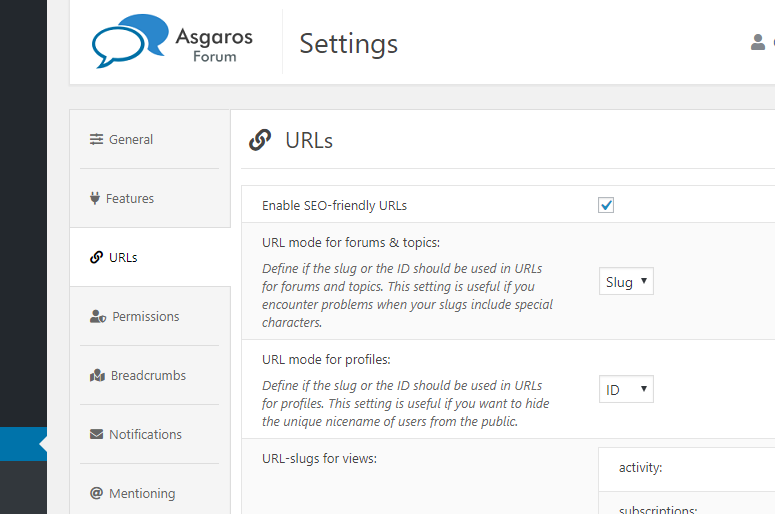
Gestione delle opzioni generali.
Installazione
- Scarica
Asgaros Forum. - Attiva il plugin tramite la schermata
Plugindi WordPress. - Una nuova pagina forum è creata automaticamente durante l’installazione
- È inoltre possibile aggiungere manualmente un forum a una pagina aggiungendo lo shortcode
[forum] - Aggiungi questa pagina al tuo menu in modo tale da poter accedere al forum.
- Sul lato sinistro dell’area di amministrazione troverai un nuovo menu chiamato
Forumdove potrai cambiare le impostazioni e creare nuove categorie e forum - È tutto!
FAQ
-
Non posso vedere il contenuto o le modifiche che ho fatto al forum
-
Se stai usando qualche plugin terzo per la cache (WP Super Cache per esempio), disabilita il caching per la pagina del forum. Tutto dovrebbe funzionare nuovamente.
-
Non riesco a caricare i miei file
-
Di default solo i file di questi tipi possono essere caricati: jpg, jpeg, gif, png, bmp, pdf. Puoi modificare i tipi di file permessi all’interno dell’amministrazione del forum.
-
Dove posso aggiungere moderatori o bannare utenti?
-
Puoi bannere utenti o aggiungere moderatori tramite la schermata modifica utenti nella sezione d’amministrazione di WordPress.
-
Come posso mostrare uno specifico messaggio/discussione/forum/categoria su una pagina?
-
Tu puoi estendere gli shortcodes con parametri differenti per mostrare soltanto un contenuto specifico. Per esempio:
[forum post="POSTID"],[forum topic="TOPICID"],[forum forum="FORUMID"],[forum category="CATEGORYID"]oppure[forum category="CATEGORYID1,CATEGORYID2"]. -
Come posso aggiungere un captcha all’editor degli ospiti?
-
Per estendere il tuo forum con un captcha devi utilizzare uno dei plugin captcha sviluppato da terzi per WordPress e estendere il file functions.php del tuo tema con il checking-logic tramite gli hooks e filtri disponibili. Per esempio, puoi usare il plugin Really Simple CAPTCHA e estendere il tuo file functions.php del tuo tema con questo codice: https://gist.github.com/Asgaros/6d4b88b1f5013efb910d9fcd01284698.
-
Voglio aiutare a tradurre Asgaros Forum
-
Puoi aiutare a tradurre Asgaros Forum su questo sito:
https://translate.wordpress.org/projects/wp-plugins/asgaros-forum.
Perfavore utilizzate solamente questo sito e non inviatemi i vostri .po/.mo file poichè sono difficili da mantenere se ottengo differenti traduzioni per la stessa lingua. -
Perfavore, approva le mie traduzioni
-
Puoi approvare le tue traduzioni se sei un Project Translation Editor (PTE). Perfavore, contattami nei forum se sei madrelingua e vuoi diventare PTE.
-
Quali hook e filtri sono disponibili?
-
You can find a list of available hooks and filters on this site:
https://asgaros.com/support/topic/list-of-available-hooks-and-filters/.
Recensioni


Contributi e sviluppo
“Asgaros Forum” è un software open source. Le persone che hanno contribuito allo sviluppo di questo plugin sono indicate di seguito.
Collaboratori

“Asgaros Forum” è stato tradotto in 32 lingue. Grazie ai traduttori per i loro contributi.
Traduci “Asgaros Forum” nella tua lingua.
Ti interessa lo sviluppo?
Esplora il codice segui il repository SVN, segui il log delle modifiche tramite RSS.
Changelog (registro delle modifiche)
2.9.0
- Fixed: Cross-Site Request Forgery vulnerability when marking topics as read
- Compatibility with WordPress 6.5
2.8.0
- Fixed: PHP Object Injection
- Miglioramenti riguardanti la performance e ottimizzazione dei codici
- Compatibility with WordPress 6.4
2.7.2
- Fixed: PHP warning and database error in statistics
2.7.1
- Fixed: PHP parse error in forum-compatibility.php
- Fixed: Prevent forum administrators from allowing dangerous file extensions for uploads
- Fixed: Improved file size error handling during file uploads
- Fixed: Ensure that asgarosforum_filter_profile_link filtering is always performed
2.7.0
- Added: Option which allows users to only delete own topics without replies
- Added: Support for forum name in title of notifications
- Fixed: Malformed meta descriptions when using some special characters
- Fixed: Deprecated error message in statistics
- Improved compatibility with WP-Sweep
- Removed: Themes functionality
- Miglioramenti riguardanti la performance e ottimizzazione dei codici
- The required minimum PHP version is now 5.3
2.6.0
- Fixed: Minor display issues
- Fixed: Wrong stylings when using custom colors
- Compatibility with WordPress 6.3
2.5.1
- Fixed: Wrong stylings when using custom colors
- Fixed: Display issues on mobile navigation
- Fixed: Potential error in title generation
2.5.0
- Revised topic view
- Fixed: Wrong HTML output in forum navigation
- Added: Option to define minimum time between new posts
- Changed: Time limit for editing/deleting topics/posts from minutes to seconds
- Minor design changes
- Improved mobile design
- Miglioramenti riguardanti la performance e ottimizzazione dei codici
- Compatibility with WordPress 6.2
2.4.1
- Fixed: Multiple warnings in widgets
- Fixed: Wrong stylings when using custom colors
2.4.0
- Fixed: It was not possible to unsubscribe from topics/forums in the subscriptions area
- Fixed: Don’t remove href-attribute if links are allowed in signatures
- Fixed: Remove slashes from some outputs
- Fixed: Show groups in mobile view
- Aggiustato: Problemi di visualizzazione con alcuni temi
- Changed: Only show moderators, administrators and topic participants in suggestions for mentioning-functionality
- Minor design changes
- Miglioramenti riguardanti la performance e ottimizzazione dei codici
- Updated: Font Awesome to version 6.3.0
2.3.1
- Fixed: Broken automatic embedding
2.3.0
- Fixed: Embedding shortcodes broken under certain conditions
- Fixed: Rare rendering issues for widgets
- Fixed: Add missing escaping for output data
- Fixed: Cross-Site Request Forgery vulnerability when moving topics
- Miglioramenti riguardanti la performance e ottimizzazione dei codici
2.2.1
- Fixed: Add missing escaping for output data
2.2.0
- Fixed: Multiple Cross-Site Request Forgery vulnerabilities
- Compatibility with WordPress 6.1
2.1.0
- Added: Functionality to delete forum posts and topics when deleting users
- Added: asgarosforum_overwrite_is_feed_enabled filter
- Improved compatibility with Yoast SEO
- Compatibility with WordPress 6.0
2.0.0
- Revised pagination
- Added: Option to hide names of online users in statistics
- Added: Option to define units for maximum file-size of uploads
- Added: Forum name to notifications
- Added: asgarosforum_render_custom_forum_element action
- Added: asgarosforum_overwrite_forum_status filter
- Added: asgarosforum_overwrite_post_counter_cache filter
- Added: asgarosforum_overwrite_topic_counter_cache filter
- Added: asgarosforum_overwrite_lastpost_forum_cache filter
- Added: asgarosforum_overwrite_get_topics_query filter
- Added: asgarosforum_overwrite_get_sticky_topics_query filter
- Added: asgarosforum_render_custom_forum_element_decision filter
- Fixed: SQL injection vulnerability in the reaction-functionality
- Fixed: Usergroup icons could not get saved correctly
- Fixed: Send notifications to forum-subscribers when there is a new blog-post-topic
- Fixed: Send notification to siteowner when there is a new unapproved blog-post-topic
- Fixed: HTML from message-templates got removed after saving them
- Changed: Move settings related to statistics to its own section
- Changed: Improve instructions in notifications-template
- Changed: Improved multiple strings for better clarifications
- Miglioramenti riguardanti la performance e ottimizzazione dei codici
- Updated: Font Awesome version 5.15.4
- Compatibility with WordPress 5.9
- Compatibility with PHP 8.1
1.15.20
- Fixed: Broken links when URLs contain special characters
- Fixed: Add missing escaping for output data
1.15.19
- Fixed: Add missing escaping for output data
1.15.18
- Fixed: Add missing sanitizing for input data
- Fixed: Add missing escaping for output data
- Fixed: Warnings related to the currently implemented security-improvements
- Fixed: Forum-icons could not get saved correctly
- Fixed: Correctly save allowed html-tags for signatures in forum-settings
- Removed: Advertising functionality
- Miglioramenti riguardanti la performance e ottimizzazione dei codici
1.15.17
- Fixed: Add missing sanitizing for input data
- Fixed: Broken output due to wrong escape-functions
1.15.16
- Fixed: Display and calculation-issues related to time and timezones
- Fixed: Ensure safe local redirects within the forum
- Fixed: Add missing sanitizing for input data
- Fixed: Add missing escaping for output data
- Changed: Added some clarifying comments for translators
- Miglioramenti riguardanti la performance e ottimizzazione dei codici
1.15.15
- Fixed: SQL injection vulnerability in the approval-functionality
- Fixed: Prevent cross-site request forgery when creating, editing or deleting posts and topics
- Fixed: Add missing sanitizing for input data
- Fixed: Use sanitizing instead of escaping functions for input data
- Fixed: Add missing escaping for output data
1.15.14
- Fixed: Escape forum-name properly in backend
1.15.13
- Fixed: Multiple Unauthenticated SQL Injection vulnerabilities in the subscription-logic
1.15.12
- Added: asgarosforum_filter_before_post_submit filter
- Added: asgarosforum_filter_before_edit_post_submit filter
- Added: asgarosforum_filter_before_topic_submit filter
- Fixed: Warning in permalink-logic when a deleted post contains the forum-shortcode
- Aggiustato: Problemi di visualizzazione con alcuni temi
- Improved compatibility with Sassy Social Share
- Compatibility with WordPress 5.8
1.15.11
- Added: Option to limit the number of awarded points for likes in MyCred integration
- Added: title-attribute to spoiler-shortcode
- Added: asgarosforum_filter_username filter
- Added: asgarosforum_filter_error filter
- Added: asgarosforum_filter_forum_status_options filter
- Fixed: Hide empty paragraphs for topics created via WordPress posts
- Fixed: pre and code-tags were breaking the layout
- Fixed: Answer-options in polls were ordered randomly on some server-configurations
- Fixed: Added missing translation strings
- Updated: Font Awesome version 5.15.3
- Compatibility with WordPress 5.7
1.15.10
- Added: Option to show usernames in reactions
- Added: Option to hide site-admins in memberslist
- Added: Option to change format for activity-timestamps
- Added: asgarosforum_filter_profile_row filter
- Fixed: Make it possible to delete empty topics
- Fixed: Errors when a topic is empty due to problems during post-creation
- Aggiustato: Problemi di visualizzazione con alcuni temi
- Changed: Moved post-counter and report-button to the top
- Miglioramenti riguardanti la performance e ottimizzazione dei codici
1.15.9
- Added: asgarosforum_filter_show_header filter
- Added: asgarosforum_filter_upload_folder filter
- Fixed: Show bulk-actions for user-roles/groups to administrators only
- Fixed: Added missing context for some translation strings
- Miglioramenti riguardanti la performance e ottimizzazione dei codici
- Improved compatibility with All In One SEO Pack
- Compatibility with WordPress 5.6
1.15.8
- Added: asgarosforum_filter_meta_post_type filter
- Fixed: Broken TinyMCE-editor in the administration-area
- Miglioramenti riguardanti la performance e ottimizzazione dei codici
1.15.7
- Fixed: PHP warning during initialization of REST-routes
1.15.6
- Added: Option to hide “last seen” status from profiles and the members list
- Added: Links to login/register notification
- Added: asgarosforum_signature filter
- Added: asgarosforum_filter_header_menu filter
- Aggiustato: Problemi di visualizzazione con alcuni temi
- Fixed: Minor display issues
- Updated: Font Awesome version 5.14.0
- Compatibility with WordPress 5.5
1.15.5
- Added: Option to change title-separator
- Added: CSS view-class to body-classes
- Added: asgarosforum_title_separator filter
- Added: asgarosforum_filter_profile_header_image filter
- Fixed: Do not execute a search-query when no categories are accessible
- Fixed: Minor display issues
- Changed: Misleading strings
- Improved compatibility with All In One SEO Pack
- Improved compatibility with Rank Math SEO
- Improved compatibility with Yoast SEO
1.15.4
- Fixed: Fatal error when multibyte-extension is not installed
1.15.3
- Added: Show number of forum-posts for every user in administration area
- Fixed: Prevent banned users from reacting to posts
- Fixed: Allow line-breaks in biographical info of profile
- Fixed: SQL syntax error when opening a non-existent topic
- Fixed: Rare string-cutting issues
- Fixed: Misleading strings
- Aggiustato: Problemi di visualizzazione con alcuni temi
- Corretto: problemi di visualizzazione sui dispositivi mobili
- Improved compatibility with Rank Math SEO
- Miglioramenti riguardanti la performance e ottimizzazione dei codici
- Compatibility with WordPress 5.4
1.15.2
- Added: Option to hide newest member
- Added: Option to let users open their own topics
- Added: Option to let users close their own topics
- Fixed: Only show meta-box for creating topics when user can publish a page/post
- Fixed: Errors in Google Search Console for breadcrumbs
- Updated: Font Awesome version 5.11.2
- Minor design changes
- Compatibility with WordPress 5.3
1.15.1
- Added: Widget option to filter output by forums
- Added: Meta box to create topics for WordPress pages and posts
- Changed: asgarosforum_widget_recent_posts_custom_content is now a filter
- Changed: asgarosforum_widget_recent_topics_custom_content is now a filter
- Updated: Font Awesome version 5.10.2
- Minor design changes
- Miglioramenti riguardanti la performance e ottimizzazione dei codici
1.15.0
- Added: myCRED Integration
- Added: Reputation system based on amount of posts
- Added: Option to change login URL
- Added: Option to change register URL
- Added: asgarosforum_profile_row action
- Added: asgarosforum_after_add_reaction action
- Added: asgarosforum_after_remove_reaction action
- Added: asgarosforum_after_update_reaction action
- Fixed: Missing users in suggestions if their display name contains special characters
- Fixed: Missing users in suggestions if their display name is not equal to their unique name
- Fixed: Prevent that users react to their own posts
- Aggiustato: Problemi di visualizzazione con alcuni temi
- Updated: Font Awesome version 5.10.1
- Miglioramenti riguardanti la performance e ottimizzazione dei codici
1.14.15
- Fixed: Compatibility issues with certain editor plugins
- Aggiustato: Problemi di visualizzazione con alcuni temi
- Changed: Combined approval and closed options into a forum status option
- Updated: Font Awesome version 5.10.0
- Improved compatibility with Enlighter
- Minor design changes
- Miglioramenti riguardanti la performance e ottimizzazione dei codici
1.14.14
- Added: Option to define general forum description
- Fixed: Dont cut meta-tag description in the middle of a word
- Fixed: Compatibility issues with certain editor plugins
- Miglioramenti riguardanti la performance e ottimizzazione dei codici
1.14.13
- Fixed: Problems when saving ads
- Fixed: Fatal PHP error when processing mentionings
- Changed: Default editor-buttons
- Removed: Option for minimalistic editor
1.14.12
- Added: Options to hide certain filters from memberslist
- Added: Code editor for custom-css and ad-code
- Added: Time to elements in unread-view
- Fixed: Display issues with Font Awesome icons
- Minor design changes
- Miglioramenti riguardanti la performance e ottimizzazione dei codici
- The required minimum WordPress version is now 4.9
1.14.11
- Fixed: Fatal PHP error in memberslist
1.14.10
- Added: Suggestions for mentioning-functionality
- Added: Show uploaded files in notification-mails
- Added: Option to define if poll-results are visible without vote
- Added: asgarosforum_enqueue_css_js action
- Fixed: PHP warnings during mentioning-processing when HTML 5 tags are used in posts
- Aggiustato: Problemi di visualizzazione con alcuni temi
- Fixed: Correctly embed iframe-media
- Updated: Font Awesome version 5.9.0
- Minor design changes
- Extensive performance improvements in memberslist and online-logic
- Miglioramenti riguardanti la performance e ottimizzazione dei codici
1.14.9
- Added: Option to define number of activities per page
- Added: asgarosforum_reactions filter
- Added: asgarosforum_execution_check action
- Fixed: JavaScript ReferenceError when leaving a page which does not contain an instance of the TinyMCE editor
- Aggiustato: Problemi di visualizzazione con alcuni temi
- Changed: Use AJAX for reactions to prevent reload of page
- Improved compatibility with Toolset
- Improved compatibility with Permalink Manager
- Miglioramenti riguardanti la performance e ottimizzazione dei codici
1.14.8
- Added: Option to let users delete their own topics
- Added: Option to set time limitation for deleting topics
- Added: Option to let users delete their own posts
- Added: Option to set time limitation for deleting posts
- Added: Option to disable post editing
- Added: Option to change location of subforums
- Added: Warning when an user leaves a page with unsaved changes in the editor
- Fixed: Division by zero warning when viewing the results of a poll without votes
- Fixed: Added missing translation strings
- Aggiustato: Problemi di visualizzazione con alcuni temi
- Changed: Select ad randomly if multiple ads are defined for a specific location
- Changed: Restructuring of settings
- Updated: Font Awesome version 5.8.2
- Minor design changes
- Miglioramenti riguardanti la performance e ottimizzazione dei codici
1.14.7
- Fixed: Search-engines could not index the forum if profiles were not accessible for guests
1.14.6
- Added: Option to change the indicator color for read and unread items
- Fixed: Wrong stylings when using custom colors
1.14.5
- Added: Options to change URL-slugs for views
- Added: Option to set icon for usergroup
- Added: Generate Open Graph image-tag for topics
- Added: asgarosforum_seo_trailing_slash filter
- Fixed: Search-engines cannot longer index profiles if they are not accessible for guests
- Fixed: Display issues with Font Awesome icons
- Aggiustato: Problemi di visualizzazione con alcuni temi
- Minor design changes
- Miglioramenti riguardanti la performance e ottimizzazione dei codici
1.14.4
- Aggiunto: Opzione per definire chi può usare le firme
- Corretto: Esclusione corretta dei contenuti dei post
- Corretto: Strip slashes nei sondaggi
- Corretto: Esclusione HTML nei sondaggi
- Compatibilità con WordPress 5.2
1.14.3
- Added: Caption titles to topic-icons
- Fixed: Display issues with Font Awesome icons
- Aggiustato: Problemi di visualizzazione con alcuni temi
1.14.2
- Fixed: Load Font Awesome v4 compatibility library to fix display-issues with icons
1.14.1
- Fixed: Database error when creating table for poll-answers
1.14.0
- Added: Poll functionality
- Added: Font Awesome icons
- Added: Option to change URL mode (slug, ID) for SEO-friendly URLs
- Added: Option to disable spoiler-functionality
- Added: asgarosforum_after_topic_approve hook
- Fixed: Dont send notifications to users who got mentioned inside of quotes
- Fixed: Broken layout with certain links
- Fixed: Wrong avatar-size in certain configurations
- Aggiustato: Problemi di visualizzazione con alcuni temi
- Improved compatibility with Rank Math SEO
- Minor design changes
- Updated design for the administration area
- Miglioramenti riguardanti la performance e ottimizzazione dei codici
1.13.3
- Added: Option to disable avatars
- Added: Show received likes in profiles
- Added: Functionality to reassign forum posts when deleting users
- Design changes
- Miglioramenti riguardanti la performance e ottimizzazione dei codici
1.13.2
- Fixed: Names of administrators/moderators not highlighted when using custom link-colors
1.13.1
- Added: Global stickies
- Added: Option to disable automatic embedding of content in posts
- Added: Option to show excerpt in recent topics/posts widget
- Added: asgarosforum_widget_excerpt_length filter
- Fixed: In some cases usergroup could not get removed from user using bulk-actions
- Fixed: Wrong stylings when using custom colors
- Aggiustato: Problemi di visualizzazione con alcuni temi
- Changed: Moderators have access to reports
- Changed: Report management has been moved to the frontend
- Changed: Dont show HTML tags in report preview
- Changed: Show enabled register-link even when user registration is temporarily disabled
- Improved RTL support
- Improved compatibility with Yoast SEO
- Minor design changes
- Miglioramenti riguardanti la performance e ottimizzazione dei codici
- Compatibility with WordPress 5.1
1.13.0
- Added: Approval functionality for topics
- Added: Spoiler functionality
- Added: Option to define days of activity to show
- Added: Option to define receivers of administrative notifications
- Fixed: Display issues in the administration-area of Asgaros Forum when notices of WordPress or other plugins are shown
- Fixed: Broken forum if settings could not get loaded from database
- Fixed: Height of editor to small in certain configurations
- Fixed: It is not longer possible to quote posts from other topics
- Fixed: It is not longer possible to quote posts from inaccessible topics
- Fixed: It is not longer possible for guests to post when topics are inaccessible for guests
- Fixed: Search-engines cannot longer index inaccessible areas
- Fixed: Dont leak content via meta-tags in inaccessible areas
- Fixed: Performance issues in forums which consist of many topics
- Fixed: PHP-error in notifications-processing when a receiver-mail does not belong to a WordPress-user
- Fixed: Wrong stylings when using custom colors
- Aggiustato: Problemi di visualizzazione con alcuni temi
- Changed: Show all editor-buttons when the minimalistic editor is not used
- Changed: Dont notify users about a new post or topic when they already receive a mail because they got mentioned
- Minor design changes
- Miglioramenti riguardanti la performance e ottimizzazione dei codici
- The required minimum WordPress version is now 4.8
1.12.1
- Fixed: Ad code containing JavaScript could not be edited
- Fixed: Allow activity-feed when using shortcode-parameters for categories
- Fixed: Only show accessible topics in unread-view
- Fixed: Only show accessible topics in unread-view when using shortcode-parameters
- Fixed: Only show accessible topics in post-history when using shortcode-parameters
- Minor design changes
- Miglioramenti riguardanti la performance e ottimizzazione dei codici
1.12.0
- Added: Ads Management
- Added: Option to add custom css
- Added: Option to hide posts from logged-out users
- Added: Mark all read-button to unread-view
- Added: Show location of unread topics
- Added: asgarosforum_content_top hook
- Added: asgarosforum_content_header hook
- Added: asgarosforum_after_category hook
- Added: asgarosforum_after_forum hook
- Added: asgarosforum_after_topic hook
- Added: asgarosforum_after_post hook
- Added: asgarosforum_content_bottom hook
- Added: asgarosforum_add_admin_submenu_page hook
- Fixed: Rare javascript-errors with some themes
- Removed: asgarosforum_after_first_post hook
- Minor design changes
- Minor design changes in the administration area
- Miglioramenti riguardanti la performance e ottimizzazione dei codici
1.11.3
- Fixed: Possible infinite-loop during database-updates
- Fixed: Prevent creation of indexes if they already exist
- Fixed: Possible PHP-errors in overview when there are empty forums/subforums
1.11.2
- Added: Option for recent-posts-widget to group posts by topic
- Added: asgarosforum_user_replacements filter
- Fixed: Delayed database-updates after plugin-update
- Fixed: Performance issues in forums which consist of many topics
- Fixed: Rare PHP-error in unread-logic
- Fixed: It was not possible to use HTML-attributes in mail-templates
- Aggiustato: Problemi di visualizzazione con alcuni temi
- Miglioramenti riguardanti la performance e ottimizzazione dei codici
1.11.1
- Fixed: Wrong avatar-sizes with certain themes and plugins
1.11.0
- Added: New view to show unread topics
- Added: Filter users in memberslist by their role/usergroup
- Added: Mail-templates for notifications
- Added: Show groups of user inside the memberslist
- Added: Bulk-actions to assign roles
- Added: Filter users in backend by their role
- Added: Option to change link-color
- Added: Option to change light text-color
- Added: Option to change second background-color
- Added: asgarosforum_prepare hook
- Added: asgarosforum_usergroup_{ID}_add_user hooks
- Added: asgarosforum_usergroup_{ID}_remove_user hooks
- Added: asgarosforum_breadcrumbs_{current_view} hooks
- Fixed: Only show accessible posts inside post-histories to the current user
- Fixed: Broken forum-role selector in backend-profile
- Fixed: Broken banning-functionality in frontend when using plain URL-structure
- Fixed: Various problems which prevents the application of custom appearance-modifications
- Fixed: Hidden filters for usergroups in backend user-overview when there were many usergroups
- Fixed: A couple of display issues
- Aggiustato: Problemi di visualizzazione con alcuni temi
- Changed: Dont group posts in “Recent Forum Posts”-widget by topic
- Changed: Show IDs of usergroups in the backend
- Changed: Usergroup-tags now link to memberslist showing all users of that group
- Changed: Show username of notification-receiver in mail
- Minor design changes
- Minor design changes in the administration area
- Improved application of custom appearance-settings
- Improved mobile design
- Improve first-time installation-process
- Screen-reader accessibility improvements
- Miglioramenti riguardanti la performance e ottimizzazione dei codici
- Compatibility with WordPress 5.0
1.10.1
- Added: Forum administrator role
- Added: Show forum role in backend user overview
- Added: Moderators can now ban users
- Added: Its now possible to ban users from their profile
- Fixed: Rare PHP-error in rewrite-logic when post-object is not set
- Fixed: Performance issues in forums which consist of many topics
- Fixed: Broken links in posts pointing to other forum topics
- Fixed: Wrong default values for dates in database
- Changed: Users can no longer be moderators and banned at the same time
- Minor design changes
- Miglioramenti riguardanti la performance e ottimizzazione dei codici
1.10.0
- Added: RSS feeds for topics and forums
- Added: Option to change main forum title
- Added: Unread indicator to activity feed
- Added: Show location of search results
- Added: asgarosforum_wp_head hook
- Added: asgarosforum_bottom_navigation hook
- Added: asgarosforum_filter_editor_buttons filter
- Fixed: Broken cookies when using SEO-friendly URLs
- Fixed: Render allowed HTML-tags in signatures inside the profile
- Aggiustato: Problemi di visualizzazione con alcuni temi
- Modificato: modifiche minori al design
- Miglioramenti riguardanti la performance e ottimizzazione dei codici
1.9.6
- Added: Option to disable counting of topic views
- Added: Option to allow HTML tags in signatures
- Added: Option to define allowed HTML tags for signatures
- Fixed: Use correct background color in profile when using a custom background color
- Changed: Remove HTML tags from signatures completely when HTML tags are not allowed
1.9.5
- Added: asgarosforum_custom_profile_menu hook
- Fixed: Broken post history view when SEO-friendly URLs are disabled
1.9.4
- Added: Post history of users
- Added: Option to change accent color
- Aggiustato: Problemi di visualizzazione con alcuni temi
- Modificato: modifiche minori al design
- Modificato: miglioramenti ai temi per dispositivi mobili
- Miglioramenti riguardanti la performance e ottimizzazione dei codici
1.9.3
- Fixed: Users cannot post in closed topics anymore
- Fixed: Users cannot create topics in closed forums anymore
- Changed: Show registration date in last seen-status when user was not online yet
1.9.2
- Fixed: Broken seo-friendly URLs in combination with certain server protocol configurations
1.9.1
- Fixed: Broken usernames when URL contains certain special characters
- Fixed: Broken profile URLs when usernames are numeric
- Fixed: Broken URLs when using certain custom permalink structures
- Fixed: Dont show last seen-status in profiles/memberslist when who is online-functionality is disabled
- Changed: Allow HTML in forum descriptions
- Added: asgarosforum_widget_recent_posts_custom_content hook
- Added: asgarosforum_widget_recent_topics_custom_content hook
1.9.0
- Added: SEO-friendly URLs
- Added: User option to disable mentioning notifications
- Added: Option to add new users to specific usergroups automatically
- Added: Show last post info on small screens
- Aggiustato: Problemi di visualizzazione con alcuni temi
- Corretto: problemi di visualizzazione su schermi piccoli
- Changed: Group activity by time
- Modificato: modifiche minori al design
- Changed: Minor design changes in the administration area
- Miglioramenti riguardanti la performance e ottimizzazione dei codici
1.8.4
- Aggiunto: funzionalità di feed attività
- Aggiunto: opzione per nascondere specifici gruppi utente al pubblico
- Aggiunto: opzione per impostare il limite di tempo per la modifica dei messaggi
- Aggiunto: mostra i gruppi utente visibili dell’utente nei messaggi
- Modificato: usa sempre il colore definito del gruppo di utenti quando l’output è il gruppo di utenti
- Modificato: descrizioni migliorate nella panoramica delle iscrizioni
- Modificato: modifiche minori al design
- Miglioramenti riguardanti la performance e ottimizzazione dei codici
- Migliorata la compatibilità con Autoptimize
1.8.3
- Corretto: gravi problemi di prestazioni nella logica delle notifiche
- Corretto: funzionalità di abbonamenti interrotti per gli amministratori in categorie accessibili solo ai moderatori
- Corretto: checkbox iscrizione non funzionante nell’editor
- Rimosso: filtro asgarosforum_filter_subscribers_query_new_post
- Rimosso: filtro asgarosforum_filter_subscribers_query_new_topic
- Modificato: modifiche minori al design
- Modificato: miglioramenti ai temi per dispositivi mobili
- Modificato: non mostrare il checkbox dell’iscrizione nell’editor quando l’utente è iscritto a tutte le discussioni
- Miglioramenti riguardanti la performance e ottimizzazione dei codici
1.8.2
- Aggiunto: opzione per iscriversi a tutte le discussioni e messaggi
- Aggiunto: possibilità di annullare l’iscrizione dagli abbonamenti all’interno della panoramica degli abbonamenti
- Aggiunto: opzione per nascondere il nome della categoria nei breadcrumb
- Modificato: spostate le impostazioni abbonamenti dell’utente nella panoramica degli abbonamenti
- Modificato: modifiche minori al design
- Modificato: miglioramenti ai temi per dispositivi mobili
- Modificato: spostate le regole css per dispositivi mobili nel file style.css
- Corretto: problemi di visualizzazione su schermi piccoli
- Miglioramenti riguardanti la performance e ottimizzazione dei codici
1.8.1
- Aggiunto: orario in cui un utente è stato visto l’ultima volta sui profili e nell’elenco degli iscritti
- Aggiunto: nome della persona che ha menzionato un utente all’email di notifica
- Aggiunto: filtro asgarosforum_filter_notify_mentioned_user_message
- Corretto: problemi di visualizzazione nell’area di amministrazione su schermi piccoli
- Aggiustato: Problemi di visualizzazione con alcuni temi
1.8.0
- Aggiunto: funzionalità menzioni
- Aggiunto: funzionalità per spostare i forum
- Corretto: le reazioni non venivano salvate correttamente in alcuni casi
- Aggiustato: Problemi di visualizzazione con alcuni temi
- Modificato: migliorata navigazione su dispositivi mobili
- Modificato: modifiche minori al design
- Miglioramenti riguardanti la performance e ottimizzazione dei codici
1.7.2
- Fixed: Parse error when using some older versions of PHP
1.7.1
- Aggiunto: la funzionalità di ricerca ora controlla anche i titoli delle discussioni
- Aggiunto: inclusi ospiti attualmente attivi nell’area delle statistiche
- Corretto: nomi utente sbagliati nelle segnalazioni quando gli utenti non esistono
- Aggiustato: Problemi di visualizzazione con alcuni temi
- Rimosso: pulsante continua a leggere dall’editor
- Modificato: nuovo design del profilo
- Modificato: modifiche minori al design
- Miglioramenti riguardanti la performance e ottimizzazione dei codici
1.7.0
- Aggiunto: funzionalità di reazione
- Aggiunto: funzionalità di segnalazione
- Aggiunto: widget ricerca
- Aggiunto: opzione per limitare i caricamenti di file ai moderatori
- Aggiunto: opzione per cambiare il font
- Aggiunto: opzione per cambiare dimensione al font
- Aggiunto: link modifica profilo al profilo
- Aggiunto: possibilità di mostrare le citazioni troncate con un clic
- Aggiunto: asgarosforum_prepare_{current_view} hook
- Aggiunto: filtro asgarosforum_filter_get_sticky_topics_order
- Corretto: segna tutto letto non funziona quando si utilizzano i parametri di categoria nello shortcode
- Corretto: discussioni visitate non contrassegnate come lette in alcuni casi
- Corretto: nomi di autori errati per discussioni create automaticamente da articoli del blog programmati
- Corretto: titoli errati quando si utilizzano alcuni plugin SEO
- Corretto: ricerca non funzionante quando si utilizzavano determinati caratteri speciali
- Corretto: Alcune stringhe non potrebbero essere tradotte
- Aggiustato: Problemi di visualizzazione con alcuni temi
- Modificato: applica ulteriori regole di convalida prima di salvare le opzioni
- Modificato: tutte le opzioni relative a temi e colori sono ora disponibili nell’area aspetto
- Modificato: modifiche minori al design
- Miglioramenti riguardanti la performance e ottimizzazione dei codici
1.6.8
- Aggiunto: opzione per cambiare il colore del bordo
- Aggiunto: opzione per nascondere la lista degli iscritti agli ospiti
- Aggiunto: opzione per definire il numero di membri per pagina nell’elenco degli iscritti
- Aggiunto: mostra il ruolo dell’utente nell’elenco degli iscritti
- Aggiunto: filtro asgarosforum_filter_widget_avatar_size
- Fixed: Parse error when using some older versions of PHP
- Fixed: Wrong stylings when using custom colors
- Corretto: problemi di visualizzazione sui dispositivi mobili
- Modificato: modifiche al design dell’area di amministrazione
- Modificato: modifiche minori al design
- Miglioramenti riguardanti la performance e ottimizzazione dei codici
1.6.7
- Aggiunto: Elenco degli iscritti
- Aggiunto: filtro asgarosforum_filter_members_link
- Aggiunto: filtro asgarosforum_filter_automatic_topic_title
- Aggiunto: filtro asgarosforum_filter_automatic_topic_content
- Corretto: crea discussioni automatiche solo per i nuovi articoli del blog invece che per tutti i post type
- Miglioramenti riguardanti la performance e ottimizzazione dei codici
1.6.6
- Corretto: fare ulteriori controlli di errore durante l’aggiornamento del database per evitare alcuni errori durante un aggiornamento
1.6.5
- Aggiunto: Categorie per gruppi utente
- Corretto: gli amministratori non ricevevano notifiche in alcuni casi quando utilizzavano gruppi utente
- Corretto: nasconde discussioni e forum dalla lista di abbonamenti quando un utente non ha accesso ad essi
- Aggiustato: Problemi di visualizzazione con alcuni temi
- Modificato: mostra il numero di utenti per ciascun gruppo utente nella panoramica utente
- Modificato: modifiche minori al design
- Miglioramenti riguardanti la performance e ottimizzazione dei codici
1.6.4
- Aggiunto: opzione per creare automaticamente discussioni per i nuovi articoli del blog
- Corretto: abbonamenti/vista profilo non funzionanti quando si utilizza lo shortcode con parametro di categoria
- Modificato: tronca lunghe citazioni
- Modificato: modifiche minori al design
- Modificato: rinominato hook asgarosforum_after_add_thread_submit in asgarosforum_after_add_topic_submit
- Miglioramenti riguardanti la performance e ottimizzazione dei codici
1.6.3
- Aggiunto: paginazione nella panoramica delle discussioni
- Aggiunto: nome categoria ai breadcrumb
- Aggiunto: Gruppi utente al profilo
- Aggiunto: informazioni biografiche al profilo
- Aggiunto: firma al profilo
- Aggiunto: filtro asgarosforum_filter_forum_menu
- Aggiunto: filtro asgarosforum_filter_topic_menu
- Aggiunto: filtro asgarosforum_filter_post_menu
- Modificato: modifiche minori al design
- Miglioramenti riguardanti la performance e ottimizzazione dei codici
- Compatibilità con WordPress 4.9
- Aggiunto nell’area di amministrazione il link al forum di supporto ufficiale
1.6.2
- Added: Options to hide login/logout/register buttons
- Added: asgarosforum_custom_header_menu hook
- Corretto: ricerca non funzionante quando si utilizza una struttura di permalink semplice
- Corretto: problemi di stile con nomi utente evidenziati
- Aggiustato: Problemi di visualizzazione con alcuni temi
- Modificato: impedisce l’indicizzazione delle seguenti viste: addtopic, movetopic, addpost, editpost, search
- Modificato: mostra il numero di pagina nel meta titolo
- Modificato: modifiche minori al design
1.6.1
- Fixed: Broken guest-posting functionality
1.6.0
- Added: Profile functionality
- Fixed: Subscriptions view not working with certain shortcode parameters
- Fixed: Rare PHP-notices
- Changed: Login/Logout/Register links are now accessible everywhere
- Modificato: modifiche minori al design
- Miglioramenti riguardanti la performance e ottimizzazione dei codici
1.5.9
- Added: Option to hide author posts counter
- Fixed: Prevent cross-site request forgery in settings
1.5.8
- Fixed: Prevent non-admin users from modifying settings
- Fixed: PHP errors when updating user profile
- Changed: Enqueue stylesheets
- Miglioramenti riguardanti la performance e ottimizzazione dei codici
1.5.7
- Added: Subscription overview
- Fixed: Strip slashes when showing the description inside of a forum
- Changed: Highlight quotes in the editor
- Modificato: modifiche minori al design
1.5.6
- Fixed: Broken structure administration
- Miglioramenti riguardanti la performance e ottimizzazione dei codici
1.5.5
- Added: Option to show description in forum
- Added: asgarosforum_filter_avatar_size filter
- Fixed: Dont show last posts/topics in widgets when user cant access any categories
- Fixed: Limit maximum characters in a couple of input fields
- Fixed: Display issues in administration with small screen resolutions
- Fixed: Wrong stylings when using custom colors
- Modificato: modifiche minori al design
- Miglioramenti riguardanti la performance e ottimizzazione dei codici
1.5.4
- Added: Register links to some error messages
- Fixed: Huge performance drops when the forum has a lot of posts/topics
- Fixed: Broken editor with some editor-configurations
- Fixed: Wrong stylings when using custom colors
- Aggiustato: Problemi di visualizzazione con alcuni temi
- Changed: Increased page-navigation size on mobile devices
- Miglioramenti riguardanti la performance e ottimizzazione dei codici
1.5.3
- Aggiunto: Opzione per cambiare le icone dei forum
- Fixed: Missing data when using shortcode parameter for specific post
- Miglioramenti riguardanti la performance e ottimizzazione dei codici
1.5.2
- Aggiunto: opzione per impostare il nome del mittente
- Added: Option to set notification sender mail
…