
Descrizione
Explore Post Category Image Features | Annual or Lifetime Bundle Deal
Post Category Image With Grid and Slider plugin allow users to upload category image and display in grid and slider.
Also work with Gutenberg shortcode block.
Once Post Category Image With Grid and Slider plugin activated, go to Category Image -> and Select categories option where you want to add custom image upload.
This plugin features includes:
- Category grid and Slider
- Custom image for category
This plugin contain 2 shortcode:
-
Display categories in grid view
[pci-cat-grid] –OR– echo do_shortcode(‘[pci-cat-grid]’); -
Display categories in slider view
[pci-cat-slider] –OR– echo do_shortcode(‘[pci-cat-slider]’);
Usage
Go to Posts -> Categories to see Custom Category Image options
You can use Following parameters with grid shortcode
[pci-cat-grid]
- size:
size=”full” (Enter size of image. option are large, medium, thumbnail and full) - taxonomy:
taxonomy=”category” (Display Specific taxonomy.) - term_id:
term_id=”1″ (Display Specific Category id. values are Comma separated Category Id. By Default is all.) - Order by categories:
orderby=”name” ( Accepts term fields (‘name’, ‘slug’, ‘term_group’, ‘term_id’, ‘id’, ‘description’) ) - Order
order=”ASC” (Accepts ‘ASC’ (ascending) or ‘DESC’ (descending). Default ‘ASC’ ) - hide_empty
hide_empty=”1″ (Accepts 1|true or 0|false. Default 1|true. ) - Grid columns :
columns=”3″ (display category in grid ) - Show title :
show_title=”true” (i.e. show category title or not. By default value is “true” Values are “true” and “false” ) - Show count :
show_count=”true” (i.e. show category post count or not. By default value is “true” Values are “true” and “false” ) - Show description :
show_desc=”true” (i.e. show category description or not. By default value is “true” Values are “true” and “false” ) - Exclude Category:
exclude_cat=”” ( Exclude specific Category id. Values are Comma separated Category Id.)
You can use Following parameters with slider shortcode
[pci-cat-slider]
- size:
size=”full” (Enter size of image. option are large, medium, thumbnail and full) - taxonomy:
taxonomy=”category” (Display Specific taxonomy.) - term_id:
term_id=”1″ (Display Specific Category id. values are Comma separated Category Id. By Default is all.) - Order by categories:
orderby=”name” ( Accepts term fields (‘name’, ‘slug’, ‘term_group’, ‘term_id’, ‘id’, ‘description’) ) - Order
order=”ASC” (Accepts ‘ASC’ (ascending) or ‘DESC’ (descending). Default ‘ASC’ ) - hide_empty
hide_empty=”1″ (Accepts 1|true or 0|false. Default 1|true. ) - Show title :
show_title=”true” (i.e. show category title or not. By default value is “true” Values are “true” and “false” ) - Show count :
show_count=”true” (i.e. show category post count or not. By default value is “true” Values are “true” and “false” ) - Show description :
show_desc=”true” (i.e. show category description or not. By default value is “true” Values are “true” and “false” ) - Number of categories display at a time:
slidestoshow=”3″ (Controls number of categories display at a time) - Number of categories slides at a time:
slidestoscroll=”1″ (Controls number of categories rotate at a time) - Pagination and arrows:
dots=”false” arrows=”false” (Hide/Show pagination and arrows. By default value is “true”. Values are true OR false) - Autoplay and Autoplay Speed:
autoplay=”true” autoplay_interval=”1000″ - Slide Speed:
speed=”3000″ (Control the speed of the slider) - loop:
loop=”true” ( By default value is “true”. Values are true OR false) - Exclude Category:
exclude_cat=”” ( Exclude specific Category id. Values are Comma separated Category Id.)
Post Category Image With Grid and Slider Features
- Post Grid shortcode, Post Slider shortcode
- 1 Designs for Post Grid and Post Slider
- 10+ shortcode parameter
- Post order and order by parameter
- Include & Exclude specific category by category id
- 100% Responsive
- Slide RTL Support
Pro Features
Premium Version
- Post Grid Shortcode, Post Slider Shortcode
- 10 Designs for Post Grid and Post Slider
- 25+ Shortcode parameter
- Wp Templating Feature Support
- Wpbackery Support
- Gutenberg Block Support
- Elementor, Beaver, SiteOrigin Page Builder Support
- Divi Page Builder Native Support
- Fusion Page Builder (Avada) Native Support
- Image height option
- Limit, Post order, order by and pagination parameter
- Include & Exclude specific category by category id
- Option to display child category
- Custom CSS to override plugin CSS
- 100% Responsive
- Slide RTL Support
Screenshot
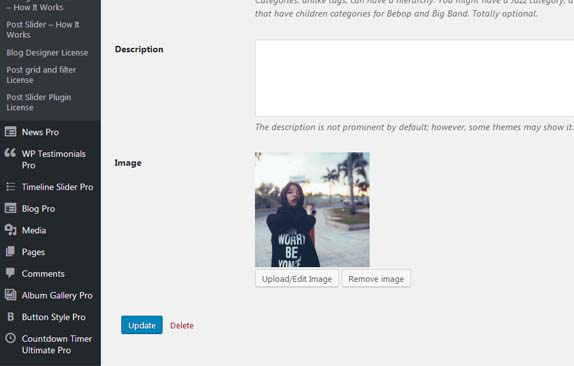
Admin view showing category image. 
Admin view showing category selection. 
Output in Grid and Slider.
Blocchi
Questo plugin fornisce 2 blocchi.
- Post Category Grid
- Post Category Image With Grid and Slider
Installazione
- Upload the ‘post-category-image-with-grid-and-slider’ folder to the ‘/wp-content/plugins/’ directory.
- Activate the ‘post-category-image-with-grid-and-slider’ list plugin through the ‘Plugins’ menu in WordPress.
- Once activated go to Category Image -> and Select categories option where you want to add custom image upload.
- Once activated go to Wp-Admin -> Posts -> Categories to see Custom Category Image options
-
To display use the TWO shortcodes
[pci-cat-grid]
[pci-cat-slider]
Recensioni


Contributi e sviluppo
“Post Category Image With Grid and Slider” è un software open source. Le persone che hanno contribuito allo sviluppo di questo plugin sono indicate di seguito.
Collaboratori


“Post Category Image With Grid and Slider” è stato tradotto in 1 lingua. Grazie ai traduttori per i loro contributi.
Traduci “Post Category Image With Grid and Slider” nella tua lingua.
Ti interessa lo sviluppo?
Esplora il codice segui il repository SVN, segui il log delle modifiche tramite RSS.
Changelog (registro delle modifiche)
1.4.8 (09, Jan 2023)
- [*] Update – Use escaping functions for better security.
- [*] Update – Check compatibility to WordPress version 6.1.1
1.4.7 (07, Nov 2022)
- [*] Tested up to: 6.1
1.4.6 (28, March 2022)
- [+] Added demo link
- [-] Removed some unwanted code and files.
1.4.5 (14, Feb 2022)
- [-] Removed some unwanted code and files.
1.4.4 (04, Feb 2022)
- [*] Tested up to: 5.9
- [*] Solved Gutenberg wp-editor widget issue.
1.4.3 (16, Nov 2021)
- [*] Fix – Resolve Gutenberg WP-Editor script related issue.
- [*] Update – Add some text and links in Readme file.
1.4.2 (24, Sep 2021)
- [*] Tested up to: 5.8.1
1.4.1 (23, Aug 2021)
- [*] Updated all external links
- [*] Tweak – Code optimization and performance improvements.
- [*] Fixed – Blocks Initializer Issue.
- [*] Updated language file and JSON.
1.4 (19, Jan 2020)
- [+] New – Added Gutenberg block support. Now use plugin easily with Gutenberg!
- [+] New – Added native shortcode support for Elementor, SiteOrigin and Beaver builder .
- [+] New – Added Divi page builder native support.
- [+] New – Added Fusion Page Builder (Avada) native support.
- [+] New – Click to copy the shortcode.
- [*] Tweak – Code optimization and performance improvements.
1.3.2 (14, July 2020)
- [*] Follow WordPress Detailed Plugin Guidelines for Offload Media.
- [*] Minor code optimization.
1.3.1 (01 Jan 2020)
- [*] Added new ‘exclude_cat’ parameter in both shortcodes.
- [*] Add new ‘Upgrade to Pro’ page in submenu with updated features list.
1.3 (21 Sep 2019)
- [*] Tested with latest version of WordPress.
- [*] Updated readme file and update demo link.
1.2 (31 May 2019)
- [*] Fixed some CSS issues for slider design.
1.1 (23 March 2018)
- Note : If you are using v1.0.1 then please do not update this plugin OR first take backup before updating.
- [+] Re-structured complete plugin.
1.0.1
- Approved from WordPress.
1.0
- Initial release.