Descrizione
Show support for your favorite cause, event, charity, political event, or anything else that’s awesome. Show Support Ribbon includes four built-in ribbon styles and makes it easy to customize with your own CSS.
Features
- Plug-n-play functionality
- No configuration required
- Regularly updated and “future proof”
- Shortcode and template tag to display the ribbon anywhere
- Limit display of the ribbon to any URL(s)
- Choose one of four built-in ribbon styles
- Customize the ribbon with your own CSS
- Control the link text, link URL, and title text
- Includes copy/paste CSS recipes to customize the ribbon
- Includes option to restore default settings
- Super-slick toggling settings page
- Works with or without Gutenberg Block Editor
Ribbon Styles
Choose one of the following ways to display your ribbon:
- Badge
- Banner
- Nastro
- Collegamento
- Custom (any text/HTML/CSS)
Much more is possible via the Custom option, which enables you to add your own CSS for custom styling.
Privacy
This plugin does not collect or store any user data. It does not set any cookies, and it does not connect to any third-party locations. Thus, this plugin does not affect user privacy in any way.
Show Support Ribbon is developed and maintained by Jeff Starr, 15-year WordPress developer and book author.
Support development
I develop and maintain this free plugin with love for the WordPress community. To show support, you can make a donation or purchase one of my books:
- The Tao of WordPress
- Digging into WordPress
- .htaccess made easy
- WordPress Themes In Depth
- Wizard’s SQL Recipes for WordPress
And/or purchase one of my premium WordPress plugins:
- BBQ Pro – Super fast WordPress firewall
- Blackhole Pro – Automatically block bad bots
- Banhammer Pro – Monitor traffic and ban the bad guys
- GA Google Analytics Pro – Connect WordPress to Google Analytics
- Simple Ajax Chat Pro – Unlimited chat rooms
- USP Pro – Unlimited front-end forms
Links, tweets and likes also appreciated. Thank you! 🙂
Screenshot
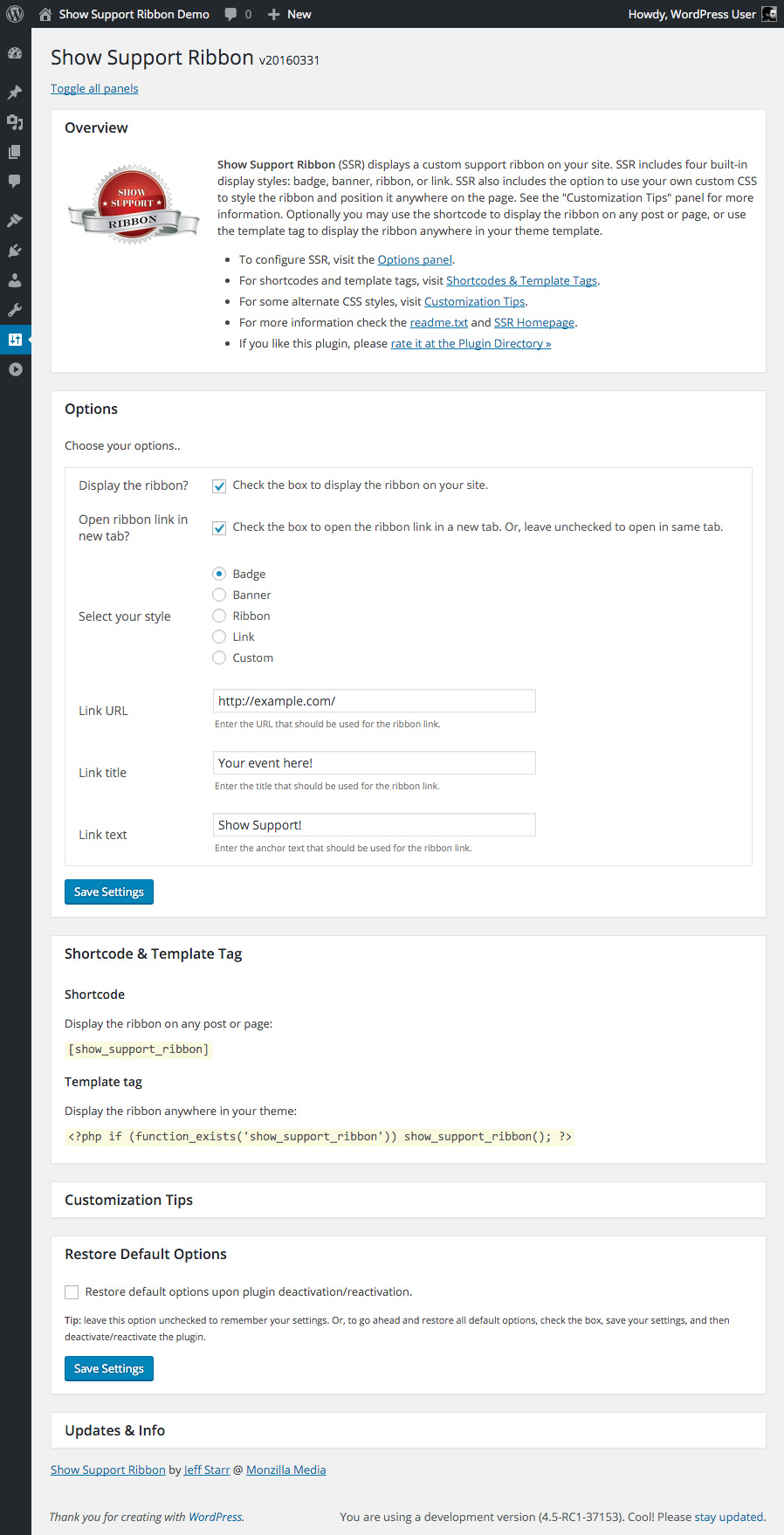
Show Support Nastro: Plugin Settings (panels toggle open/closed)
Installazione
Installation
- Upload the plugin to your blog and activate
- Visit the settings to configure your options
More info on installing WP plugins
Custom Markup
Note: For the “Custom” markup option, you can use the following shortcodes to display related information:
{{css_div}} = adds the CSS from the custom option, "CSS for <div>"
{{css_a}}   = adds the CSS from the custom option, "CSS for <a>"
{{url}}     = adds the URL from the option, "Link URL"
{{title}}   = adds the title from the option, "Link title"
{{text}}    = adds the text from the option, "Link text"
Upgrades
To upgrade Show Support Ribbon, remove the old version and replace with the new version. Or just click “Update” from the Plugins screen and let WordPress do it for you automatically.
Note: uninstalling the plugin from the WP Plugins screen results in the removal of all settings from the WP database.
Restore Default Options
To restore default plugin options, either uninstall/reinstall the plugin, or visit the plugin settings > Restore Default Options.
Uninstalling
Show Support Ribbon cleans up after itself. All plugin settings will be removed from your database when the plugin is uninstalled via the Plugins screen.
Like the plugin?
If you like Show Support Ribbon, please take a moment to give a 5-star rating. It helps to keep development and support going strong. Thank you!
FAQ
-
Images may be displayed using CSS. Upload the desired file and then display it using CSS, like so:
background-image { url(/path/to/image.png) fixed no-repeat center top; }Fine-tune as needed to dial it in. To add via plugin settings, select “Custom” for the “Select your style” option and include for either
<div>or<a>styles. -
What is the Targeted Display option?
-
That setting enables you to limit the display of the ribbon to any specified URLs. So if you enter some URLs (separated by a comma), the plugin will display the ribbon only on those pages. Otherwise if no URLs are entered and the option is empty/blank, then the ribbon will be displayed on all pages on the site.
-
How to override inline custom styles?
-
First, you can customize any of the CSS/HTML for the “Custom” button option. For the other predefined options, you can override the default inline styles as follows:
To override the button’s outer
<div>tag:.show-support-ribbon[style] { font-size: 14px !important; }To override the button’s inner
<a>tag:.show-support-ribbon a[style] { font-size: 14px !important; }Then you can change the
font-sizeto whatever properties are required. -
How to make a plain-text badge with no link?
-
Select “Custom” for the option “Select your style”. Then replace the “Markup” option with the following code:
<div id="show-support-ribbon" class="show-support-ribbon" style="{{css_div}}">{{text}}</div>Actually you can customize the markup however you want. And as explained in the Installation section of these docs, you can use
{{css_div}}and other shortcodes to display related information from the plugin options. Or you can just skip the shortcodes and add whatever text/markup is required. -
How to style the ribbon on mobile (small screens)?
-
This can be done with a CSS
@mediaquery. Here is an example that you can add via the plugin settings:@media (max-width: 400px) { .show-support-ribbon[style] { right: 15px !important; top: 15px !important; } }That will apply to screens up to 400px wide, so you can adjust to whatever is needed. You can add whatever styles you want. In the example, we’re just moving the ribbon a little bit on the page. The
!importantdeclaration is needed only if overriding default styles. -
How to make a non-linked ribbon?
-
By default, the message displayed in the ribbon/badge is linked. To change that to display the message only (with no link), follow these steps:
1) For the option, “Select your style” choose “Custom”
2) In the “Markup” setting that appears, replace whatever is there with this:
<div id="show-support-ribbon" class="show-support-ribbon" style="{{css_div}}">{{text}}</div>3) Then in the “CSS for div” setting, replace whatever is there with this:
position:fixed;right:-60px;top:30px;z-index:9999;box-sizing:border-box;display:block;width:220px;padding:10px 0;color:#fff;background:rgba(102,153,204,.9);font-size:12px;line-height:16px;font-family:'Lucida Grande','Lucida Sans Unicode','Lucida Sans',Geneva,Verdana,sans-serif;text-align:center;text-decoration:none;border:1px solid rgba(255,255,255,.7);transform:rotate(40deg);box-shadow:1px 1px 3px 0 rgba(0,0,0,.3);Save changes and done. You may want to customize the CSS and/or other settings as desired. Results in a non-linked ribbon.
-
Got a question?
-
To ask a question, suggest a feature, or provide feedback, contact me directly.
Recensioni


Contributi e sviluppo
“Show Support Nastro” è un software open source. Le persone che hanno contribuito allo sviluppo di questo plugin sono indicate di seguito.
Collaboratori
“Show Support Nastro” è stato tradotto in 2 lingue. Grazie ai traduttori per i loro contributi.
Traduci “Show Support Nastro” nella tua lingua.
Ti interessa lo sviluppo?
Esplora il codice segui il repository SVN, segui il log delle modifiche tramite RSS.
Changelog (registro delle modifiche)
If you like Show Support Ribbon, please take a moment to give a 5-star rating. It helps to keep development and support going strong. Thank you!
Version 20240303
- Updates plugin settings page
- Updates default translation template
- Improves plugin docs/readme.txt
- Tests on WordPress 6.5 (beta)
Full changelog @ https://plugin-planet.com/wp/changelog/show-support-ribbon.txt