

Descrizione
Custom Fields Account Registration For WooCommerce is the most complete solution for extending the default WooCommerce registration form with unlimited custom fields of any type. Collect any extra information you need from your customers at the point of sign-up — no coding, no page builder, no shortcode required.
From a simple text input or phone number field to a full billing or shipping address block — every field is managed from a clean, React-powered admin panel with drag-and-drop ordering, inline editing modals, and AJAX saves with no page reloads.
All submitted data is saved to each user’s WordPress profile as user meta and is shown in three places: the WooCommerce My Account custom tab, the WordPress admin user-edit screen, and (for address fields) directly in WooCommerce billing and shipping records.
Need advanced field types like File Upload, Date Picker, Color Picker, Radio Buttons, Dropdowns, or Multi-Select? Upgrade to the Pro version to unlock all 13 advanced field types plus priority support.
- Documentation: https://www.plugin999.com/docs/custom-fields-account-for-woocommerce-registration/
- Get Pro: https://www.plugin999.com/plugin/custom-fields-account-registration-for-woocommerce/
- Support: https://www.plugin999.com/support/
WHO IS THIS PLUGIN FOR?
- B2B and wholesale stores that need to collect company name, VAT number, trade licence, or business type at registration.
- Marketplaces and multi-vendor stores that need sellers to provide extra details before being approved.
- Membership and subscription sites that need profile data beyond the defaults (date of birth, interests, referral source, etc.).
- Service and booking businesses that need to capture contact preferences, service area, or custom identifiers upfront.
- Any WooCommerce store that wants to collect billing or shipping addresses at the point of registration instead of waiting until the first checkout.
PRO VERSION — ADVANCED FIELD TYPES & FEATURES
The Pro version unlocks 13 advanced field types for the WooCommerce registration form, giving you a complete form builder experience for any store or industry.
Get Pro: https://www.plugin999.com/plugin/custom-fields-account-registration-for-woocommerce/
File Upload (Pro)
Let customers upload files directly on the registration form at the point of sign-up. Accepted file types include images (JPG, PNG, GIF, BMP, WebP), PDF, Word documents (DOC, DOCX), Excel spreadsheets (XLS, XLSX), PowerPoint presentations (PPT, PPTX, PPS, PPSX), OpenDocument (ODS), PSD, audio files, and video files.
Ideal for: B2B stores requiring a trade licence or company registration document, service businesses requiring proof of identity or certification, or any store where onboarding documentation is needed before a customer can be approved.
Textarea (Pro)
Multi-line text input for collecting longer free-text responses — notes, descriptions, special requirements, or open-ended questions that a single-line text field cannot accommodate.
Password (Pro)
Add a secondary password or PIN field to the registration form. Useful for stores that use a secondary security code, a dealer PIN, or a membership password separate from the standard WooCommerce login password.
Radio Button (Pro)
Single-choice selection from a fully customizable list of options. Add as many option values and labels as you need directly in the field editor. The selected value is saved to user meta and displayed on the My Account tab.
Ideal for: Collecting customer type (Individual / Business / Reseller), preferred contact method, business category, or any mutually exclusive selection.
Checkbox (Pro)
A single yes/no toggle checkbox. Commonly used for consent confirmations (terms acceptance, marketing opt-in, newsletter subscription) or simple boolean data points during registration.
Multiple Checkbox (Pro)
Multi-choice selection from a fully customizable list of options. Customers can tick as many options as apply. All selected values are saved together as an array and displayed correctly on the My Account tab and in the WordPress admin user-edit screen.
Ideal for: Collecting interests, product categories of interest, services required, languages spoken, or any scenario where multiple answers are valid.
Select / Dropdown (Pro)
Single-choice dropdown with fully customizable option values and labels. Add as many options as needed. The selected value is saved to user meta.
Ideal for: Country-of-origin (separate from the WooCommerce billing country), industry sector, business size, referral source, or any enumerated single-choice field.
Multi-Select Dropdown (Pro)
Multi-choice dropdown powered by Select2, allowing customers to choose several options from a searchable dropdown list. All selected values are saved as an array.
Ideal for: Collecting multiple languages, multiple products of interest, multiple service needs, or any multi-choice list that benefits from a searchable dropdown interface rather than a long checkbox list.
Date Picker (Pro)
Calendar date input allowing customers to select a date from a popup date picker.
Ideal for: Date of birth, preferred delivery date, membership start date, subscription commencement date, or event registration date.
Time Picker (Pro)
Time input field for collecting a specific time of day.
Ideal for: Preferred contact time, appointment time preferences, or shift start time for employee registration forms.
Color Picker (Pro)
A full Spectrum color picker field that lets customers choose and submit a hex color value at registration. The chosen color is saved to user meta.
Ideal for: Print-on-demand stores where customers select a brand color at sign-up, uniform customization stores, or any niche where a color preference is collected as part of onboarding.
Custom HTML Block (Pro)
Insert any custom HTML content — a heading, a paragraph of instructions, a notice box, a horizontal divider, a terms-and-conditions block, or any other HTML — at any position within the registration form field list. The HTML block is not a data-input field; it is a presentational block used to structure and annotate the form.
Ideal for: Adding section headings between field groups (Personal Details / Company Details / Address), displaying inline instructions, linking to a privacy policy, or inserting a styled notice between fields.
Hidden Field (Pro)
A hidden input field that is present in the form HTML but not visible to the customer. Useful for passing background values, tracking tokens, affiliate codes, or internal reference data through the registration form and saving them to user meta automatically.
HOW IT WORKS
- Install and activate the plugin.
- Go to Custom Fields Registration in the WordPress admin menu.
- Click Add New Field, choose a field type, set a label, slug, placeholder, and any required options, then save.
- Drag fields into the order you want them to appear on the form.
- Switch to the General Settings tab to configure email notifications, form title text, field position, and My Account tab labels.
- Visit your WooCommerce My Account > Register page — your new fields appear instantly.
- When a customer registers, their submitted data is saved to their user profile and shown in the My Account custom tab and on the WordPress admin user-edit screen.
Screenshot
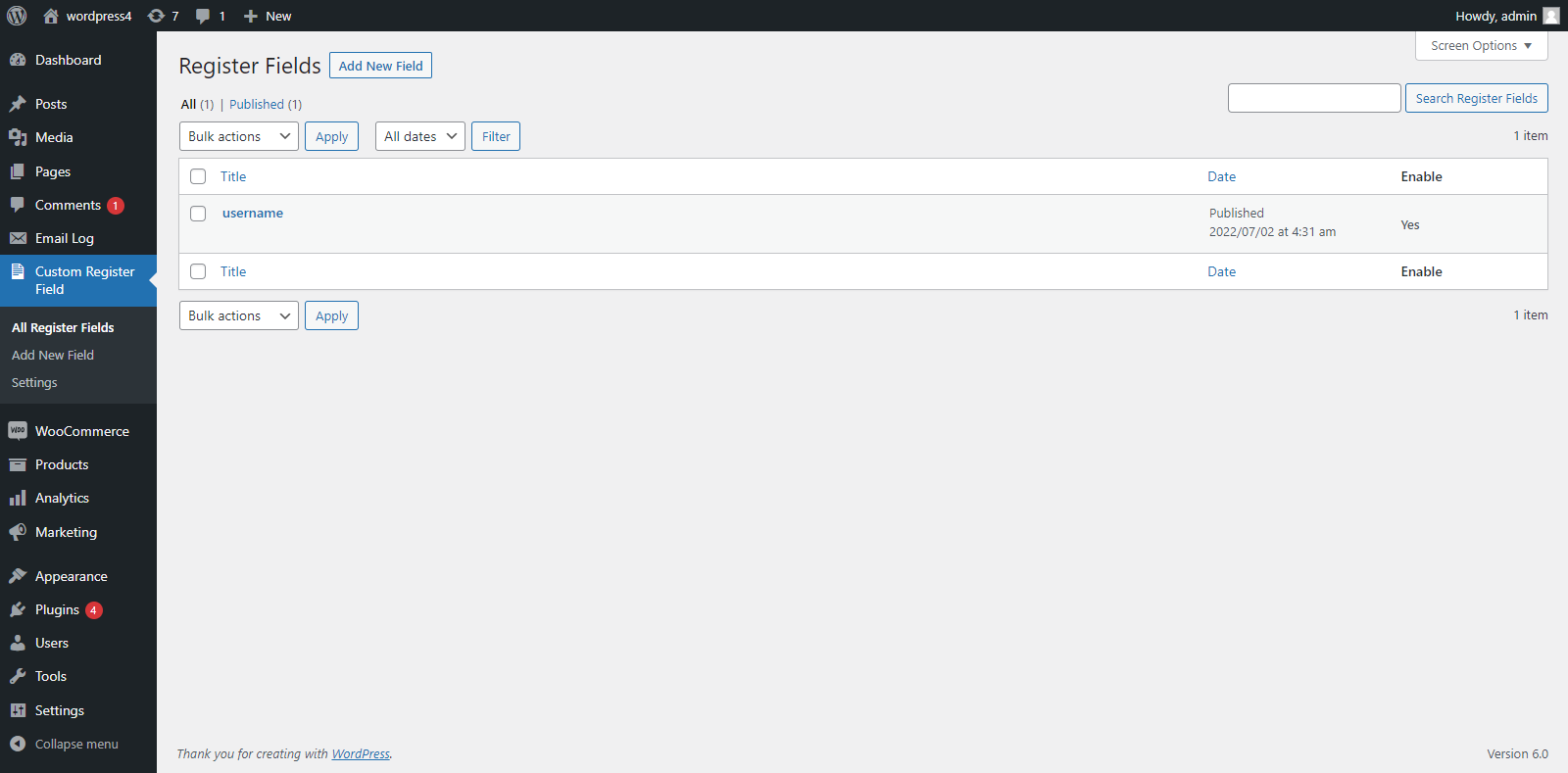
Field Manager — The React-powered field list with drag-and-drop handles, Edit and Delete buttons, and the Add New Field button. 
Add New Field Modal — Field type selector grouped into Billing Address Fields, Shipping Address Fields, and Other Fields (with Pro field types clearly labelled with a lock icon). 
Edit Field Modal — Same layout as the Add modal, pre-populated with existing field data for in-place editing without page reload. 
General Settings Tab — Authentication toggle, email notification settings, hide labels option, title text overrides, required message template, My Account tab customization, and field position selector.
Installazione
From the WordPress Dashboard
- Navigate to Plugins > Add New.
- Search for Custom Fields Account Registration For WooCommerce.
- Click Install Now, then Activate.
Manual Upload
- Download the plugin .zip file.
- Go to Plugins > Add New > Upload Plugin.
- Choose the .zip file and click Install Now.
- Click Activate Plugin.
After Activation
- Go to Custom Fields Registration in the admin sidebar to add your first field.
- Adjust global settings (email, labels, authentication, field position) from the General Settings tab.
FAQ
-
Does this plugin work with the default WooCommerce registration form?
-
Yes. All custom fields are rendered on the standard WooCommerce registration form on the My Account page. No shortcode or page builder is needed — activate the plugin and your fields appear automatically.
-
What is the difference between the free and Pro versions?
-
The free version gives you 5 standard input field types (Text, Number, Phone, Email, URL) plus full Billing and Shipping address field groups, along with all general settings (drag-and-drop ordering, required validation, My Account tab, registration email, etc.). The Pro version additionally unlocks 13 advanced field types: Textarea, Password, Radio, Checkbox, Multiple Checkbox, Select, Multi-Select, Date Picker, Time Picker, Color Picker, File Upload, Custom HTML, and Hidden.
-
Where is the submitted field data stored?
-
All custom field data is saved as WordPress user meta and is accessible in three places: the customer’s My Account custom tab on the frontend, the WordPress Users > Edit User screen in the admin panel, and (for billing/shipping address fields) directly in the WooCommerce billing and shipping profile.
-
Can I make a field mandatory?
-
Yes. When creating or editing a field, toggle it as required and set a custom validation error message using the {field_label} placeholder. Required validation works correctly for all field types.
-
Can I reorder the fields?
-
Yes. The admin panel uses drag-and-drop ordering via ReactSortable. The order you set is immediately reflected on the registration form and My Account tab.
-
What file types can customers upload using the File Upload field?
-
The file upload field (Pro) accepts images (JPG, PNG, GIF, etc.), PDF, DOC, DOCX, PPT, PPTX, PPS, PPSX, ODS, XLS, XLSX, PSD, audio files, and video files.
-
Can I add billing and shipping address fields to the registration form?
-
Yes, and this is available in the free version. The plugin includes a Billing Address group with 11 selectable fields and a Shipping Address group with 9 selectable fields. When a customer fills these in at registration, the data maps directly to their WooCommerce billing and shipping profile.
-
Will adding billing/shipping fields to the registration form break my checkout page?
-
No. The plugin detects when the page is checkout and preserves the original WooCommerce required field rules there. Only the registration form behaviour is affected by the plugin’s required-field settings.
-
Can I choose where on the registration form my custom fields appear?
-
Yes. The General Settings panel includes a Show Custom Field Position option with two choices: Register Form Start (fields appear above the default email/password fields) and Before Register Button (fields appear below all standard fields, just above the submit button).
-
Can I hide a field without deleting it?
-
Yes. Every field has an Enable/Disable toggle. Disabled fields are hidden from the registration form and My Account tab but remain saved in the database and can be re-enabled at any time.
-
Can I hide all field labels at once?
-
Yes. The Hide Field Labels setting in General Settings applies globally, hiding labels for all custom fields on the registration form and My Account tab simultaneously — useful for placeholder-only or minimal form designs.
-
Does the plugin send a confirmation email after registration?
-
Yes. The registration email is optional and fully customizable. Enable it in General Settings and write your own subject and body text using the {site_name} placeholder.
-
Can I add a custom CSS class to a specific field?
-
Yes. Each field has a Custom CSS Class setting. The class name is added to the field’s wrapper element, letting you target it with your theme’s CSS for custom styling.
-
Can I add a custom HTML block between fields?
-
Yes, with the Pro version. The Custom HTML field type lets you inject any HTML — a heading, a notice, a horizontal rule, a paragraph of instructions — at any position within the field list.
-
Does the plugin support multiple languages?
-
Yes. A .pot file is included and the plugin is compatible with WPML. Translations are already available in Chinese, Dutch, Russian, and Spanish.
-
Does this plugin require any coding knowledge?
-
No. Everything is managed from the visual admin panel. No PHP, CSS, or JavaScript knowledge is required.
-
How do I get the Pro version?
-
Visit https://www.plugin999.com/plugin/custom-fields-account-registration-for-woocommerce/ to purchase and download the Pro version.
Recensioni


Contributi e sviluppo
“Custom Fields Account Registration For WooCommerce” è un software open source. Le persone che hanno contribuito allo sviluppo di questo plugin sono indicate di seguito.
Collaboratori
Traduci “Custom Fields Account Registration For WooCommerce” nella tua lingua.
Ti interessa lo sviluppo?
Esplora il codice segui il repository SVN, segui il log delle modifiche tramite RSS.
Changelog
1.3
- Added full Billing address field group — all 11 WooCommerce billing fields individually selectable for the registration form.
- Added full Shipping address field group — all 9 WooCommerce shipping fields individually selectable for the registration form.
- Added billing and shipping field required-state override, preserving checkout field rules independently from the registration form.
- Added Show Custom Field Position setting — choose between Register Form Start and Before Register Button.
- Added duplicate slug detection with inline error on the Add/Edit field modals.
- Added Custom CSS Class setting per field.
- Pro: Added Custom HTML block field type.
- Pro: Added Color Picker field type using Spectrum color picker library.
- Pro: Added Time Picker field type.
- Pro: Added Multi-Select field type powered by Select2.
- Pro: Added Multiple Checkbox field type.
- Improved drag-and-drop field reordering via AJAX (ReactSortable).
- REST API-based settings save with nonce security on all AJAX endpoints.
- React admin UI performance improvements, toast notifications, and confirm-before-delete dialog.
- Bug fixes and code cleanup.
1.2
- Pro: Added File Upload field type supporting images, PDFs, Office documents, audio, and video.
- Added Hidden field type.
- Added custom email subject and body message settings with {site_name} placeholder.
- Added My Account custom tab title and heading text options.
- Improved frontend field rendering for multi-checkbox and multiselect.
1.1
- Pro: Added Select dropdown field type.
- Pro: Added Date Picker field type.
- Added Number field type.
- Added hide/show field label option per field (global Hide Labels setting).
- Added custom required-field validation message setting with {field_label} placeholder.
1.0
- Initial release.
- Text, Email, Phone, and URL field types (free).
- Pro: Checkbox, Radio, Textarea, and Password field types.
- My Account page custom tab integration.
- Enable/disable WooCommerce authentication section setting.
- Registration email notification with enable/disable toggle.