

Descrizione
BrikPanel turns the default WooCommerce admin into a clean, fast, all-in-one store cockpit — a modern WooCommerce dashboard, a powerful WooCommerce bulk editor, an inventory management workspace, an order management center, a coupon manager, a custom WP login page, and a real-time conversion tracking suite. Everything is free. Forever. No premium tier, no feature locks, no monthly subscriptions.
It is a free WooCommerce admin plugin built by a developer who shipped 1000+ WooCommerce stores and got tired of every workflow taking five extra clicks.
Who is BrikPanel for?
- Store owners who want a modern WooCommerce dashboard with real numbers, not the slow built-in reports
- Shop owners paying monthly fees for external SaaS analytics tools who want a self-hosted WooCommerce analytics solution on their own server
- Stores using ATUM who want a lighter ATUM alternative built into a complete admin redesign
- Agencies handing off stores to non-technical clients who need a simplified WooCommerce admin
- Anyone who needs to bulk edit WooCommerce products — including variations — without a premium plugin
- Developers who want a WooCommerce dashboard plugin that does not slow down the storefront
What you get (all free)
Modern WooCommerce Dashboard with Real-Time Sales Analytics
The heart of BrikPanel is a modern WooCommerce dashboard — a true woocommerce admin dashboard plugin, not a styling layer.
- Total Sales, Total Orders, Average Order Value (AOV) — today, yesterday, last 7/30 days, or any custom range
- Visitors counted from your own database (admins excluded)
- Conversion Rate computed live from real visitors and real orders
- Period-over-period delta — every metric shows ±% versus the previous equivalent period
- Beautiful sales chart powered by Chart.js
- Order status donut — Completed, Processing, Cancelled, Refunded, Failed
- WooCommerce conversion funnel — Visitors Add to Cart Checkout Orders, with the conversion percentage at every step
This is the best WooCommerce dashboard for stores that need a modern WooCommerce admin and a woocommerce custom dashboard without paying for a SaaS.
Live Visitors & Real-Time Conversion Tracking
BrikPanel ships a built-in WooCommerce live visitors widget — see who is on your store right now, what page they are on, and whether they have items in the cart. Refreshes every 30 seconds. No external service, no Hotjar, no monthly fee.
- WooCommerce real time visitors widget with cart status, current page, and customer info
- Visitor states: Browsing / Has items in cart / On thank-you page
- WooCommerce conversion tracking in the same database that powers the dashboard
- IP addresses SHA-256 hashed for privacy
- Most-viewed pages and most added-to-cart products reports
If you wanted a woocommerce statistics plugin or woocommerce sales tracker without an external SaaS, BrikPanel is the answer.
Geographic Analytics — WooCommerce Sales by Country
A 3D rotating globe (Cobe.js) plots every order on its real location. See WooCommerce sales by country and city without exporting a CSV.
- Interactive 3D globe with order dots, light/dark toggle
- Top 10 Countries table with order count and flag emoji
- Top 10 Cities table
- Works with both HPOS and legacy order storage
Lightning-Fast Order Search — Cmd/Ctrl + K from Anywhere
Hit Ctrl + K (or Cmd + K on Mac) anywhere in wp-admin and a beautiful order search overlay opens. This is the free woocommerce order search plugin every store owner has been asking for.
Search across order ID, customer first/last name, email, phone, and product SKU inside order line items — all at once. True woocommerce quick search with results as you type, color-coded status badges, totals, and dates. If you wanted to search WooCommerce orders fast, this feature alone is worth installing BrikPanel.
Modern WooCommerce Order Management
BrikPanel replaces the cluttered default orders page with a clean woocommerce order list plugin screen. Real order management, not just CSS.
- 30-day overview bar: total orders, completed, refunded, cancelled, revenue
- Inline status change — change order status without opening the edit page
- Custom columns and a clean grid layout
- HPOS (
wc_get_orders) and legacy storage (WP_Query) both supported - Two new statuses: Return Draft and Change
- Reskinned order edit page with copy-to-clipboard for billing/shipping
- Optional BrikMarket marketplace stats integration
If you wanted a woocommerce order management plugin that does more than reskin the WC defaults, this is it. Disable from settings anytime.
WooCommerce Product List Plugin — Built for People Who Actually Edit Products
The default WooCommerce product list is fine for browsing, painful for editing. BrikPanel ships a complete woocommerce product list plugin that fixes it.
- Thumbnail, product name, SKU, regular/sale price, stock badge, category
- Publish status toggle — flip draft published with one click, no reload
- Edit, Duplicate, Delete actions
- Status tabs (All / Published / Draft / Trash), live search by name or SKU
- Configurable per-page (5–100, default 20), AJAX pagination
- Bulk publish, bulk draft, bulk delete
Quick Edit Sidebar — Edit Without Leaving the List
A slide-in panel from any product row. Edit name, SKU, regular price, sale price, stock, and category — save without leaving the list. The woocommerce quick edit experience WooCommerce should have shipped years ago. Update woocommerce quick edit price, stock, or category in two clicks.
Bulk Edit WooCommerce Products — With Full Variation Support
This is where BrikPanel pulls ahead of every other free woocommerce bulk editor. Most free woocommerce bulk product editor plugins only handle simple products and only let you “increase price by X%” or “decrease by X%”. BrikPanel does much more, and it does it for variable products too.
What you can bulk update:
- Bulk edit WooCommerce products prices (regular and sale) across the entire catalog or filtered by category
- WooCommerce bulk price update by percentage, by fixed amount, or by absolute value
- WooCommerce bulk edit prices for selected products only, or by category
- Bulk update WooCommerce products stock quantities (in/out of stock, set quantity, add/subtract)
- WooCommerce bulk price by category — pick a category, set a rule, every product updates
- WooCommerce bulk sale price updates with a date range
- WooCommerce mass price update with a confirmation dialog so you never wreck your catalog by accident
Now the part nobody else does for free: variation support.
- WooCommerce variation price editor — open any variable product and edit every variation in one modal
- Bulk edit variation prices WooCommerce — set the same price for all variations of an attribute (every “Red” variation, every “L” size)
- WooCommerce variation bulk editor — apply a percentage rule across all variations
- Bulk update variation stock — set or adjust the stock of every variation in one click
- Attribute filter to narrow visible variations when a product has 50+ combinations
How to bulk edit WooCommerce products including variations without buying a $79/year plugin? BrikPanel’s free WooCommerce bulk editor handles both simple and variable products — more than most paid alternatives.
Simplified WooCommerce Product Editor
The default WooCommerce add-product screen has 11 metaboxes, 3 tabs, and 40+ fields. New owners give up before finishing their first product. BrikPanel ships a complete woocommerce product editor plugin with the noise removed.
- Featured image + product gallery with drag-and-drop upload, unlimited images, drag-to-reorder
- Regular price, sale price with decimal validation
- Searchable category picker with multi-select + quick create category without leaving the page
- Short description + full rich-text description (wp_editor)
- SEO fields — custom slug, meta title, meta description, live Google SERP preview
- Product type (Simple, Variable), attribute management with inline create
- Auto-generate variations from attribute combinations, per-variation price/sale/SKU/stock
- Duplicate any product in one click, inline edit support
Opt-in. Keep the default WooCommerce product page if you prefer. Best for training new team members or onboarding non-technical clients.
WooCommerce Variation Gallery
Attach a separate image gallery to each product variation. The frontend swaps the gallery automatically when a customer picks a variation. Image metadata (srcset, sizes, alt text) is fully preserved.
WooCommerce Categories Page — Drag-and-Drop Parent/Child Management
The default WooCommerce category screen has not been redesigned in a decade. BrikPanel rebuilds it.
- Per-page setting (5–200, default 20)
- Drag-and-drop parent/child nesting — change parents by dragging
- Circular reference prevention
- Works with both
product_catandproduct_tag
Best WooCommerce Coupon Plugin — Free Coupon Manager
A complete WooCommerce coupon manager that makes coupons a first-class part of the admin. We honestly think this is the best WooCommerce coupon plugin in the free repository.
- Coupon table: code with copy-to-clipboard, discount type icon, amount, usage count, expiry (highlighted if expired), status
- Status tabs, AJAX pagination, slide-over coupon panel — create/edit without a reload
- Auto-generate random coupon codes
- Discount types: percentage, fixed cart, fixed product + free shipping toggle
- Expiry date picker, total + per-customer usage limits, min/max spend
- Individual use toggle, product/category include/exclude rules
- One-click duplicate
Custom WordPress Login Page — Custom WP Login Page for WooCommerce
BrikPanel ships a custom WP login page that fully replaces the default wp-login.php look. A real WordPress login customizer built for WooCommerce stores.
- Centered card layout with your site name as logo
- Minimal, distraction-free fields, AJAX submission (no reload)
- Toast notification on errors, footer site branding
- Default WordPress login styles fully hidden
A complete woocommerce custom login and wordpress login customizer out of the box.
WooCommerce Inventory Management
BrikPanel includes a complete woocommerce inventory management workspace. The product list, bulk editor, variation editor, and quick edit sidebar work together as one inventory workflow.
- Current stock for every product and variation in one place
- Stock status badges in the product list (in stock / low stock / out of stock)
- Update stock inline from the quick edit sidebar
- Bulk update stock for entire categories or all variations
- Edit stock and prices in the same session — no tool switching
- HPOS-enabled stores supported
A free woocommerce inventory management plugin that covers the daily workflow without installing ATUM or another heavy stock control plugin.
Sound Notifications & Order Celebrations
- Notification sound the moment a new completed order arrives
- Confetti animation and a top-right popup showing the order amount
- Polls for the latest order ID, remembers the last seen ID in
localStorage - No external services
Navigation & Admin UI Cleanup
- BrikPanel dashboard becomes the first item in the WordPress admin menu
- Admin bar gains BrikPanel quick links, footer replaced with branding
- Optional simplified mode hides the full WordPress menu (Posts, Media, Plugins, Tools, Settings) and shows only BrikPanel + WooCommerce — for non-technical clients
A Free, Self-Hosted WooCommerce Analytics & Inventory Suite
Many store owners pay monthly subscriptions to external SaaS tools that do parts of what BrikPanel does for free.
- Self-hosted WooCommerce analytics — sales, AOV, conversion rate, funnels, and geographic data without sending any data to a third-party service.
- ATUM is the most popular WooCommerce inventory plugin — excellent but heavy. BrikPanel is a simpler ATUM alternative built into a full admin redesign.
- Works as a free alternative to Metorik for store owners who want their analytics to stay on their own server.
Your data stays on your server. No external account, no monthly fee, no premium upgrade path — every feature on this page is in the free version.
Why BrikPanel and not the default WooCommerce admin?
WooCommerce’s built-in analytics are slow, refresh hourly, and have no live visitor tracking, no conversion funnel, no geographic data, no Cmd+K order search, no quick edit sidebar, no variation bulk editor, no custom login, and no coupon manager. BrikPanel fixes every one of those gaps inside a single free WooCommerce admin plugin.
If you wanted a woocommerce dashboard plugin, a woocommerce admin dashboard plugin, the best woocommerce dashboard, or a woocommerce custom dashboard, this is it. Built across 1000+ WooCommerce stores.
Performance & Compatibility
- Zero impact on storefront speed — only loads inside wp-admin
- HPOS (High-Performance Order Storage) fully supported with dual code paths
- WooCommerce 7.x, 8.x, and newer
- Works alongside Admin Menu Editor, Slider Revolution, Yoast SEO, RankMath, WPML, Polylang
- Translation-ready (
.potfile included) - All AJAX actions verify nonces and
manage_woocommercecapability; all DB writes use prepared statements; IPs SHA-256 hashed; admin activity excluded from analytics
Screenshot
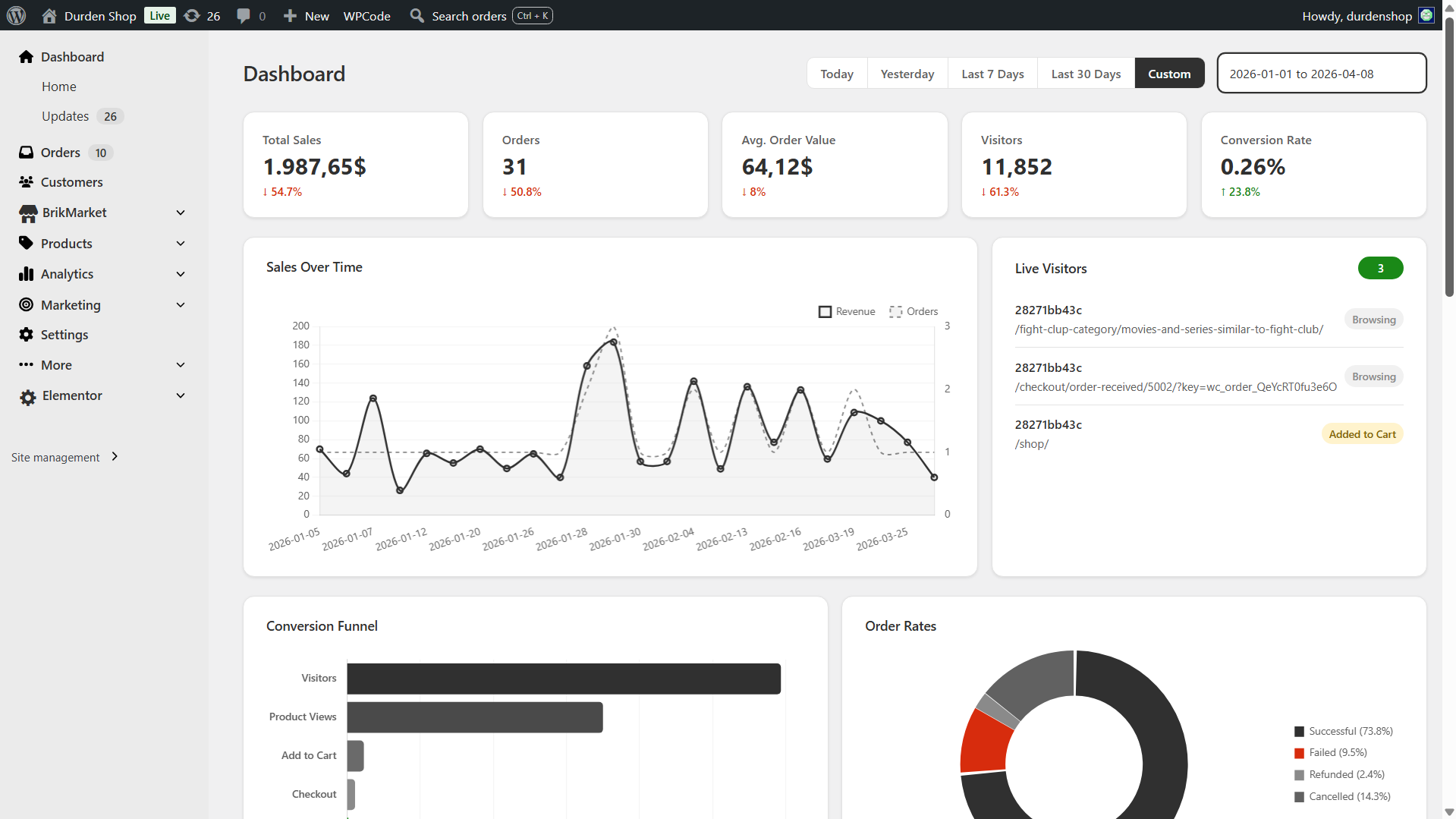
Modern WooCommerce Dashboard — real-time sales, orders, AOV, visitors, and conversion rate with an interactive sales chart, conversion funnel, and live visitors widget 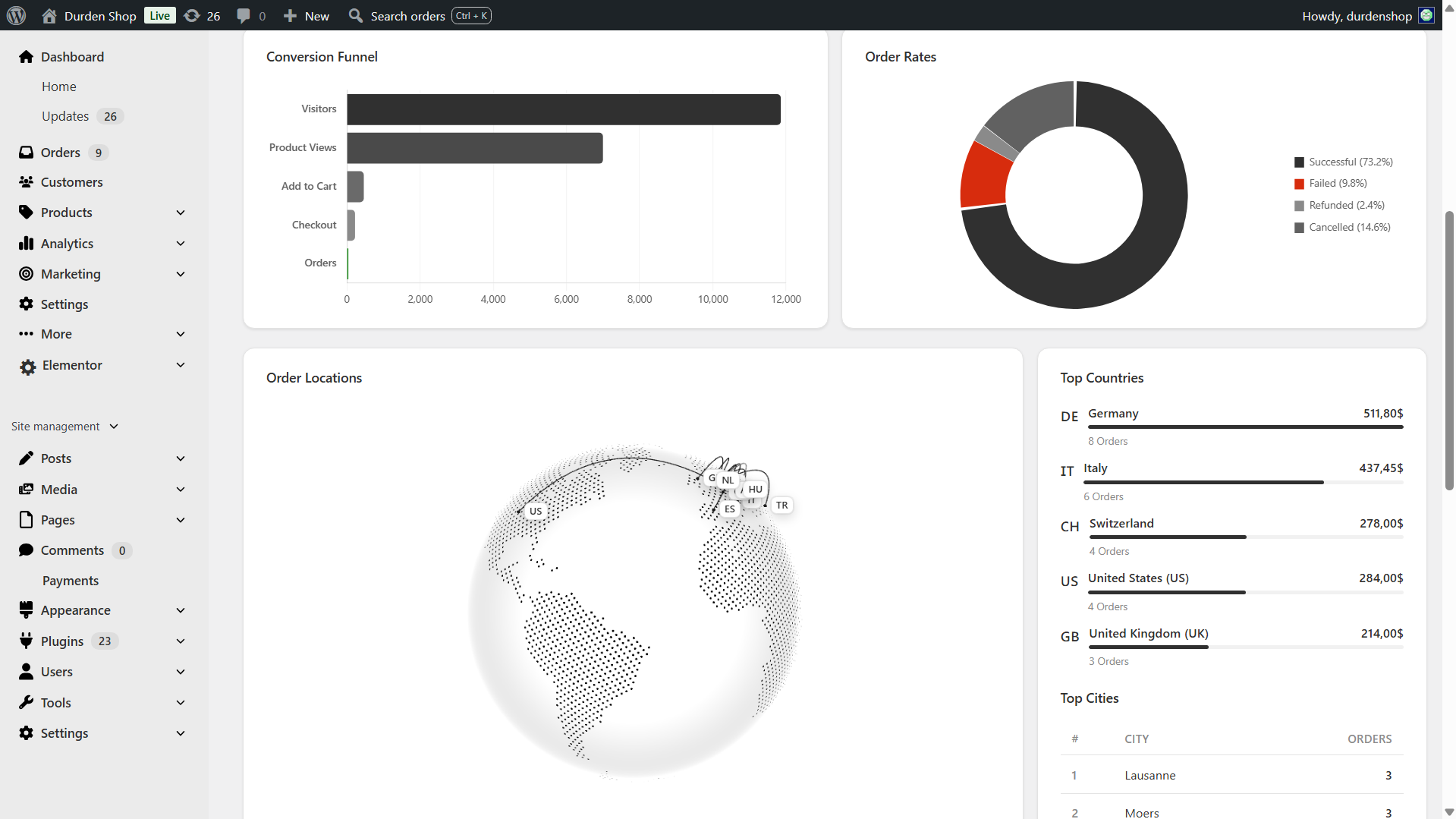
Geographic Analytics & WooCommerce Sales by Country — 3D globe of order locations, top countries and cities, conversion funnel, and order status breakdown 
Store Activity Widgets — top-selling products, recent orders with status badges, most viewed pages, and most added-to-cart products 
Modern WooCommerce Order Management — redesigned orders page with 30-day overview bar, color-coded status tabs, and inline status change 
WooCommerce Product List Plugin — clean product table with thumbnails, SKU, pricing, stock badges, categories, and one-click publish toggle 
Bulk Edit WooCommerce Products — bulk update prices, sale prices, and stock for all products or by category, with simple and variable product support 
Quick Edit Sidebar — slide-in panel to edit name, prices, stock, and category without leaving the product list 
WooCommerce Variation Price Editor — modal to bulk edit variation prices and stock for variable products with attribute filtering 
Lightning-Fast WooCommerce Order Search — Cmd/Ctrl + K opens an instant order search overlay across order ID, customer name, email, phone, and SKU 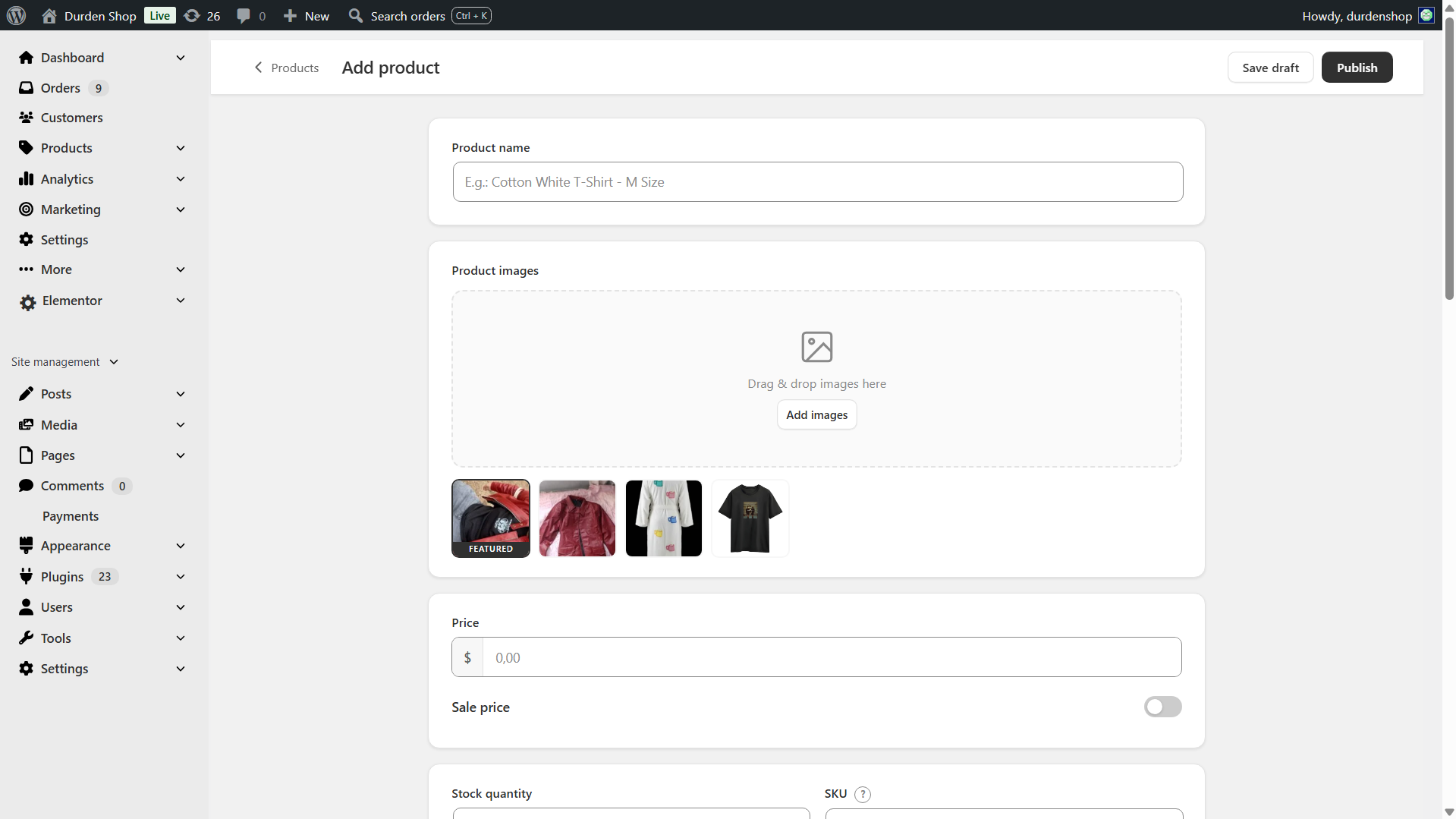
Simplified WooCommerce Product Editor — Images & Pricing — drag-and-drop image upload, gallery management, and clean pricing fields 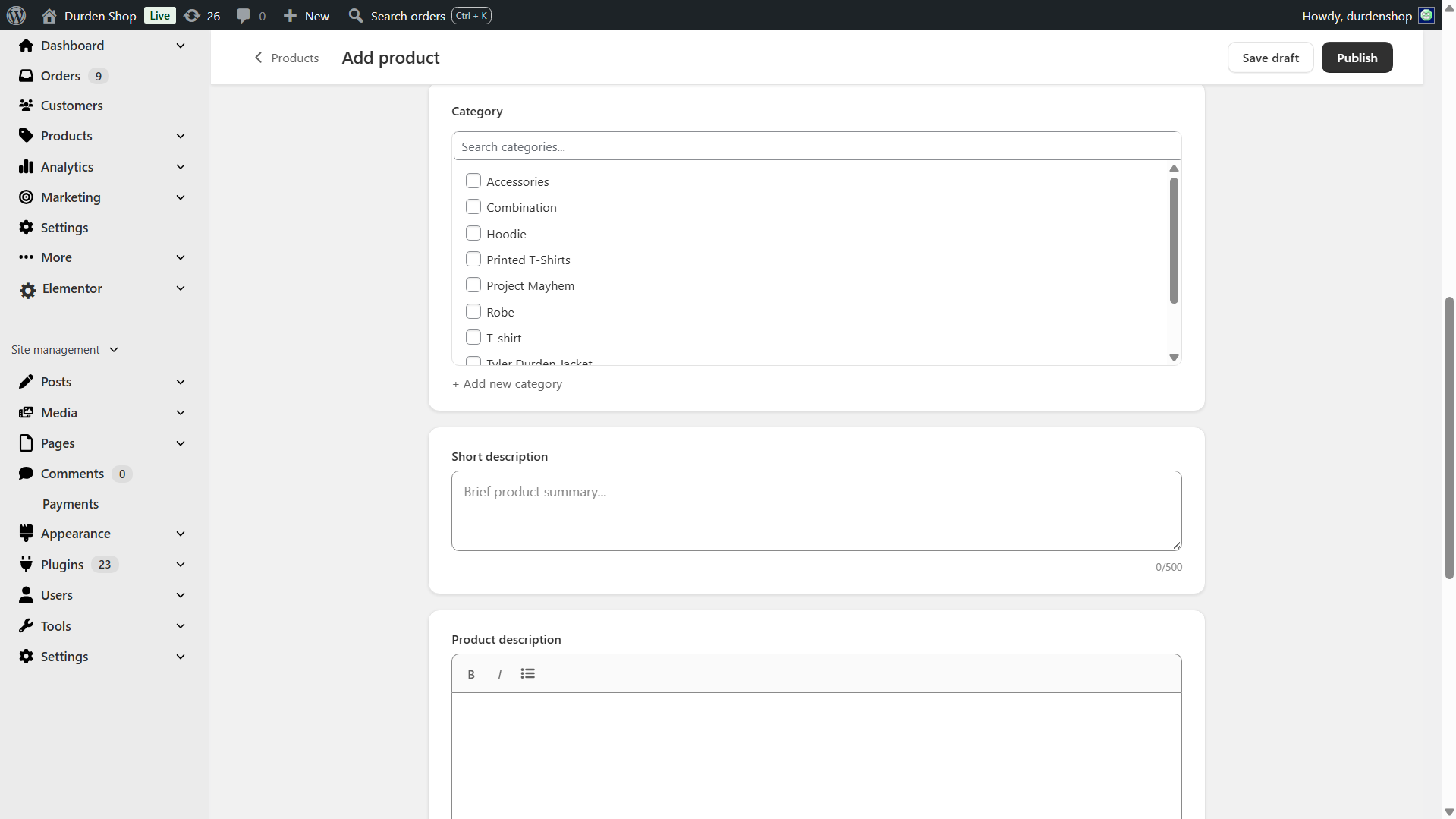
Simplified WooCommerce Product Editor — Categories & Description — searchable category picker, quick-create category button, and rich text description editor 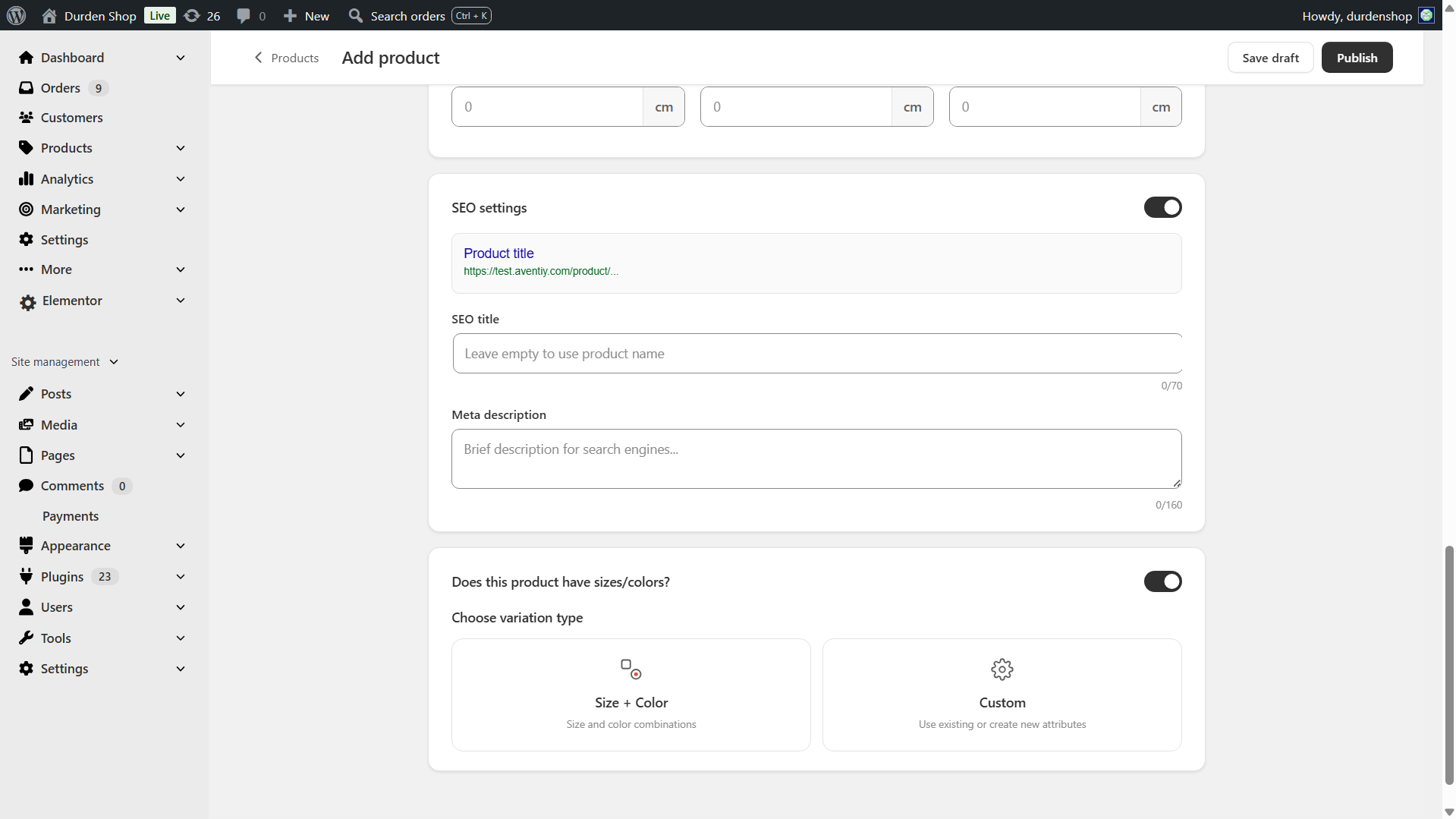
Simplified WooCommerce Product Editor — SEO & Variations — custom slug, meta title, meta description, live SERP preview, and auto-generated variation matrix 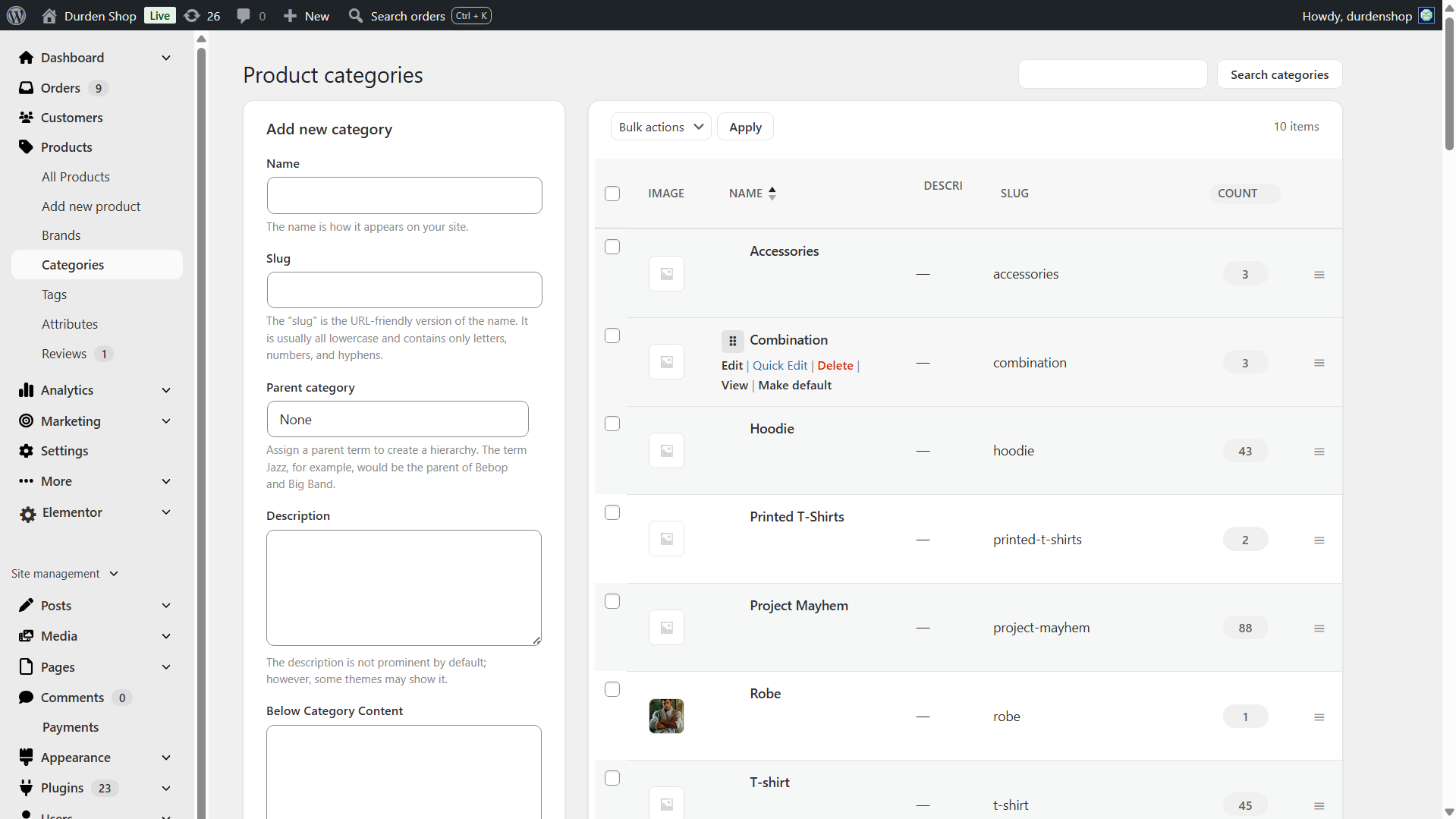
WooCommerce Categories Page — drag-and-drop parent/child nesting with circular reference protection 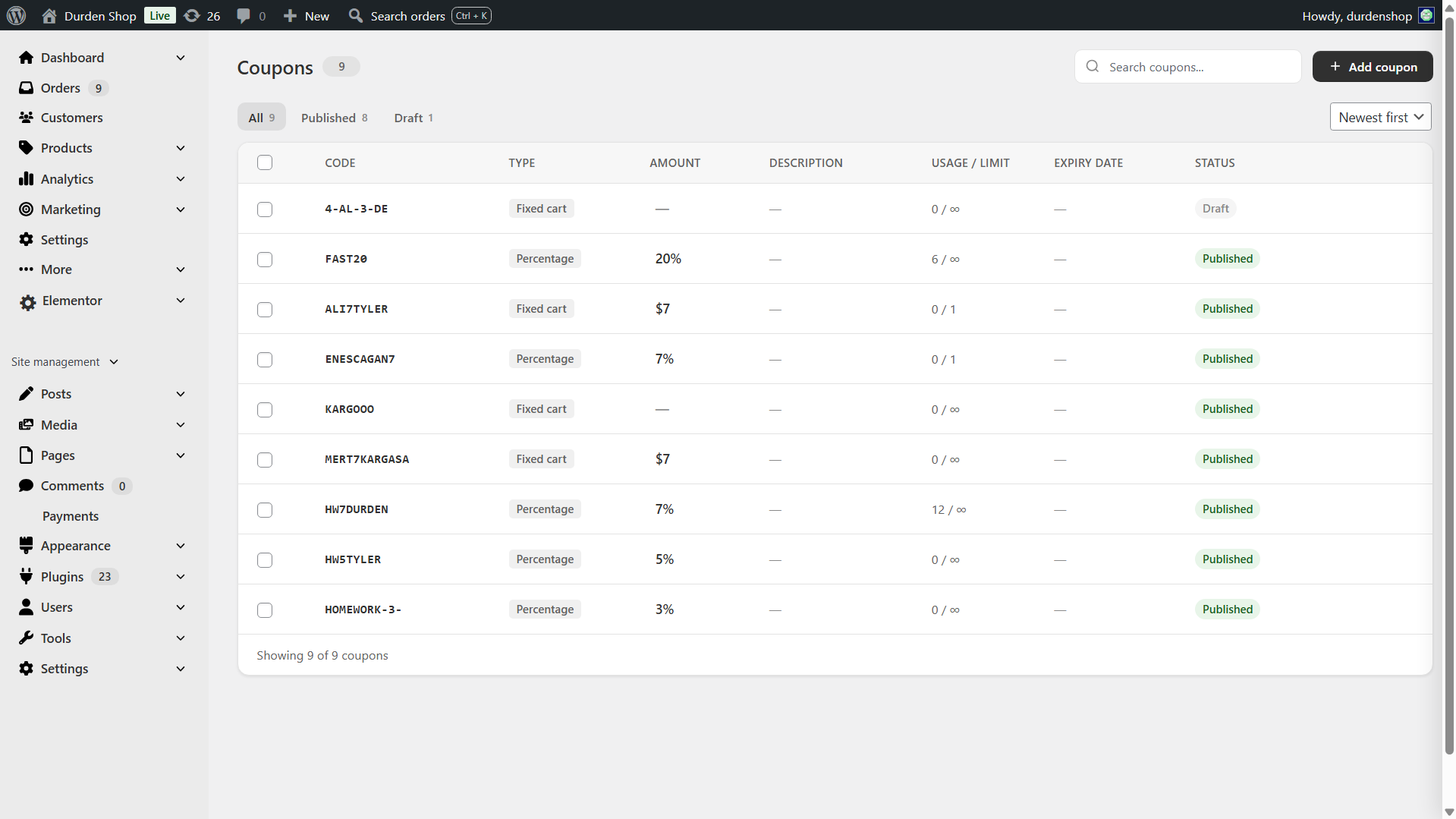
WooCommerce Coupon Manager — clean coupon list with code copy, discount type icons, usage stats, and expiry highlighting 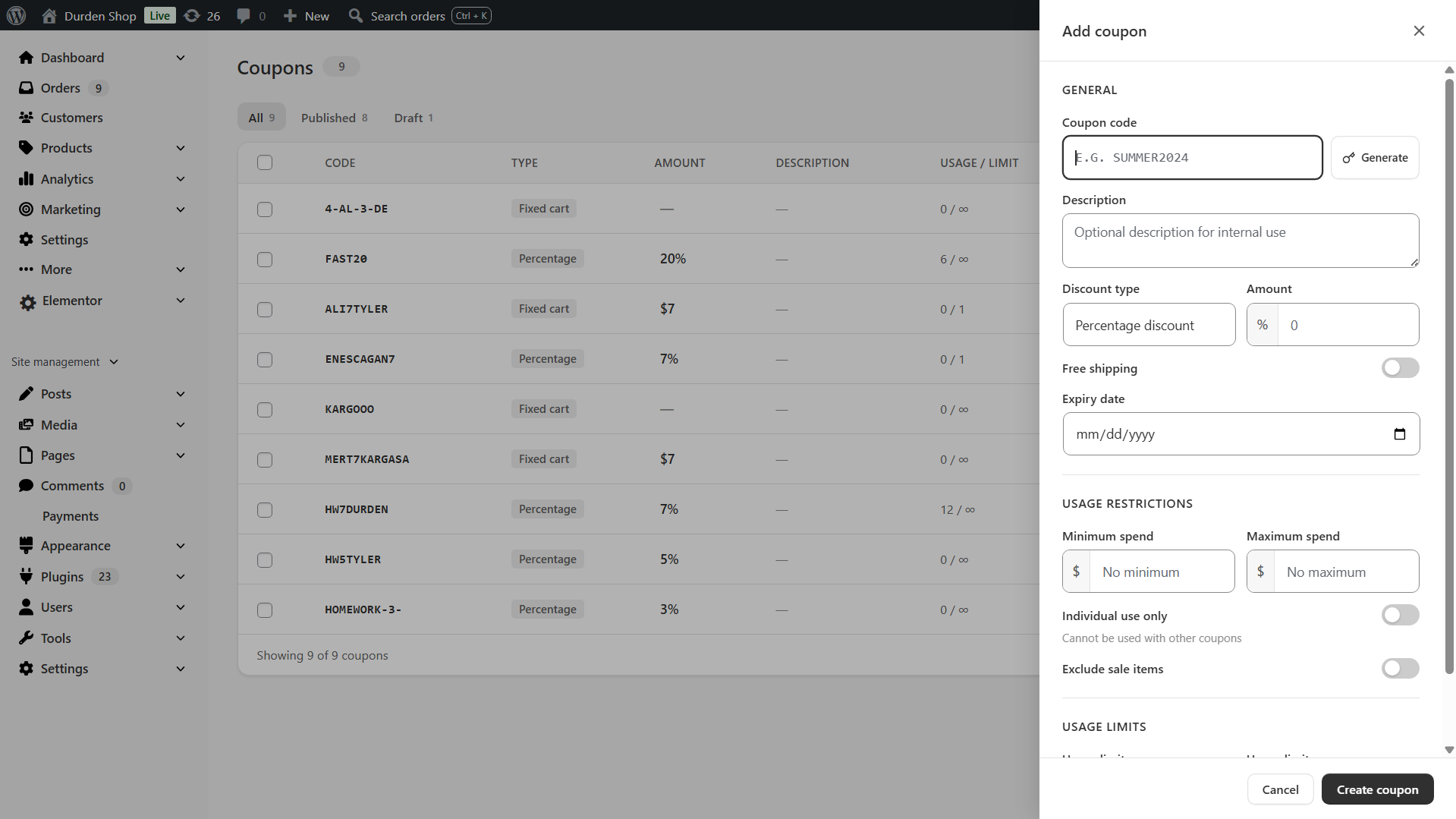
Add Coupon Slide-Over Panel — create or edit coupons with all WooCommerce coupon options without leaving the page 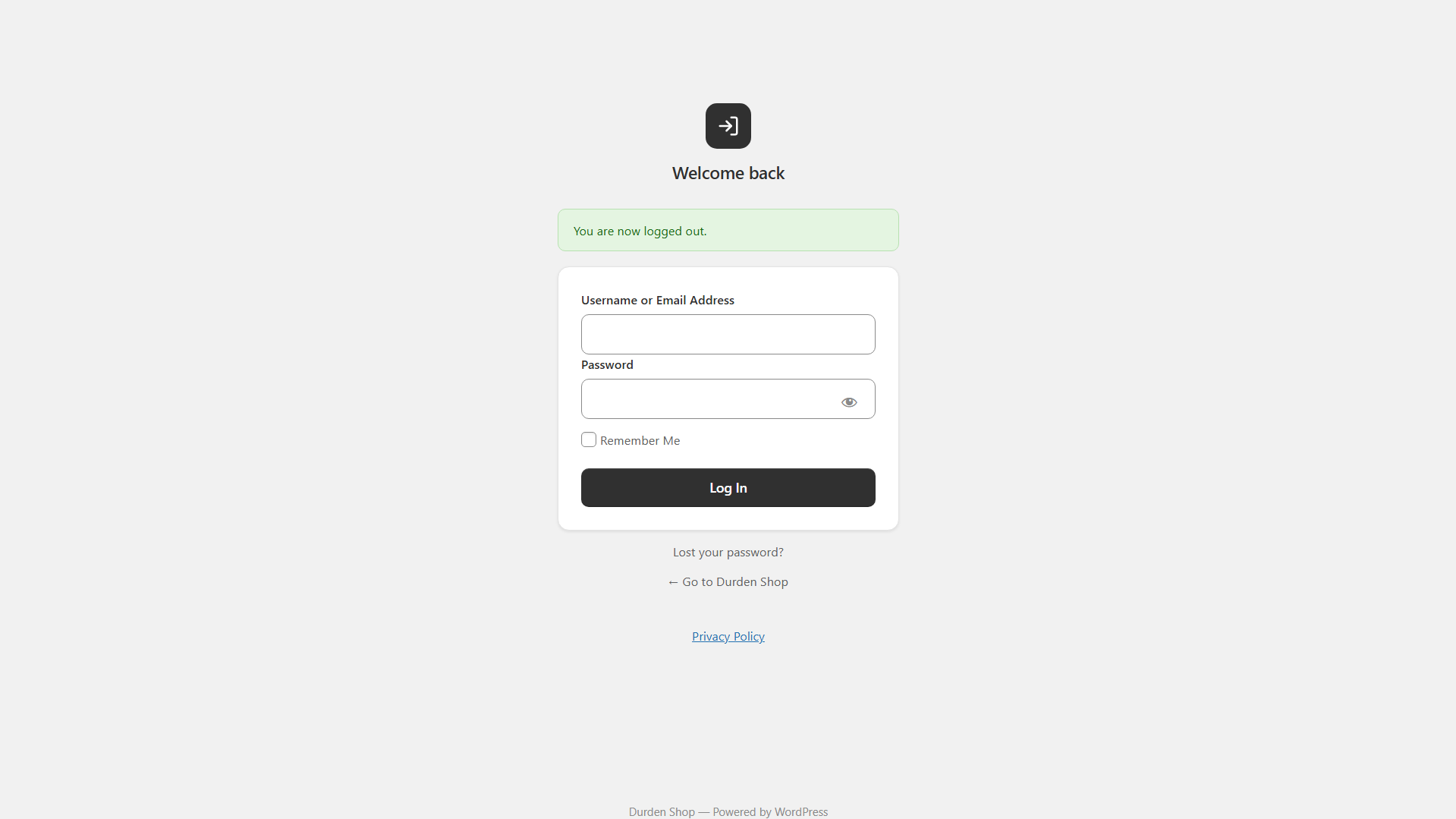
Custom WP Login Page — modern, branded login screen replacing the default WordPress login
Installazione
- Upload the plugin files to
/wp-content/plugins/brikpanel, or install via Plugins Add New Upload Plugin. - Activate through the Plugins menu.
- Open BrikPanel in the admin sidebar — the dashboard loads immediately.
- (Optional) Visit WooCommerce Settings BrikPanel to enable or disable specific modules.
That is it. No license key, no email signup, no external account.
FAQ
-
Is BrikPanel really 100% free?
-
Yes. Every feature on this page is in the free version. There is no premium tier, no feature lock, no trial period, no upsell. We built this because we needed it for our own 1000+ WooCommerce stores and decided to release it.
-
Is BrikPanel a self-hosted WooCommerce analytics solution?
-
Yes. BrikPanel gives you a complete WooCommerce analytics suite that runs entirely on your own server with no external dependencies. Sales analytics, product reports, conversion tracking, and customer data are all included — nothing is sent to any third-party SaaS.
-
Is BrikPanel an ATUM alternative for inventory management?
-
For most stores, yes. BrikPanel includes complete woocommerce inventory management — stock levels, low stock badges, bulk stock updates, variation stock updates — all integrated into the same dashboard you use for sales and orders. If you only installed ATUM for daily stock work and never used its advanced supplier or purchase order features, BrikPanel is a much lighter ATUM alternative.
-
How do I bulk edit WooCommerce products including variations?
-
Open BrikPanel Products and click the Bulk Update button in the toolbar. You can update prices, sale prices, and stock for all products, by category, or for selected products. For variable products, open any product, click Edit Variations, and bulk update prices and stock across every variation in one modal. This is the part most free WooCommerce bulk editor plugins do not handle — BrikPanel does.
-
Can I bulk edit variation prices in WooCommerce with the free version?
-
Yes. Bulk edit variation prices WooCommerce is a core BrikPanel feature, and it is free. Set a percentage rule, set a fixed price, or update by attribute (every “Red” variation, every “Large” size). The same modal handles bulk update variation stock for the same products.
-
Does BrikPanel slow down my WooCommerce store?
-
No. BrikPanel only loads inside wp-admin. It has zero impact on your storefront speed, customer experience, page weight, or Core Web Vitals. The frontend never loads any BrikPanel code.
-
Is BrikPanel compatible with HPOS (High-Performance Order Storage)?
-
Yes. Every order query has dual code paths —
wc_get_orders()for HPOS,WP_Queryfor legacy. BrikPanel declares HPOS compatibility viaFeaturesUtil::declare_compatibility('custom_order_tables', ...)and is tested on stores running both modes. -
How do I see WooCommerce sales by country?
-
Open the BrikPanel dashboard. Scroll to the geographic analytics section. The 3D globe shows every order on its real geographic location, and the Top 10 Countries and Top 10 Cities tables update in real time. BrikPanel extracts country and city from the billing or shipping address of every order, so this works with no extra setup.
-
How do I customize the WordPress login page for my WooCommerce store?
-
BrikPanel includes a built-in wordpress login customizer. Enable the custom wp login page module from BrikPanel settings and the default
wp-login.phpis replaced with a clean, branded login form that matches the rest of the BrikPanel admin. No CSS knowledge required. -
How do I search WooCommerce orders by customer name or phone number?
-
Press
Ctrl + K(orCmd + Kon Mac) anywhere inside wp-admin. The BrikPanel quick search overlay opens and searches across order ID, customer name, email, phone, and product SKU at the same time. This is the woocommerce search orders experience the WooCommerce admin should ship with by default. -
Can I see who is on my WooCommerce store right now?
-
Yes. BrikPanel includes a woocommerce live visitors widget on the dashboard that updates every 30 seconds. You can see what page each visitor is on, whether they have items in the cart, and whether they are an existing customer. This is real woocommerce real time visitors tracking, not estimates.
-
Does BrikPanel track WooCommerce conversion rate and conversion funnel?
-
Yes. BrikPanel includes a complete woocommerce conversion tracking system that records visitors, add-to-cart events, checkout starts, and completed orders. The dashboard shows your woocommerce conversion funnel as a four-step visual: Visitors Add to Cart Checkout Orders, with the conversion percentage at every step.
-
What makes BrikPanel different from the built-in WooCommerce analytics?
-
The built-in WooCommerce analytics are slow, refresh on a delay, only show historical data, and have no live visitor tracking, no conversion funnel, no geographic globe, no Cmd+K order search, no quick edit sidebar, no variation bulk editor, no custom login page, and no coupon manager. BrikPanel adds every one of those features inside a single free plugin.
-
Is BrikPanel just a CSS reskin of the WooCommerce admin?
-
No. BrikPanel is a real woocommerce admin dashboard plugin with custom database tables for visitor tracking, custom AJAX endpoints for every interaction, real conversion analytics, a working bulk editor, a real product editor, a real coupon manager, and a real custom login system. Other plugins (Dashify, UiPress) only restyle the admin. BrikPanel rebuilds the parts of WooCommerce that needed to be rebuilt.
-
Does BrikPanel work with Yoast SEO, RankMath, Elementor, WPML, and Polylang?
-
Yes. BrikPanel does not interfere with frontend rendering, so it works with every page builder and SEO plugin we have tested. It also has its own translation files and is fully compatible with WPML and Polylang for multilingual stores.
-
Where does BrikPanel store data?
-
Everything stays in your WordPress database. BrikPanel creates three custom tables:
wp_brikpanel_visitors,wp_brikpanel_cart_tracking, andwp_brikpanel_visited_pages. Live visitor data is stored in a transient that auto-expires every 2 minutes. No data is sent to any external server, ever. -
Will BrikPanel always be free?
-
Yes. The dashboard, the bulk editor, the inventory tools, the order management, the coupon manager, the custom login, the conversion tracking, and every other feature listed above will remain free forever. We may release a separate paid product (BrikMentor) on top of BrikPanel in the future, but it will be additive — BrikPanel itself stays 100% free.
Recensioni


Contributi e sviluppo
“BrikPanel — WooCommerce Dashboard, Inventory Management & Bulk Editor” è un software open source. Le persone che hanno contribuito allo sviluppo di questo plugin sono indicate di seguito.
Collaboratori
Traduci “BrikPanel — WooCommerce Dashboard, Inventory Management & Bulk Editor” nella tua lingua.
Ti interessa lo sviluppo?
Esplora il codice segui il repository SVN, segui il log delle modifiche tramite RSS.
Changelog
2.1.0 (2026-04-16)
- New: Admin notice suppression — hides third-party plugin notices on BrikPanel pages for a cleaner, distraction-free admin experience (toggleable from settings)
- New: Product tags support in the simplified product editor with autocomplete suggestions
- New: Cost of Goods Sold (COGS) field support when enabled in WooCommerce settings
- Improvement: Enhanced SEO plugin compatibility — Yoast SEO, Rank Math, AIOSEO, and SEOPress metaboxes now load correctly on the BrikPanel product editor
,* Improvement: Better admin body class handling for modern product edit and classic navigation modes
2.0.7 (2026-04-12)
- Comprehensive settings have been added to the product editing page.
2.0.4 (2026-04-09)
- Add Digital product support
2.0.1 (2026-04-08)
- Bug fix: The “Live Visitors” section was scrolling to the right
2.0.0 (2026-04-08)
- New: Modern WooCommerce dashboard rebuilt from scratch with real-time sales analytics, conversion funnel, order status donut, and 3D geographic globe
- New: WooCommerce live visitors widget with cart status and current page
- New: Cmd/Ctrl + K lightning-fast order search across ID, name, email, phone, and SKU
- New: Modern WooCommerce order management page with 30-day overview bar and inline status change
- New: WooCommerce product list plugin with AJAX pagination, live search, and one-click publish toggle
- New: Quick edit sidebar for inline product editing without leaving the list
- New: WooCommerce bulk editor with full variation support — bulk edit variation prices, bulk update variation stock, percentage and fixed-amount updates, by category or selected products
- New: WooCommerce variation price editor modal with attribute filtering
- New: Simplified WooCommerce product editor with drag-and-drop image upload, searchable category picker, live SEO preview, and auto-generated variations
- New: WooCommerce variation gallery — separate image gallery per variation
- New: WooCommerce categories page with drag-and-drop parent/child nesting
- New: Best-in-class free WooCommerce coupon manager with slide-over panel and one-click duplicate
- New: Custom WP login page (WordPress login customizer) with AJAX submission
- New: Sound notifications and confetti celebrations on new completed orders
- New: Welcome / onboarding modal for first-run experience
- New: WooCommerce sales by country and city with interactive 3D globe
- New: WooCommerce conversion tracking with full visitor cart checkout order funnel
- New: Two custom order statuses — Return Draft and Change
- New: Optional simplified admin mode that hides the full WordPress menu for non-technical clients
- Improvement: Full HPOS (High-Performance Order Storage) compatibility with dual code paths on every order query
- Improvement: All AJAX endpoints hardened with nonce + capability checks
- Improvement: IP addresses now SHA-256 hashed before storage for privacy
- Improvement: Admin users excluded from all analytics to keep numbers clean
- Improvement: Tested up to WordPress 6.9 and WooCommerce 9.x
1.5.0 (2025-03-01)
- Improvement: Simplified licensing — all features now completely free
1.4.1 (2025-02-15)
- Bug fix: Yesterday date range calculation corrected in dashboard widgets
1.3.5 (2025-01-20)
- Bug fix: Order conversion rate calculation accuracy improved
1.3.4 (2025-01-10)
- New feature: Added new dashboard widgets for enhanced store insights
1.3.3 (2024-12-15)
- Bug fix: Order count display corrected for filtered views
1.3.2 (2024-12-01)
- Bug fix: Resolved Slider Revolution CSS color conflict
1.2.9 (2024-11-15)
- Bug fix: Resolved compatibility issues on stores without HPOS enabled
1.2.6 (2024-11-01)
- Bug fix: Product category addition issue resolved
1.2.3 (2024-10-15)
- Improvement: Full translation support added with .pot file
1.2.2 (2024-10-01)
- Bug fix: Admin Menu Editor compatibility restored
1.2.0 (2024-09-15)
- Improvement: WooCommerce 9.4 compatibility
- Improvement: Redesigned UI with enhanced navigation
- Bug fix: Various minor fixes