
Descrizione
SEO Fury is a free SEO plugin for meta titles and descriptions, XML sitemaps, schema markup, redirects and a 404 monitor — plus GEO tools: an llms.txt file and a robots.txt editor that help AI search engines find and quote your content. It loads no front-end scripts by default.
The core is free and unlimited: 301/302/307 redirects with regex, 404 logging, 20+ schema types with templates per post type, XML, news and video sitemaps, Google Search Console reports, IndexNow, hreflang, breadcrumbs, Local SEO (LocalBusiness schema), WooCommerce product schema and readability analysis.
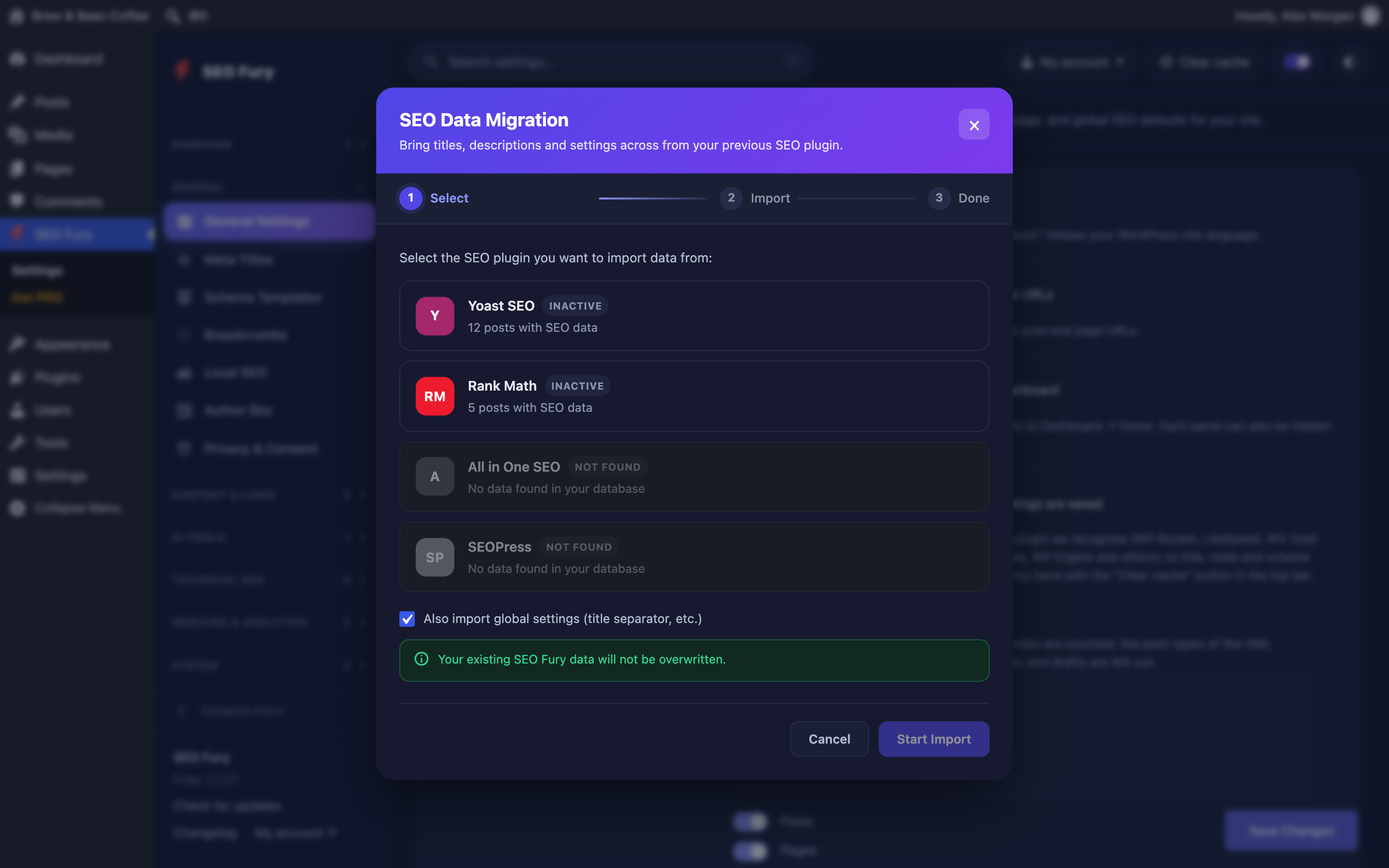
Switching is simple: the Migration Wizard imports titles, descriptions, redirects and schema from Yoast SEO, Rank Math, All in One SEO and SEOPress. SEO Fury PRO adds an SEO audit with one-click fixes, AI texts, rank tracking and more.
Why SEO Fury?
- 60+ features, zero bloat — every feature loads only when needed; nothing extra on your front end.
- Unlimited redirects & 404 monitoring — no artificial limits, for free.
- Google Search Console and IndexNow built in — clicks, impressions and positions inside WordPress; Bing, Yandex and other IndexNow engines notified the moment you publish.
- Advanced readability analysis — Flesch Reading Ease, passive voice, transition words, keyword synonyms — features other plugins charge for.
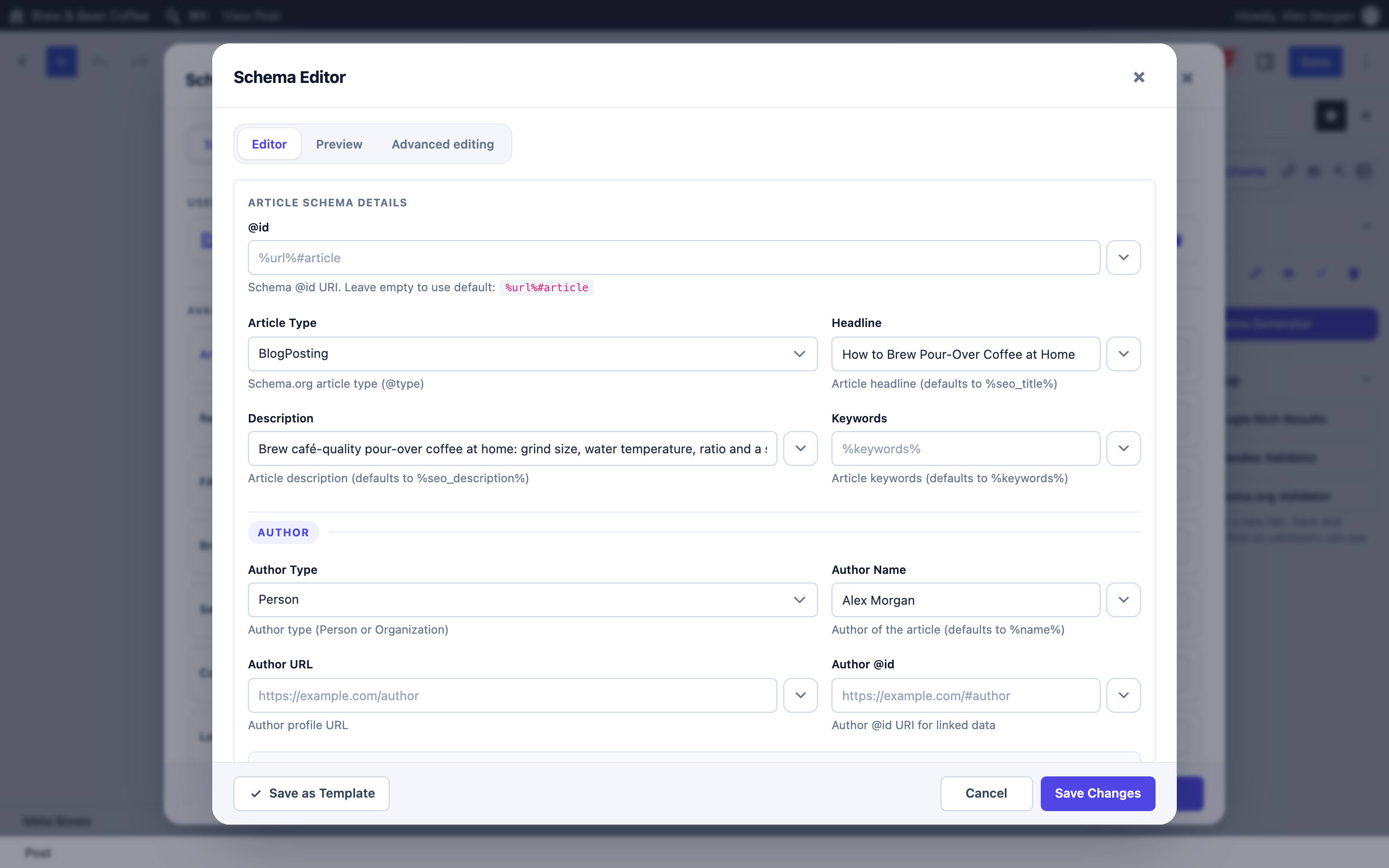
- 20+ schema types with a visual builder — Article, Product, FAQ, How-To, Recipe, Event, LocalBusiness and more. No code.
- One-click migration — from Yoast SEO, Rank Math, All in One SEO and SEOPress: titles, descriptions, redirects and schema.
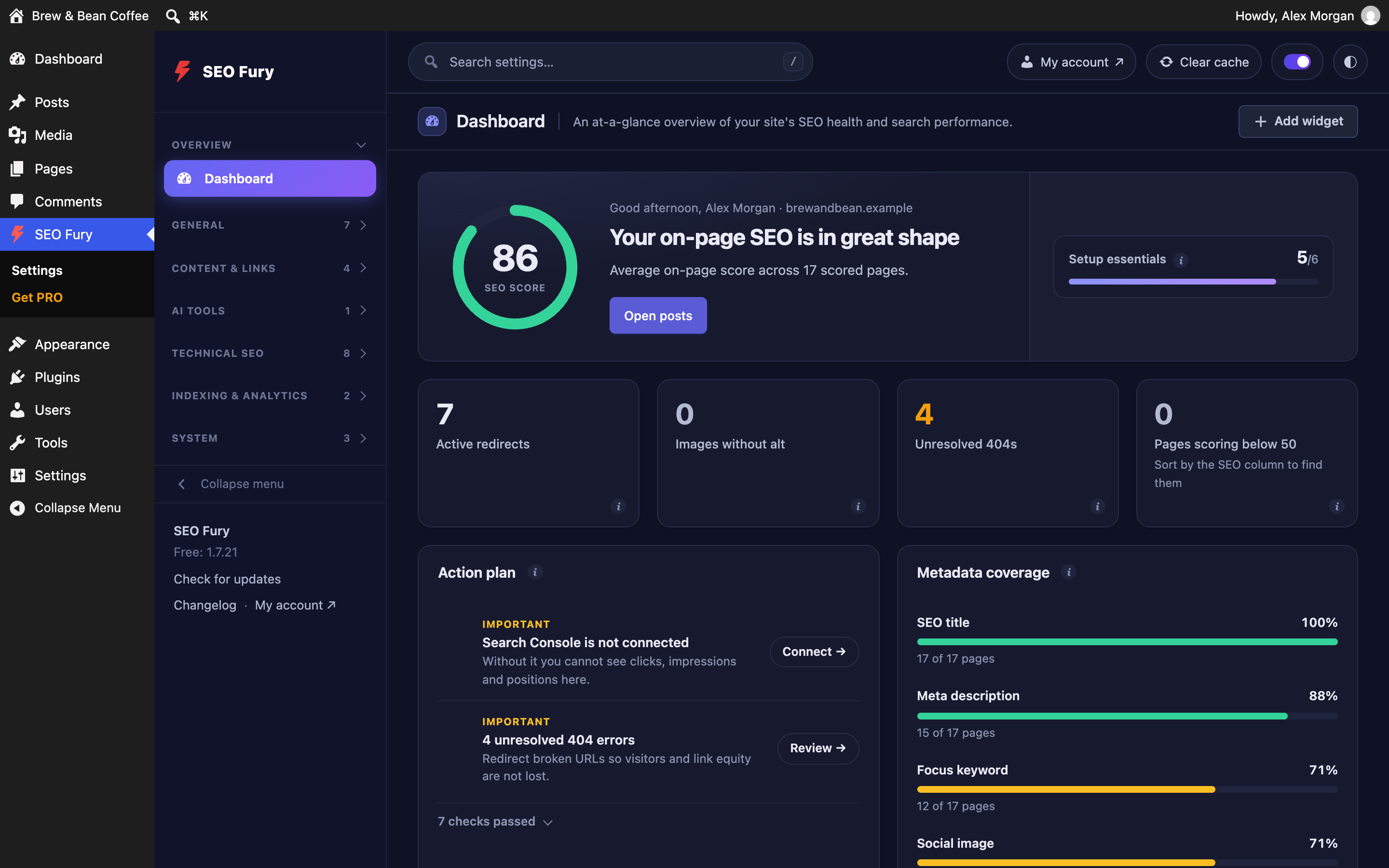
- A dashboard you arrange yourself — drag, hide and add cards (Search Console graph, top queries, PageSpeed); light / dark / auto theme.
- 7 languages — English, Russian, German, French, Spanish, Italian and Portuguese.
Core Features (All Free)
Meta & Content Optimization
- Meta titles & descriptions with 15+ dynamic variables
- Focus keyword analysis with synonym and morphological matching, secondary keywords
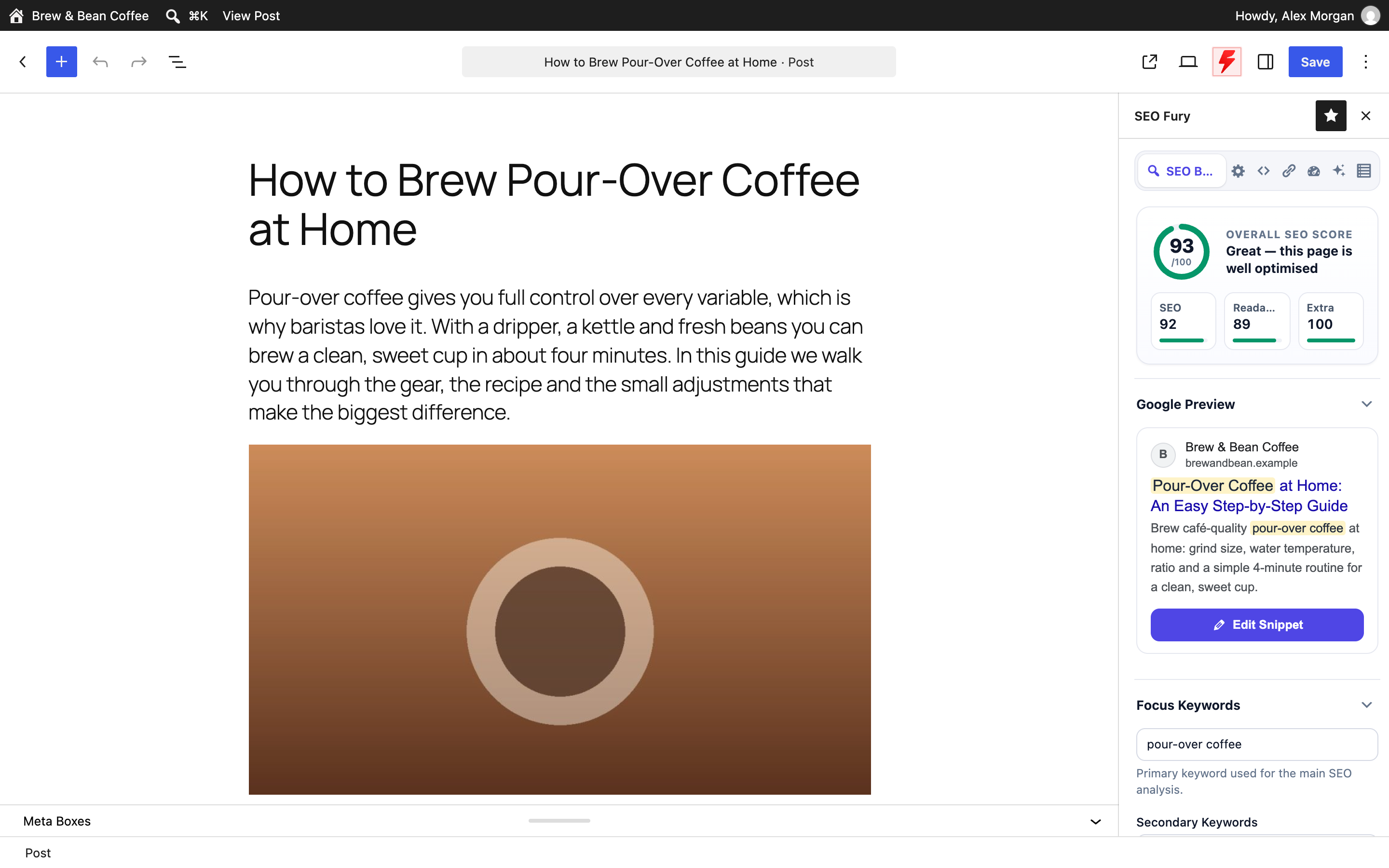
- SEO score (0-100) with 13 on-page checks; readability score (English + Russian)
- SERP preview — desktop, mobile, Facebook, Twitter/X; Open Graph & Twitter Cards
- Canonical URLs; SEO fields for categories, tags and custom taxonomy terms
Technical SEO
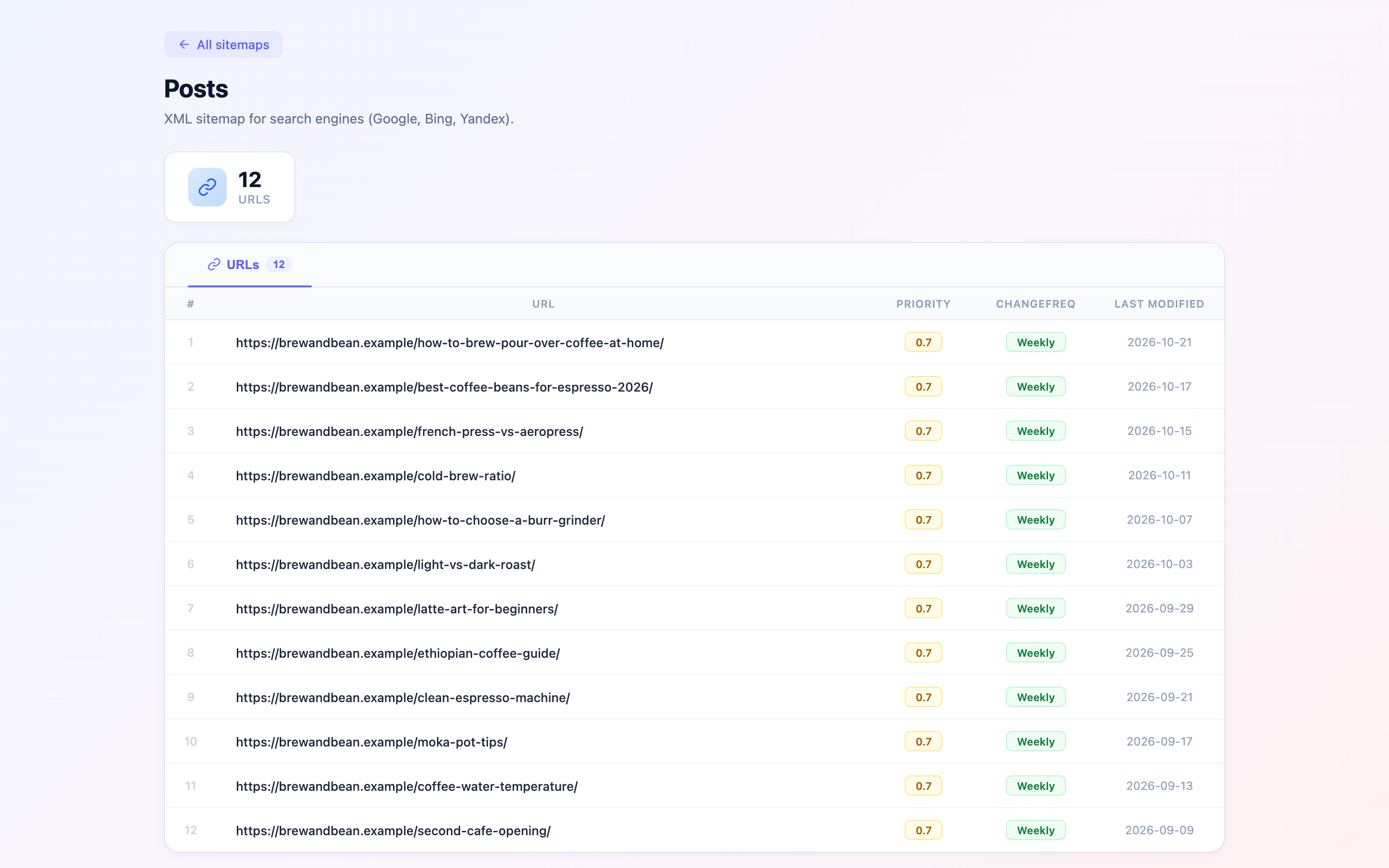
- XML & HTML sitemaps per post type; News & Video sitemaps (YouTube/Vimeo auto-detection)
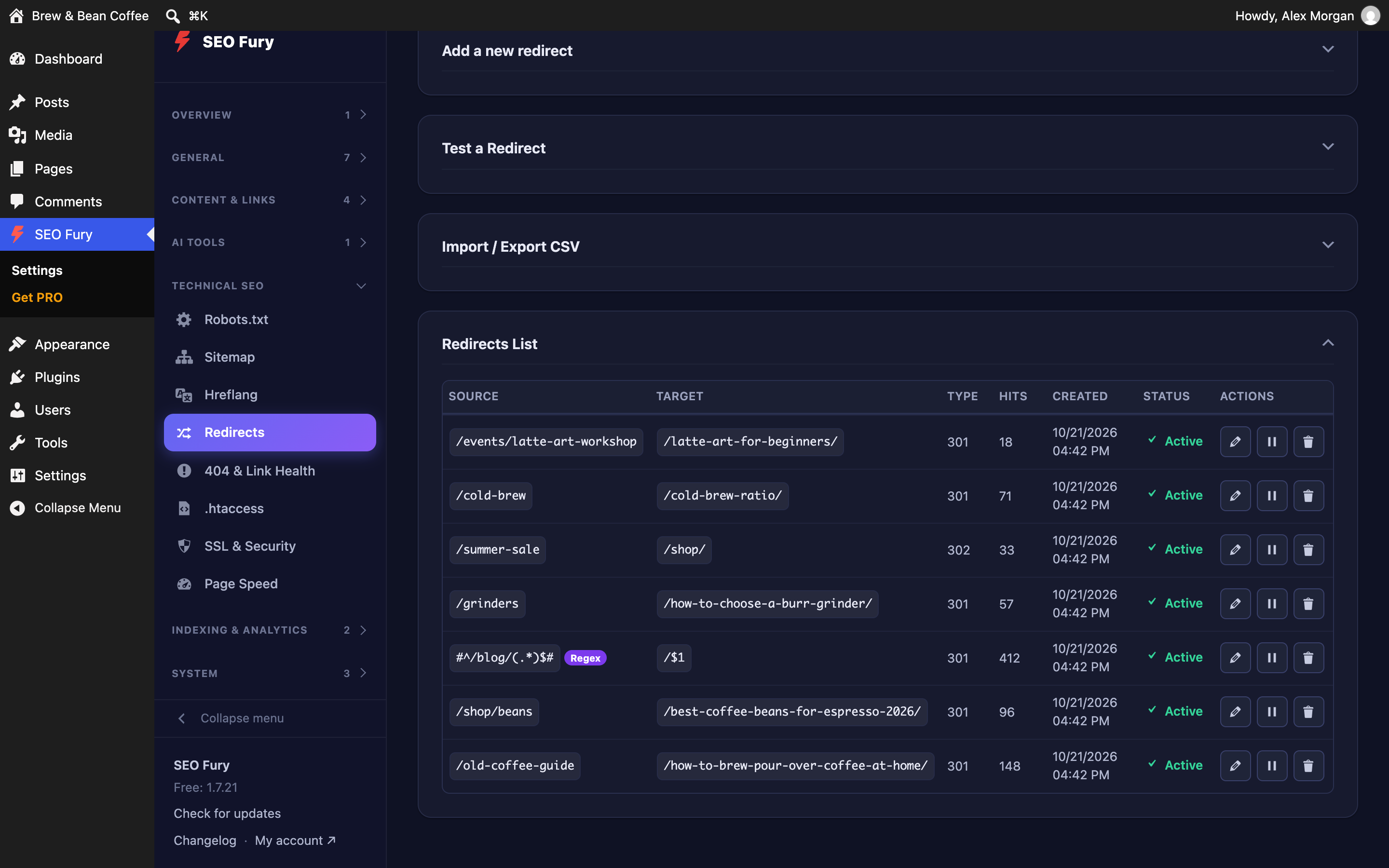
- Unlimited 301/302/307 redirects with regex and hit tracking; auto-redirect on slug change
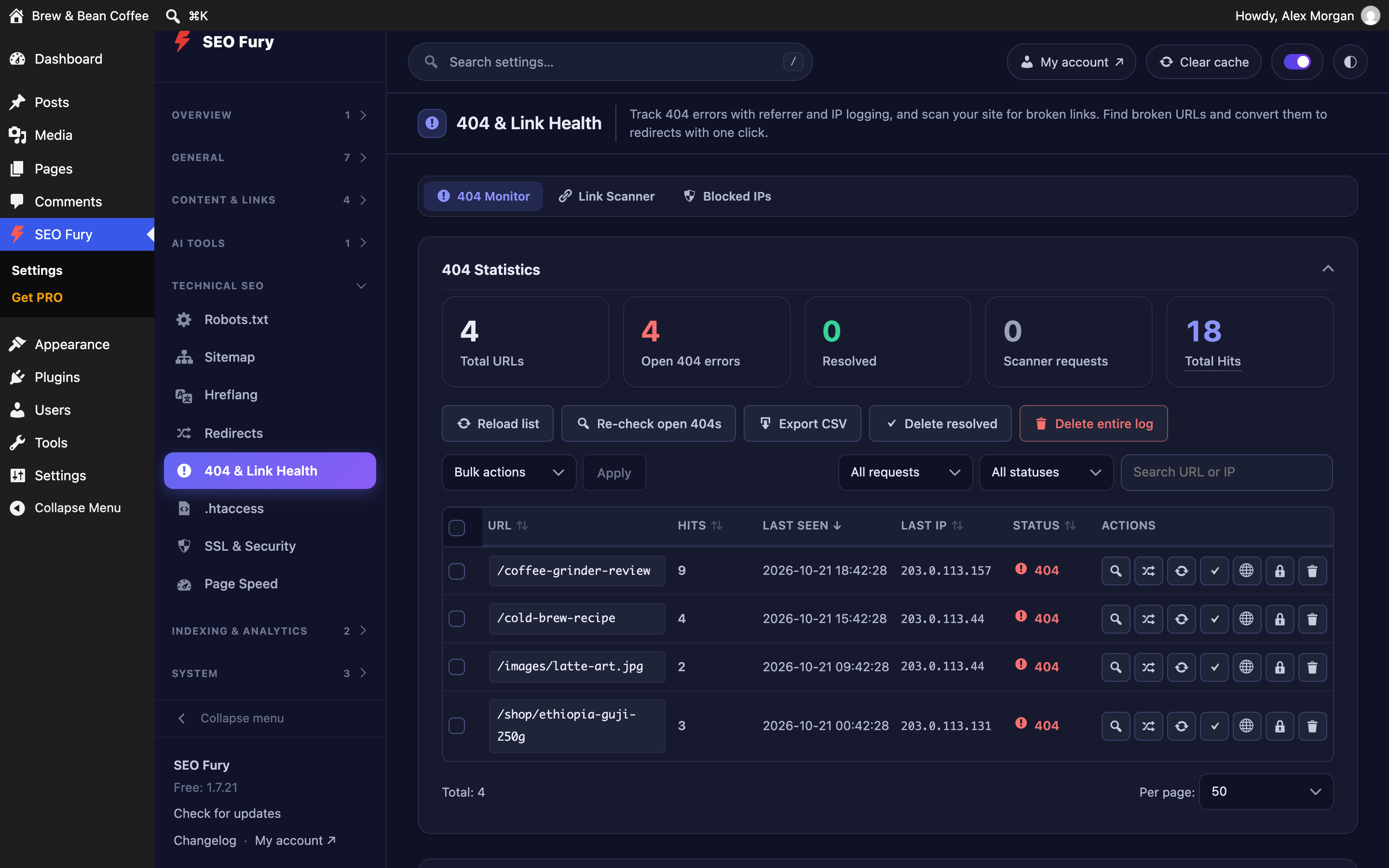
- Unlimited 404 monitoring with referrer, IP, re-check and bot filters
- Robots.txt visual editor with per-bot rules; .htaccess editor with backup
- SSL & HTTPS module — force HTTPS, fix mixed content, HSTS
- Hreflang — auto-detect WPML, Polylang, TranslatePress, or set manually
Schema & Structured Data
- 20+ schema types, Schema Templates per post type
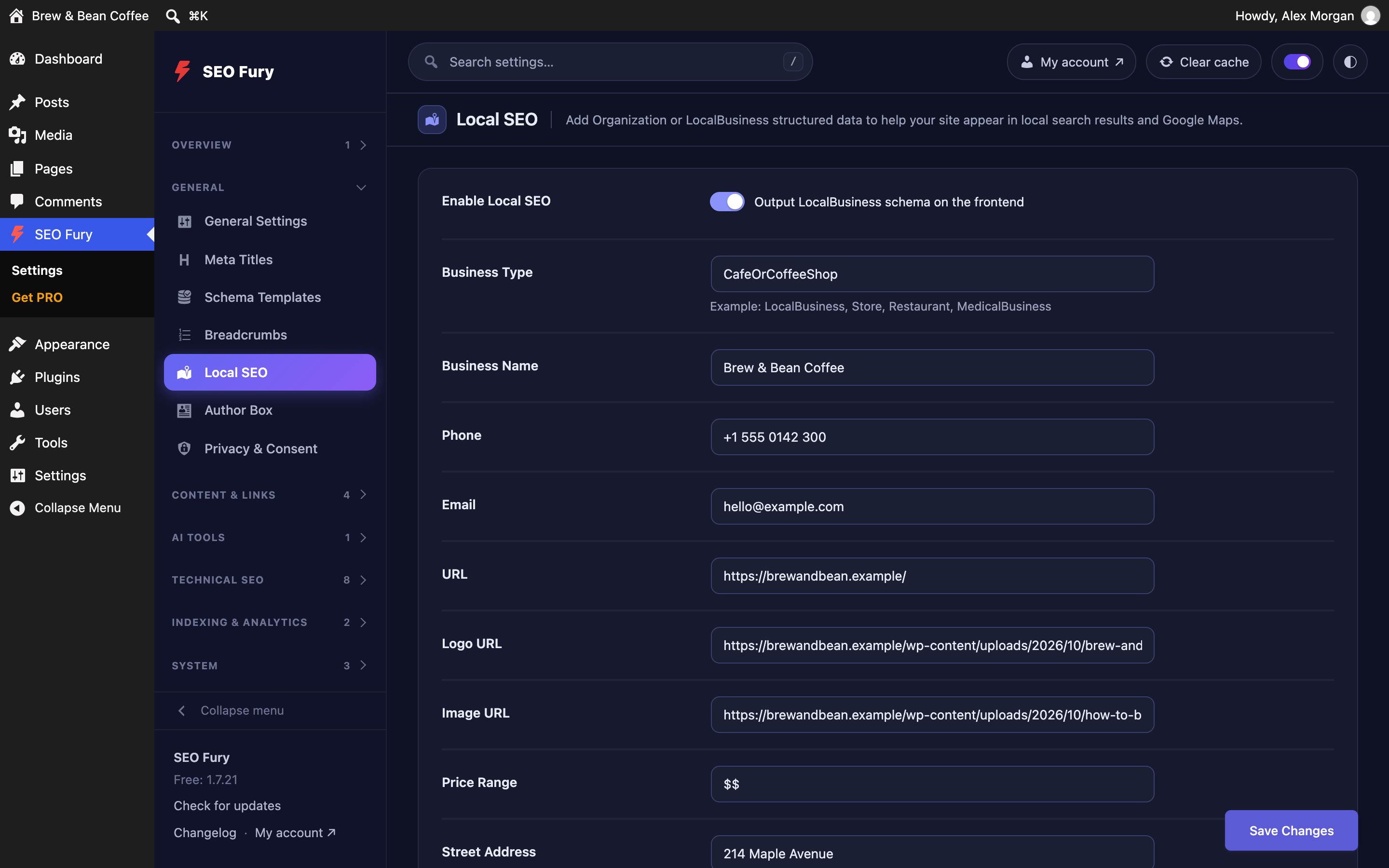
- LocalBusiness & Organization schema; WooCommerce Product schema
- Breadcrumbs with JSON-LD and shortcode
Author Box (E-E-A-T)
- Author profile: photo, job title, credentials, expertise, social profiles
- Author box under the content or anywhere via
[seo_fury_author](Elementor, Bricks, Divi, theme templates) - The same profile feeds the Person in your Article schema and a ProfilePage on author archives
Post Views
- View counter that works with page caching and skips bots; no personal data stored
- Counter via
[seo_fury_views], block or PHP; most viewed lists; Views column and Dashboard panel - Import from Post Views Counter, WP-PostViews, Page Views Count and Statify
Content Tools
- Table of contents from the headings — automatic (e.g. above the featured image or before the first heading) or via block /
[seo_fury_toc]; numbered, collapsible, “Show all” for long lists; works with Elementor - Reading time and post details line, with timeRequired / wordCount in the schema
- Duplicate posts and pages with layouts and SEO settings
- Moving off other plugins: shortcodes of LuckyWP Table of Contents, Easy Table of Contents, Table of Contents Plus, Reading Time WP and Post Views Counter keep working, and one tool replaces them (and the LuckyWP widget in Elementor layouts) in all posts, with undo
Privacy & Consent (152-ФЗ / GDPR-style)
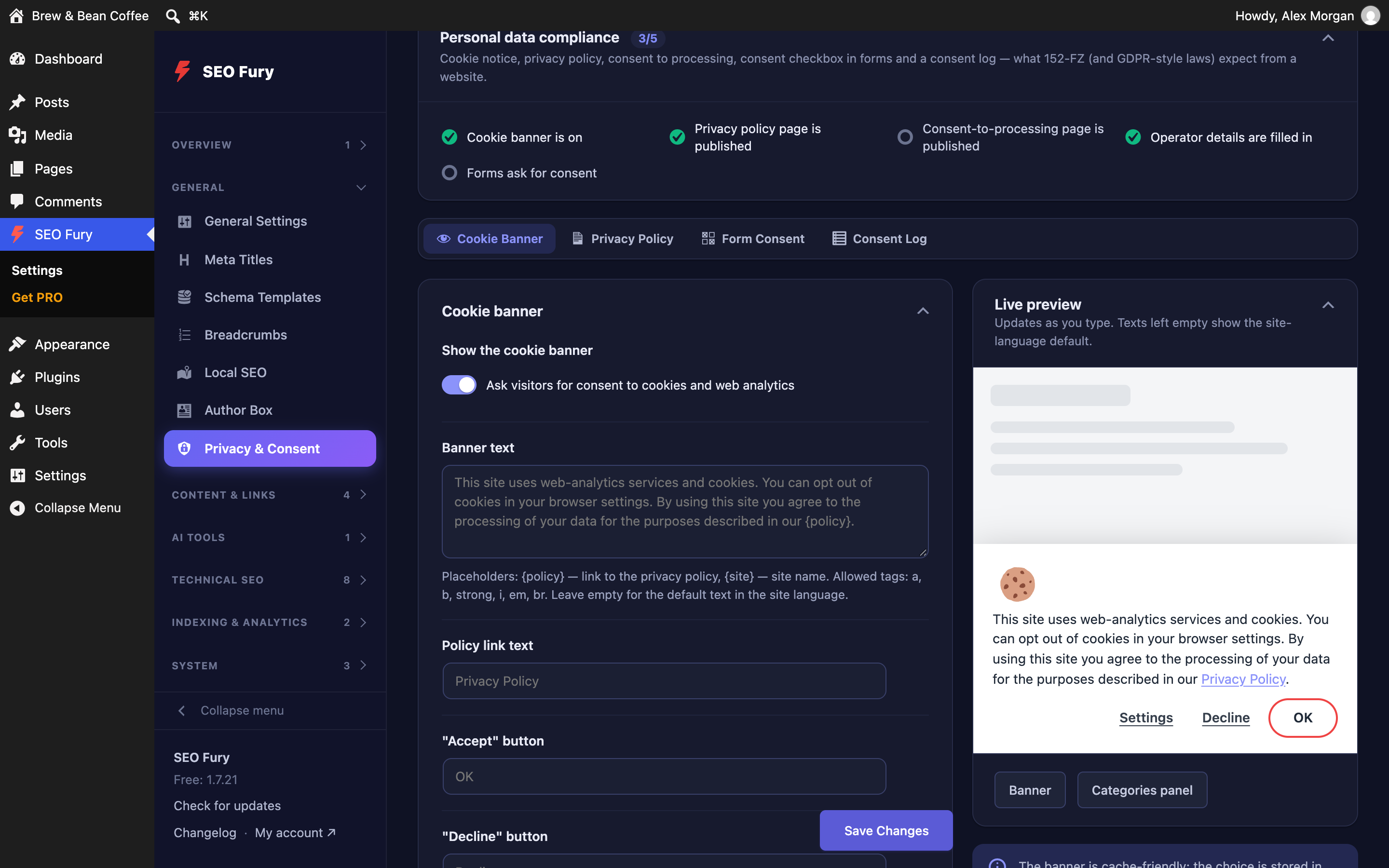
- Cookie banner with live preview; necessary / analytics / marketing categories; Google Consent Mode v2
- Script gating with
data-sf-consentand optional auto-blocking of known trackers until consent - Privacy policy and consent documents generated from your business data (Russian or English)
- Consent checkbox for comments, registration, Contact Form 7, WPForms, WooCommerce; consent log with CSV export
SEO Fury Writer (free add-ons)
- SEO and readability analysis inside Google Docs, Microsoft Word and LibreOffice — seo-fury.com/writer
- One click sends the document to your site as a draft with the SEO fields filled in
Local SEO
- Business profile, opening hours (one-click presets), geo coordinates and service area — output as LocalBusiness schema
Analytics & Indexing
- SEO panels on the WordPress dashboard: score, redirects, 404s, images without alt, site-health checklist
- Google Search Console (OAuth 2.0), IndexNow, PageSpeed Insights (Core Web Vitals)
- Site verification — Google, Bing, Yandex and any custom meta tag
Image SEO
- Alt text and title attributes from templates: {post_title}, {filename}, {site_name}
Tools & Utilities
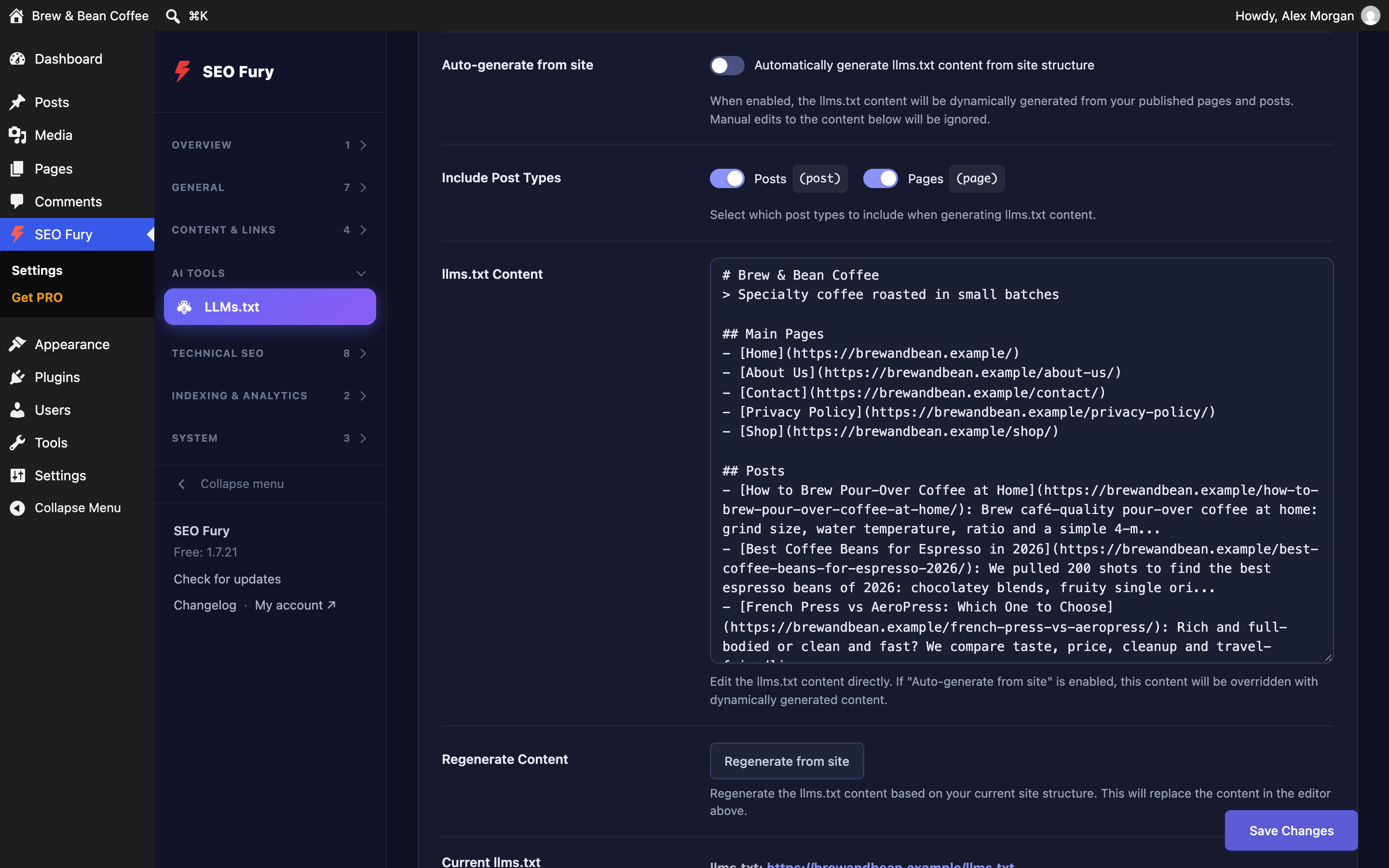
- llms.txt for AI assistants (auto-generated, editable)
- SEO Revisions — history of SEO fields with one-click restore
- Frontend SEO Inspector in the admin bar; settings Import/Export
- Elementor integration — full SEO panel inside the builder
- Finds active plugins whose job SEO Fury already does and helps you switch them off
SEO Fury vs. Competitors
Where the free version of SEO Fury differs from the free and paid versions of Yoast SEO and Rank Math (checked September 2026):
- Redirects and 404 monitor — SEO Fury: both free, unlimited. Yoast: redirects in Premium, no 404 monitor. Rank Math: both free.
- Google Search Console — SEO Fury: built in. Yoast: through the Site Kit plugin. Rank Math: built in.
- Hreflang — SEO Fury: included. Yoast and Rank Math: not available.
- Flesch reading score and passive voice — SEO Fury and Yoast: included. Rank Math: not available.
- Keyword variations (synonyms, word forms) — SEO Fury: included. Yoast: Premium. Rank Math: not available.
- News and video sitemaps — SEO Fury: included. Yoast: Premium. Rank Math: PRO.
- SEO revisions history — SEO Fury: included. Yoast and Rank Math: not available.
- IndexNow — SEO Fury: included. Yoast: Premium. Rank Math: included.
- Schema — SEO Fury: 20+ types and templates per post type. Yoast: basic set. Rank Math: 18 types (840+ in PRO).
- llms.txt — all three generate it for free. SEO Fury PRO also shows which AI crawlers read your pages and can block the aggressive ones.
- White label — SEO Fury: PRO. Yoast and Rank Math: not available.
- Starting price — SEO Fury: free, PRO from $3/month, lifetime $300. Yoast Premium: $118.80/year. Rank Math PRO: $6.99/month, billed yearly.
PRO Features (Addon)
Unlock advanced capabilities with SEO Fury PRO:
- AI content and images — write, rewrite, meta texts and keyword ideas with 6 AI providers; images with DALL-E 3, Stability AI, Flux Pro and more; AI alt text
- Rank Tracker and Index Status Tracker — positions in Google, Bing, Yahoo; indexing in Google, Yandex, Bing
- Google Analytics (GA4), Yandex Metrika, Bing UET
- Backlink Checker — Ahrefs, Moz, DataForSEO or Majestic
- Link Assistant and Content Decay Detection
- SEO Audit — 75+ checks across content, E-E-A-T, crawlability, rendering and structured data, run on the server
- Search Console and Post Views reports, also as scheduled e-mails
- AI Search Traffic and AI bot blocking — visits from ChatGPT, Perplexity, Claude, Gemini; robots.txt rules for GPTBot, ClaudeBot and more
- Article rating with AggregateRating schema; White Label; priority support
Plans start at $3/month. Lifetime option available ($300).
Getting Started
- Install and activate SEO Fury
- Go to SEO Fury General Settings to configure basics
- Use the Migration Wizard if switching from another SEO plugin
- Edit any post to see the SEO metabox with analysis, schema builder and social preview
Full documentation at seo-fury.com.
External Services
This plugin connects to external services only when you use a feature that needs them. Nothing is sent in the background, and there is no telemetry.
The charting library (Chart.js 4.4.7, MIT) ships inside the plugin, so admin screens load no third-party scripts.
IndexNow API
Tells search engines that support IndexNow (Bing, Yandex, Seznam, Naver and others) about new or changed pages.
- Service URL: https://api.indexnow.org/indexnow
- What is sent: the page URLs and your IndexNow key
- When: when you submit URLs manually, or on publish/update if you switch on automatic submission (off by default)
- IndexNow Terms of Use
- IndexNow Privacy Policy
Google PageSpeed Insights API
- Service URL: https://www.googleapis.com/pagespeedonline/v5/runPagespeed
- What is sent: the URL of the page being analysed
- When: only when you click “Analyze” on the Page Speed tab or in the post editor
- Google API Terms of Service
- Google Privacy Policy
Google Search Console API and Google OAuth
Shows clicks, impressions, CTR and positions from your own Search Console property.
- Service URLs: https://oauth2.googleapis.com/token (sign-in tokens) and https://www.googleapis.com/webmasters/v3 (search data)
- What is sent: OAuth tokens, your property URL and the date range / page being queried
- When: when you connect Search Console, open the Search Console tab or dashboard widgets, or view a post’s Search Console numbers in the editor
- Google API Terms of Service
- Google Privacy Policy
SEO Fury Google sign-in proxy
Lets you connect Search Console with one click without creating your own Google Cloud project.
- Service URL: https://seo-fury.com/oauth/ (connect.php, token.php, refresh.php)
- What is sent: your site URL (to return you to the right admin page), the one-time authorisation code from Google, and — about once an hour while connected — the Google refresh token, so the proxy can issue a new access token (nothing is stored on SEO Fury servers)
- When: when you connect with the one-click option and while that connection is active (with your own Google Cloud credentials the proxy is not used)
- SEO Fury Terms of Service
- SEO Fury Privacy Policy
SEO Fury changelog
- Service URL: https://seo-fury.com/api/changelog.json
- What is sent: a standard request; the WordPress version is part of the user agent
- When: only when you open the Changelog tab (cached for 6 hours)
- SEO Fury Privacy Policy
SEO Fury support (tickets and ideas)
- Service URL: https://api.seo-fury.com/api/v1 (fallback https://api-ru.seo-fury.com/api/v1)
- What is sent: your ticket or idea text, attachments you add, the site address, and with tickets the system information shown on the form (WordPress, PHP and MySQL versions, theme, active plugins)
- When: only when you use the Support tab
- SEO Fury Terms of Service
- SEO Fury Privacy Policy
SEO Fury deactivation feedback
- Service URL: https://api.seo-fury.com/api/v1/plugin/feedback (fallback https://api-ru.seo-fury.com)
- What is sent: the reason you pick, your optional comment and e-mail, the site URL and plugin/WordPress versions
- When: only if you click “Send” in the optional dialog shown when you deactivate the plugin (“Skip” sends nothing)
- SEO Fury Privacy Policy
SEO Fury PRO (separate add-on)
The PRO add-on, when installed, connects to SEO Fury servers for licence validation, updates and AI features, and to the third-party services you configure in it. These connections are made by the add-on, not by this plugin, and are described in the add-on’s documentation.
Screenshot
Blocchi
Questo plugin fornisce 6 blocchi.
- Reviews
- Post Info
- Toc
- Luckywp Tableofcontents
- Post Views
- Most Viewed
Installazione
- Upload the
seo-furyfolder to/wp-content/plugins/, or install directly through the WordPress plugins screen (search “SEO Fury”). - Activate the plugin through the ‘Plugins’ screen in WordPress.
- Go to SEO Fury in the admin sidebar to configure settings.
- (Optional) Install the SEO Fury PRO addon for advanced features.
FAQ
-
Is SEO Fury really free with no limits?
-
Yes. The free version includes 60+ features with no artificial restrictions. Unlimited redirects, unlimited 404 monitoring, Google Search Console, IndexNow, schema markup, sitemaps — all included. No trial, no expiration, no credit card required.
-
Does SEO Fury slow down my site?
-
No. SEO Fury loads admin features only in the dashboard. The frontend output is minimal — just essential meta tags, schema markup, and sitemap endpoints. By default it loads no scripts or stylesheets for visitors; the cookie banner, reviews and author box add their small files only on pages where you use them.
-
Can I migrate from Yoast SEO, Rank Math, or AIOSEO?
-
Yes. The built-in Migration Wizard imports all your SEO data from Yoast SEO, Rank Math, All in One SEO, and SEOPress with one click. Meta titles, descriptions, redirects, and schema are all preserved.
-
Does SEO Fury work with WooCommerce?
-
Yes. Automatic Product schema with price, stock status, and reviews. Custom SEO title templates for products, categories, and tags.
-
Does SEO Fury work with page builders?
-
Yes. Full compatibility with Gutenberg, Classic Editor, and Elementor. The Elementor integration includes a dedicated SEO panel inside the builder.
-
What AI features are available?
-
The free version includes advanced readability analysis (Flesch score, passive voice, transition words). PRO adds AI content generation, meta title and description writing, focus keyword suggestions, AI image creation, and AI-powered alt text optimization — with 6 AI providers (OpenAI, Claude, Gemini, Mistral, DeepSeek and OpenRouter, which in turn opens up any model in its catalogue).
-
How does the license work?
-
The free version works forever with no license. PRO licenses are per-site, starting at $3/month. A Lifetime option ($300) gives you all features forever with no recurring payments.
-
What is GEO, and what does llms.txt do?
-
GEO — Generative Engine Optimization — is about being found and quoted by AI assistants, not only by search engines. ChatGPT, Perplexity, Claude and Google’s AI Overviews read pages, and they favour content that is clearly structured and easy to cite. SEO Fury helps on three fronts: llms.txt tells AI assistants what your site is about and which pages matter, 20+ schema types make your facts machine-readable, and the robots.txt editor lets you decide which AI crawlers (GPTBot, ClaudeBot, PerplexityBot, Google-Extended and others) may read your content at all. All of it is in the free version; one-click AI-bot and web-archive-bot blocking, the AI Crawler Monitor and automatic blocking of aggressive crawlers are PRO.
-
Which features need PRO?
-
Everything listed under “Core Features” above is free forever, including redirects, the 404 monitor, Search Console, IndexNow, schema, sitemaps, readability analysis and llms.txt. PRO adds the AI tools (content, images, alt text), Rank Tracker, Index Status Tracker, the site-wide SEO Audit, Link Assistant, Content Decay, Backlink Checker, analytics integrations (GA4, Yandex Metrika, Bing UET), historical Search Console reports, one-click AI-bot blocking, the site-wide Organization / WebSite schema graph and white labelling. The free plugin never nags for a licence key and never expires.
-
Does the free version phone home?
-
No. There is no background telemetry and no licence checking. The free version only contacts an external service when you use a feature that needs it: IndexNow submissions, PageSpeed analysis, Google Search Console (connecting and loading data), the Changelog tab, the Support tab, or the optional feedback form when you deactivate the plugin. Each one is listed under “External Services” below.
Recensioni


Contributi e sviluppo
“SEO Fury – SEO & GEO: Schema, XML Sitemap, Redirects, 404 Monitor, llms.txt” è un software open source. Le persone che hanno contribuito allo sviluppo di questo plugin sono indicate di seguito.
Collaboratori
“SEO Fury – SEO & GEO: Schema, XML Sitemap, Redirects, 404 Monitor, llms.txt” è stato tradotto in 2 lingue. Grazie a chi traduce per il contributo.
Ti interessa lo sviluppo?
Esplora il codice segui il repository SVN, segui il log delle modifiche tramite RSS.
Changelog
1.7.22
- llms.txt: the site name, titles and descriptions are written as plain text. A name like “Brew & Bean” used to come out as “Brew & Bean”, and text saved by earlier versions is cleaned up when the file is served.
- Redirects and 404 Monitor: the free plan no longer shows a usage bar with “of 9223372036854775807” (it has no limit).
- Redirects: long source and target URLs wrap inside their column instead of running over Type and Hits.
- 404 Monitor: all seven row actions fit in the table on every screen width (the last icon was cut off at the card edge); dates break between day and time.
- Dashboard: “Focus keyword” in Metadata coverage counts the focus keyword, not the old meta keywords field.
- Editor: a focus keyword with a hyphen (“pour-over coffee”) is now found in the URL.
1.7.21
- Schema: HTML character codes in titles and other values (for example a dash stored as a code, which WordPress and imports often leave) are written to JSON-LD as the characters themselves. Search engines read JSON-LD as plain text, so the code used to reach them literally.
1.7.20
- Menu: with the plugin language set to English, section headings no longer stay in another language. Preferences menu order saved the default headings as typed text in the language of that moment; such headings now follow the plugin language again (renamed sections keep your name), and the duplicated sections (“Content & Links” next to its translation) are merged.
1.7.19
- Schema: JSON-LD pasted together with its
- Schema: when a post’s own schema renders nothing, the post type’s default Schema is used instead of leaving the page without markup.
- Schema templates: applying a template to all posts keeps quotes and other escaped characters in custom JSON-LD valid.
1.7.18
- Migration from Rank Math: schemas from Rank Math’s Schema Generator are now moved over: Article / BlogPosting / NewsArticle become regular SEO Fury schemas, every other type (Product, FAQ, Event…) is kept as custom JSON-LD with its variables. The article Schema Rank Math, Yoast or AIOSEO used by default for a post type becomes SEO Fury’s default for that post type.
- Sites already migrated get this once, automatically, on the first admin page after the update (only once the old SEO plugin is deactivated). Posts that already have a schema in SEO Fury are left alone.
- Migration: Yoast’s “force index” (Yes) setting is no longer carried over as noindex. Robots settings moved from Yoast, Rank Math, AIOSEO and SEOPress are now saved the way SEO Fury saves them: the post editor shows the box ticked, and the sitemap, IndexNow and the site audit leave those pages out. Posts that follow AIOSEO’s default robots no longer pick up stale per-post values.
- Migration: an archive-page noindex from Yoast or AIOSEO no longer marks the whole post type as noindex, which removed all its posts from the sitemap and IndexNow. A post type is now only left out of the sitemap when its robots override is switched on under Meta Titles, matching what the pages themselves say.
- Migration: verification codes (Google, Bing, and now also Yandex) land in Site Verification, Pinterest’s code in the custom meta tag; Local SEO coordinates from SEOPress land in the Latitude / Longitude fields.
- Migration: the primary category from Yoast, Rank Math, SEOPress or AIOSEO is used for breadcrumbs, BreadcrumbList and %category% in permalinks, as before the switch. Yoast’s per-post article type becomes an Article / BlogPosting / NewsArticle schema.
- Migration: redirects keep every source of a Rank Math rule and its match type (exact, contains, starts with, ends with, regex), Yoast Premium regex rules, AIOSEO regex rules, SEOPress per-post redirects, and 410 / 451 rules without a target.
- Sites migrated earlier are repaired once, automatically, on the first admin page after the update.
- Redirects: 410 Gone and 451 rules now answer with that status and the theme’s 404 page (they showed a WordPress error screen).
- Schema: a custom JSON-LD that is a whole pasted @graph block (copied from another plugin’s page source) is merged into the page’s graph instead of being nested inside it.
- Admin screens: the page keeps its scroll position when a list reloads after an action. Marking a 404 as resolved, deleting a row or blocking an IP near the bottom of a long list no longer jumps back to the top; switching the 404 Monitor page takes you to the first row of the new page.
- Schema (post editor): removing a schema no longer scrolls the editor to the top.
1.7.17
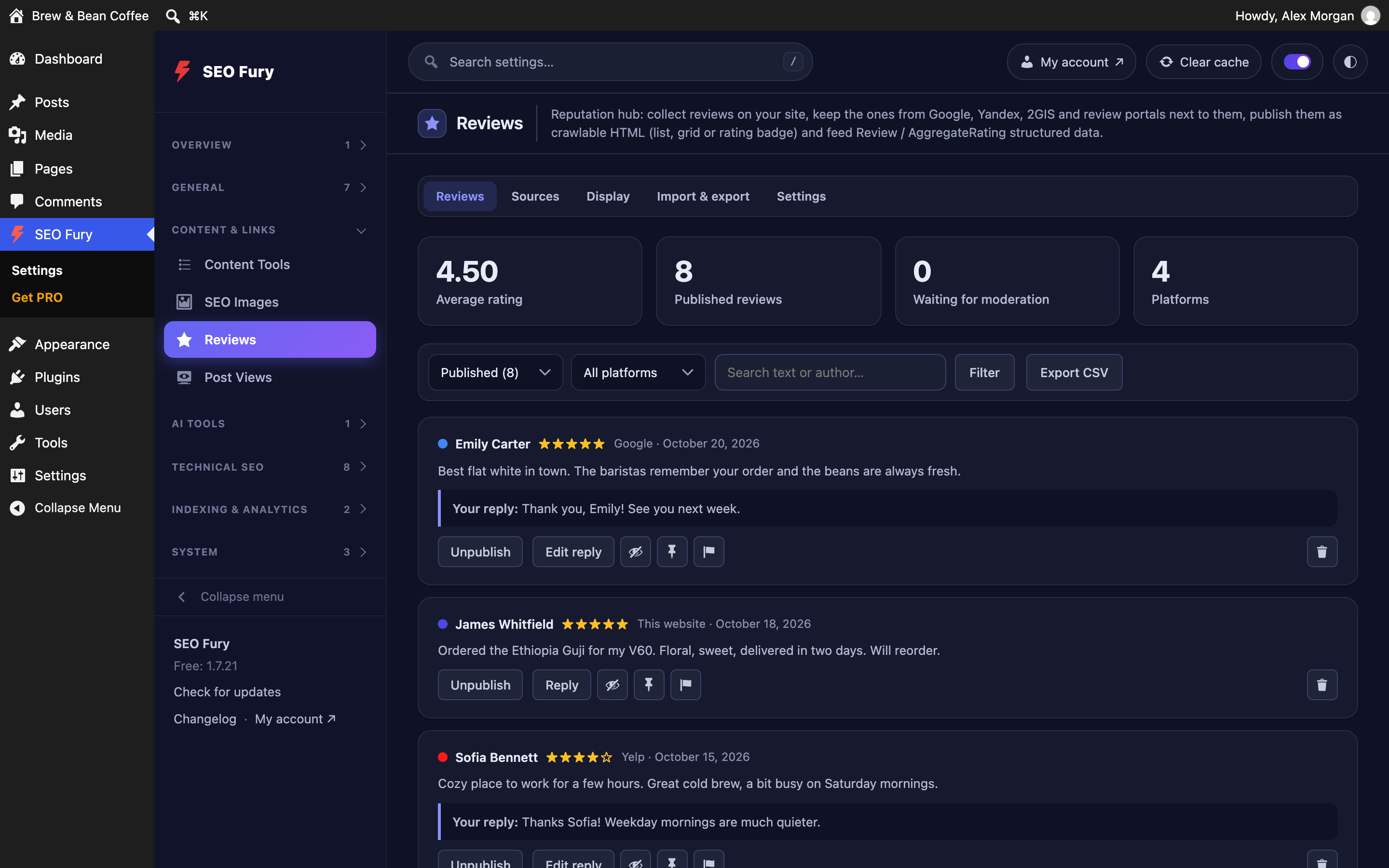
- Reviews: compact cards — Display Card size, or size=”compact” in the shortcode: smaller text and avatars, 3 lines before “Read more”.
- Reviews: platform filter, “Read more” and “Leave a review” keep their look on themes that style every button (Elementor kits gave them thick red borders and large padding).
- Reviews: “Leave a review” opens the review form right under the reviews when the page has no form of its own (it did nothing before).
- Reviews: “Reply from the company” lines up at the bottom of each card; short reviews no longer get a “Read more” because of theme paragraph margins.
1.7.16
- Reviews: the “Replace other plugins’ shortcodes” tool (now also on Reviews Import & export) swaps the MyReviews widget for SEO Fury’s reviews — in post content and in Elementor HTML widgets, which become Shortcode widgets with their spacing kept. Undo works as before.
- Reviews: a platform’s rating on the Sources screen is the platform’s own (for example 4.3 on Yandex, which counts star ratings left without text) when SEO Fury PRO collects it, instead of the average of the collected reviews.
1.7.15
- Reviews: Google Maps links (and other long profile links) can be saved — a link longer than 255 characters used to fail with “Could not save the platform”.
- “Clear cache”: the message listing what was cleared wraps inside its box instead of running off the screen.
- Auto-clear cache on settings save also reacts to the SEO Fury PRO settings that change what pages show (Google Analytics, Article Rating and other older modules) — switching the Google Analytics mode no longer leaves cached pages with the old tracking code.
1.7.14
Moving off Post Views Counter and Yet Another Stars Rating.
- “Replace other plugins’ shortcodes in posts” now also replaces the [post-views] shortcode of Post Views Counter with [seo_fury_views] and, with SEO Fury PRO, the [yasr_visitor_votes] shortcodes and block of Yet Another Stars Rating with the SEO Fury article rating — in post content and Elementor layouts (icon lists, text and shortcode widgets). The tool is on Content Tools Table of Contents, Post Views Tools and (PRO) Article Rating; undo works as before.
- Post Views: [post-views] keeps showing a view counter once Post Views Counter is turned off, even before the replacement.
1.7.13
- Post Views: saving the settings clears Elementor’s cache, so a new label or icon shows at once in counters placed in Elementor layouts (Elementor keeps rendered widgets as HTML).
1.7.12
Table of contents above the article, with a short list that opens on demand.
- Table of Contents: new position “Above the featured image” — in page-builder articles the title, breadcrumbs and post details are part of the content, so “At the top” landed above the title; this puts the list right above the main image of the post (falls back to “Before the first heading” when the image is not in the content).
- Table of Contents: “Headings shown at first” — a long list shows only its first headings and a “Show all” link that opens the rest (“Show fewer” closes it). Search engines still read every heading. Shortcode attribute visible=”5″.
- Russian: the module is called “Оглавление” everywhere (some screens said “Содержание”).
1.7.11
Fix from user feedback.
- Menu: a section could appear twice in the sidebar (e.g. “Content & Links” and “System”) when the menu layout had been saved in Preferences by an earlier version — tabs the saved layout did not know opened the default section again under the same title. Sections with the same title are now shown as one.
1.7.10
Moving from LuckyWP Table of Contents, and post details that look right in page builders.
- Table of Contents: “Replace another plugin’s table of contents in posts” (Content Tools Table of Contents) finds the shortcodes and blocks of LuckyWP Table of Contents, Easy Table of Contents and Table of Contents Plus, and the LuckyWP widget inside Elementor layouts, and puts the SEO Fury table of contents in their place with the same heading, levels and numbering. Shows the list of posts first; posts are not re-saved (the modified date stays), each keeps a copy, and the replacement can be undone. Elementor CSS and page caches are cleared afterwards.
- Table of Contents: the LuckyWP widget saved in Elementor layouts shows the SEO Fury table of contents as soon as LuckyWP is turned off — even before the replacement.
- Table of Contents: in the Elementor editor the shortcode shows a placeholder instead of an empty box.
- Post Views: the [seo_fury_views] counter takes the font and colour of the text around it (it was smaller and faded inside a post details row); only the counter added under the post keeps the muted look.
- Post Views: no second counter under the post when the content already shows one (Elementor runs shortcodes before the automatic counter is added).
- Post Views: the counter’s styles load when Elementor serves the widget from its cache.
1.7.9
Improvements from user feedback.
- 404 Monitor: new “Log 404s from” setting — choose which requests may file a 404: visitors who followed a link, requests without a referring page (typed addresses, but also most bots posing as browsers), search engine crawlers, other bots and tools, vulnerability scanners, and requests your own server makes (link scanners, SEO audit, cache preloading — now off by default). A new site nobody links to no longer has to collect thousands of bot probes such as /zh/, /vi/ or /?author=2. Replaces the old “Ignore Bots” switch; existing settings carry over.
- “Ignore addresses”: one pattern per line with * wildcards (e.g. /zh/*); matching requests are never logged.
- New filters “Missing pages — from a link” and “Missing pages — without referring page”, so the junk can be selected and deleted in one go.
- “Delete resolved” button deletes only fixed entries; “Clear All” is now “Delete entire log” and says what it removes. “Refresh” is now “Reload list” and explains that the 404 log records requests — it is not a scan (that is the Link Scanner).
- Re-check icon on every open 404 row.
- Author enumeration (/?author=N) counts as a scanner request.
1.7.8
Fixes from user feedback.
- 404 Monitor no longer logs addresses that are redirected. WordPress sends the 404 status before redirects run (SEO Fury redirects, WordPress’s own “did you mean” redirect, other plugins), and the monitor logged at that moment — so URLs that answer 301 and then open a working page showed up as open 404s. The request is now logged only when the response really ends as 404.
- New “Re-check open 404s” button (and “Re-check status” bulk action): every open address is requested again, and the ones that work now — page restored or caught by a redirect — are marked as resolved. Run it once after the update to clear entries logged by the bug above.
- The status column shows the error code “404” instead of “Active”; the tile is now “Open 404 errors” and the filter “Open (404)”.
- “Find” popup renamed “Find a page to redirect to”: it explains what it is for, says what the address answers right now (still 404, or already redirected / working — with a one-click “Mark as resolved”), and finds pages with a similar address or title even when umlauts are spelled differently (oe / ö / o). “Create a redirect manually” is always offered.
- Block editor: the SEO Fury sidebar no longer goes blank and jumps back to the top every minute. It was moved out of the sidebar on every save — autosaves included — and stayed empty afterwards; now it stays put and only a copy of its fields is handed to WordPress’s save.
1.7.7
Fix from user feedback.
- Internal link suggestions in the editor no longer offer pairs of filler words as anchors (“für ein”, “sind auf”, “sie ihre”). Articles, prepositions and pronouns are ignored in English, German, Russian, Ukrainian, Spanish, French, Italian, Portuguese, Dutch and Polish (filter
seo_fury_stop_words), phrases must match whole words, and a three-word phrase from the title is preferred over two words.
1.7.6
Fix from user feedback.
- SEO Fury PRO no longer stays switched off after its update. Some sites found PRO deactivated after every update and had to switch it on again by hand (the licence itself was never lost). The free plugin now notes that PRO was active when its update starts and, if WordPress leaves it off afterwards, switches it back on at the next admin page and says so in a notice. A deliberate deactivation on the Plugins screen is respected.
- Support tickets attach a short log of the last PRO updates (started, finished, active or not), so a deactivation can be traced.
1.7.5
Fixes from user feedback.
- Preferences: new switch “Always show all menu sections expanded” for everyone who prefers to see all tools in one scroll. Off (default): only the section of the open screen is expanded.
- Menu sections with a single tool fold like the others.
- Dashboard: the label inside the score ring (“SEO-BEWERTUNG”, “PUNTUACIÓN SEO”) wraps inside the circle instead of touching the ring in German, Spanish, Italian and Portuguese.
- Plugin menu reorganised: SEO Audit and Reports sit under Overview next to the Dashboard; Schema Templates under General; Reviews under Content & Links; AI Traffic, AI Crawlers and LLMs.txt under AI Tools; Hreflang, Speed and Page Speed under Technical SEO. A layout saved in Preferences is kept (Reset to defaults picks up the new one).
- WordPress dashboard widget: “Configure” in the widget header chooses what it shows — score, each tile (redirects, 404s, images without alt, missing descriptions, and the new “Pages scoring below 50”), setup progress, open setup steps and buttons. Per user.
- Bulk URL conversion only counts pages search engines may index (the sitemap’s post types, published, without noindex): Elementor kits, other builder templates and drafts are left out.
1.7.4
Fixes and one feature from user feedback.
- Table of contents: a “Table of contents” tab in the SEO Fury editor panel. Besides show / hide, a page can now have its own heading levels, nesting, numbering, heading text and minimum number of headings — for posts that need a different structure than the site-wide settings. Block and shortcode settings still win.
- The LuckyWP import also carries over per-post heading settings, not only “show / hide”.
- 404 statistics: “Active” now counts missing pages only, the same number as the dashboard; scanner requests have their own tile. Click “Active” to list those pages.
- Dashboard: the score summary under the verdict is split into two lines.
- Plugin menu: groups fold like an accordion — the group of the open screen is expanded, a click on a group heading opens or closes the others (wide menu only; the icon-only menu and small screens stay unchanged).
- Elementor: the Author Box “hide on this post” switch is saved from the Elementor panel too.
- Long translations no longer overflow: widget settings menu on the dashboard (size buttons wrap), sitemap post type rows, 404 log column headers, buttons and link stats in the editor sidebar, and seven tabs in the classic editor sidebar.
1.7.3
Fixes from user feedback.
- One SEO score everywhere: with a site audit (PRO) the WordPress dashboard panel and the SEO dashboard show the audit’s score and page count, instead of a separate average that disagreed with it.
- The dashboard score and counts cover only indexable pages — the post types in the XML sitemap, published, not noindex. Page-builder templates (Elementor kits, ElementsKit templates…) and drafts no longer count.
- 404 log: requests from vulnerability scanners (/.env, wp-config.php.bak, debug.log, .php files…) are recognised and marked “Scanner”. They are left out of the dashboard 404 numbers, can be filtered in the log, and get no redirect buttons.
- The 404 tile is amber instead of red: a missing page is a task, not an error in the SEO score.
- WordPress dashboard panel: stat tiles fit narrow columns (two per row when the column is narrow, long words wrap).
1.7.2
Fixes from user feedback.
- No sideways scrollbar in the post sidebar in German and other languages with long words: the titles of the Table of contents, Post views and Article rating boxes now wrap instead of pushing the box wider than the sidebar.
- The SEO Fury editor sidebar can no longer scroll sideways.
- Long URLs wrap inside their column in the Blocked IPs list and the 404 log instead of running over the next columns.
1.7.1
Fixes and small improvements from user feedback.
- Tables line up again next to the Folders plugin, which added an empty “move to folder” column to every table on the plugin screens.
- No horizontal scrollbar in the post editor’s SEO Fury sidebar (the Canonical URL field and the Table of contents box were a few pixels too wide).
- Settings tabs come last: Post Views now reads Overview, Reports, Tools, Settings; in Reviews, Analytics comes right after the reviews and Settings at the end.
- The dashboard’s “Add widget” button sits in the page header line instead of taking a row of its own.
- The Image SEO and License screens use the full width of the window.
- The SEO score popup in the posts list can open the editor straight on the matching SEO Fury tab (Schema, Links, Advanced, the snippet’s Social tab).
- Most viewed dashboard card: long titles end in “…” and the view counts stay in place.