Descrizione
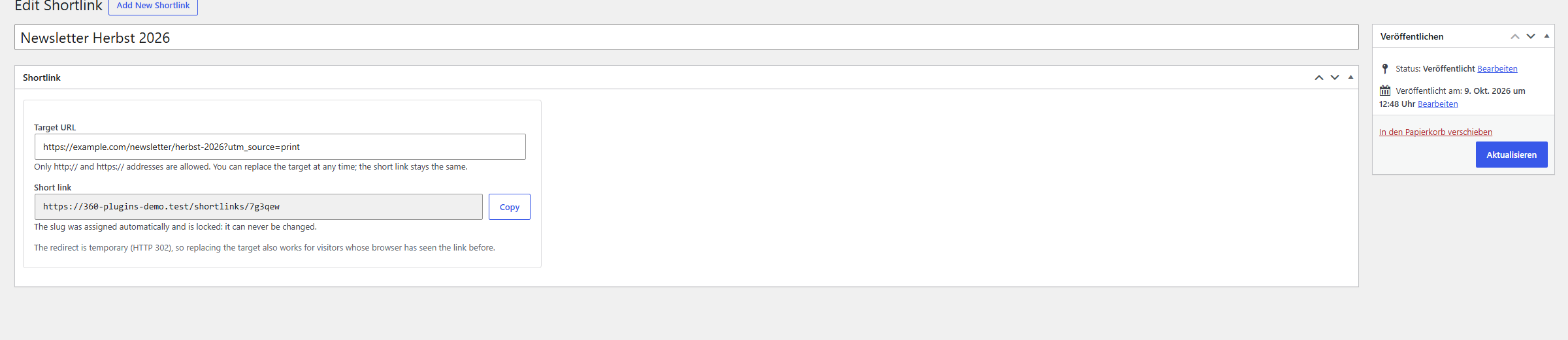
Links in print, newsletters, QR codes and social media cannot be corrected once they are out. Shortlink Service gives every link a short address such as /shortlinks/k3x9tq. The address is assigned automatically and is locked: it can never be changed. The page it leads to can be replaced whenever you need to, and everything that was printed or shared keeps working.
- Create a link in seconds: a name and a target address, nothing else. The short address is assigned for you.
- Locked address: six characters without easily confused letters (no 0/o, no 1/l/i). Once assigned, it never changes and is never given out again, not even after the link is deleted.
- Replace the target at any time: the short address stays the same.
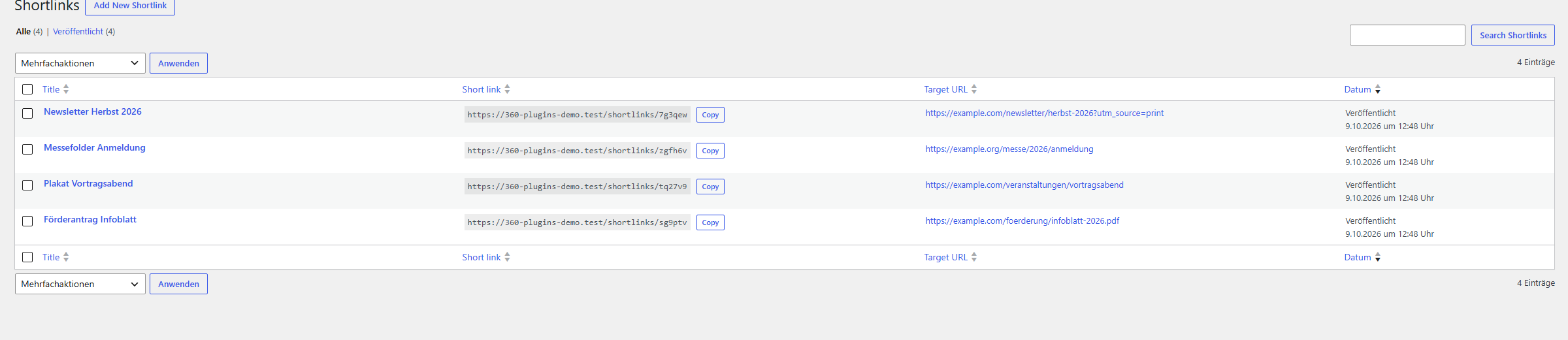
- Overview list: title, short address, target and a copy button, sortable and searchable, also by target address.
- Temporary redirect (HTTP 302): browsers and search engines remember permanent redirects (301) for a long time, which would defeat a later change of the target. A temporary redirect always reaches returning visitors too.
- Error page for unknown links: an invalid, deleted or unpublished link shows a clear message instead of redirecting.
- Safe by default: only http:// and https:// targets are accepted, on saving and again at every redirect. Every change needs the right permission and a security token.
Requires pretty permalinks (any structure except “Plain”). If you use a page cache or a CDN, exclude the path /shortlinks/ from caching, so a changed target reaches visitors without delay.
Free vs. Pro
The free version covers everything above.
Shortlink Service Pro adds:
- URL history: every replaced target address is kept with date and user and can be restored in one click.
- Archive for old links: archive instead of deleting. The address, history and clicks are kept, the link shows the error page and can be reactivated in one click, one by one or in bulk.
- Redirect type per link: 302 (default), 307 or, on request, 301.
- Click counter without personal data: total clicks and last visit per link. No IP address, no cookies, no user agent stored; bots, HEAD requests and prefetching are not counted. Nothing to add to your cookie banner.
- Statistics over time: clicks per day, week and month, per link or in total, for any period.
- CSV import and export: import existing links with a preview and a report of rejected rows, export everything as CSV.
- QR code for every shortlink as SVG and PNG, created in your browser. The code contains the short address, so a printed code keeps working when you change the target.
- Optional own short domain, for example wirt.at/k3x9tq, with a built-in check and a step-by-step guide.
- Automatic update notifications directly in the WordPress admin area.
Screenshot
Installazione
- Install the plugin under Plugins Add New (search for “360 Orbit Shortlink Service”), or upload the ZIP under Plugins Add New Upload Plugin.
- Activate the plugin.
- Open Shortlinks in the 360 WP Orbit menu and click Add New. Enter a name and the target address and publish. Copy the short address from the list.
- Make sure your site uses pretty permalinks (Settings Permalinks, anything except “Plain”).
FAQ
-
Can I change the short address of a link?
-
No, by design. That is the point of the plugin: a printed or shared address must stay valid. You can change the target at any time.
-
Will an address ever be used for a different link?
-
No. Addresses of deleted links are remembered and never assigned again.
-
Why is the redirect temporary (302) and not permanent (301)?
-
Browsers and search engines remember the target of a permanent redirect, sometimes for good. If you later replace the target, returning visitors could still be sent to the old page. A temporary redirect avoids that. The Pro version lets you choose another type for individual links.
-
My short links show a 404 page. What is wrong?
-
The most common reason is the permalink structure “Plain”. Short links need pretty permalinks: open Settings Permalinks and choose any other structure. If the problem remains, open the same page and click “Save Changes” once.
-
I changed the target, but visitors still land on the old page.
-
A page cache or a CDN is probably serving the old redirect. Exclude the path
/shortlinks/from caching. The plugin already sends headers that forbid caching. -
Which addresses are allowed as a target?
-
Only addresses starting with http:// or https:// that contain a host name. Addresses such as javascript: or data: are rejected when you save and again before every redirect.
-
Does the plugin send data to other servers?
-
No. The free version makes no requests to external services, sets no cookies and stores no visitor data. It does not create its own database tables either.
-
What happens when I deactivate or delete the plugin?
-
Deactivating keeps all your links; they simply stop redirecting while the plugin is inactive. Deleting the plugin removes all links and settings.
-
Does it work on multisite?
-
The plugin works per site. Activate it on each site where you want to use it.
-
Liability?
-
This plugin is provided without any warranty (“as is”). The developer assumes no liability for damage or loss arising from its use. Taking a full backup before use is strongly recommended.
Recensioni
Non ci sono recensioni per questo plugin.
Contributi e sviluppo
“360 Orbit Shortlink Service” è un software open source. Le persone che hanno contribuito allo sviluppo di questo plugin sono indicate di seguito.
Collaboratori
Traduci “360 Orbit Shortlink Service” nella tua lingua.
Ti interessa lo sviluppo?
Esplora il codice segui il repository SVN, segui il log delle modifiche tramite RSS.
Changelog
1.0.0
- Initial release: shortlinks with an automatically assigned, locked address, temporary redirect, error page for invalid links, overview list with copy button and safe handling of target addresses.