
Descrizione
ACookies adds a cookie consent banner, Google Consent Mode v2 support and an editable Cookie Policy block to WordPress. Review detected cookies, manage optional script rules, and let visitors change their choices.
The Free plugin provides the essential consent workflow without a paid license. Optional Pro licenses add larger and more frequent managed scans for 1, 5, or 25 WordPress sites.
The consent workflow includes:
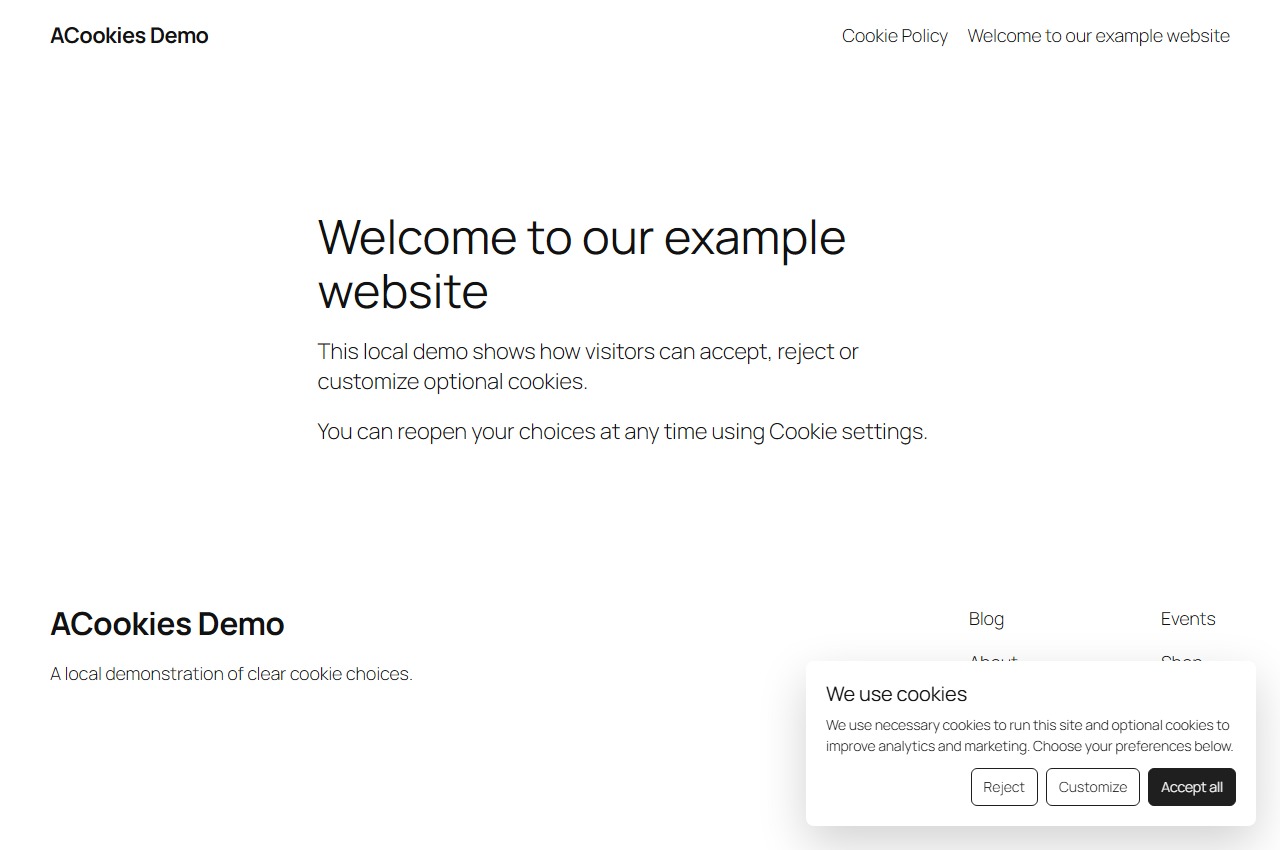
- A balanced banner with Accept, Reject, and Customize choices.
- Google Consent Mode v2 defaults and updates.
- Optional WP Consent API synchronization.
- 26 bundled visitor languages, WPML-aware matching, and RTL support.
- A managed five-page cookie scan once per calendar month.
- A seven-day import code from the free generator so onboarding can keep a completed scan.
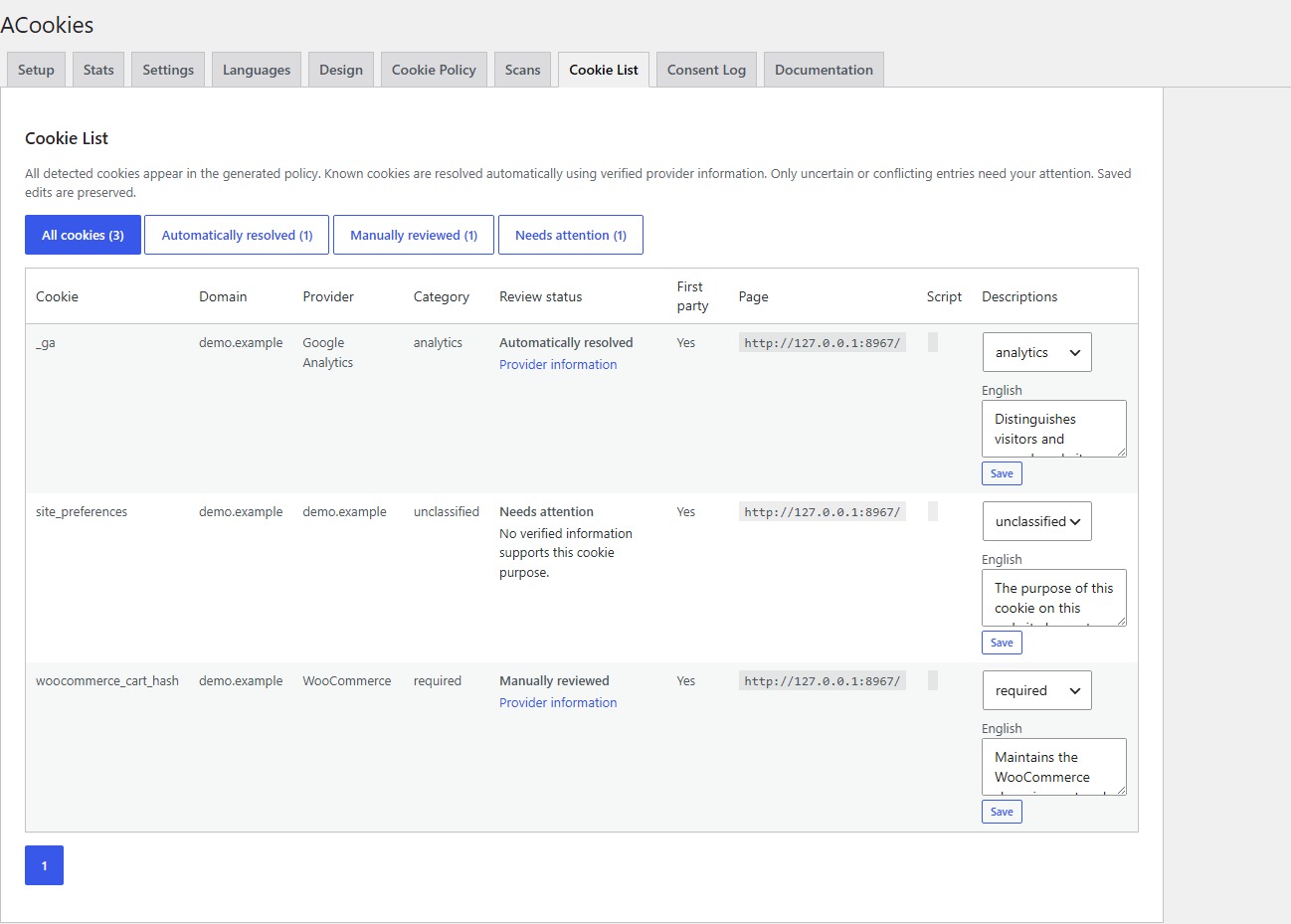
- Editable cookie categories and descriptions.
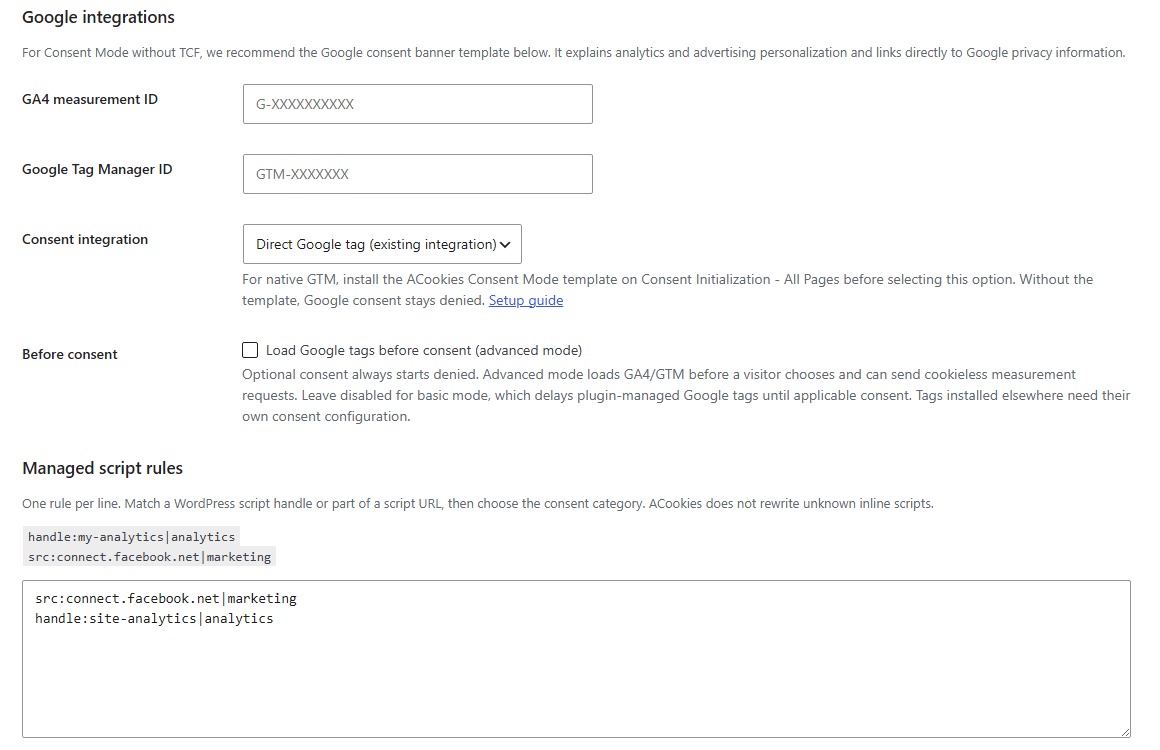
- Conservative rules that can delay registered external scripts by WordPress handle or script URL.
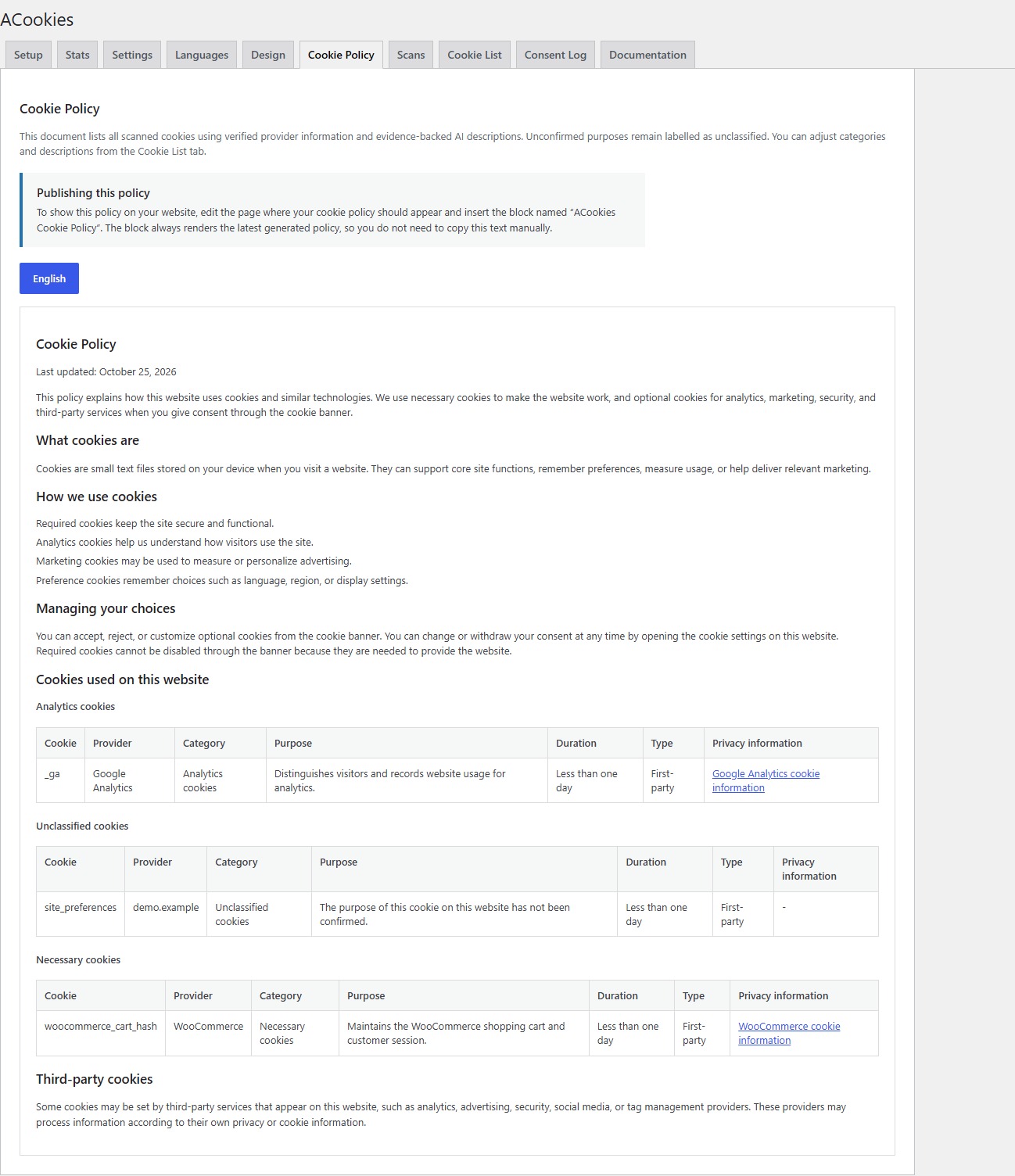
- A Cookie Policy block disclosing all detected cookies, including clearly labelled unclassified cookies.
- Verified cookie references, automatic classifications, and a review queue for uncertain or changed evidence.
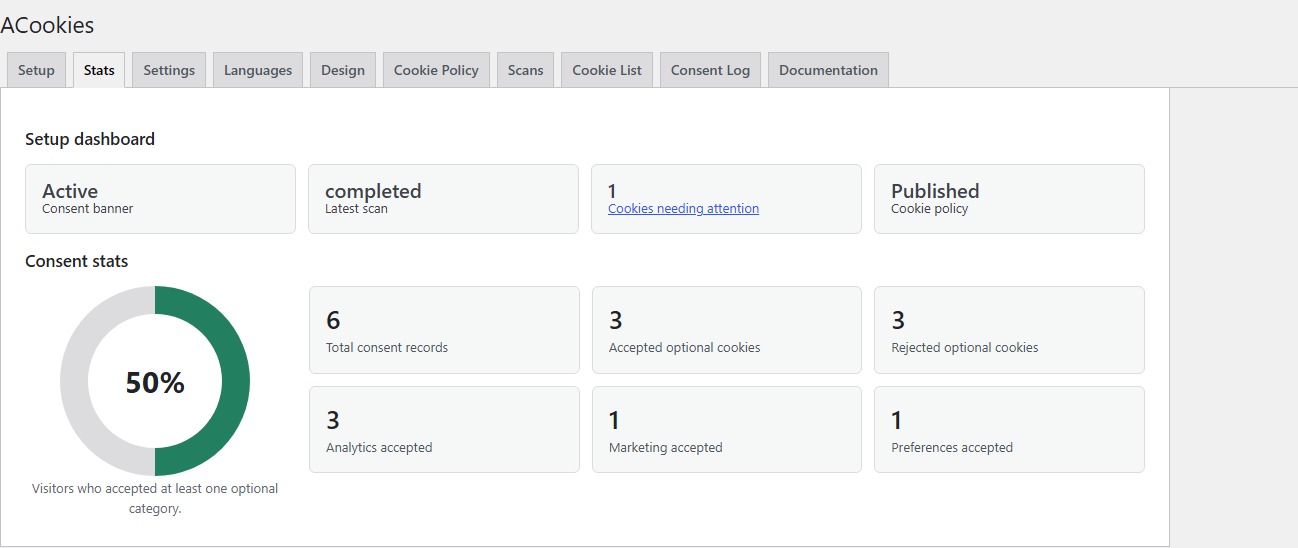
- Local consent records for up to 30 days or 1,000 entries.
- No visitor or page-view limit.
ACookies stays inactive after a fresh installation. The public banner and managed scanner are enabled only after an administrator completes the setup flow.
Scanner and AI classifications are suggestions. ACookies does not provide legal advice or guarantee compliance with every law, site, theme, tag manager, or third-party integration.
Free and Pro
Free contains the essential visitor choices, Consent Mode integration, basic design, bundled languages, monthly scan, cookie list, local records, and policy publishing.
All paid site-count tiers include the same features. Pro scanning allows up to 500 pages per scan and two scans per site per UTC calendar day, with manual, daily, or weekly scheduling after scanner opt-in and license verification. The default sample remains 10 pages, and existing saved sample sizes are preserved. Scanner and AI suggestions remain reviewable. Paid licenses include updates and email support during the purchased term. Contact support@acookies.com for an initial technical response within four business days. Existing Free installations remain functional without a paid plan.
Managed script controls
ACookies can delay external scripts registered through WordPress when they match an administrator-defined handle or source URL rule. ACookies does not use broad output buffering and does not claim to block every hardcoded inline script, iframe, or dynamically injected resource. Test the actual site before publication.
External services
ACookies managed scanner
The managed scanner is optional and disabled by default. When an administrator enables it and accepts the linked data-processing terms, the plugin sends:
- A random installation identifier.
- The public WordPress site origin.
- Up to five selected public page URLs on Free.
- The plugin version, default language, and enabled languages.
The service loads those public URLs in an isolated browser and returns cookies, domains, providers, script URLs, and related evidence. Site-scoped access tokens are used instead of a credential shared inside the plugin. After this same scanner opt-in, the plugin may send deduplicated activation, onboarding-complete, first-scan and policy-published milestone events with its plugin version. The service associates these events with a one-way hash of the installation identity. These events contain no visitor data and are not sent before scanner opt-in. Server-side scan job data is scheduled for deletion after seven days. Results copied into WordPress remain in the site owner’s database.
Service documentation and terms:
OpenAI
Managed scans on both Free and Pro may use server-side AI enrichment when enabled by the service operator. This may send detected cookie names, domains, paths, categories, relevant script evidence, verified references, and requested languages to OpenAI. Cookie values, page content, WordPress passwords, and private administrator data are not intentionally sent. Classifications are accepted only when they match a supplied verified reference; uncertain results need administrator review. Descriptions remain editable.
Google Analytics and Google Tag Manager
These optional integrations load Google’s tag script from www.googletagmanager.com only when an administrator configures a GA4 measurement ID or GTM container ID. In the default basic consent mode, the plugin loads GA4 after analytics consent and GTM after analytics or marketing consent. If the administrator explicitly enables advanced consent mode, Google tags can load before consent with denied storage defaults and may send cookieless pings. No Google tag is loaded by these integrations when no ID is configured.
Loading a tag contacts Google with the configured measurement/container ID, the visitor’s IP address, browser request headers, and page/request information. Tags receive the visitor’s consent state. Google Analytics and tags configured in a GTM container can send additional analytics or advertising events and use cookies according to their configuration and the visitor’s consent. Site owners must configure and review their tags; ACookies does not control every tag placed in a container or added by another plugin.
Google Consent Mode commands, including ACookies’ vendor developer ID, are queued locally by the consent bridge. Queuing those commands alone does not contact Google. The built-in Facebook URL rules only identify scripts already registered by the site; ACookies does not load Meta/Facebook scripts itself.
Freemius
The Premium distribution bundles the Freemius SDK for optional product telemetry, account and license handling, paid checkout, and Premium updates. Freemius presents its own opt-in permissions inside WordPress. The WordPress.org Free distribution does not include or load that SDK and uses WordPress.org for updates. Free requires neither a paid license nor a Freemius account.
Screenshot
Blocchi
Questo plugin fornisce 1 blocco.
- ACookies Cookie Policy
Installazione
- In WordPress, open Plugins > Add New, search for ACookies, then install and activate the Free plugin. You can also upload the plugin ZIP through Plugins > Add New > Upload Plugin. No paid license or Freemius account is required to use Free.
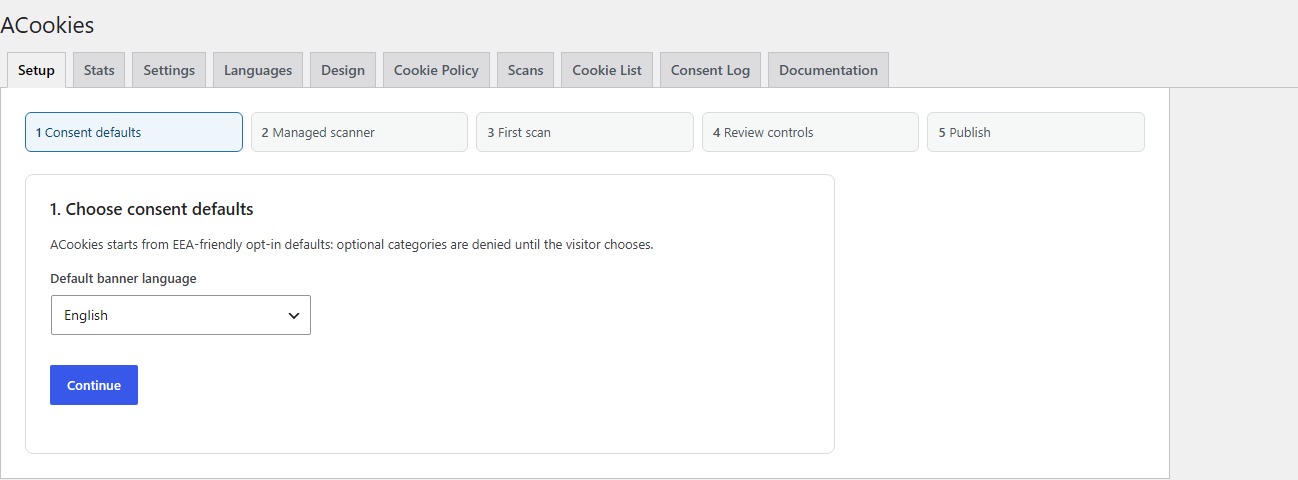
- Open Settings > ACookies. A fresh install remains inactive while you configure it.
- Choose consent defaults and the visitor language.
- Read and optionally accept the managed scanner terms, then run or skip the first scan. If you used the free generator, paste its seven-day import code in step 3.
- Review cookies needing attention and script rules, create or select a Cookie Policy page, preview the banner, and activate ACookies.
- Test Accept, Reject, Customize, withdrawal, mobile, keyboard navigation, and relevant tags in a private browser session.
FAQ
-
No. ACookies provides technical consent, scanning, record, and publishing tools. The site owner must review the implementation, categories, policy language, regional requirements, and third-party services.
-
No. ACookies keeps the public banner disabled until the administrator completes the final setup step.
-
No. The managed scanner accepts public HTTP/HTTPS pages on the registered public origin. Local, private, link-local, metadata, redirect-to-private, and private subresource targets are rejected.
-
What does Free include?
-
Free includes the balanced banner, Consent Mode v2, WP Consent API support, basic design, 26 bundled locales, one five-page scan per month, cookie review, a policy block, and limited local consent history without page-view limits.
-
No. It can delay registered external scripts that match explicit rules. Unknown hardcoded inline code and dynamic resources require manual integration and testing. ACookies reports this limitation instead of claiming universal automatic blocking.
-
Can visitors change their choice?
-
Yes. Add the ACookies preferences shortcode or a link with
data-acookies-open-preferencesso visitors can reopen their choices. -
Where is consent data stored?
-
Visitor consent records are stored in the WordPress database. IP addresses are truncated and then hashed with the WordPress salt; user-agent values are hashed. The current Free and Pro packages retain records for at most 30 days and keep the latest 1,000 records.
-
Can I bring a free generator scan into the plugin?
-
Yes. A completed free generator scan can show a seven-day import code. Accept the managed scanner terms, enable the scanner, and paste the code into step 3 of onboarding. The code is restricted to the same public site origin and expires automatically.
-
Where can I find source code for the compiled JavaScript?
-
Readable banner and policy-block source is included under
src/. The consent bridge and admin scripts and styles are readable underassets/. The source files, package lock and build instructions inREADME.mdare included in this plugin ZIP. From the plugin directory, install the locked development dependencies withnpm ci, then runnpm run build. Node.js 20 or newer is required for the build tools; Node.js is not required on the WordPress server. No access to a separate repository is required. -
Use the Banner and Buttons controls in Settings > ACookies > Design for colors, borders, radii, position and theme button styles. For additional CSS, use WordPress’s built-in Additional CSS editor in the Customizer or Site Editor. The plugin does not accept or execute arbitrary custom CSS, JavaScript or PHP. Previously stored plugin CSS is retained in the database but is no longer applied; copy any needed rules into WordPress’s CSS editor before upgrading.
Recensioni
Non ci sono recensioni per questo plugin.
Contributi e sviluppo
“ACookies” è un software open source. Le persone che hanno contribuito allo sviluppo di questo plugin sono indicate di seguito.
Collaboratori
Traduci “ACookies” nella tua lingua.
Ti interessa lo sviluppo?
Esplora il codice segui il repository SVN, segui il log delle modifiche tramite RSS.
Changelog
1.2.2
- Removes arbitrary custom CSS editing and execution; use WordPress’s built-in CSS editor.
- Enqueues admin styles, design preview and scan controls, and the early consent bridge through WordPress APIs.
- Documents optional Google tag services, consent conditions, transmitted data and service policies.
- Includes all build sources in the ZIP without a private repository dependency.
1.2.1
- Aligns translation domains and contributor metadata with the WordPress.org package.
- Documents Free installation, scanner milestones, and AI enrichment on Free and Pro.
- Includes build instructions and locked JavaScript dependencies.
- Declares WordPress 6.6 as the minimum required by the compiled scripts.
- Excludes the licensing and updater SDK from the directory Free ZIP while retaining it in Premium.
1.2.0
- Adds complete banner, preference and policy defaults for Swedish, Norwegian Bokmål, Danish, Finnish, Japanese and Icelandic.
- Recognizes Norwegian no browser locales as Bokmål and retains existing custom language overrides.
- Adds Icelandic cookie-purpose descriptions and shared locale consistency checks.
1.1.1
- Identifies ACookies with its Google-issued developer ID in direct Google tag mode and through the native GTM template.
1.1.0
- Adds shared verified cookie references and evidence-validated AI enrichment with bounded requests and deterministic fallbacks.
- Separates automatically resolved, manually reviewed, and needs-attention cookies; the review count includes only unresolved issues.
- Preserves multilingual descriptions, cookie paths, attributes, and classification evidence across the managed API.
- Discloses unclassified cookies truthfully in the policy and preferences without adding a consent toggle.
- Reclassifies existing scan results on upgrade, preserves manual edits, and handles legacy results with missing paths.
- Paginates the admin list while counting and publishing the complete cookie inventory.
1.0.2
- Increases the paid managed scan maximum from 100 to 500 public pages.
- Keeps the 10-page default, saved preferences, Free limits, and UTC scan quotas.
- Registers with scanner protocol 3 while the managed API preserves access for older plugins.
1.0.1
- Adds an early consent bridge and opt-in native GTM consent integration.
- Keeps denied defaults in advanced mode and restores saved consent from the existing cookie when local storage is unavailable.
- Restricts basic-mode GA4 loading to analytics consent.
- Adds developer ID support; Google identification remains unset until a vendor ID is issued.
0.2.3
- Persists setup completion, scanner opt-in, accepted terms and renewed scanner credentials through WordPress settings sanitization.
- Shows completed setup status instead of restarting the wizard after publication.
0.2.2
- Preserves active banners and existing settings on legacy upgrades and reactivation.
- Prevents forced setup on configured or active installations.
- Detects Premium scanner eligibility and preserves paid scan preferences.
- Adds authenticated site-scoped Premium scanning: up to 100 pages once per UTC day.
- Refreshes scanner access after license changes and reports verification failures.
0.2.1
- Makes cookie choices accessible early in keyboard navigation.
- Preserves unsaved choices when the non-blocking banner collapses during page navigation.
- Adds a focus-visible Cookie settings control and improves focus restoration.
- Keeps the entire banner scrollable on small screens and at high zoom.
- Improves category disclosure names and screen-reader status announcements.
0.2.0
- Removes the scanner API key from distributable plugin code.
- Adds site-scoped managed scanner registration and access tokens.
- Keeps the banner and recurring scans disabled on fresh activation.
- Adds a five-stage setup flow and setup dashboard.
- Adds Free quotas and 30-day/1,000-entry consent retention.
- Adds conservative external-script rules and basic-mode Google tag loading.
- Improves WordPress.org documentation and external-service disclosure.
0.1.19
Polishes banner cookie detail controls and adds a way back to the compact banner view.
0.1.18
Adds expandable cookie category details inside the banner customization view.
0.1.17
Restores the desktop cookie banner max width to 450px and shortens bundled banner action labels.
0.1.12
Improves multilingual banner language detection for WPML pages and page language fallback.
0.1.10
Improves generated cookie policies with clearer purpose, duration, first-party/third-party labels, and provider privacy links.
0.1.0
Initial implementation.