

Descrizione
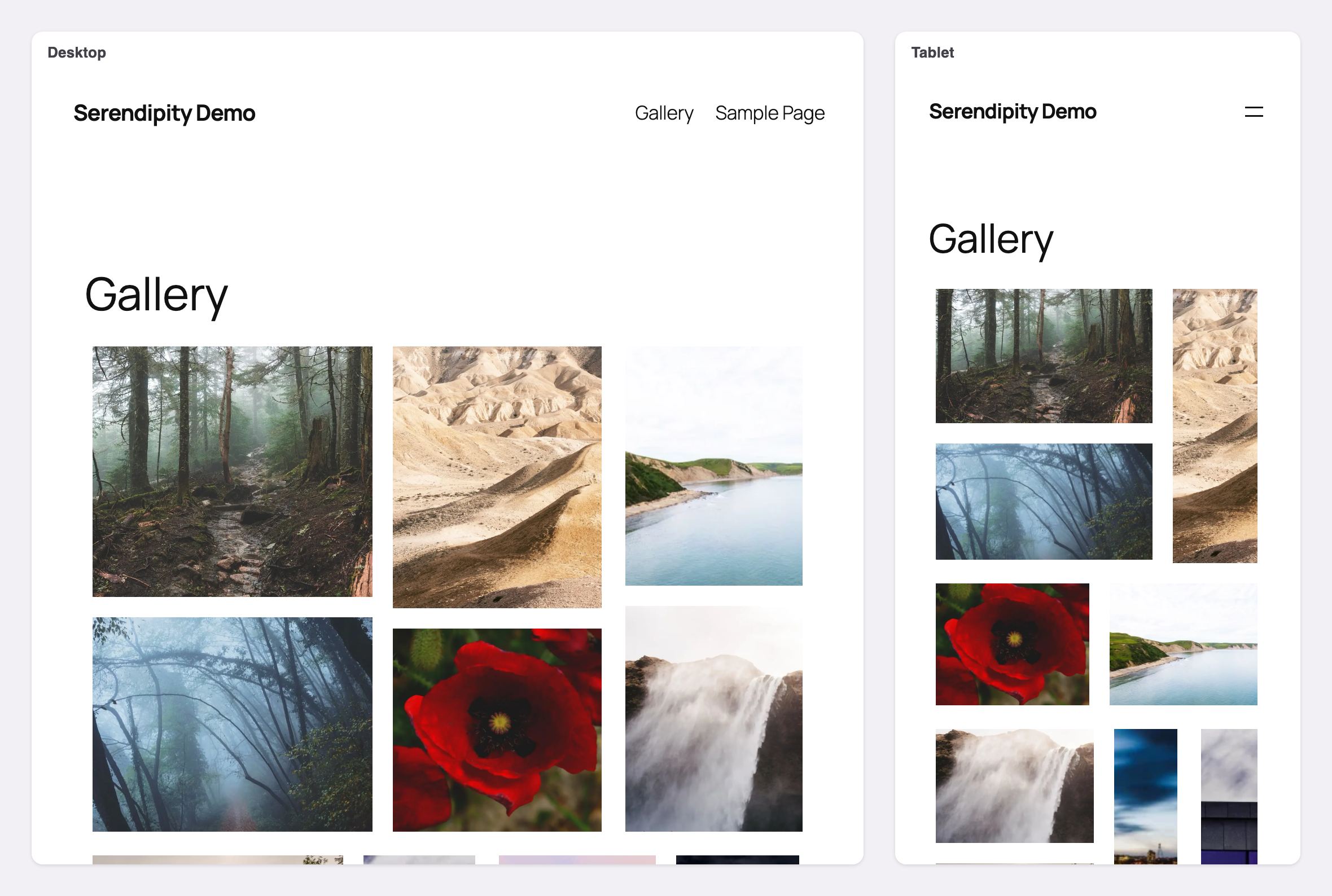
Serendipity composes a mosaic from your photographs — not a grid with the gaps filled in, but a
partition of the space where every tile earns its size. Compose one, keep it, and it stays exactly
as you left it: layouts are saved per breakpoint, so a gallery looks deliberate on a phone as well
as a desktop.
A masonry-style gallery that fills its space
If you want a gallery that isn’t a rigid grid, this is one. Like a masonry gallery, Serendipity
mixes tiles of different sizes, and the more photographs you give it, the more they vary. Unlike
one, it doesn’t run on down the page in uneven columns: it fills the space you give it, cropping
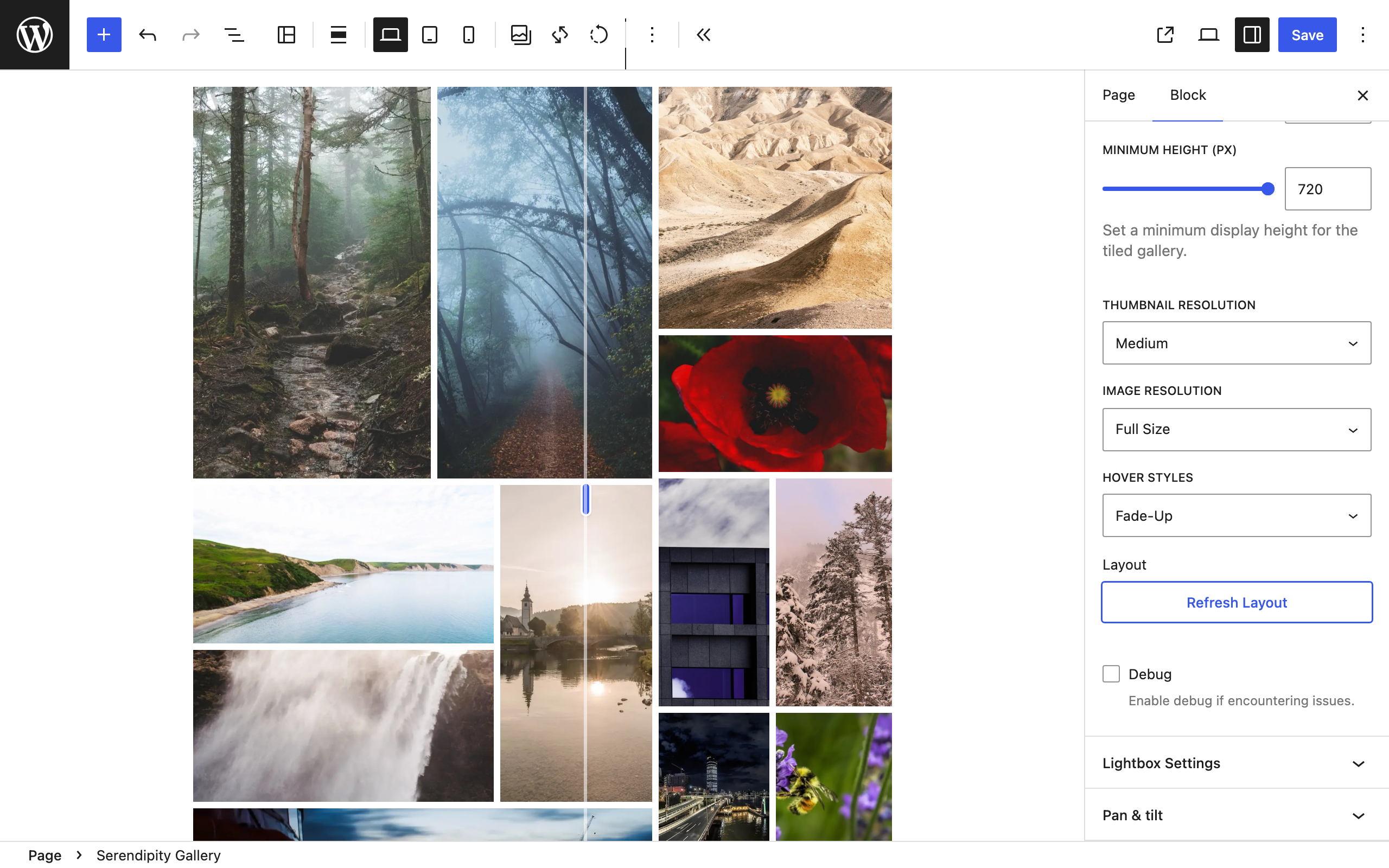
each photograph to its tile. Choose Refresh Layout & Save in the block toolbar until you like
what it composes. It saves for the breakpoint you are editing.
It is a block, not a custom post type. There is no separate gallery screen to visit, nothing to
sync, and nothing left behind if you deactivate the plugin — the gallery lives in the post where
you put it.
Bring your own lightbox
Serendipity links each image to its full-size file and groups the gallery, which is what lightbox
plugins look for. If you already run one, it will pick these galleries up with no configuration.
If you would rather it did not, there is a setting for that too: link to the file without grouping,
link to the attachment page, or emit no link at all.
What it does
- A generative mosaic engine — compose, refresh, keep the one you like
- Saved layouts at all three breakpoints, so nothing reshuffles on a phone
- Gap, minimum height, thumbnail and full-size resolution
- Stack on mobile, for galleries that read better as a column
- Lightbox-agnostic output, or no links at all
- One hover style, Fade-Up, with captions
- Four starter block patterns
- Loads nothing on pages that have no gallery
External services
This plugin does not contact any external service. It sends nothing on page loads, nothing in
the background, and nothing on a schedule. Galleries, layouts and settings never leave your
site.
Links to GhostLabs — not a service. The plugin links to two GhostLabs sites from wp-admin and
the block editor. It never contacts either one: nothing is requested from them, and the plugin
sends them nothing.
- https://theghostlab.io — GhostLabs’ site, including Serendipity Deluxe’s product page
(/serendipity). - https://enter.theghostlab.io/account — your GhostLabs account, where Serendipity Deluxe is
downloaded after you buy it. It is linked from Settings Serendipity, under
Have a license?, and opens in a new tab.
Following either link is an ordinary visit to that site in your browser.
Terms of service: https://theghostlab.io/terms-of-service
Privacy policy: https://theghostlab.io/privacy-policy
Source code
The complete, unminified source of this plugin — including the block sources the compiled assets
are built from — is published at:
https://github.com/theghostlab/wp-ghostlabs-serendipity
The repository’s committed build/ directory is the readable build, and pnpm install reproduces it byte for byte. Released
--frozen-lockfile && GHOSTLABS_MINIFY=0 pnpm run build
versions of the plugin ship the same sources built minified, which pnpm install reproduces byte for byte.
--frozen-lockfile && pnpm run build
Screenshot


Blocchi
Questo plugin fornisce 1 blocco.
- Serendipity Gallery A generative tiled photo gallery. Each composition partitions the available area into a unique mosaic, saved per breakpoint.
Installazione
- Install through Plugins Add Plugin, or upload the plugin folder to
/wp-content/plugins/. - Activate it through the Plugins screen.
- In a post or page, add the Serendipity Gallery block and choose Add Images.
- Choose Refresh Layout & Save in the block toolbar until you like what it composes. It saves for the breakpoint you are editing; switch to Tablet or Mobile in the same toolbar to compose those too. A breakpoint you leave unsaved borrows the nearest saved layout.
- Optional: start from a pattern instead. The inserter’s Patterns tab has a Serendipity category with four starter galleries.
FAQ
-
Is it a masonry gallery?
-
It’s the masonry look without the uneven columns. Serendipity breaks the space you give it into a
mosaic of tiles of different sizes, so it isn’t a rigid grid. A classic masonry gallery keeps every
photograph whole and lets its columns run on to different lengths; Serendipity crops each
photograph to its tile, so the gallery fills its space. If every photograph has to stay uncropped,
Serendipity is not the gallery you want. -
Does it work with my lightbox plugin?
-
Very probably. Each image is linked to its full-size file — not the attachment page, which is what
some lightboxes need — and the gallery is grouped withdata-relso a lightbox can page through it
rather than treating every tile as a lone image.These four were installed and tested against a Serendipity gallery, and all four picked it up with
no configuration: Firelight (Easy FancyBox), Responsive Lightbox & Gallery, FooBox, and Lightbox
with PhotoSwipe.If yours needs something else, the
ghostlabs_serendipity_link_attributesfilter lets you add any
attribute to the link without touching the plugin. -
My gallery looks different every time I reload the editor
-
Compose a layout and save it. Until a layout is saved for a breakpoint, the mosaic is generated
fresh each time — that is the point of the generator. Once saved, it is fixed, and other
breakpoints borrow it rather than composing their own. -
Will it slow my site down?
-
The gallery’s stylesheet and script load only on pages that actually contain a gallery, and the
composition is rendered as CSS by the server, so the layout is correct on the first paint rather
than after JavaScript runs. -
What is in Serendipity Deluxe?
-
Layout Studio — drag the seams between tiles, reframe a photograph inside its tile, swap two
photographs — plus a built-in carousel lightbox with autoplay, three more hover styles, and a
library of twelve block patterns. The free plugin is not a trial: nothing here expires, and no
feature is withheld that would make a gallery look broken without it. -
I bought Serendipity Deluxe. How do I switch over?
-
Serendipity Deluxe is a separate plugin. Once you have bought it:
- Download it from your GhostLabs account. Settings Serendipity links there under
Have a license? - From the Plugins menu, open the screen for adding a plugin and choose Upload Plugin.
- Activate it, then enter the license key from your receipt email in its settings.
When Serendipity Deluxe starts, it deactivates this plugin. Every gallery and saved layout stays
exactly as it is, because every gallery’s settings and layout live in the gallery block, which
both plugins read. This plugin is left installed but inactive, and you can delete it whenever
you like. - Download it from your GhostLabs account. Settings Serendipity links there under
Recensioni
Non ci sono recensioni per questo plugin.
Contributi e sviluppo
“GhostLabs Serendipity – Masonry & Mosaic Photo Gallery Block” è un software open source. Le persone che hanno contribuito allo sviluppo di questo plugin sono indicate di seguito.
Collaboratori
Traduci “GhostLabs Serendipity – Masonry & Mosaic Photo Gallery Block” nella tua lingua.
Ti interessa lo sviluppo?
Esplora il codice segui il repository SVN, segui il log delle modifiche tramite RSS.
Changelog
1.0.0
- First release.