

Descrizione
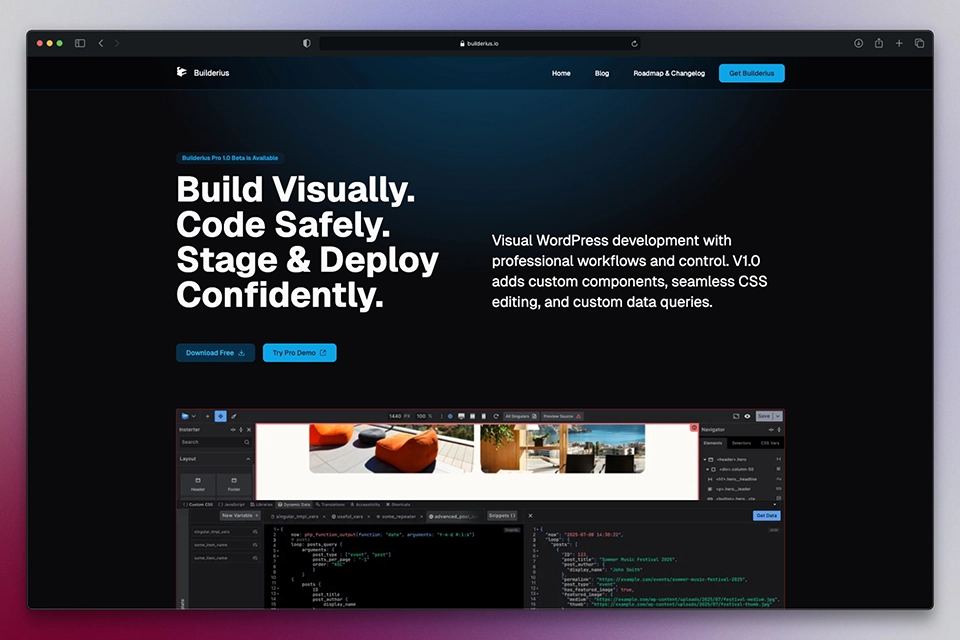
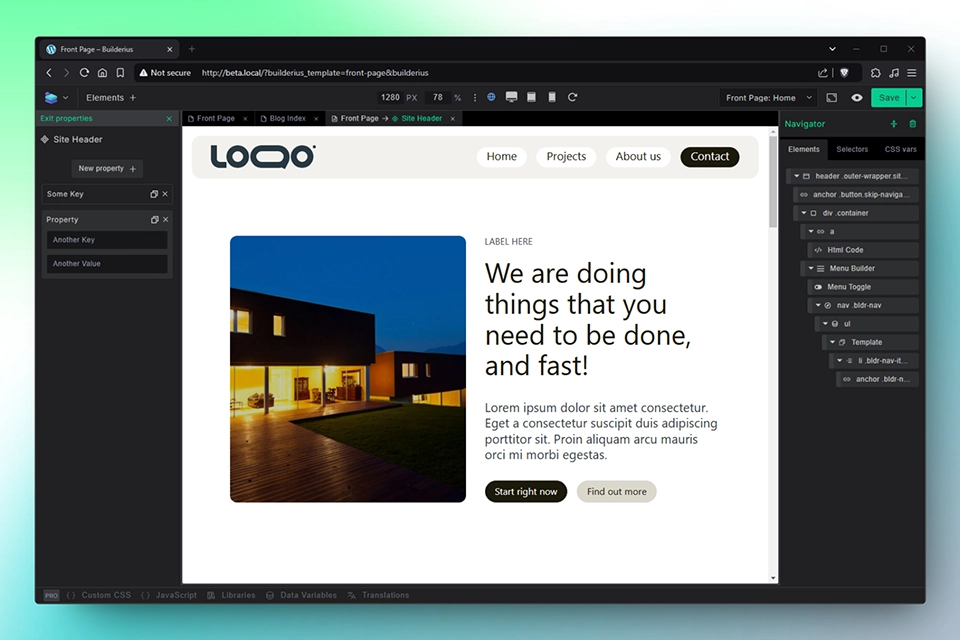
Drag-and-drop page builder for WordPress website creators who want to build visually with professional results. Create landing pages, dynamic templates, and custom designs with clean code output. Visual building that doesn’t compromise on quality.
Why Choose Builderius
Tired of choosing between easy visual building and professional code quality? Builderius eliminates that compromise. Our page builder combines intuitive drag-and-drop functionality with clean, semantic HTML and CSS output that performs well and follows web standards. Unlike other builders that create bloated markup, Builderius generates lean code that loads fast and ranks well in search engines. You get the efficiency of visual building with the quality you’d expect from hand-coded websites.
Perfect for Landing Pages and Content Templates
Builderius excels at creating high-converting landing pages and templates that control how your content displays. Build standalone landing pages with precision and no limits, or create templates that automatically style your blog posts, pages, and archives with consistent design while pulling from WordPress content and custom fields.
Whether you’re building individual landing pages or creating templates that style hundreds of posts consistently, Builderius saves time while maintaining quality across your entire site.
Professional Features That Scale
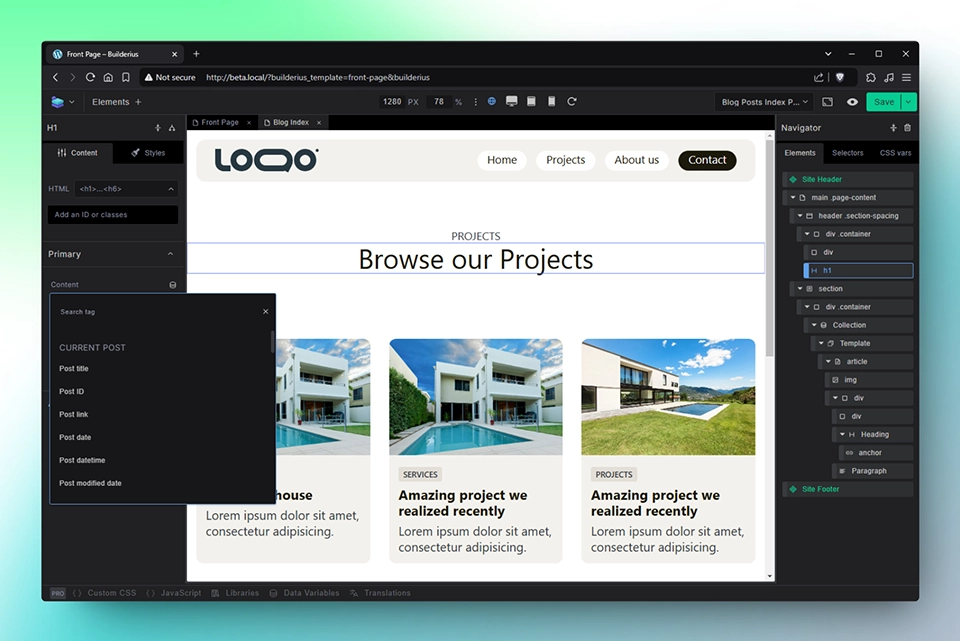
- Template System: Create templates that control how your posts, pages, and archives display. Design once and apply consistent styling to unlimited content, use built in header and footer components with the ability to customize through properties and conditions.
- Clean Code Architecture: Every element generates semantic HTML with clean CSS. No shortcode bloat, no unnecessary wrapper divs, no inline styles cluttering your markup.
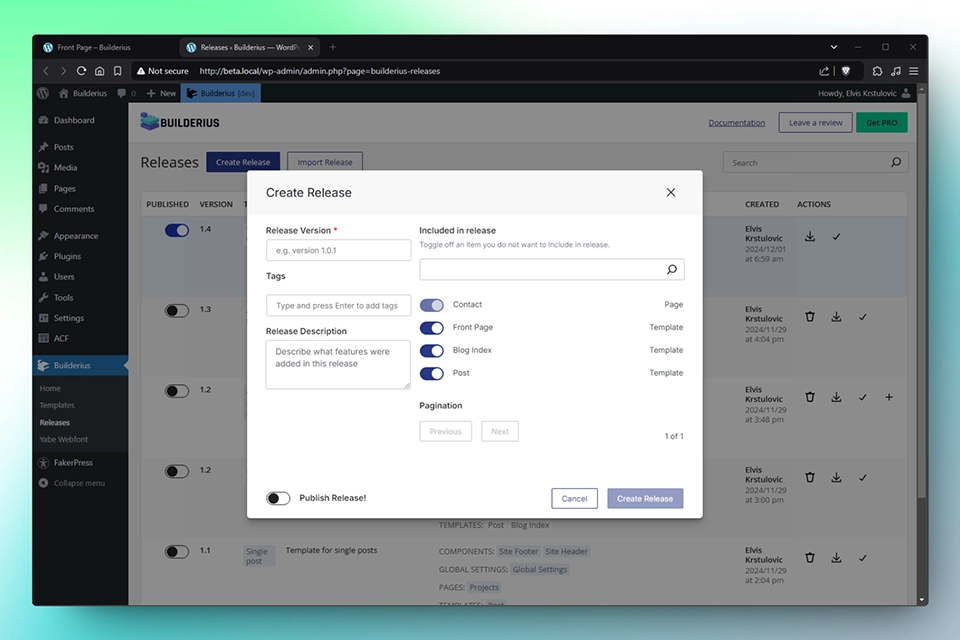
- Built-in Staging Environment: Test changes safely before going live. Make updates in your staging environment, preview the results, then deploy when ready.
- Dynamic Data Integration: Connect to Advanced Custom Fields, Meta Box, and WordPress queries visually. Display dynamic content without writing code.
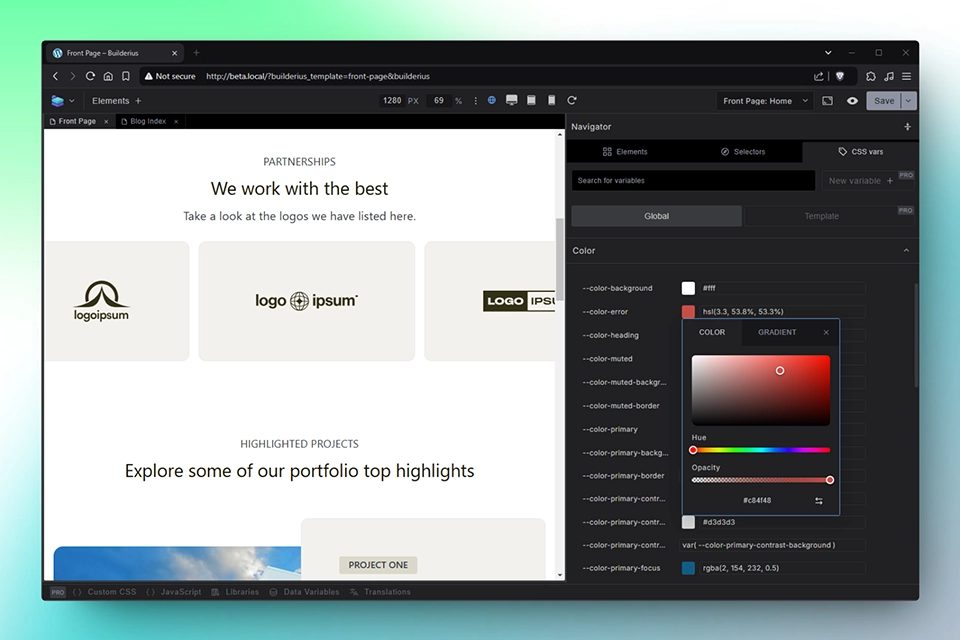
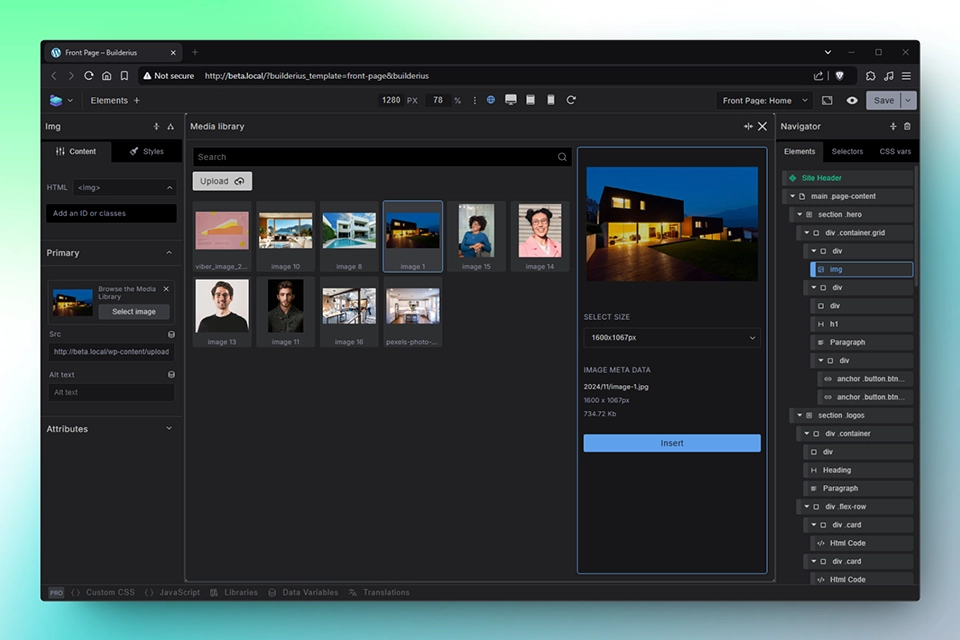
- Visual CSS Control: Style elements using visual controls that correspond directly to CSS properties. Access selectors and create CSS variables through the visual interface.
Free Version Capabilities
The free version provides everything needed for professional landing pages and basic template building:
- Unlimited landing pages and content templates
- Global header and footer components
- Basic dynamic data (ACF and Meta Box simple fields)
- WordPress main query integration for post loops
- Built-in staging environment with Releases for import and export between websites
- Clean code output with visual CSS controls
- Responsive design tools
Screenshot

FAQ
Do I need coding skills to use Builderius?
No coding required. Builderius provides visual tools for everything, while teaching web standards through its interface. You’ll understand HTML and CSS better by using it, but you don’t need to know them to start.
How does Builderius compare to Elementor or other page builders?
Builderius focuses on code quality and professional workflows. While other builders prioritize ease of use above all else, we provide visual building that maintains web standards and generates clean markup. You get professional results without sacrificing efficiency.
Will Builderius slow down my website?
Builderius websites load faster than most page builder sites because we generate clean, minimal code. No bloated CSS, no unnecessary JavaScript, no shortcode overhead. Just semantic HTML and efficient stylesheets.
Is my site secure with Builderius?
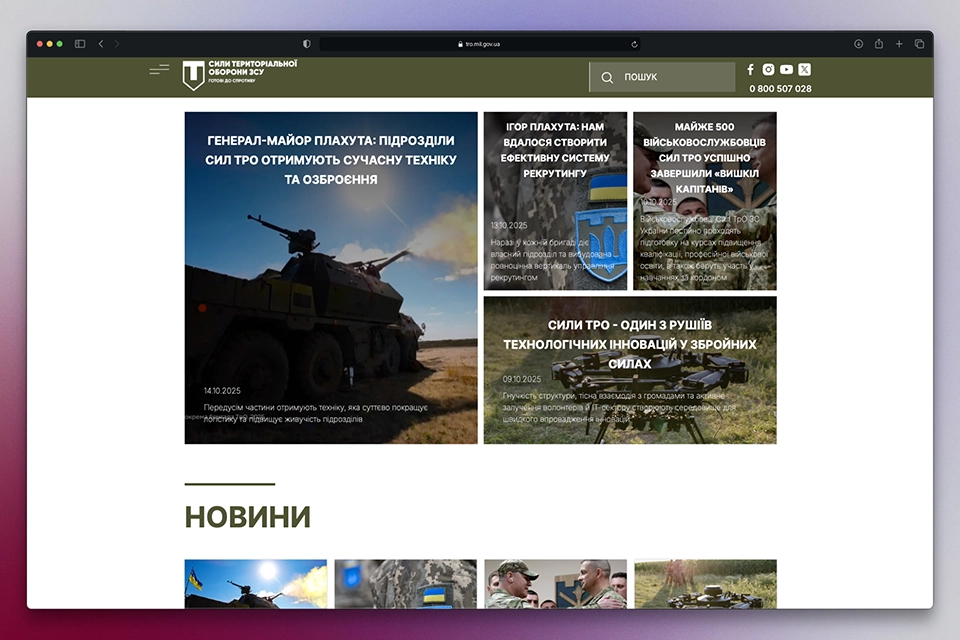
Yes. Builderius passed a rigorous security audit when selected for the Ukrainian Territorial Defense website (Ukrainian Military). Our architecture prevents common security vulnerabilities found in other builders by using a customized GraphQL system that blocks potentially harmful functions and prevents unauthorized database modifications. Additionally, Builderius restricts builder access to WordPress administrators only – we don’t just hide the interface, we prevent it from running for users without proper permissions.
Can I migrate from other page builders?
Yes. Builderius works alongside other builders during transition periods. You can gradually rebuild pages and templates at your own pace without breaking existing content.
Is the free version limited or a trial?
The free version is fully functional for landing pages and basic template building. It’s not a trial or demo – it’s a complete solution for many use cases. Pro features add advanced capabilities for complex sites and agency workflows.
What themes work with Builderius?
Builderius works with any properly coded WordPress theme. For maximum flexibility, we recommend minimal themes, but Builderius functions with any theme that follows WordPress standards.
Can I use Builderius with the Advanced Custom Fields Plugin?
Certainly, the pro version works with all ACF fields. The free version of the builder works with simple fields only, including:
- text
- textarea
- number
- range
- url
- password
- image
- file
- wysiwyg editor
- select
- checkbox
- radio
- button
- true/false
- link
- page link
Can I use Builderius with the Meta Box Plugin?
Certainly, the pro version works with all Meta Box fields. The free version of the builder works with simple fields only, including:
- button
- checkbox
- checkbox list
- hidden
- number
- password
- radio
- range
- select
- select advanced
- text
- textarea
- url
- autocomplete
- color picker
- Google Maps
- image select
- oEmbed
- slider
- time
- wysiwyg
- file
- file advanced
- file input
- image
- image advanced
- video
Recensioni


Contributi e sviluppo
“Builderius – Landing Page Builder + Dynamic Templates” è un software open source. Le persone che hanno contribuito allo sviluppo di questo plugin sono indicate di seguito.
Collaboratori


“Builderius – Landing Page Builder + Dynamic Templates” è stato tradotto in 1 lingua. Grazie a chi traduce per il contributo.
Traduci “Builderius – Landing Page Builder + Dynamic Templates” nella tua lingua.
Ti interessa lo sviluppo?
Esplora il codice segui il repository SVN, segui il log delle modifiche tramite RSS.
Changelog
1.4-beta
- Feature: Close a builder tab with a middle click
- Feature: Tab context menu with Close, Close Other Tabs and Close All Tabs
- Updated: Publishing now publishes the whole commit group instead of autopublishing per commit
- Updated: A save that skips a document now reports which documents it skipped and why, instead of reporting success
- Fix: Wrong post data on the front end. A template’s query loop borrowed WordPress’s current post and never handed it back, so anything reading it afterwards read whichever post the loop finished on: SEO plugins writing schema and Open Graph published/modified times, and get_previous_post()/get_next_post() in a template. The loop can run while the page head is being built, which is why the wrong post could differ between requests for the same URL
- Fix: Reload Canvas button did nothing at all
- Fix: Components did not appear in the editor after turning a group of elements into a component, until the page was refreshed
- Fix: Choosing a different post in the preview dropdown kept showing the previous one
- Fix: The preview dropdown could show another template’s pages, or none of the current template’s, until the editor was refreshed
- Fix: A save could be silently discarded and still report success, losing the work
- Fix: A stale save is now decided from the stored configs rather than the client’s dirty flag
- Fix: Component properties were parsed as template syntax, breaking the page on large properties and mangling accented characters
- Fix: Backslashes in visibility conditions were not escaped, so a regex or path condition changed meaning or broke the page
- Fix: Dynamic data was not resolved in component property overrides
- Fix: Two scope errors that silently killed the post-save handler
- Fix: Inline JS snippets set to the header produced no script tag at all. External and footer snippets were unaffected
- Fix: Collection elements rendered with no children when their context attribute contained encoded characters
- Fix: Date archive applicants, and archive and extended condition functions
- Fix: Release descriptions lost their line breaks, storing a literal \n. A description containing a backslash or a Windows line ending produced invalid GraphQL and the release failed to create
- Fix: Dynamic Data and JS editor panel styling were mixed up (BLDR-391)
1.3.6-beta
- Feature: History with undo & redo. Changes are tracked together with their context, and undo opens the page, template or component, and the editor panel, where the change was made
- Feature: Commits and preview. Global save states are stored in the development branch, and Preview mode lets you inspect and navigate any commit state without reverting to it
- Feature: Change detection per commit, so changes can be found and inspected before reverting
- Feature: Persistent builder tabs. Tabs stay open after closing the site or the browser, switching between them is instant, and switching no longer fires a save you did not initiate
- Feature: WordPress admin bar link to open the currently active template or page in Builderius
- Feature: Rename elements inside the navigator by double click or right click
- Feature: Change the HTML tag of an element from any element tab (Style & Content)
- Feature: Navigator context menu additions: Rename, Auto-BEM, Wrap in, Expand Children
- Feature: Reorder elements in the navigator by drag and drop
- Feature: Canvas resizing by drag, independent of sidebar size, with breakpoints updating accordingly
- Updated: CSS scope toggles now visible in the style panel under the class input, with classes and selectors colored by scope, making it clear where styles come from
- Updated: Styling panel now shows added classes and any selectors influencing the element, including parent based and element based selectors
- Updated: %local% selector is now always visible in all modes
- Fix: Template scope CSS now shows only in template scope, not in global
- Fix: Release creation date bug that caused issues for static site generation
1.3.5-beta
- Fix: Broken whole dynamic tags because of rendering condition based on post meta
- Fix: Loosing first character while typing in textareas and inputs
- Fix: Critical PHP error when saving component with certain conditions
- Added: Foundation for Static Site Generation functionality in Builderius PRO.
1.3.4-beta
- Fix: Critical PHP error when saving component with certain conditions
- Added: Foundation for Static Site Generation functionality in Builderius PRO.
1.3.3-beta
- Fix: Critical PHP error when saving templates with certain conditions
1.3.2-beta
- Fix: CSS load order now consistent between builder mode and frontend (Global Components Template)
- Fix: CSS generation spaces clearing bug that caused selector logic to break on frontend
- Fix: Starter site theme toggle now works regardless of browser dark/light preference
1.3.1-beta
- Added: New “Architecture Studio” Starter
- Added: Possibility to include WP data in Builderius release export
1.3-beta
- Fix: Preview zoom incorrectly triggering breakpoint switch when manually entering width value
- Fix: Site logo not switching correctly between dark and light mode variants
- Fix: Social icons not switching correctly between dark and light mode variants
- Updated: Supporting changes for Pro 1.3-beta compatibility
1.2.1-beta
- Fix: JS caching by browser causing stale assets after update
1.2-beta
- Updated: Supporting changes for Pro 1.2-beta compatibility
1.1.9-beta
- Feature: Direct canvas selection of collection child elements in complex nested layouts
- Updated: Flexbox display settings now inherit across breakpoints automatically
- Updated: BCSS Framework 1.2 with OKLCH color system and relative color syntax
- Updated: Automatic dark mode support via prefers-color-scheme
- Updated: Icon rendering updated from background images to CSS masks
1.1.8-beta
Feature: Sub-Collection element for building nested loops visually
Feature: Recursive Template element for unlimited depth hierarchical data (menus, comments, categories)
Feature: Template element redesigned with dedicated data-source, data-condition, and data-recursive-name fields
Feature: Visual conditions builder now works inside collection loops
Feature: Optional frontend rendering toggle for collections (JSON in HTML on/off, default off)
Feature: Collection HTML tags now support div, ul, and ol (builderius-collection remains for backward compatibility)
Feature: List type toggle UI when collections use ul/ol tags
Feature: Updated standard starter with new menu builder using Sub-Collection
Feature: Sub-Collection added to favorites bar
Fix: Custom data variables in template scope no longer disappear
Fix: Loop item fields now properly exposed in Sub-Collection child elements
Fix: Config copy action from context menu now works
Fix: Component outlines display correctly in edit mode
Fix: Button style switcher now functions properly
Fix: List type switcher operational
Fix: SubCollection selection behavior matches Collection behavior
Fix: Touchpad scrolling restored in dynamic data dropdown
Fix: Dynamic data limited to loop scope for SubCollection
Fix: Collection design glitch with extra separator line removed
Fix: Context menu positioning corrected
Fix: CSS selector resorting fixed (no longer moves edited selector)
Fix: Collection rendering bugs on frontend resolved
Fix: Menu dropdowns now work in Safari
Fix: Nested menu functionality in Safari fixed
Fix: Keyboard navigation in dropdowns restored
Fix: Nested media queries in selectors now supported
Fix: Monaco editor text selection error resolved
Fix: PHP fatal error with cache directory handled gracefully
Fix: Canvas now works in Safari
Fix: Component deletion now removes from inserter immediately
Fix: Component props panel now has scrollbar
Fix: Dropdown scroll behavior for object fields improved
Fix: Accordion icons now rotate correctly when expanded/collapsed
Fix: Non-Latin characters (Japanese, Cyrillic) in component props now render correctly
Fix: SVG in component select props no longer causes errors
Tweak: Standard starter logo element renamed to “Site Logo”
Tweak: Menu builder default background changed to transparent
Tweak: Menu builder CSS specificity reduced
Tweak: Collection favorites exclude Template and Recursive Template (auto-added when needed)
1.1.7-beta
- Fix: Canvas does not work in Safari
- Fix: Accordion icons in settings groups do not toggle up/down when opened or closed
- Fix: Component properties sidebar does not have a scroll
- Fix: When a component is deleted, it remains in the inserter until reload
- Fix: Using non-Latin characters in component props results in Unicode-escaped output
1.1.6-beta
- Feature: Component removal with usage checking
- Feature: Components in Loops – loop fields now available in dynamic data dropdown
- Feature: Template element redesign with dedicated data-source, data-condition, and data-recursive-name fields
- Feature: CSS parsing improvements with preserved selector order, comments, and nested CSS support
- Feature: Tag-based selectors can now be created in Selectors tab
- Fix: Component prop for element tag switching styling issue
- Fix: Monaco editor vertical and horizontal scrollbar visibility
- Fix: Component properties icon incorrectly shown in template builder mode
- Fix: CSS code mode textarea showing component property icon
- Fix: Scope selection in DD Helpers dropdown closing instead of filtering
- Fix: DD tag style incorrectly applied to JSON output panel
- Fix: Nested component boolean and image props missing binding UI
- Fix: Component props tags and DD tags visual alignment
- Fix: DD tags and Component Props tag cursor positioning
- Fix: DD Helpers expressions processing error
- Fix: Data variables with nullable values not appearing in DD dropdown
- Fix: Objects structure in DD Tags in Loop category not exposing subfields
- Fix: Component property select with empty value passing label instead of empty
- Fix: Components not working on front end when element connected to component prop
- Fix: Fatal error on components with nested props
- Fix: Components spacing issue in settings sidebar
- Fix: Creating CSS variables inside components breaking CSS vars UI
- Fix: Cannot detach local selector
- Fix: Bug in advanced properties setting
- Fix: Error in search tag JS component
- Fix: Not possible to disable responsive version
- Fix: Clearing custom icon for Menu Toggle
- Fix: Nested components disappearing when parent has tag-switching prop
- Fix: Broken SVG in monaco editor
- Fix: Broken styles in dev mode while ok when published
- Tweak: Props textarea uses consistent scrollbar styling
- Tweak: Component settings accordions open by default when selected
- Tweak: Heading styles moved from .font-size-* classes to h1-h6 selectors
- Tweak: Page template location corrected to apply only to pages
- Tweak: Admin homepage links updated to new documentation location
1.1.4-beta
- Updated: Page set as the Front Page now has own dedicated Builderius Page Template. Previously, the regular template was linked to the front page, which caused confusion for users
- Updated: The “Edit with Builderius” button is no longer shown on the page set as the Blog Index. Multiple Builderius templates can be created for the “Blog Index” location with different conditions, so linking a single template directly caused confusion
- Fix: A critical error that could occur when extracting a release has been resolved
1.1.3-beta
- Updated: Full compatibility with PHP 8.2 and newer versions
- Fix: Search template location bug in edge case template conditions
- Fix: Bug with initial-scale=1 in meta tag generation
- Tweak: Improved search results applicants calculation
- Tweak: Enhanced viewport meta tag generation for mobile responsive behavior
1.1.2-beta
- Fix: CSS styles not generating when template names contain special symbols
- Fix: SVG markup rendering issues in HTML Code element
- Fix: Navigation items incorrectly receiving current-menu-item class
1.1.1-beta
- Fix: HTML tag changes now work properly when switching between element types
- Fix: Template conditions for post category and tag-based assignments
- Feature: Choose specific posts and pages for each release
- Feature: Test individual content without affecting other pages
- Feature: Keep draft posts private while publishing finished content
- Feature: Full granular control over what goes live
1.1.0-beta
- Updated: Compatibility with new Pro version
- Feature: New Accessible Tabs Element
- Feature: Improved builder loading speed
- Feature: Optimized performance when working with many elements
- Feature: Reduced memory usage during editing sessions
- Feature: Enhanced responsiveness of canvas and drag-and-drop interactions
- Feature: Faster switching between template tabs
- Tweak: Improved stability when editing large, complex layouts
- Tweak: Streamlined styling controls based on community feedback
- Tweak: Enhanced element insertion workflow with new Favorites column
- Tweak: Improved CSS variable and classes picker with preview functionality
- Tweak: Improved template conflicts messaging in builder
- Tweak: Improved distinction between editing component vs template
=1.0.6-beta =
* Fix: Fatal errror on single pages on the front end while in editor works fine
* Fix: Rendering submenu, in collection ul mode
* Fix: Values in {{}} inside nested template in attributes (source and condition)
* Fix: JS error in CSS varuables search inside editor
* Fix: Do not clear margin values when unlock icon is clicked
* Fix: Fix caching on auroreleases
* Tweak: prevent link default behavior in canvas when overlay is off
* Tweak: make Publish to live button active when only global changes to CSS are present
* Feature: add pot files for PhP and JS translation
1.0.5-beta
- Feature: Inline text editing on canvas with double-click functionality
- Feature: Cleaner HTML output with auto-classes only when styles are added
- Feature: Enhanced flexbox controls with “Align content” properties
- Feature: Smart viewport navigation with automatic scrolling to selected elements
- Feature: Media library support for webp, avif, heif, and svg uploads
- Feature: Keyboard navigation in dropdowns for dynamic data, CSS variables, and classes
- Feature: Persistent selections for custom classes when switching between elements
- Feature: Content textarea for article, section, header, footer, main, and aside elements
- Feature: Menu builder with complete dynamic menu structure
- Feature: CSS optimization with external files for global, component and template CSS
- Feature: Boolean HTML attributes render correctly
- Fix: Collection elements duplicated rendering issues
- Fix: CSS compatibility with -webkit, -moz, and vendor prefixes
- Fix: Meta Box integration image field properties
- Fix: Source element compatibility when placed outside compatible elements
- Fix: Component updates display when global component properties are modified
- Tweak: Better default behavior with margins, padding, and corners linked by default
- Tweak: Collection element assets consolidated from 3 files to 1 file
- Tweak: “Extract templates” renamed to “Work on this release” for clarity
- Tweak: “%root%” renamed to “%local%” for better function description
- Tweak: Larger clickable area for selectors “X” icon
- Tweak: More visible active button states
- Tweak: Admin area links to builder stay in same tab
- Tweak: Builderius moved to top of admin menu
- Tweak: %local% based selectors now selectable in dropdown
=1.0.4-beta =
* Fix: thumbnail image inisde loop does shows broken link
* Fix: Flex wrap button logic somtimes remains unselected after enabling
* Fix: Fatal error on template preview in edge cases
* Fix: when all styles are removed from autogenerated class, remove it from HTML
* Fix: unlinking component properties on attributes
* Fix: JS error when clicking Run on collection
* Tweak: change border UI to enable more fledible styling, including style, width, color per side
* Tweak: allow adding static elements inside menu collection
* Tweak: Keep last selected selector in store for better UX
* Feature: Scroll canvas to view when clicking on items in structure that are out of viewport
* Feature: Create API for forms functionality
* Feature: Forms submissions admin page
1.0.3-alpha
- Feature: Custom CSS Variables in builder with create, edit, and delete functionality
- Feature: Component Edit Button appears when component is selected for immediate access
- Fix: Menu styling specificity conflicts affecting consistency
- Fix: Advanced styles saving multiple times causing performance issues
- Fix: CSS setting labels not turning blue when edited
- Fix: HTML Code and SVG Code elements not properly selectable in canvas
- Fix: Template vs pages priority conflicts causing unexpected rendering
1.0.0-alpha
- Feature: Completely new admin area with home dashboard and central project management
- Feature: Templates management system for creation, editing, and organization
- Feature: Releases system with built-in version control and one-click staging to live publishing
- Feature: Form submissions with integrated data management and processing
- Feature: Starter sites system with one-click setup and pre-built templates
- Feature: New dynamic data engine with Interactivity API
- Feature: Collections for visual dynamic content management from WordPress data sources
- Feature: Smart forms system with contact forms and integrated submissions
- Feature: Interactive states with dynamic data and user interactions
- Feature: Site Header and Site Footer components
- Feature: Upgraded CSS framework with enhanced flexibility and improved stability
- Feature: Style guides page for efficient global styling management
- Feature: Support for simple ACF and Meta Box fields
- Feature: Default posts and pages support
- Feature: Main WordPress query loops
- Tweak: Improved styling controls with optimized CSS variables picker and selectors management
- Tweak: Workflow optimizations with reduced clicks and smoother interactions
- Tweak: Better organization and logical grouping based on user feedback
- Tweak: Enhanced form functionality beyond basic HTML elements
- Tweak: Dynamic integration with forms interacting with other page elements
- Tweak: Visual building for complex form workflows without code
- Tweak: Better extension points and customization options
- Tweak: Better specificity handling and conflict resolution
- Tweak: Framework agnostic approach for built-in framework, extensions, or replacements
1.0-alpha
- Feature: New user interface with navigator moved to right and settings to left
- Feature: Renamed “modules” to “elements” for better clarity and learnability
- Feature: Container element added
- Feature: Updated section element to include inner container element
- Feature: Improved element inserter with compact spacing and better categorization
- Feature: Favorites functionality for most-used elements at top of inserter
- Feature: Site Header and Site Footer components with predesigned content
- Feature: Direct page editing for posts and pages in Builderius
- Feature: “Edit in Builderius” button added to Gutenberg and Classic editors
- Feature: Tabbed canvas interface for multiple pages, templates, or components
- Feature: Dynamic data previews with ability to change preview content
- Feature: Publish releases straight from builder with save button publish option
- Feature: Enhanced CSS framework with improved typography scale
- Feature: Spacing scale and rounded corner scale added
- Feature: Common utility classes and better specificity handling
- Feature: CSS class-based workflows with global scope
- Feature: Support for any valid CSS selector
- Feature: Dynamic %root% and %selector% selectors
- Feature: Custom Media variables for responsive design
- Feature: Full Selectors Manager and CSS Variable Manager
- Feature: Date dynamic data tag that formats based on WordPress settings
- Feature: Post category names and links
- Feature: Post tag names and links
- Feature: Automatic featured image links for all sizes
- Feature: Autoreleases functionality for smoother workflow
- Fix: Button link styling to work with new CSS framework
- Fix: Image and HTML Code elements now work properly with SVG
- Fix: Template reassignment errors
- Fix: Component selection issues preventing accidental element selection
- Fix: Navigator indentation issues when inserting elements near components
- Fix: Rendering issues with collection elements
- Fix: Breakpoint-based overrides in both code mode and UI
- Fix: Field focus issues for smoother editing experience
- Fix: Delete release icon visibility issues
- Tweak: Improved element management with more compact navigator spacing
- Tweak: Delete-all-elements option with proper warning and confirmation
- Tweak: New elements scroll into view and receive focus for immediate styling
- Tweak: Enhanced styling workflow across scopes and breakpoints
- Tweak: More compact selectors panel showing more selectors in less space
- Tweak: Better variable naming for improved grouping and consistency
- Tweak: Categories collapse by default when variables panel opens
- Tweak: Components can be edited in place without going to admin area
- Tweak: Posts and pages list shows “Builderius” label when edited in Builderius
- Tweak: New templates and pages automatically include site headers and footers
- Tweak: Better empty state messaging addressing common pain points
- Tweak: “Applicants” renamed to “Preview content” for clarity
- Tweak: Dynamic data no longer escaped by default
- Tweak: Improved canvas tabs with closeable active component tabs
- Tweak: Removed incomplete or Pro-only items from top bar
- Tweak: Removed incomplete breadcrumbs from under canvas
- Tweak: Improved bottom bar tabs styling to indicate Pro features
- Tweak: Changing HTML tags retains previously added classes and content
- Tweak: More modular grid classes using variables
- Tweak: Classless selectors for better out-of-the-box appearance
1.0-dev-preview
- Feature: Complete product rebuild with new workflow and UI design patterns
- Feature: Module Inserter with enhanced element insertion workflow
- Feature: Modules Structure Tree for visual hierarchy management
- Feature: Responsive Canvas for clean responsive design environment
- Feature: Global Breakpoints with custom responsive breakpoint creation and management
- Feature: Template Switcher with improved conditional logic for precise template targeting
- Feature: Components with Properties system (Header and Footer components included)
- Feature: CSS Variables Manager for design system variables across entire site
- Feature: CSS Selectors Manager with visual interface for local selectors and global classes
- Feature: CSS Code Mode with direct code access fully synced with visual controls
- Feature: Simple CSS Framework without traditional framework bloat
- Feature: Modules Content Settings interface for content management
- Feature: CSS Settings with input fields that sync with CSS Code Mode
- Feature: Native WordPress dynamic data support for default post loops, menu links, and post data
- Feature: Simple ACF fields and Meta Box fields integration for basic custom field support
- Tweak: Rebuilt foundation for visual builder with ultimate flexibility
- Tweak: Enhanced workflow efficiency and easier learning curve
- Tweak: Visual hierarchy understanding and page structure organization
- Tweak: Clean, efficient responsive design testing across device sizes
- Tweak: Enhanced template management capabilities
- Tweak: Design system variables that update across entire site
- Tweak: Scalable selector system for complex styling needs
- Tweak: Clean, modern CSS foundation
- Tweak: Standard WordPress content integration