

Descrizione
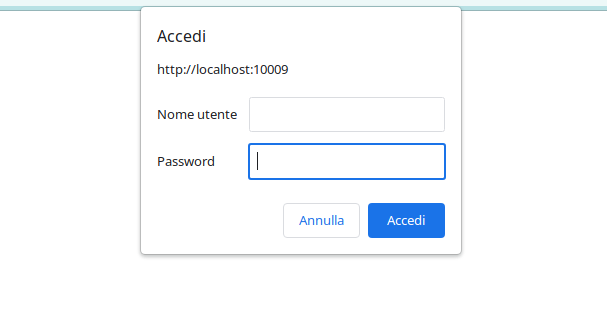
Il plugin Easy Basic Authentication fornisce un metodo semplice per aggiungere la basic authentication al tuo sito WordPress. Puoi abilitare l’autenticazione di base per l’intero sito o solo per l’area di amministrazione impostando un nome utente e una password personalizzati. Proteggi il tuo sito limitando l’accesso solo agli utenti autorizzati.
Provalo su un sito di prova gratuito: fai click qua
Funzionalità chiave
-
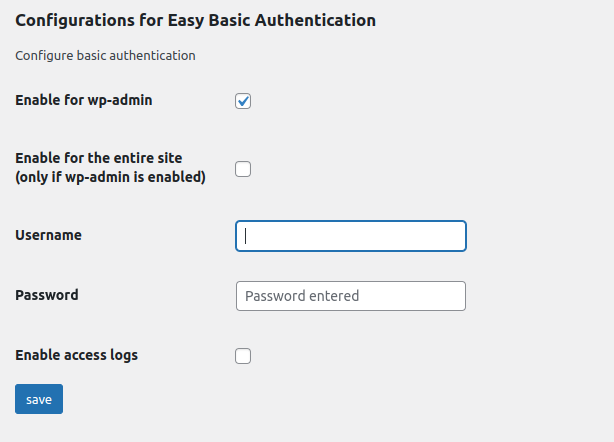
Configurazione Semplice: Con Easy Basic Authentication, puoi facilmente impostare l’autenticazione di base per l’intero sito web o in modo specifico per l’area di amministrazione. Imposta un nome utente e una password personalizzati per garantire un accesso sicuro.
-
Protezione dell’Area di Amministrazione: Se desideri limitare l’accesso alla tua area di amministrazione di WordPress, Easy Basic Authentication ti consente di farlo in modo rapido ed efficace. Solo gli utenti con le credenziali corrette potranno accedere a questa parte critica del tuo sito.
-
Protezione dell’intero sito: se lo desideri, c’è la possibilità di estendere la limitazione di accesso all’intero sito e non solo all’area amministrativa di WordPress, Easy Basic Authentication ti consente di farlo in modo rapido ed efficace. Solo gli utenti con le credenziali corrette potranno accedere a questa parte critica del tuo sito.
-
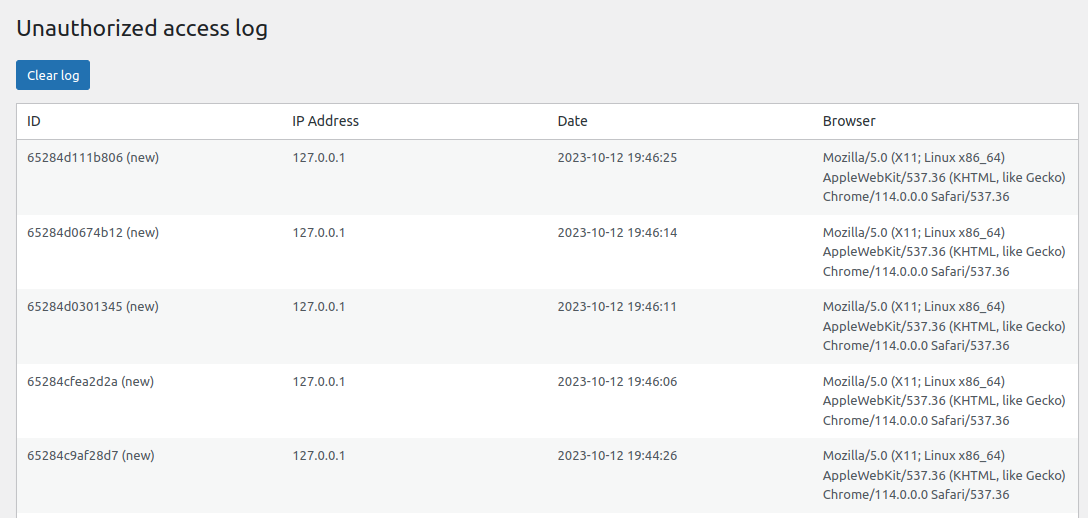
Registro degli Accessi Non Riusciti: Il plugin tiene traccia dei tentativi di accesso non riusciti, aiutandoti a identificare i tentativi di accesso non autorizzati. Questo è particolarmente utile per monitorare la sicurezza del tuo sito.
-
Registro di Accesso: Se scegli di abilitare questa funzione, Easy Basic Authentication ti consente di registrare i login riusciti, fornendo una panoramica completa delle attività di accesso sul tuo sito.
-
Gestione Semplice: L’interfaccia intuitiva del plugin rende facile gestire le impostazioni della basic authentication. Puoi facilmente abilitare o disabilitare la basic authentication e regolare le credenziali in base alle tue esigenze.
-
Funzionalità di Avviso via Email:Easy Basic Authentication include una funzione di avviso via email per informarti dei tentativi di accesso non autorizzati. Puoi ricevere avvisi via email quando qualcuno cerca di accedere al tuo sito senza le credenziali corrette.
-
Funzionalità della White List: La funzionalità di Autenticazione Basica Semplificata ora include una funzione di White List, che ti consente di specificare gli indirizzi IP sicuri esenti dall’autenticazione di base. Configura questa lista per concedere un accesso immediato agli utenti o ai sistemi conosciuti senza richiedere credenziali, migliorando la comodità mantenendo al contempo la sicurezza.
-
Access Token for Crawlers: Some visitors cannot type a username and password: a search engine crawler, an uptime check, a headless front end. Generate an access token in the settings and let them through with an
X-Basic-Auth-Tokenheader, or anAuthorization: Bearerone. The token opens the site only, never the admin area or the login page, and it exists only if you generate it.
Proteggi rapidamente e in modo affidabile il tuo sito WordPress con la basic authentication. Easy Basic Authentication ti offre il controllo per garantire che solo utenti autorizzati possano accedere alle tue risorse online. Mantieni la sicurezza del tuo sito e previeni l’accesso non desiderato oggi stesso con Easy Basic Authentication.
Utilizzo
- Visita la pagina delle impostazioni del plugin per configurare le opzioni desiderate di basic authentication.
- Scegli se abilitare la basic authentication per l’intero sito o solo per l’area di amministrazione.
- Imposta un nome utente e una password personalizzati per un accesso sicuro.
- Monitora i tentativi di accesso non riusciti e i registri di accesso per una maggiore sicurezza.
Letting a crawler in with a token
Go to the plugin settings, tick Generate a token when saving next to Access token for crawlers, and save. The token appears in the field; copy it and give it to the service that needs to reach the site.
That service must send it as a header, one of these two:
X-Basic-Auth-Token: your-token-here
Authorization: Bearer your-token-here
A request carrying the right token is served normally. The admin area and the login page stay behind the username and password, so the token cannot be used to reach the dashboard. A wrong token is refused like wrong credentials, and it is recorded among the failed attempts.
The token is a password: anyone holding it can read the whole site. Send it over HTTPS, and tick Delete the token and close this door when it is no longer needed. Tick Replace this token with a new one when saving to rotate it; the old one stops working immediately.
The basic_auth_token_access_granted action fires whenever a request comes in on the token, if you want to log or count those separately.
Risoluzione dei problemi: reimpostazione dell’autenticazione di base
Se riscontri problemi di accesso a causa dell’autenticazione di base, puoi reimpostarla e riottenere l’accesso seguendo questi passaggi:
1 Connettiti al tuo sito web tramite FTP.↵
2 Vai alla directory dei plugin:
wp-content/plugins/easy-basic-authentication/class/
3 Individuare il file:
easy-basic-authentication-class.php
4 Trova la seguente riga:
add_action( 'init', array($this,'basic_auth_admin') );
5 Commenta quella riga aggiungendo un # all’inizio:
#add_action( 'init', array($this,'basic_auth_admin') );
6 Salva il file e ricaricalo sul tuo server.
Questo disabiliterà temporaneamente l’autenticazione di base, consentendoti di effettuare l’accesso. Una volta effettuato l’accesso, puoi modificare le impostazioni del plugin in base alle tue esigenze.
Se hai bisogno di ulteriore assistenza, non esitare a contattarci.
Repository su GitHub
You can find the source code and contribute to the project on GitHub: Easy Basic Authentication on GitHub
Screenshot
Installazione
- Carica il plugin Easy Basic Authentication sul tuo sito WordPress.
- Attiva il plugin.
- Configura le impostazioni di autenticazione di base dal pannello di amministrazione di WordPress.
Recensioni


Contributi e sviluppo
“Easy Basic Authentication – Aggiungi la basic auth al sito o all'area di amministrazione” è un software open source. Le persone che hanno contribuito allo sviluppo di questo plugin sono indicate di seguito.
Collaboratori

“Easy Basic Authentication – Aggiungi la basic auth al sito o all'area di amministrazione” è stato tradotto in 6 lingue. Grazie a chi traduce per il contributo.
Ti interessa lo sviluppo?
Esplora il codice segui il repository SVN, segui il log delle modifiche tramite RSS.
Changelog
4.2.0
- New: an access token that lets a crawler or an external service reach the site without a username and password. Generate it in the settings and send it as an
X-Basic-Auth-Tokenheader, or asAuthorization: Bearer. It opens the site only: the admin area and the login page stay protected. No token is generated until you ask for one, so nothing changes for sites that do not need it. - Fixed: on a site protected in full, scheduled tasks stopped running. WordPress closes the response of
wp-cron.phpbefore loading the plugins, so the 401 challenge reached nobody, left a “headers already sent” warning in the error log on every run, and the exit that followed cancelled every scheduled task of the site. Cron requests are no longer challenged. - Fixed: on WordPress 6.7 and later the plugin triggered the “Translation loading was triggered too early” notice. The settings fields are now built on
admin_initinstead ofplugins_loaded.
4.1.0
- Fixed: an access attempt was logged, and an alert email sent, for every visitor. Basic Authentication always makes a first request without credentials, and that request was being counted as a failed attempt. Only requests that send wrong credentials are recorded now.
- Fixed: the access log was stored in an autoloaded option, so up to 500 entries (around 144 KB) were loaded on every request to the site. It is now loaded only where it is used, and existing logs are migrated on update.
- Fixed: on a site protected in full, WP-CLI and any command line script stopped silently. HTTP authentication is no longer applied outside HTTP requests.
- The 401 status is now sent through WordPress instead of a hardcoded HTTP/1.0 header.
- The authentication realm can be changed with the new
basic_auth_realmfilter. - Tested up to WordPress 7.1.