
Descrizione
KooKoa Folders aggiunge una barra laterale con cartelle alla Media Library di WordPress. Puoi creare cartelle, annidarle in sottocartelle e spostare i file con il drag and drop. Include anche Smart Folder illimitate che si popolano automaticamente in base a regole che definisci tu — tipo di file, dimensione, data, proporzioni, tag e altro ancora — così la libreria rimane ordinata man mano che cresce.
👉 PROVA LA DEMO LIVE ☝️ — Accesso immediato, nessun account necessario
Le cartelle sono virtuali. Sono archiviate come tassonomia privata di WordPress e collegate ai tuoi elementi media, quindi i file sul disco non vengono mai spostati e gli URL delle immagini esistenti continuano a funzionare. Se disattivi il plugin, la tua Media Library continua a funzionare come se nulla fosse accaduto.
🗂️ Organizzazione
- Cartelle e sottocartelle illimitate nella Media Library
- Trascina e rilascia gli allegati tra le cartelle
- Assegna automaticamente i nuovi caricamenti alla cartella in cui ti trovi
- Conteggio elementi per cartella
- Filtro cartelle nella vista lista della Media Library
⚡ Smart Folder
- Smart Folder illimitate (basate su regole), popolate automaticamente man mano che la tua Media Library cresce
- Combina più regole per cartella con logica AND — tipo di file, dimensione, proporzioni, data, autore, stato, ricerca, tag e altro ancora
- Conteggi in tempo reale memorizzati nella cache per cartella, aggiornati automaticamente quando gli elementi cambiano
- Supporto per fissaggio, blocco, colore e icona — stessa UX delle cartelle normali
🌈 Personalizzazione
- Colori personalizzati per le cartelle
- Icone personalizzate per le cartelle con selettore emoji
- Fissa le cartelle in cima all’albero
- Blocca le cartelle per evitare rinominazioni, cambi di colore, icona o eliminazioni accidentali
🔍 Navigazione
- Barra laterale delle cartelle ridimensionabile e fissa
- Cerca e ordina l’albero delle cartelle
- Barra breadcrumb e schede sottocartelle
- Smart Startup Folder — apri la Media Library sull’ultima cartella utilizzata o su una cartella fissa a tua scelta
- Scorciatoie da tastiera per le azioni comuni
- Layout responsive per dispositivi mobili
🔄 Operazioni in blocco
- Modalità Organizzazione in blocco — seleziona più allegati e spostali in una cartella con un clic
- Scarica una cartella (e tutte le sue sottocartelle) come singolo archivio ZIP
- Scarica solo gli elementi selezionati come ZIP, direttamente dalla barra degli strumenti Organizzazione in blocco
- Carica una struttura di cartelle dal tuo computer e le sottocartelle vengono ricreate automaticamente
- Esporta e importa la struttura delle cartelle in formato JSON, con modalità Unisci o Sostituisci
📊 Informazioni
- Tooltip al passaggio del mouse sugli elementi media con nome file, dimensione e proporzioni
- Campi EXIF opzionali nel tooltip al passaggio del mouse — fotocamera, apertura, tempo di scatto, ISO, lunghezza focale
🛡️ Controllo accessi
- Accesso basato sui ruoli — scegli quali ruoli WordPress possono utilizzare la barra laterale delle cartelle
🔒 Privacy
- Font self-hosted, nessuna chiamata a Google Fonts
- Nessuno script esterno, nessun tracker, nessuna analytics
- Nessuna risorsa frontend viene caricata per i visitatori normali; le integrazioni con builder/editor si caricano solo quando un editor autorizzato apre un visual builder supportato
✅ Compatibile con
La barra laterale delle cartelle è disponibile in:
- Viste lista e griglia della Media Library di WordPress
- Modal media dell’editor a blocchi (Gutenberg)
- Modal media dell’Editor classico
- Modal media di Divi 4 e 5
- Modal media di Elementor
- Modal media della galleria prodotti WooCommerce
💻 Use cases
A few real-world setups where KooKoa Folders earns its keep:
- Bloggers and content writers — keep every blog image, post screenshot, hero photo, video clip and audio file inside dedicated media folders. Drag and drop assets between folders, filter the media library by folder, and find the right image for tomorrow’s article in seconds instead of scrolling past 2,000 thumbnails.
- WordPress photographers and photo studios — split your media library by shoot type (portraits, weddings, real estate, landscapes, nature, family), by client, by year, or by location. Pin your active project to the top, lock the archive against accidental edits, and let smart folders auto-collect images by date, file size or alt text.
- WooCommerce shop owners and e-commerce managers — organize product images into folders that mirror your catalog (apparel, footwear, accessories, electronics). Drag and drop new product photos straight from upload into the right SKU folder, and use smart folders to auto-group every PNG, JPEG or WebP above a certain size for quality audits.
- Web designers, web developers and freelance agencies — separate site assets per project, per page section or per client (logos, mockups, illustrations, icon sets, screenshots). Folder colors and custom icons turn the media library into a navigable workspace even when you sit on thousands of files.
- Online publishers, magazines and editors — file every image per issue, per article, per author or per topic. Smart folders auto-collect everything uploaded this week, this month, or by a specific contributor — no manual sorting needed.
- Real estate, hospitality and listings sites — one folder per property or per location, subfolders per room, view or photoshoot. Bulk upload an entire shoot, drag the keepers into the listing folder, and skip the rest. Color-code your busiest property folders so the right one stands out at a glance.
- Course creators and membership sites — split lesson screenshots, video thumbnails and downloadable PDFs into folders per course, per module or per lesson. Find the right cover image without scrolling past fifty unrelated lessons.
- Marketing agencies, design studios and creative teams — one WordPress Media Library, many clients. A folder per brand keeps work tidy, role-based access keeps clients out of each other’s assets, and the export/import tool ships a folder tree to a new project in a single JSON file.
🚀🚀🚀 Add-on Pro
Un add-on commerciale separato, KooKoa Folders Pro, estende le cartelle a Post, Pagine e Custom Post Type. Aggiunge anche la modifica delle immagini, la filigrana, la conversione WebP/AVIF, il rilevamento dei duplicati e la pulizia dei media inutilizzati.
👉 PROVA LA DEMO LIVE ☝️
Librerie Open Source
KooKoa Folders è costruito su questi progetti open source. Grazie ai loro autori per aver condiviso il loro lavoro con la community.
-
jsTree v3.3.16 by Ivan Bozhanov (vakata) — MIT License
Website: https://www.jstree.com/ -
Share Tech Mono di Carrois Apostrophe (Ralph du Carrois) — SIL Open Font License 1.1 — https://www.carrois.com/
Font monospace self-hosted utilizzato in tutta l’interfaccia. Nessun CDN Google Fonts.
Per tutto il resto, KooKoa Folders utilizza le librerie già incluse nel core di WordPress — jQuery, jQuery UI (Draggable, Droppable, Sortable) e Dashicons — invece di includere le proprie copie.
Crediti
KooKoa Folders è progettato e sviluppato da Adamo Lussana — https://www.kookoa.com
Screenshot

Cartelle della Media Library 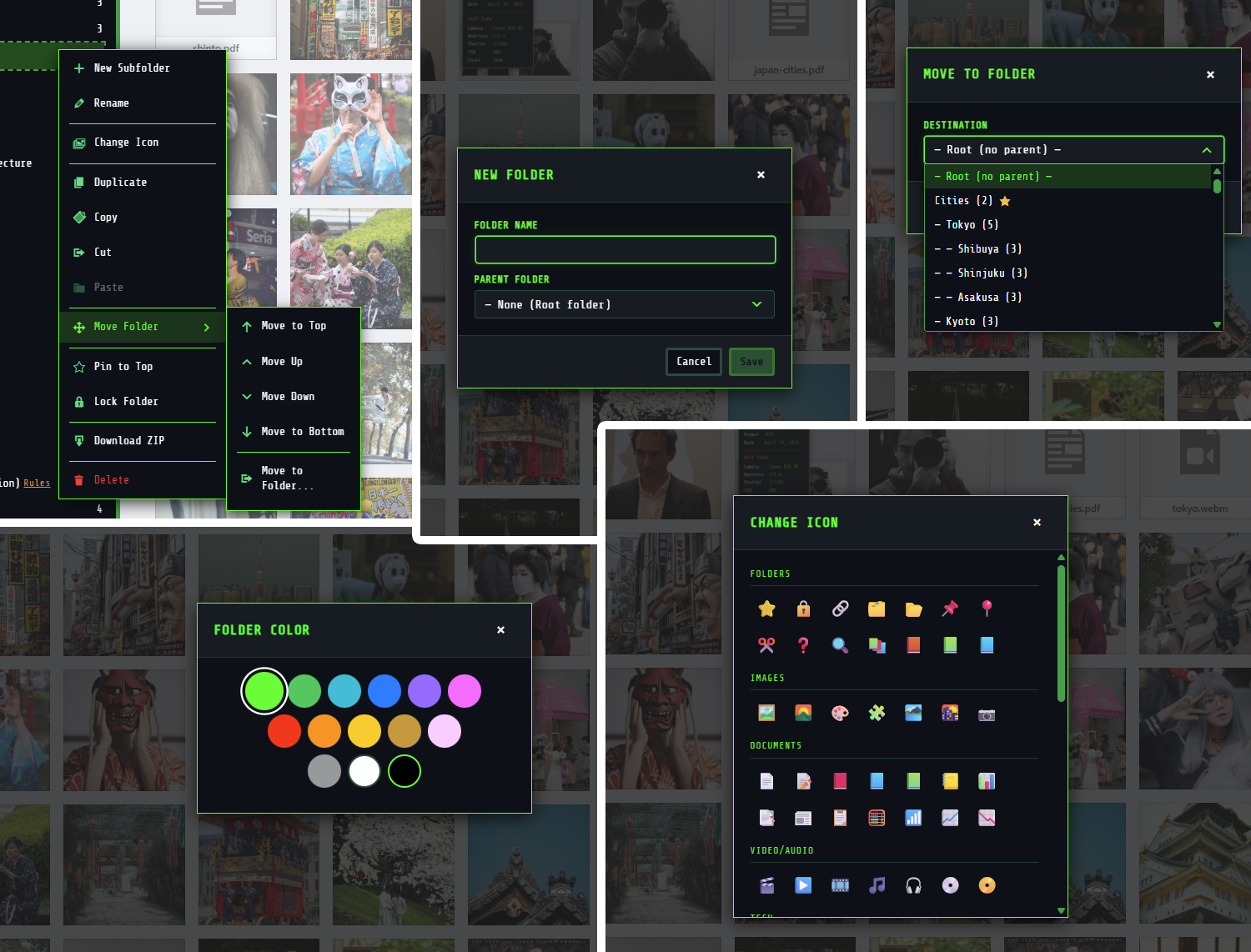
Azioni cartelle e finestre di dialogo 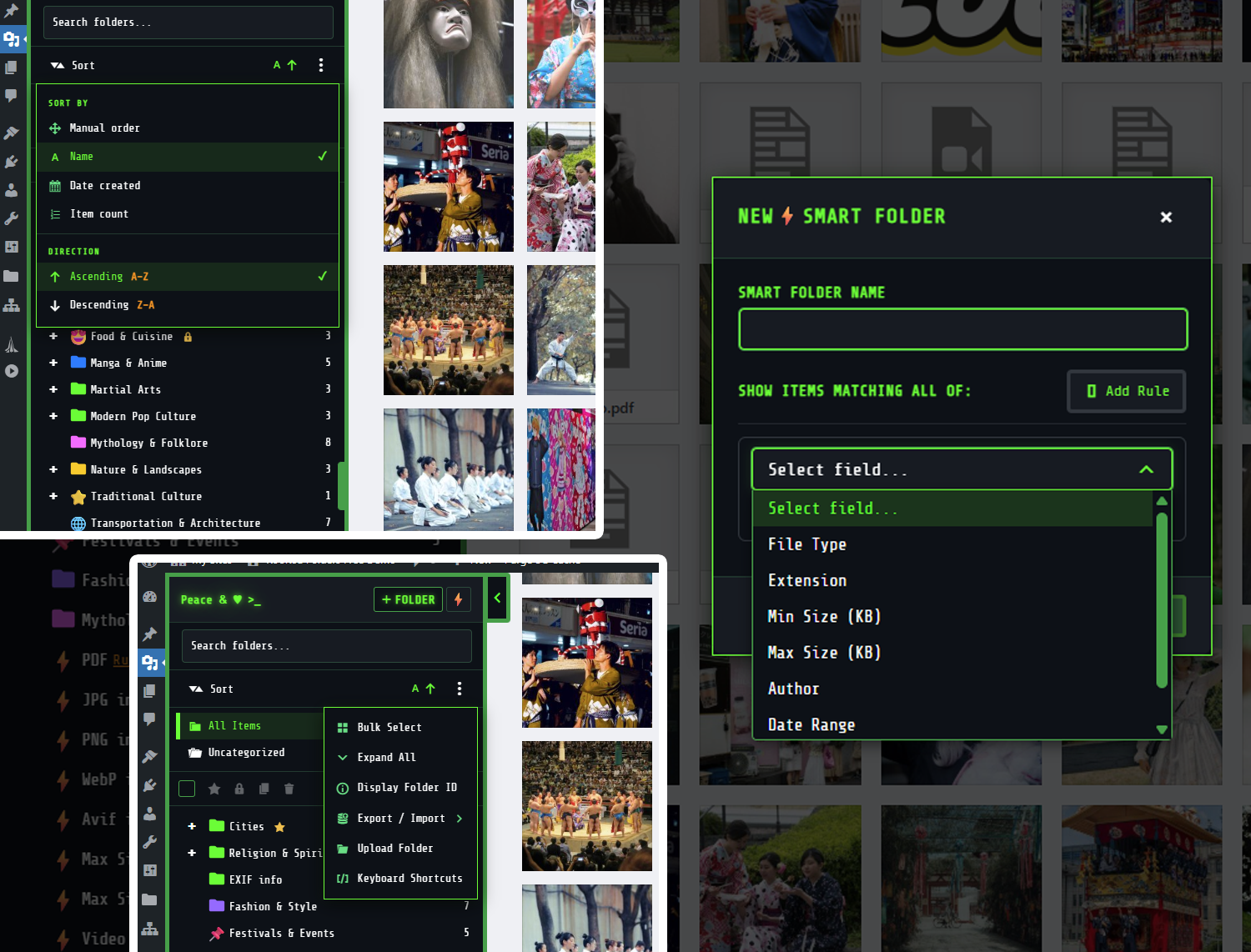
Costruttore di regole Smart Folder 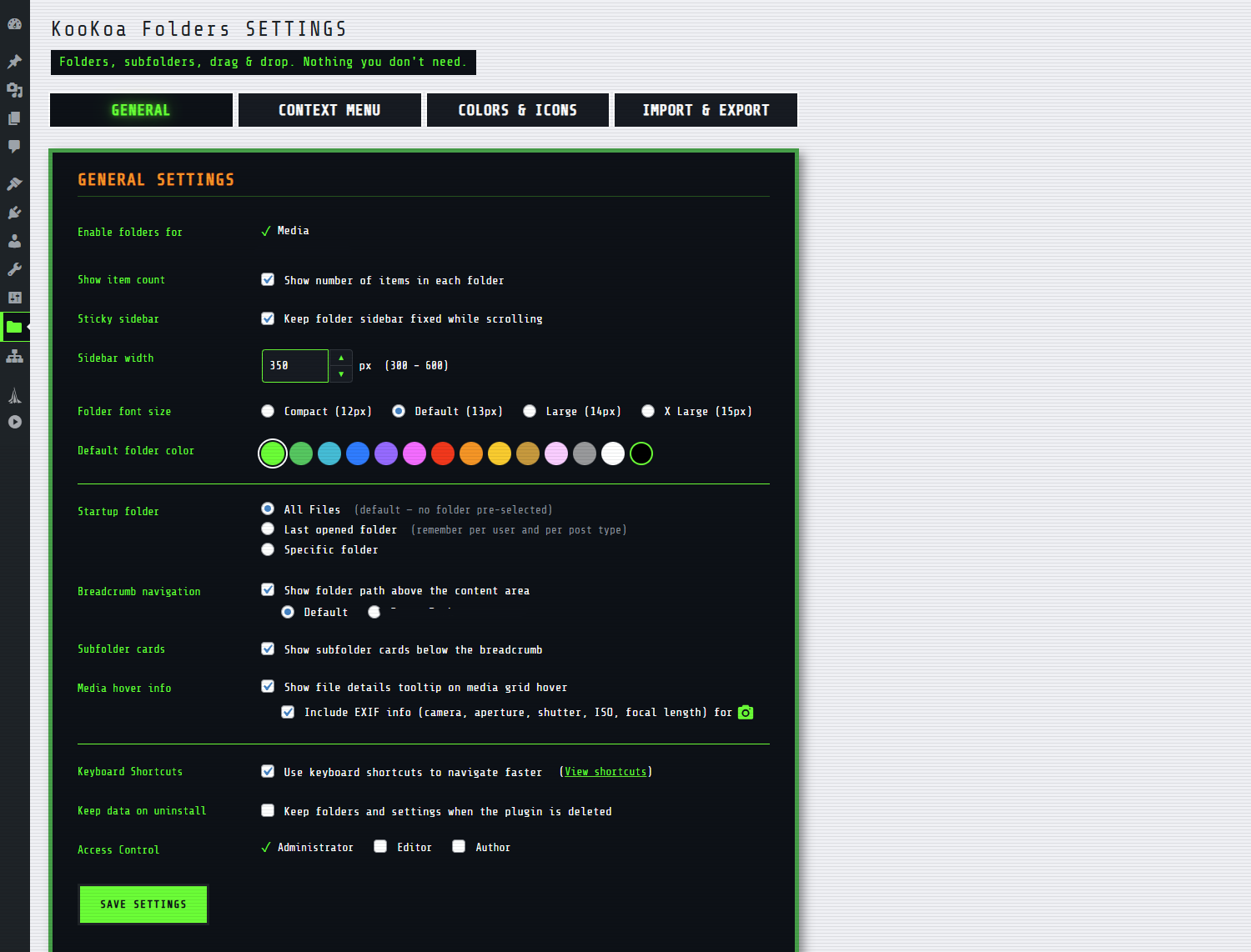
Impostazioni Generali 
Impostazioni Menu Contestuale 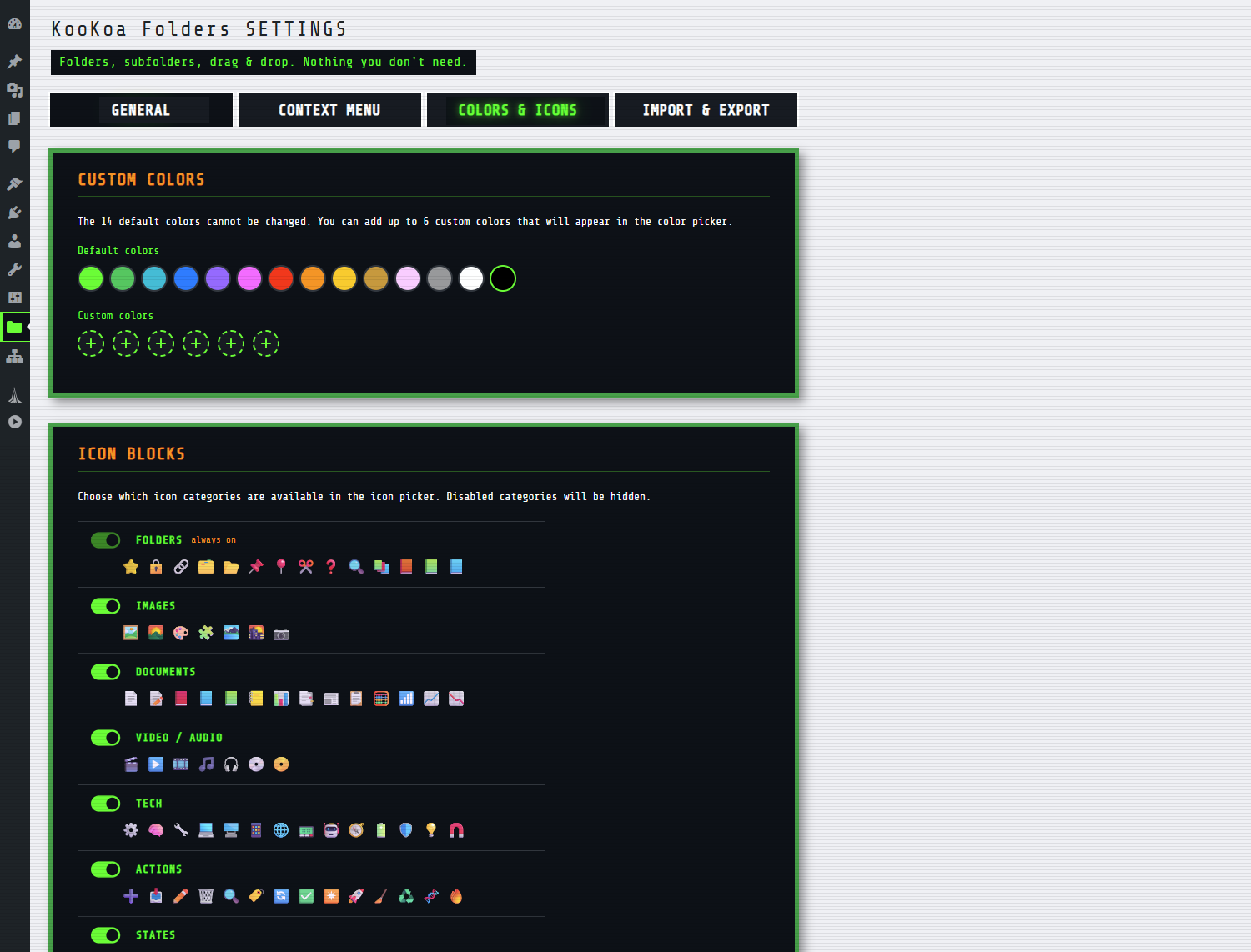
Impostazioni Colori & Icone 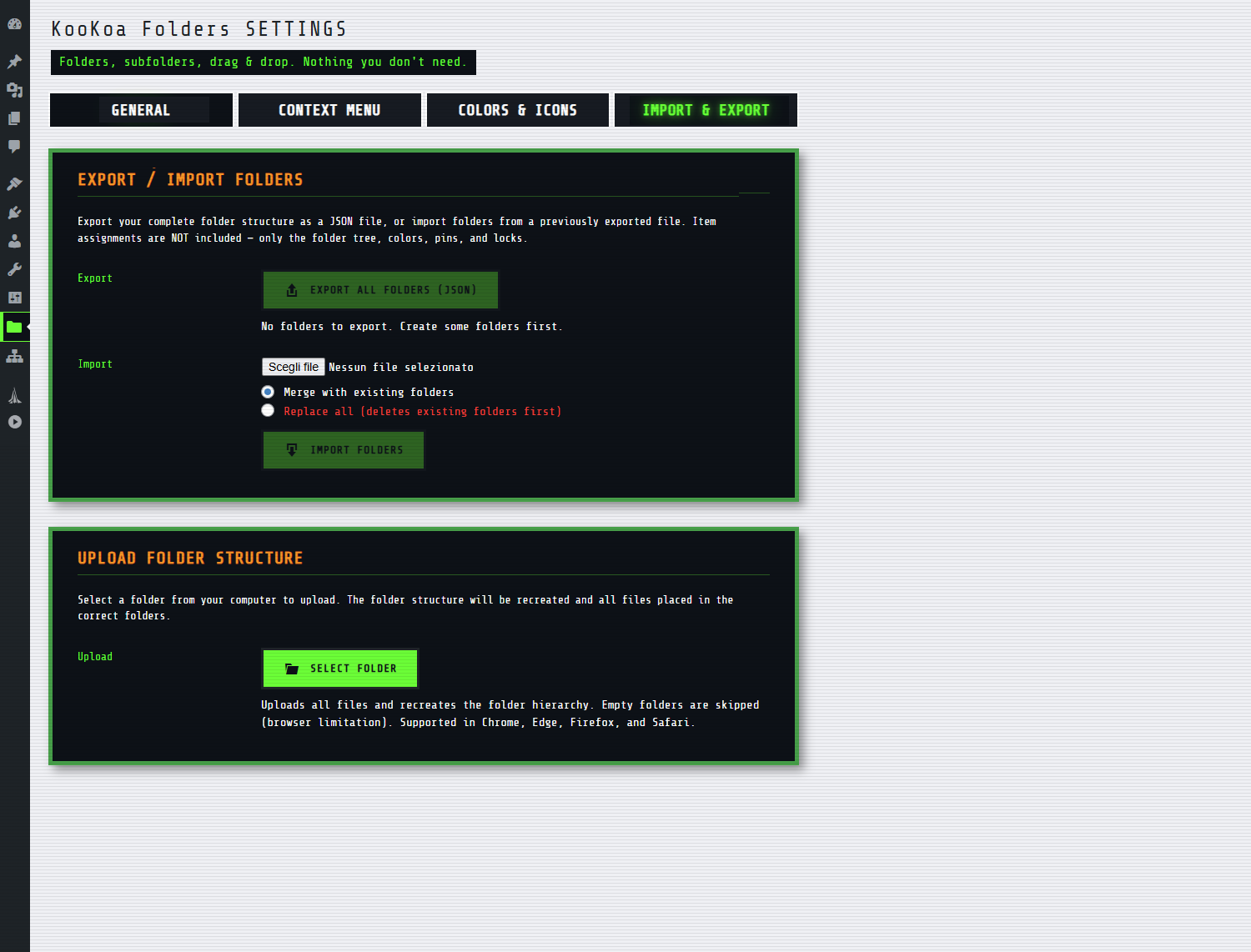
Impostazioni di importazione e esportazione 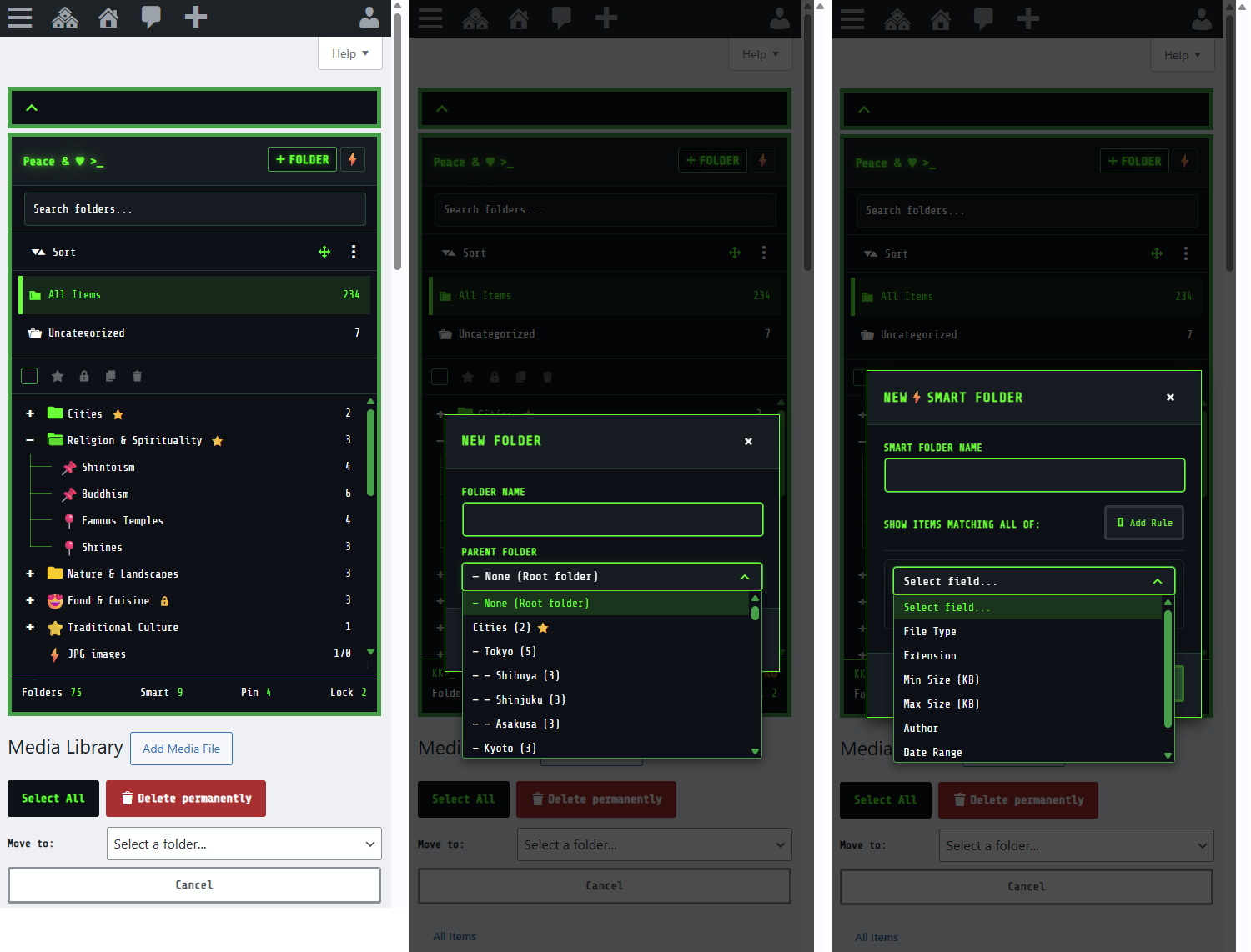
Vista mobile
Installazione
- Nel pannello di amministrazione di WordPress, vai su Plugin Aggiungi nuovo.
- Cerca KooKoa Folders.
- Fai clic su Installa ora, poi su Attiva.
- Apri la Media Library — la barra laterale delle cartelle apparirà a sinistra.
- Fai clic su + Folder nell’intestazione della barra laterale per creare la tua prima cartella, poi trascina gli elementi al suo interno.
Per configurare il plugin, vai su KooKoa Folders nel menu di amministrazione di WordPress. Puoi impostare la larghezza predefinita della barra laterale, cambiare la palette di colori e il set di icone, abilitare le scorciatoie da tastiera, regolare il menu contestuale, scegliere quali ruoli possono usare il plugin e molto altro.
Installazione manuale
- Scarica il file zip del plugin.
- Vai su Plugin Aggiungi nuovo Carica plugin e carica il file zip.
- Attiva il plugin.
FAQ
-
KooKoa Folders sposta i file sul disco?
-
No. Le cartelle sono virtuali. Sono archiviate come tassonomia privata di WordPress e collegate agli elementi media. I file sul server mantengono i percorsi originali, quindi gli URL delle immagini esistenti nei tuoi contenuti non si interrompono mai.
-
Eliminare una cartella elimina anche i miei file?
-
No. Eliminare una cartella rimuove solo la cartella stessa. I media al suo interno diventano non categorizzati e rimangono nella Media Library.
-
Cosa succede se disattivo il plugin?
-
Le tue cartelle rimangono nel database. Quando riattivi il plugin, tutto torna al suo posto. Se invece utilizzi Elimina dalla schermata dei Plugin, tutti i dati del plugin (cartelle, colori, icone, stato di fissaggio e blocco, impostazioni) vengono rimossi in modo pulito.
-
Il plugin carica qualcosa da internet?
-
No. Il font utilizzato dall’interfaccia del plugin è incluso nel plugin stesso e servito dal tuo sito — nessun CDN di Google Fonts, nessuno script esterno, nessuna analytics.
-
Influisce sul frontend o sulle prestazioni del mio sito?
-
Il plugin si carica nella Media Library, nella propria pagina delle impostazioni e nel modal media — anche quando un editor autorizzato apre un visual builder supportato come Divi o Elementor. I visitatori normali non ricevono nulla di extra: niente CSS, niente JavaScript, niente query al database.
-
Quante Smart Folder posso creare?
-
Quante ne vuoi. KooKoa Folders include Smart Folder illimitate. Ogni cartella combina più regole con logica AND e si popola automaticamente man mano che nuovi elementi corrispondono.
Recensioni

Contributi e sviluppo
“KooKoa Folders – Cartelle Media Library & Organizzatore File” è un software open source. Le persone che hanno contribuito allo sviluppo di questo plugin sono indicate di seguito.
Collaboratori
“KooKoa Folders – Cartelle Media Library & Organizzatore File” è stato tradotto in 8 lingue. Grazie a chi traduce per il contributo.
Traduci “KooKoa Folders – Cartelle Media Library & Organizzatore File” nella tua lingua.
Ti interessa lo sviluppo?
Esplora il codice segui il repository SVN, segui il log delle modifiche tramite RSS.
Changelog
1.0.4
- New: Dutch translation bundled (nl_NL).
- Improvement: minor admin UI refinements.
1.0.3
Translations + bug fix release.
- New: Polish translation bundled (pl_PL).
- New: Brazilian Portuguese translation bundled — also covers European Portuguese (pt_PT) and other Portuguese-speaking locales (pt_AO, pt_MZ and others) via automatic locale fallback.
- Fix: “Sidebar width” in Settings General now applies immediately to the admin who saves it, and the field always reflects the width currently on screen (drag-resized value if any, else the site-wide default).
- Removed: “Sticky sidebar” toggle in Settings General — the toggle had no effect since the folder sidebar was always pinned regardless of the setting. Sidebar behavior is unchanged for all users.
1.0.2
Versione traduzioni.
- Novità: traduzione italiana inclusa.
- Novità: traduzione spagnola inclusa — copre la Spagna e tutte le varianti di spagnolo latinoamericano (es_MX, es_AR, es_CL, es_CO, es_VE, es_PE e altre) tramite fallback automatico della lingua.
- Novità: traduzione francese inclusa — copre Francia, Belgio, Canada, Svizzera e altre lingue francofone tramite fallback automatico della lingua.
- Novità: traduzione tedesca inclusa — copre Germania, Austria, Svizzera e altre lingue tedesche tramite fallback automatico della lingua.
- Novità: traduzione giapponese inclusa.
- Miglioramento: fallback intelligente della lingua — quando un file .mo specifico per la regione non è presente (es. es_MX), il plugin carica ora il file della lingua generica (es) invece di lasciare le stringhe non tradotte.
- Miglioramento: l’opzione Forza inglese appare ora per gli utenti con varianti regionali della lingua ogni volta che è disponibile una traduzione generica di fallback.
1.0.1
Versione con correzioni di bug.
- Correzione: il pulsante “Carica altri” nel modal media non riporta più la griglia alla prima pagina.
- Correzione: il download di un singolo file selezionato viene ora salvato in modo affidabile sul disco invece di aprirsi a volte direttamente nel browser.
- Correzione: la voce “Scarica ZIP” non appare più nel menu contestuale delle cartelle su Post, Pagine e Custom Post Type — solo nella Media Library.
- Correzione: le Smart Folder con due regole di estensione file (es. avif + webp) restituiscono ora l’unione di entrambe, non solo un’estensione.
- Miglioramento: regole Smart Folder suddivise per tipo di post — i Media ottengono un’etichetta più chiara “Il testo contiene (Titolo+Didascalia+Desc.)” più una nuova regola “Il testo alternativo contiene”; Post/Pagine/CPT ottengono una regola “Il titolo contiene” che cerca solo nei titoli dei post.
- Miglioramento: la barra degli strumenti Cartelle in blocco ora nasconde i pulsanti Fissa/Blocca quando le voci corrispondenti nel menu contestuale sono disabilitate nelle Impostazioni, così le azioni rimangono reversibili da un unico posto.
- Rifinitura: sostituiti tre emoji libro nella categoria icone Cartelle con nuove icone che non duplicano la categoria Documenti.
1.0.0
Prima versione su WordPress.org.
- Cartelle e sottocartelle illimitate nella Media Library.
- Smart Folder illimitate (basate su regole, popolate automaticamente, più regole con logica AND).
- Trascina e rilascia gli allegati nelle cartelle.
- Assegna automaticamente i nuovi caricamenti alla cartella corrente.
- Colori personalizzati e icone emoji per le cartelle.
- Fissa e blocca le cartelle.
- Barra laterale ridimensionabile e fissa con ricerca, ordinamento e scorciatoie da tastiera.
- Barra breadcrumb, schede sottocartelle, Smart Startup Folder.
- Layout responsive per dispositivi mobili.
- Modalità Organizzazione in blocco.
- Scarica una cartella (con tutte le sottocartelle) o solo gli elementi selezionati come archivio ZIP.
- Carica una struttura di cartelle dal tuo computer.
- Esportazione e importazione JSON della struttura delle cartelle (Unisci o Sostituisci).
- Tooltip con metadati ed EXIF al passaggio del mouse sugli elementi media.
- Controllo accessi basato sui ruoli.
- Font self-hosted, solo admin, nessuna traccia nel frontend.
- Integrazione del modal media con Gutenberg, Editor classico, Divi 4/5, Elementor e gallerie prodotti WooCommerce.