

Descrizione
Niquelao Watermark is a standalone plugin (it does not require any other Niquelao plugin) that protects your images with a watermark generated on the fly, without ever touching the original files on disk.
The page itself always shows the clean, original image, so image SEO (descriptive file name, indexing) stays intact. Only when a visitor right-clicks an image and chooses “Open image in new tab” or “Save image as” — or drags the image out — do they get a copy with your logo overlaid. That watermarked copy is generated once and then served from an on-disk cache on later requests.
Features:
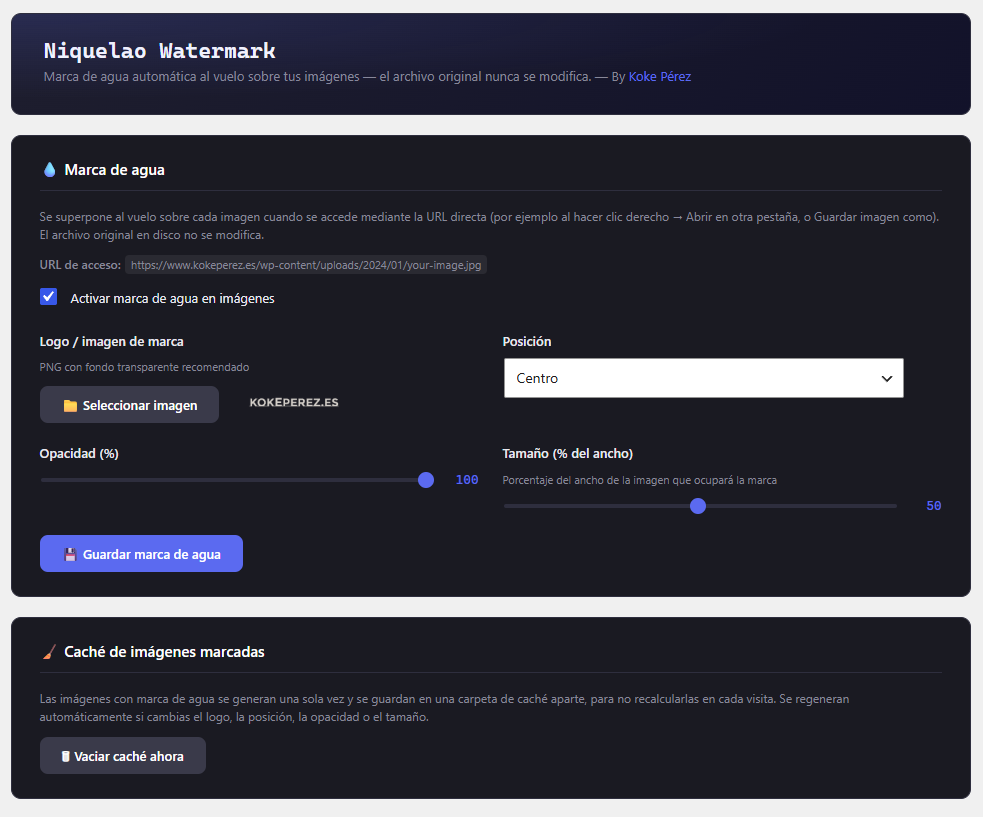
- One-switch activation from the settings screen
- Logo picker through the WordPress media library (transparent PNG recommended)
- Configurable position: center, the 4 corners, or a repeating tile
- Adjustable opacity and size (% of the image width) via sliders
- Works with JPEG, PNG and WebP
- The original file on disk is never modified
- On-disk cache of already-watermarked images, regenerated automatically when any setting changes
- No external dependencies: uses Imagick (preferred) or GD (fallback), available on virtually every shared host
- Discreet “-hd” URL for the watermarked version, so the presentation URL stays clean for SEO and the mechanism is not obvious
How it works
Since version 1.2.0 the approach is “watermark only on save/open”, using two URLs:
-
PRESENTATION (what the site and Google see): the image is loaded by its
real, clean URL (e.g..../uploads/2026/06/photo.jpg). That URL is NOT
rewritten: the original file is served without a watermark, so image SEO
(descriptive file name, indexing) stays intact. -
SAVE / OPEN: a frontend script (
assets/js/niquelao-wm-front.js)
intercepts the right-click and the drag, pointing to a variant with the
-hd suffix before the extension (e.g..../photo-hd.jpg). That URL does
not exist on disk;.htaccessrecognizes it, strips the-hd, and passes
the REAL file path to PHP, which returns the watermarked version
(generated once and cached). So “Save image as” and “Open image in new
tab” deliver the watermarked version, while the page stays clean and the
discreet-hdURL does not reveal the mechanism.
The script does NOT modify the src/srcset of the page’s <img> (that
would break the WordPress lightbox): for right-click it overlays a
transparent watermarked clone, and for drag it only alters the
dataTransfer.
Honest note: this is deterrence, not absolute protection. A user with the
browser developer tools (Network tab) can still see the real, unwatermarked
image URL. The goal is to make casual downloading harder (right-click /
drag / copy link), not to make it impossible.
Requirements
- WordPress 5.8 o superior
- PHP 7.4 o superior
- Imagick or GD enabled on the server
- Apache mod_rewrite (or equivalent) for the
.htaccessrewrite
Screenshot
Installazione
- Upload the
niquelao-watermark/folder to/wp-content/plugins/ - Activate the plugin from Plugins Installed Plugins
- Configure it under Niquelao Watermark Settings: enable the watermark, upload your logo, choose position, opacity and size, then save
Nginx servers (no Apache/.htaccess)
On Apache or LiteSpeed hosts there is nothing to do: the plugin writes the
rule block into .htaccess automatically when the watermark is enabled. On
Nginx servers (which do not read .htaccess) add this equivalent rule once,
by hand, inside the site’s server { ... } block (usually in
/etc/nginx/sites-available/your-site.conf) and reload Nginx with
sudo nginx -t && sudo systemctl reload nginx:
# Niquelao Watermark: rewrites "-hd" URLs to the watermarked version.
# The real, clean image URL is left untouched (served normally).
location ~* ^/wp-content/uploads/(.+)-hd\.(jpe?g|png|webp)$ {
    rewrite ^/wp-content/uploads/(.+)-hd\.(jpe?g|png|webp)$ /index.php?niquelao_wm_file=wp-content/uploads/$1.$2 last;
}
If your uploads folder is not the standard wp-content/uploads, adjust that
path in both places. The rest of the flow (detecting the real file,
generating and caching the watermark) is handled by PHP just like on Apache.
FAQ
-
Does it modify my original images?
-
No. The original file in
wp-content/uploadsis never touched. The watermarked image is generated in a separate cache folder. -
Does the watermark show up inside my normal web page?
-
No. Since version 1.2.0 the page always displays the clean original image. The watermarked version is only delivered when a visitor right-clicks and chooses “Save image as” / “Open image in new tab”, or drags the image out. This keeps your design clean and image SEO intact.
-
Is this real protection?
-
It is deterrence, not absolute protection. A technical user with the browser developer tools (Network tab) can still find the clean image URL. The goal is to discourage casual downloading (right-click, drag, copy link), not to make it impossible.
-
Does it work without Niquelao Image Optimizer installed?
-
Yes. It is a completely standalone plugin, with no dependency between the two.
-
What happens if I change the logo or position?
-
The cache is invalidated automatically: the next time the image is requested it is regenerated with the new settings. You can also clear the cache manually from the settings screen.
Recensioni
Non ci sono recensioni per questo plugin.
Contributi e sviluppo
“Niquelao Watermark” è un software open source. Le persone che hanno contribuito allo sviluppo di questo plugin sono indicate di seguito.
Collaboratori
Traduci “Niquelao Watermark” nella tua lingua.
Ti interessa lo sviluppo?
Esplora il codice segui il repository SVN, segui il log delle modifiche tramite RSS.
Changelog
1.5.4
- i18n fix: 5 error-log strings inside Niquelao_WM_Htaccess were still hardcoded in Spanish, bypassing the translation system entirely (they were missing from the .pot/.po files). They are now proper English source strings wrapped in
__(), with the original Spanish wording preserved as the es_ES translation. languages/niquelao-watermark.pot and niquelao-watermark-es_ES.po/.mo were regenerated to include all 39 translatable strings (previously 8 were missing, including 3 English ones that had simply never been added to the .pot after being written). - Hardening (WordPress.org review readiness): replaced direct file_get_contents()/file_put_contents() calls in Niquelao_WM_Htaccess (writing/removing the .htaccess block) and the NIQUELAO_WM_DEBUG diagnostic logger in Niquelao_WM_Serve with the WP_Filesystem API (get_contents()/put_contents()), removing the corresponding phpcs:ignore waivers. insert_with_markers() is still not used for the .htaccess block itself, since it always appends and this plugin needs the block at the top of the file; WP_Filesystem gives the same manual position control without bypassing core’s filesystem abstraction. No functional change on standard installs.
1.5.3
- WordPress.org review compliance: (1) uninstall.php no longer directly includes wp-admin/includes/misc.php — the Niquelao_WM_Htaccess class already loads the required core files (misc.php + file.php) on demand with require_once and uses their functions immediately after, which is the allowed pattern. (2) The uploads path used to build the .htaccess rewrite rules (root and uploads/) and to normalise the requested path in the serve endpoint is now derived from wp_upload_dir()[‘baseurl’] via wp_parse_url(), through the new reusable Niquelao_WM_Htaccess::uploads_url_path() helper, instead of str_replace( ABSPATH, ”, wp_upload_dir()[‘basedir’] ). This works correctly with custom WP_CONTENT_DIR or external uploads locations, where the uploads directory is not inside the WordPress root. No functional change on standard installs.
1.5.2
- Hardening (WordPress.org review readiness): added an explicit current_user_can( ‘manage_options’ ) check at the top of save_settings(), maybe_purge_cache() and maybe_fix_uploads_htaccess() as defence in depth, since those methods process $_POST directly (previously they relied only on the menu capability). Added the License URI header to the main plugin file (it was only in readme.txt). Shortened the plugin-header Description to a single concise line.
1.5.1
- Improved: watermark size now uses an attenuated scale instead of a plain linear percentage of the image width. Previously the logo looked too small on large images and too big on small ones, because the final visual size depends on the resolution the image is displayed at, not on its real pixels. The size percentage is now corrected by the square root of the image-to-reference (1200px) ratio, clamped to [0.5x, 2.0x], so the watermark keeps a consistent visual size across images of very different dimensions. Applies to both the Imagick and GD render paths.
1.5.0
- Plugin Check hardening: removed a misplaced phpcs:ignore on the can_write() method signature (it silenced nothing), and expanded the inline justifications on all direct filesystem calls in the dual-.htaccess logic explaining why insert_with_markers() cannot be used (block-position control at the top of the file, and writing into a subdirectory .htaccess). No functional change.
1.4.9
- Fixed: uninstall.php now always calls disable() unconditionally (instead of only when is_installed() was true for the root .htaccess). This ensures the rewrite block is removed from BOTH the root .htaccess AND wp-content/uploads/.htaccess, even when the plugin was deactivated before being deleted (which had already cleaned the root but left the uploads block orphaned). Also loads insert_with_markers() explicitly to avoid a fatal error in the uninstall context.
1.4.8
- Fixed: on plugin update/reactivation, niquelao_wm_activate() called sync() which only acted on state changes and did nothing if the watermark was already active. It now calls enable() directly when the watermark is active, so the .htaccess block (root + uploads/ if present) is always regenerated with the latest rules immediately after updating the plugin — no manual save needed.
1.4.7
- Fixed: the .htaccess block was not regenerated when saving settings if the watermark was already active (sync() only acted on state changes). Settings save now always calls enable()/disable() directly, so the block is always rewritten with the latest rules after a plugin update — no need to deactivate/reactivate manually.
1.4.6
- Added: compatibility warning in the settings page when another plugin (WP-Optimize, Wordfence, iThemes Security, etc.) has created a .htaccess inside wp-content/uploads/ without the Niquelao Watermark rewrite rule. The notice includes a one-click “Fix automatically” button that writes the correct rule into that file immediately, without requiring the user to save settings manually.
- Improved: sync() now always rewrites the uploads/.htaccess block when the watermark is active, ensuring the rule stays up to date even if the file was modified by another plugin after activation.
1.4.5
- Fixed: dual .htaccess strategy. When plugins such as WP-Optimize, iThemes Security or Wordfence create their own .htaccess inside wp-content/uploads/, Apache opens a new directory context for image requests and stops applying the root .htaccess rules entirely. The plugin now detects that file and writes the rewrite rule into it as well (using directory-relative paths and the correct RewriteBase for that subdirectory). The uploads/.htaccess block is added on enable(), removed on disable(), and kept in sync on every sync() call. The root .htaccess is still written as before for servers without an uploads/.htaccess.
1.4.4
- Fixed: added missing RewriteBase / to the .htaccess block. On some Apache servers without an explicit RewriteBase the RewriteRule path was not resolved correctly, causing the “-hd” URLs to return a 404 Apache error instead of being passed to PHP. The fix regenerates the .htaccess block automatically on the next Settings save (or plugin reactivation).
1.4.3
- Fixed: the cleanup listeners were registered via setTimeout(…, 0), which in many browsers fired fast enough to destroy the clone before “contextmenu” could read it — resulting in the browser showing the unwatermarked URL in the context menu. The cleanup now registers only AFTER “contextmenu” fires (one-shot listener), so the clone is guaranteed to be alive when the browser builds “Save image as” / “Open image in new tab”.
1.4.2
- Fixed (critical): the marked clone was inserted on “contextmenu”, which fires AFTER the browser has already decided which image to show in the context menu. Moved the clone insertion to “mousedown” (right button), which fires before “contextmenu”, so the browser sees the clone — pointing to the watermarked “-hd” URL — when it builds the “Save image as” / “Open image in new tab” menu entries.
1.4.1
- WordPress.org compliance: replaced base64_encode() with rawurlencode() for the admin menu SVG icon to avoid Plugin Check warnings. Removed emoji from the admin page title for accessibility and dashboard consistency. Added a 100 KB rotation limit to the debug log file to prevent unbounded growth if NIQUELAO_WM_DEBUG is accidentally left enabled in production.
1.4.0
- WordPress.org readiness: the whole readme.txt (technical section and full changelog) and the plugin header Description are now in English. Admin UI strings are now English as the source language, with Spanish shipped as a translation in /languages (niquelao-watermark-es_ES.po/.mo) plus a base .pot. uninstall.php now reuses Niquelao_WM_Htaccess::disable() instead of calling insert_with_markers() directly, so a single routine owns the .htaccess block. Bundled translations are loaded via the load_textdomain_mofile filter (no discouraged load_plugin_textdomain() call) so the shipped es_ES translation works on self-hosted installs while keeping Plugin Check clean. Short description trimmed to under 150 characters.
1.3.0
- Plugin Check compliance: readme description and FAQ translated to English (required for the .org repository); cache deletion in uninstall.php and purge_cache() now uses WP_Filesystem instead of direct rmdir(); global variables in uninstall.php are prefixed; readfile() kept (correct for streaming binaries) with a documented phpcs waiver.
1.2.2
- Hardening (Plugin Check): the request input ($_GET / $_SERVER) is captured once with wp_unslash() + sanitize_text_field() before use. Behavior is unchanged (accented characters are preserved) and the unsanitized-input warnings are silenced. The endpoint is documented as a public read-only image endpoint (no nonce).
1.2.1
- Fixed (important for non-ASCII file names): images whose file name contained accents, ñ, spaces or other non-ASCII characters (e.g. “sesion-Malaga.jpg”) returned a 404 on save/open. The path sanitizer used an ASCII-only pattern that rejected those names. The path is now decoded (rawurldecode) and validated as UTF-8, accepting any character valid in real file names while still blocking path traversal (“..”).
1.2.0
- New approach: the watermark is no longer shown on the page. The page ALWAYS presents the clean original image (image SEO intact). The watermarked version is only delivered when the visitor right-clicks -> “Save/Open image” or drags the image.
- Discreet URL: the watermarked version is served from a URL with the “-hd” suffix before the extension (e.g. photo-hd.jpg) instead of the ?niquelao_wm=1 parameter, so the mechanism is not obvious. The .htaccess rule recognizes “-hd”, strips it, and serves the real file watermarked.
- New: assets/js/niquelao-wm-front.js is enqueued on the frontend (only when the watermark is enabled). It intercepts right-click (overlaying a watermarked clone, without touching the real ) and drag (dataTransfer), in a NON-intrusive way so it does not break the WordPress lightbox.
- Fixed: double concatenation of wp-content/uploads/ in the served path, which made all images disappear (file_exists failed).
- Compatibility: added an equivalent Nginx rule in the readme (Installation section) for hosts without Apache/mod_rewrite.
1.0.3
- Fixed (root cause of the persistent 404): on the target LiteSpeed server,
%{REQUEST_FILENAME}does not resolve to the absolute filesystem path, so theRewriteCond %{REQUEST_FILENAME} -fcondition was never true — neither in this rule nor in the standard WordPress rule (!-f) — which made WordPress also rewrite images to/index.phpwith no recognizable parameter, showing the theme’s 404 page. Changes: (1) the rule no longer depends on-f, only on the%{REQUEST_URI}pattern; (2) the block is now inserted at the START of.htaccess, before the WordPress rule, so it is evaluated first.
1.0.2
- Added: temporary diagnostic log (disabled by default). Enable with
define( 'NIQUELAO_WM_DEBUG', true );inwp-config.phpto record each decision step intowp-content/uploads/niquelao-wm-debug.logwhile serving an image, to pinpoint the exact cause of a 404.
1.0.1
- Fixed: images returned a 404 instead of being served. The entry point was hooked on
init, which runs after WordPress has already tried to resolve the rewritten URL as a normal query (post/page) and marked it as 404. Moved toplugins_loaded, which runs before WordPress parses the URL but with all required functions (wp_upload_dir(),get_option(), etc.) already available.
1.0.0
- First release: on-the-fly watermark via
.htaccessrewrite, without modifying original files - JPEG, PNG and WebP support
- Positions: center, 4 corners, tile
- Configurable opacity and size
- On-disk cache with automatic invalidation when settings change
- Compatible with Imagick and GD