Vai al contenuto
WordPress.org

Italia

  • Temi
  • Plugin
  • Notizie
    • Documentazione
    • Forum
  • Info
    • Manifesto
    • Unisciti alla Community
    • Team
    • Manuali
    • Traduci
    • Meetup italiani
    • WordCamp
    • Five for the Future
    • Proposte di lavoro
    • Swag Store
    • Directory delle foto
    • Learn WordPress
    • Openverse
    • Pattern
    • Playground
    • Prova l’editor Gutenberg
    • WordPress.tv
  • Eventi
  • Scarica WordPress
Scarica WordPress
WordPress.org

Plugin Directory

Temporary Login

  • Invia un plugin
  • I miei preferiti
  • Accedi
  • Invia un plugin
  • I miei preferiti
  • Accedi

Questo plugin non è stato testato con le ultime 3 versioni principali (major releases) di WordPress. Potrebbe non essere più mantenuto, o supportato, e potrebbe presentare problemi di compatibilità se utilizzato con versioni più recenti di WordPress.

Temporary Login

Di Elementor
Scarica
  • Dettagli
  • Recensioni
  • Installazione
  • Sviluppo
Supporto

Descrizione

Temporary Login creates a secure, temporary URL for easy access to your WP admin with no username and password. Share this URL with trusted support agents and colleagues in order to resolve issues quickly, and shut down access as soon as you’re done.

FEATURES

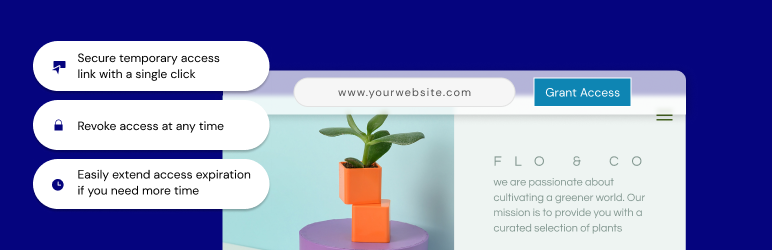
  • Grant access to your site with a single click; a temporary URL will be created that you can share for admin-level access to your site and it will automatically expire 7 days from creation.
  • Extend access – need more time? No problem. Just click to extend access so that users don’t get locked out.
  • All done? Revoke access and the link becomes inaccessible.
  • Auto disable access – whether you forget to revoke access or lose track of the timing, there’s no need to worry. We will automatically disable the access URL at the expiration, within 7 days.

CONTRIBUTION

Would you like to contribute to this plugin? You’re more than welcome to submit your pull requests on the GitHub repo. Also, if you have any notes about the code, please open a ticket on the issue tracker.

Installazione

  1. Install using the WordPress built-in Plugin installer, or Extract the zip file and drop the contents in the wp-content/plugins/ directory of your WordPress installation.
  2. Activate the plugin through the ‘Plugins’ menu in WordPress.
  3. Go to the Temporary Login tab within the Users menu.
  4. Click “Grant Access”, and you’re all set.

FAQ

Why do I need to use this plugin?

Temporary Login is a useful plugin that allows you to create an easy login option for temporary access to your website. If you need a support agent to help troubleshoot a problem or a colleague to make a simple change, just grant access and provide them with the URL. As soon as the work is done, you can disable access immediately.

Can I extend the access period?

Access can be extended up to 1 week from the original expiration date by simply clicking the ‘Extend Access’ button and confirming the action.

How secure is the URL?

The URL is very secure. In fact, it would be easier for a hacker to determine your username and password than to figure out the encryption we use here.

What if I forget to revoke access?

Not to worry. The URL is automatically disabled at the expiration time with no action needed on your part.

I deleted the plugin but forgot to revoke access first; what should I do?

Nothing! We disable the access as soon as you delete the plugin, so there’s nothing for you to worry about.

How can I report security bugs?

You can report security bugs through the Patchstack Vulnerability Disclosure Program. The Patchstack team help validate, triage and handle any security vulnerabilities. Report a security vulnerability.

Recensioni

Simply works

VisedFAQ 19 Aprile 2026
Very good and handy plugin, and also very simple. Saved me a lot of time and headache when I needed to give a temporary admin access to someone without creating a separate user account.

Worked Well. Pleased.

tdrock 24 Agosto 2025
I’m no programmer/developer so I had to have a few different things done recently by various different specialists. This was a safe and easy way to give them access to do what they needed to do without giving them my actual login info or the like. And afterwards when everything was completed I can just revoke the access to my site. Easy peasy.

Practical

ianstudio 22 Gennaio 2025
Very simple and practical

Does not work

eroma 17 Dicembre 2024
Could have been nice if it worked. When trying to create a temporary login, it just returns an empty screen.

It works well

cripoche56840 29 Maggio 2024
A nice plugin from a nice support team. Thanks ^^
Leggi tutte le recensioni di 5

Contributi e sviluppo

“Temporary Login” è un software open source. Le persone che hanno contribuito allo sviluppo di questo plugin sono indicate di seguito.

Collaboratori
  • Elementor

“Temporary Login” è stato tradotto in 6 lingue. Grazie a chi traduce per il contributo.

Traduci “Temporary Login” nella tua lingua.

Ti interessa lo sviluppo?

Esplora il codice segui il repository SVN, segui il log delle modifiche tramite RSS.

Changelog

1.3.0 – 2024-11-26

  • New: Added option to save content created by temporary user (Topic)
  • Tweak: Extend the default access time from 7 to 14 days

1.2.0 – 2024-05-30

  • Tweak: Added button to share temp login with Elementor support

1.1.0 – 2024-03-18

  • Tweak: Added site token to mitigate security risk

1.0.0 – 2024-03-12

  • Initial release

Meta

  • Versione 1.3.0
  • Ultimo aggiornamento 2 anni fa
  • Installazioni attive 40.000+
  • Versione WordPress 6.2 o superiore
  • Testato fino alla versione 6.7.5
  • Versione PHP 7.4 o superiore
  • Lingue

    Czech, Dutch, English (US), French (France), Hebrew, Turkish, e Vietnamese.

    Traduci nella tua lingua

  • Tag
    loginpasswordless logintemporary accesstemporary login
  • Visualizzazione avanzata

Valutazioni

4.2 su 5 stelle.
  • 4 recensioni a 5-stelle 5 stelle 4
  • 0 recensioni a 4-stelle 4 stelle 0
  • 0 recensioni a 3-stelle 3 stelle 0
  • 0 recensioni a 2-stelle 2 stelle 0
  • 1 1- recensioni a stelle 1 stella 1

Your review

Vedi tutte le recensioni

Collaboratori

  • Elementor

Supporto

Hai qualcosa da dire? Ti serve aiuto?

Chiedi nel forum di supporto

  • Chi siamo
  • News
  • Hosting
  • Privacy
  • Vetrina
  • Temi
  • Plugin
  • Pattern
  • Learn (Training)
  • Supporto
  • Sviluppo
  • WordPress.tv ↗
  • Partecipa
  • Eventi
  • Donazioni ↗
  • Five for the Future
  • WordPress.com ↗
  • Matt ↗
  • bbPress ↗
  • BuddyPress ↗
WordPress.org
WordPress.org

Italia

  • Visita il nostro account X (ex Twitter)
  • Visita il nostro account Bluesky
  • Visita il nostro account Mastodon
  • Visita il nostro account Threads
  • Visita la nostra pagina Facebook
  • Visita il nostro account Instagram
  • Visita il nostro account LinkedIn
  • Visita il nostro account TikTok
  • Visita il nostro canale YouTube
  • Visita il nostro account Tumblr
Code is Poetry.
The WordPress® trademark is the intellectual property of the WordPress Foundation.