
Descrizione
This plugin visualizes the evaluation of your post content based on the score of One Content Metric to Rule Them All.
This analyzes the latest 40 posts. After that, it analyzes once a day and automatically update the score.
Analyses are based on the following numbers as the score:
– Unique page views by Google Analytics
– Number of shares on Facebook
– Number of shares on Twitter
For any suggestions on the improvement of this plugin, send your pull requests github.
How to use
- Set up on
Settings > WP One Metric Setting - Push
Analyzebutton onDashboard WP One Metric
Translator(s)
- Japanese(ja) – Horike Takahiro
You can send your own language pack to me.
Please contact me.
- horike37@gmail.com
Contributor(s)
Screenshot

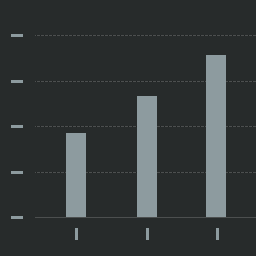
Vertical axis: evaluation indicator Horizontal axis: article 50 on the vertical axis is the indicator base for good or bad.
Installazione
- Upload
wp-one-metricto the/wp-content/plugins/directory. - Activate the plugin through the ‘Plugins’ menu in WordPress.
Recensioni
Non ci sono recensioni per questo plugin.
Contributi e sviluppo
“WP One Metric” è un software open source. Le persone che hanno contribuito allo sviluppo di questo plugin sono indicate di seguito.
Collaboratori

Traduci “WP One Metric” nella tua lingua.
Ti interessa lo sviluppo?
Esplora il codice segui il repository SVN, segui il log delle modifiche tramite RSS.
Changelog
1.0
- First release.
1.1
- Add function CSV Download.
1.1.1
- Bug fix
1.1.2
- Bug fix
1.2
- OAuth2 authorization available. ClientLogin is no longer available.