Risultati della ricerca per 'Wordpress theme code'
-
-
I’m using WordPress 6.8.2. After deleting the default plugins, I selected the Astra theme and installed the Starter Templates plugin. I then chose the options Classic Models > Elementor > Outdoor Adventure.
However, after completing the installation, I encountered an error in Dashboard > Home:
Fatal error: Uncaught ArgumentCountError: 4 arguments are required, 1 given in C:\xampp\htdocs\projects\project\wp-content\plugins\astra-sites\inc\classes\class-astra-sites.php:2669 Stack trace: #0 C:\xampp\htdocs\projects\project\wp-content\plugins\astra-sites\inc\classes\class-astra-sites.php(2669): sprintf('<div class="not...') #1 C:\xampp\htdocs\projects\project\wp-includes\class-wp-hook.php(324): Astra_Sites->admin_welcome_notices('') #2 C:\xampp\htdocs\projects\project\wp-includes\class-wp-hook.php(348): WP_Hook->apply_filters(NULL, Array) #3 C:\xampp\htdocs\projects\project\wp-includes\plugin.php(517): WP_Hook->do_action(Array) #4 C:\xampp\htdocs\projects\project\wp-admin\admin-header.php(313): do_action('admin_notices') #5 C:\xampp\htdocs\projects\project\wp-admin\index.php(137): require_once('C:\\xampp\\htdocs...') #6 {main} thrown in C:\xampp\htdocs\projects\project\wp-content\plugins\astra-sites\inc\classes\class-astra-sites.php on line 2669Where the path to my project is:
C:\xampp\htdocs\projects\projectIn the file:
C:\xampp\htdocs\projects\project\wp-content\plugins\astra-sites\inc\classes\class-astra-sites.php
at line 2669, I deleted thesprintf()function but kept the text inside it as plain text. This seems to resolve the issue, but I’m not sure if this is the correct or safe solution.
-
Salve a tutti.
Per la seconda volta nella mia vita, mi sto dilettando nello sviluppo di un sito web (sono una Graphic Designer). Sto usando WordPress + Elementor Free.
Avrei bisogno di 2 tipologie di articoli diversi ossia Notizie (userò il template di base dell’articolo) e “Predica” (creata con ACF -> Custom Post Type). In quest’ultimo caso, il design della pagina (da assemblare con Elementor) deve essere uguale per tutte le prediche.La scrittura di questa tipologia di articoli sarà gestita da persone che non hanno molta dimestichezza con questa tipologia di strumenti. Vorrei pertanto lasciare la scrittura e l’inserimento dei vari campi personalizzati quanto più semplice possibile, possibilmente attraverso l’interfaccia di scrittura dei contenuti propria di WordPress.
Quello che mi domando è questo: è possibile creare un template specifico per “predica” che venga caricato e applicato automaticamente all’articolo al momento della sua creazione-scrittura?
So che se avessi Elementor Pro, avrei potuto usare Display Conditions.
Che ho fatto
Ho fatto diverse ricerche online, anche chiedendo l’aiuto a ChatGpt, tuttavia a parere mio l’aiuto di un essere umano è insostituibile.
1) Ho creato sia un template attraverso WordPress che attraverso Royal Element Addons (mi sono resa conto successivamente che mettere la condizione per il CPT è a pagamento).2) ChatGpt mi ha guidato come di seguito:
- Siccome sto usando un tema child, mi ha fatto creare un file php nella cartella del tema child chiamato “single-predica.php” contenente le seguenti righe di codice:
<?php /* Template personalizzato per il Custom Post Type "Predica" */get_header(); // ID del template Elementor (sostituisci con il tuo ID)$template_id = 1672; // Se Elementor è attivo, carica il template personalizzatoif ( function_exists('elementor_theme_do_location') && elementor_theme_do_location('single') ) { // Elementor gestisce il template }elseif ( function_exists('elementor') ) { echo do_shortcode('[elementor-template id="' . $template_id . '"]'); } else { // Se Elementor non è attivo, mostra il contenuto classico if ( have_posts() ) : while ( have_posts() ) : the_post(); ?> <article> <h1><?php the_title(); ?></h1> <div class="content"> <?php the_content(); ?> </div> </article> <?php endwhile; endif; } get_footer(); ?- Nel file “functions.php” mi ha fatto aggiungere questo codice:
function override_predica_template($template) { if ( is_singular('predica') ) { return get_stylesheet_directory() . '/single-predica.php'; } return $template; } add_filter('single_template', 'override_predica_template');
La mia alternativa, macchinosa e non automatica, è caricare per ogni predica il template attraverso Elementor.
Mi appello dunque alla vostra esperienza. C’è un modo per farlo?
Spero di essere stata per tutto chiara.
Se ho detto delle fesserie, non biasimatemi.La pagina su cui ho bisogno di aiuto: [devi essere connesso per vedere il link]
-
Ciao,
sto riscontrando un problema con WooCommerce riguardo l’invio delle email e la configurazione del campo “Email mittente”. Ecco una descrizione dettagliata del problema e le azioni già intraprese:Problema:
- Le email generate da WooCommerce, come quelle per “Nuovo account cliente”, non vengono inviate. Tuttavia:
- Le email di test inviate tramite WP Mail SMTP funzionano correttamente.
- Altre email del sito (es. recupero password di WordPress) vengono inviate correttamente.
- Il campo “Email mittente” nelle impostazioni delle email di WooCommerce rimane sempre vuoto, anche dopo aver inserito un indirizzo valido e salvato. Ad ogni aggiornamento, il valore sparisce.
Azioni già intraprese:
- Reinstallazione di WooCommerce:
Ho disattivato ed eliminato il plugin, poi l’ho reinstallato. Il problema persiste. - Disattivazione di tutti i plugin:
Ho disattivato tutti i plugin tranne WooCommerce e WP Mail SMTP per escludere conflitti, ma non è cambiato nulla. - Cambio temporaneo di tema:
Ho testato con un tema predefinito di WordPress (Twenty Twenty-Two), ma il problema si presenta ugualmente. - Configurazione di WP Mail SMTP:
- Le email di test funzionano perfettamente.
- Ho verificato che il server SMTP sia configurato correttamente e funzioni.
- Log di WooCommerce:
Non ci sono errori evidenti nei log delle email o negli strumenti diagnostici forniti da WooCommerce.
Ulteriori Informazioni:
- Il sito usa la versione più recente di WordPress e WooCommerce.
- Ho provato anche a disabilitare temporaneamente la cache, senza risultati.
Vi chiedo gentilmente di aiutarmi a identificare la causa di questo problema. Può essere legato a:
- Una configurazione anomala nel database?
- Un bug del plugin?
- Un problema di compatibilità non rilevato?
Allego il report dello stato del sistema per aiutarvi nella diagnosi.
Grazie mille per l’aiuto!
Stato del Sistema
WordPress Environment<br><br>WordPress address (URL): https://www.anekecandles.com<br>Site address (URL): https://www.anekecandles.com<br>WC Version: 9.4.3<br>Legacy REST API Package Version: Il plugin API REST legacy non è installato in questo sito.<br>Action Scheduler Version: ✔ 3.8.2<br>Log Directory Writable: ✔<br>WP Version: 6.7.1<br>WP Multisite: –<br>WP Memory Limit: 1 GB<br>WP Debug Mode: –<br>WP Cron: ✔<br>Language: it_IT<br>External object cache: – Server Environment<br><br>Server Info: Apache<br>PHP Version: 8.0.30<br>PHP Post Max Size: 128 MB<br>PHP Time Limit: 900<br>PHP Max Input Vars: 3000<br>cURL Version: 7.68.0<br>OpenSSL/1.1.1f<br><br>SUHOSIN Installed: –<br>MySQL Version: 8.0.36-28<br>Max Upload Size: 128 MB<br>Default Timezone is UTC: ✔<br>fsockopen/cURL: ✔<br>SoapClient: Active Plugins (21)<br><br>Advanced Custom Fields: di WP Engine – 6.3.11<br>Akismet Anti-spam: Spam Protection: di Automattic – Squadra antispam – 5.3.5<br>Aruba HiSpeed Cache: di Aruba.it – 2.0.20<br>Backuply: di Softaculous – 1.4.1<br>Contact Form 7: di Takayuki Miyoshi – 6.0.1<br>Elementor Pro: di Elementor.com – 3.25.4<br>Elementor: di Elementor.com – 3.25.10<br>Essential Addons for Elementor: di WPDeveloper – 6.0.10<br>Flexible Checkout Fields: di WP Desk – 4.1.15<br>GetResponseOfficial: di GetResponse – 1.3.9<br>Ultimate Addons for Elementor Lite: di Brainstorm Force<br>Nikhil Chavan – 2.0.0<br><br>Health Check & Troubleshooting: di The WordPress.org community – 1.7.1<br>Jetpack: di Automattic – 14.0<br>Checkout Field Editor for WooCommerce: di ThemeHigh – 2.0.6<br>Widgets for WooCommerce Products on Elementor: di Themelocation – 2.0.4<br>WooCommerce: di Automattic – 9.4.3<br>ShopLentor – WooCommerce Builder for Elementor & Gutenberg: di HasThemes – 3.0.1<br>Yoast SEO: di Team Yoast – 23.9<br>WP Mail SMTP: di WP Mail SMTP – 4.3.0<br>WPForms Lite: di WPForms – 1.9.2.3<br>YayMail – WooCommerce Email Customizer: di YayCommerce – 3.5.7 Inactive Plugins (2)<br><br>Softaculous Pro: di Softaculous – 2.1.5<br>WP Login and Logout Redirect: di Aminur Islam – 3.0 Must Use Plugins (1)<br><br>Health Check Troubleshooting Mode: di – 1.9.2 Settings<br><br>Legacy API Enabled: –<br>Force SSL: –<br>Currency: EUR (€)<br>Currency Position: right_space<br>Thousand Separator: .<br>Decimal Separator: ,<br>Number of Decimals: 2<br>Taxonomies: Product Types: external (external)<br>grouped (grouped)<br>simple (simple)<br>variable (variable)<br><br>Taxonomies: Product Visibility: exclude-from-catalog (exclude-from-catalog)<br>exclude-from-search (exclude-from-search)<br>featured (featured)<br>outofstock (outofstock)<br>rated-1 (rated-1)<br>rated-2 (rated-2)<br>rated-3 (rated-3)<br>rated-4 (rated-4)<br>rated-5 (rated-5)<br><br>Connected to WooCommerce.com: –<br>Enforce Approved Product Download Directories: ✔<br>HPOS feature enabled: ✔<br>Order datastore: Automattic\WooCommerce\Internal\DataStores\Orders\OrdersTableDataStore<br>HPOS data sync enabled: – Logging<br><br>Enabled: ✔<br>Handler: Automattic\WooCommerce\Internal\Admin\Logging\LogHandlerFileV2<br>Retention period: 30 giorni<br>Level threshold: –<br>Log directory size: 553 KB WC Pages<br><br>Shop base: #79 – /negozio/<br>Carrello: #80 – /carrello/ – Contiene il blocco woocommerce/cart<br>Pagamento: ❌ La pagina non contiene lo shortcode [woocommerce_checkout] o il blocco woocommerce/checkout.<br>Il mio account: ❌ La pagina non contiene lo shortcode [woocommerce_my_account].<br>Termini e condizioni: ❌ La pagina non è impostata Theme<br><br>Name: Hello Elementor Child<br>Version: 2.0.0<br>Author URL: https://elementor.com/<br>Child Theme: ✔<br>Parent Theme Name: Hello Elementor<br>Parent Theme Version: 3.1.1 – 3.2.0 è disponibile<br>Parent Theme Author URL: https://elementor.com/?utm_source=wp-themes&utm_campaign=author-uri&utm_medium=wp-dash<br>WooCommerce Support: ✔ Templates<br><br>Overrides: – Admin<br><br>Enabled Features: activity-panels<br>analytics<br>product-block-editor<br>coupons<br>core-profiler<br>customize-store<br>customer-effort-score-tracks<br>import-products-task<br>experimental-fashion-sample-products<br>shipping-smart-defaults<br>shipping-setting-tour<br>homescreen<br>marketing<br>mobile-app-banner<br>navigation<br>onboarding<br>onboarding-tasks<br>pattern-toolkit-full-composability<br>product-custom-fields<br>remote-inbox-notifications<br>remote-free-extensions<br>payment-gateway-suggestions<br>printful<br>shipping-label-banner<br>subscriptions<br>store-alerts<br>transient-notices<br>woo-mobile-welcome<br>wc-pay-promotion<br>wc-pay-welcome-page<br>launch-your-store<br><br>Disabled Features: product-data-views<br>experimental-blocks<br>minified-js<br>product-pre-publish-modal<br>settings<br>async-product-editor-category-field<br>product-editor-template-system<br>blueprint<br>reactify-classic-payments-settings<br>use-wp-horizon<br><br>Daily Cron: ✔ Next scheduled: 2024-12-16 15:09:51 +00:00<br>Options: ✔<br>Notes: 64<br>Onboarding: completed Action Scheduler<br><br>Completato: 5.078<br>Oldest: 2024-11-21 15:10:01 +0000<br>Newest: 2024-12-16 10:12:33 +0000<br><br>Operazione non riuscita: 16<br>Oldest: 2024-11-21 15:15:52 +0000<br>Newest: 2024-12-15 22:05:04 +0000<br><br>In attesa: 7<br>Oldest: 2024-12-16 22:05:04 +0000<br>Newest: 2024-12-23 14:00:00 +0000 Status report information<br><br>Generated at: 2024-12-16 11:37:19 +00:00<br>
- Le email generate da WooCommerce, come quelle per “Nuovo account cliente”, non vengono inviate. Tuttavia:
-
Ho una versione staging del mio sito, dove sto testando la versione 6.7 di wp. Ricevo questi errori, qualcuno mi può aiutare?
Notice: Function _load_textdomain_just_in_time was called incorrectly. Translation loading for the
ultimate-memberdomain was triggered too early. This is usually an indicator for some code in the plugin or theme running too early. Translations should be loaded at theinitaction or later. Please see Debugging in WordPress for more information. (This message was added in version 6.7.0.) in /home/gialloec/staging.gialloecucina.com/wp-includes/functions.php on line 6114Notice: Function _load_textdomain_just_in_time was called incorrectly. Translation loading for the
um-recaptchadomain was triggered too early. This is usually an indicator for some code in the plugin or theme running too early. Translations should be loaded at theinitaction or later. Please see Debugging in WordPress for more information. (This message was added in version 6.7.0.) in /home/gialloec/staging.gialloecucina.com/wp-includes/functions.php on line 6114Notice: Function _load_textdomain_just_in_time was called incorrectly. Translation loading for the
um-terms-conditionsdomain was triggered too early. This is usually an indicator for some code in the plugin or theme running too early. Translations should be loaded at theinitaction or later. Please see Debugging in WordPress for more information. (This message was added in version 6.7.0.) in /home/gialloec/staging.gialloecucina.com/wp-includes/functions.php on line 6114Notice: Function _load_textdomain_just_in_time was called incorrectly. Translation loading for the
dynamic-visibility-for-elementordomain was triggered too early. This is usually an indicator for some code in the plugin or theme running too early. Translations should be loaded at theinitaction or later. Please see Debugging in WordPress for more information. (This message was added in version 6.7.0.) in /home/gialloec/staging.gialloecucina.com/wp-includes/functions.php on line 6114La pagina su cui ho bisogno di aiuto: [devi essere connesso per vedere il link]
-
Salve, da qualche tempo mi vengono notificati errori dal sito http://www.latteriamortaretta.it, per i quali non trovo poi riscontro: il sito non presenta anomalie a frontend nè funzionalità compromesse a backend. Il sito viene regolarmente aggiornato. Vorrei un vostro riscontro al riguardo, grazie.
Versione di WordPress 6.4.2
Tema attivo: Enfold Child (versione 1.0)
Versione PHP 8.1.27
Questi sono gli errori segnalati:
Un errore di E_ERROR è stato causato nella linea 2842 del file /var/www/vhosts/h476250.linp043.arubabusiness.it/latteriamortaretta.it/wp-content/themes/enfold/config-woocommerce/config.php. Messaggio di errore: Uncaught Error: Call to undefined function wc_get_notices() in /var/www/vhosts/h476250.linp043.arubabusiness.it/latteriamortaretta.it/wp-content/themes/enfold/config-woocommerce/config.php:2842

Stack trace:

#0 /var/www/vhosts/h476250.linp043.arubabusiness.it/latteriamortaretta.it/wp-includes/class-wp-hook.php(324): avia_woocommerce_cart_dropdown()

#1 /var/www/vhosts/h476250.linp043.arubabusiness.it/latteriamortaretta.it/wp-includes/class-wp-hook.php(348): WP_Hook->apply_filters()

#2 /var/www/vhosts/h476250.linp043.arubabusiness.it/latteriamortaretta.it/wp-includes/plugin.php(517): WP_Hook->do_action()

#3 /var/www/vhosts/h476250.linp043.arubabusiness.it/latteriamortaretta.it/wp-content/themes/enfold/includes/helper-main-menu.php(137): do_action()

#4 /var/www/vhosts/h476250.linp043.arubabusiness.it/latteriamortaretta.it/wp-includes/template.php(792): require('...')

#5 /var/www/vhosts/h476250.linp043.arubabusiness.it/latteriamortaretta.it/wp-includes/template.php(725): load_template()

#6 /var/www/vhosts/h476250.linp043.arubabusiness.it/latteriamortaretta.it/wp-includes/general-template.php(206): locate_template()

#7 /var/www/vhosts/h476250.linp043.arubabusiness.it/latteriamortaretta.it/wp-content/themes/enfold/header.php(275): get_template_part()

#8 /var/www/vhosts/h476250.linp043.arubabusiness.it/latteriamortaretta.it/wp-includes/template.php(790): require_once('...')

#9 /var/www/vhosts/h476250.linp043.arubabusiness.it/latteriamortaretta.it/wp-includes/template.php(725): load_template()

#10 /var/www/vhosts/h476250.linp043.arubabusiness.it/latteriamortaretta.it/wp-includes/general-template.php(48): locate_template()

#11 /var/www/vhosts/h476250.linp043.arubabusiness.it/latteriamortaretta.it/wp-content/themes/enfold/404.php(9): get_header()

#12 /var/www/vhosts/h476250.linp043.arubabusiness.it/latteriamortaretta.it/wp-includes/template.php(792): require('...')

#13 /var/www/vhosts/h476250.linp043.arubabusiness.it/latteriamortaretta.it/wp-includes/template.php(725): load_template()

#14 /var/www/vhosts/h476250.linp043.arubabusiness.it/latteriamortaretta.it/wp-includes/general-template.php(206): locate_template()

#15 /var/www/vhosts/h476250.linp043.arubabusiness.it/latteriamortaretta.it/wp-content/plugins/hide-login-page/libs/factory/templates/includes/class-helpers.php(79): get_template_part()

#16 /var/www/vhosts/h476250.linp043.arubabusiness.it/latteriamortaretta.it/wp-content/plugins/hide-login-page/includes/classes/class.configurate-hide-login-page.php(230): WBCR\Factory_Templates_126\Helpers::setError404()

#17 /var/www/vhosts/h476250.linp043.arubabusiness.it/latteriamortaretta.it/wp-content/plugins/hide-login-page/includes/classes/class.configurate-hide-login-page.php(155): WHLP_ConfigHideLoginPage->setAccessError()

#18 /var/www/vhosts/h476250.linp043.arubabusiness.it/latteriamortaretta.it/wp-includes/class-wp-hook.php(324): WHLP_ConfigHideLoginPage->wpLoaded()

#19 /var/www/vhosts/h476250.linp043.arubabusiness.it/latteriamortaretta.it/wp-includes/class-wp-hook.php(348): WP_Hook->apply_filters()

#20 /var/www/vhosts/h476250.linp043.arubabusiness.it/latteriamortaretta.it/wp-includes/plugin.php(517): WP_Hook->do_action()

#21 /var/www/vhosts/h476250.linp043.arubabusiness.it/latteriamortaretta.it/wp-settings.php(665): do_action()

#22 /var/www/vhosts/h476250.linp043.arubabusiness.it/latteriamortaretta.it/wp-config.php(80): require_once('...')

#23 /var/www/vhosts/h476250.linp043.arubabusiness.it/latteriamortaretta.it/wp-load.php(50): require_once('...')

#24 /var/www/vhosts/h476250.linp043.arubabusiness.it/latteriamortaretta.it/wp-admin/admin.php(34): require_once('...')

#25 /var/www/vhosts/h476250.linp043.arubabusiness.it/latteriamortaretta.it/wp-admin/users.php(11): require_once('...')

#26 {main}

  thrown
La pagina su cui ho bisogno di aiuto: [devi essere connesso per vedere il link]
-
Buongiorno a tutti
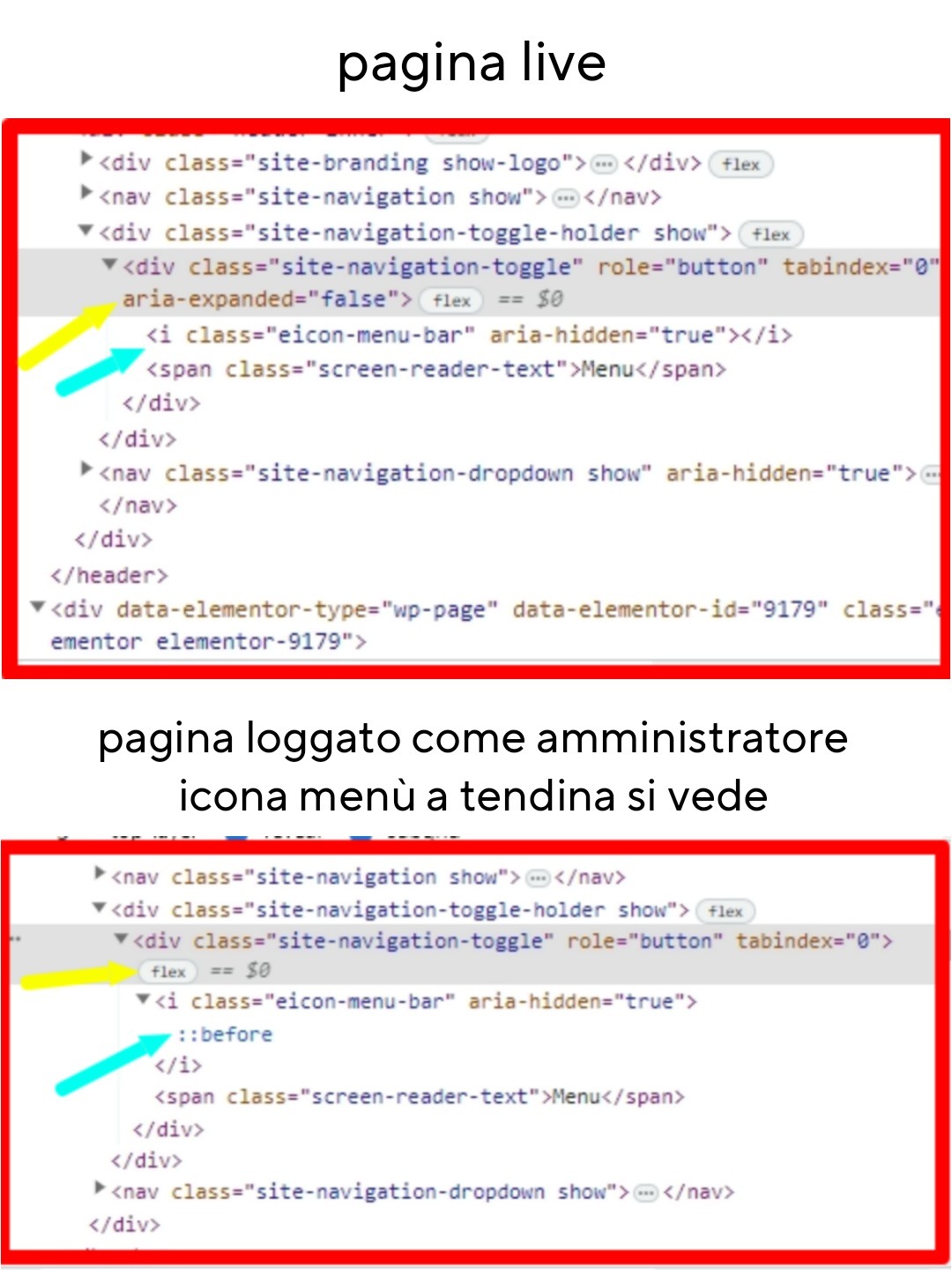
ho questo problema: l’icona del menù a tendina su mobile non viene visualizzata.
Questo capita solo sul sito “live”, se sono loggato in WordPress invece si vede. Il menù funziona, se vado sul punto esatto e clicco il menù si apre, ma chiaramente se qualcuno non lo sa è come se non ci fossa.
Ho provato a ispezionare con Chrome e ho riscontrato alcune differenze tra loggato e live nel punto dell’icona menù.
Lasciò il link con le differenze riscontrate.
Incollo anche le informazioni di sistema ricavate da Elementor. Utilizzo il tema Hello Elementor.
Grazie e buona giornata.https://psicologoautorevole.it/wp-content/uploads/2023/09/differenze-menu.jpg
Informazioni di sistema:
== Server Environment ==
Operating System: Linux
Software: Apache
MySQL version: Source distribution v5.7.39-42
PHP Version: 7.4.33
PHP Memory Limit: 768M
PHP Max Input Vars: 3000
PHP Max Post Size: 256M
GD Installed: Yes
ZIP Installed: Yes
Write Permissions: All right
Elementor Library: Connected== Theme ==
Name: Hello Elementor
Version: 2.8.1
Author: Elementor Team
Child Theme: No== Active Plugins ==
Elementor
Version: 3.16.3
Author: Elementor.comGTM4WP Version: 1.18.1 Author: Thomas Geiger iubenda | All-in-one Compliance for GDPR / CCPA Cookie Consent + more Version: 3.7.5 Author: iubenda Newsletter, SMTP, Email marketing and Subscribe forms by Brevo Version: 3.1.70 Author: Brevo SiteGround Central Version: 3.0.1 Author: SiteGround SiteGround Optimizer Version: 7.4.1 Author: SiteGround SiteGround Security Version: 1.4.5 Author: SiteGround Social Chat Version: 7.1.5 Author: QuadLayers Stop Spammers Version: 2023.4.1 Author: Trumani Xpro Elementor Addons Version: 1.3.8 Author: Xpro Yoast SEO Version: 21.1 Author: Team Yoast== Registro ==
JS: showing 11 of 11JS: 2023-08-21 15:31:07 [error X 155][https://psicologoautorevole.it/wp-content/plugins/elementor/assets/lib/pickr/pickr.min.js?ver=1.5.0:2:14799] Cannot read properties of null (reading ‘clone’)
JS: 2023-08-21 15:31:09 [error X 5][https://psicologoautorevole.it/wp-content/plugins/elementor/assets/lib/pickr/pickr.min.js?ver=1.5.0:2:19552] Cannot read properties of null (reading ‘changestop’)
JS: 2023-08-23 12:29:54 [error X 11][https://psicologoautorevole.it/wp-content/plugins/elementor/assets/js/editor.min.js?ver=3.15.3:3:917217] elementorFrontend is not defined
JS: 2023-08-30 08:44:09 [error X 6][https://psicologoautorevole.it/wp-includes/js/jquery/jquery.min.js?ver=3.7.0:2:28722] elementor_new_template_form_controls is not defined
JS: 2023-08-31 13:32:10 [error X 1][https://psicologoautorevole.it/wp-content/plugins/xpro-elementor-addons/assets/js/xpro-widgets.js?ver=1.3.8:1:21513] Cannot read properties of undefined (reading ‘size’)
JS: 2023-09-01 12:20:34 [error X 19][https://psicologoautorevole.it/wp-content/plugins/elementor/assets/js/frontend-modules.min.js?ver=3.15.3:2:12920] Cannot read properties of undefined (reading ‘attributes’)
JS: 2023-09-01 12:22:30 [error X 1][https://psicologoautorevole.it/wp-content/plugins/elementor/assets/js/editor.min.js?ver=3.15.3:3:642692] Cannot read properties of undefined (reading ‘isDesignable’)
JS: 2023-09-01 15:23:24 [error X 1][https://psicologoautorevole.it/wp-content/plugins/elementor/assets/js/editor.min.js?ver=3.15.3:3:670813] elementorFrontend.elements.window.jQuery is not a function
JS: 2023-09-10 23:47:55 [error X 3][https://psicologoautorevole.it/wp-content/plugins/elementor/assets/js/editor.min.js?ver=3.15.3:3:838767] Cannot convert undefined or null to object
JS: 2023-09-12 08:17:47 [error X 1][https://psicologoautorevole.it/wp-content/plugins/elementor/assets/js/responsive-bar.min.js?ver=3.15.3:2:5951] Cannot read properties of null (reading ‘config’)
JS: 2023-09-15 10:44:00 [error X 2][https://psicologoautorevole.it/wp-includes/js/jquery/jquery.min.js?ver=3.7.0:2:28722] Cannot read properties of undefined (reading ‘value’)== Elementor – Compatibility Tag ==
Xpro Elementor Addons: Compatibilità non specificata
-
Come posso far apparire il footer? Ho già un file footer.php che contiene il seguente:
<?php
/**
 * The template for displaying the footer
 *
 * Contains the closing of the #content div and all content after.
 *
 * @link https://developer.wordpress.org/themes/basics/template-files/#template-partials
 *
 * @package sacconicase
 */

?>

	<footer id="colophon" class="site-footer">
		<div class="site-info">
			<a href="<?php echo esc_url( __( 'https://wordpress.org/', 'sacconicase' ) ); ?>">
				<?php
				/* translators: %s: CMS name, i.e. WordPress. */
				printf( esc_html__( 'Proudly powered by %s', 'sacconicase' ), 'WordPress' );
				?>
			</a>
			<span class="sep"> | </span>
				<?php
				/* translators: 1: Theme name, 2: Theme author. */
				printf( esc_html__( 'Theme: %1$s by %2$s.', 'sacconicase' ), 'sacconicase', '<a href="http://underscores.me/">Underscores.me</a>' );
				?>
		</div><!-- .site-info -->
	</footer><!-- #colophon -->
</div><!-- #page -->

<?php wp_footer(); ?>

</body>
</html>
Il mio tema di partenza è underscores
La pagina su cui ho bisogno di aiuto: [devi essere connesso per vedere il link]
-
Salve,
ho un problema di aggiornamento che non riesco a risolvere.
Sto cercando di aggiornare una inztallazione multisito portando la versione 5.8.6 a 6.1.1 ….. Spero che possiate mettermi sulla buona strada
——————————-
Premetto che nel server ho altre installazioni e che ho appena portato a buon fine un’altro aggiornamento di un wirdpress multisito dalla 5.8 alla 6,1,1La versione del php è la 8.0
tutti i plugin del network sono aggiornati e (pensando a possibili conflitti) li ho disattivati
—————————————
Quando provo ad aggiornare, questo è il risultato:Download dell'aggiornamento da https://downloads.wordpress.org/release/it_IT/wordpress-6.1.1.zip… L'autenticità di wordpress-6.1.1.zip non può essere verificata dato che non è stata trovata alcuna firma. Estrazione dell’aggiornamento in corso… Verifica dei file estratti in corso… Preparazione all’installazione dell'ultima versione in corso… The update cannot be installed because your site is unable to copy some files. This is usually due to inconsistent file permissions.: wp-admin/options-reading.php, wp-admin/edit-tags.php, wp-admin/link-manager.php, wp-admin/options-writing.php, wp-admin/widgets-form-blocks.php, wp-admin/my-sites.php, wp-admin/async-upload.php, wp-admin/link.php, wp-admin/privacy.php, wp-admin/options-general.php, wp-admin/comment.php, wp-admin/theme-editor.php, wp-admin/admin-ajax.php, wp-admin/update.php, wp-admin/install.php, wp-admin/erase-personal-data.php, wp-admin/plugin-editor.php, wp-admin/nav-menus.php, wp-admin/customize.php, wp-admin/update-core.php, wp-admin/options-permalink.php, wp-admin/site-health-info.php, wp-admin/freedoms.php, wp-admin/user-new.php, wp-admin/menu-header.php, wp-admin/index.php, wp-admin/link-add.php, wp-admin/plugins.php, wp-admin/post.php, wp-admin/themes.php, wp-admin/edit-comments.php, wp-admin/term.php, wp-admin/media.php, wp-admin/revision.php, wp-admin/admin.php, wp-admin/upload.php, wp-admin/edit-form-advanced.php, wp-admin/options.php, wp-admin/privacy-policy-guide.php, wp-admin/tools.php, wp-admin/import.php, wp-admin/widgets.php, wp-admin/options-media.php, wp-admin/edit-link-form.php, wp-admin/about.php, wp-admin/admin-post.php, wp-admin/theme-install.php, wp-admin/options-discussion.php, wp-admin/install-helper.php, wp-admin/site-health.php, wp-admin/edit-form-comment.php, wp-admin/authorize-application.php, wp-admin/export.php, wp-admin/load-scripts.php, wp-admin/load-styles.php, wp-admin/export-personal-data.php, wp-admin/admin-header.php, wp-admin/options-privacy.php Installazione fallita.—————–
Ho controllato i permessi ma mi sembrano tutti a posto (del resto gli aggiornamenti hanno sempre funzionato da dieci anni)La pagina su cui ho bisogno di aiuto: [devi essere connesso per vedere il link]
-