Risultati della ricerca per 'Wordpress not https'
-
Forum: Fixing WordPress
In risposta a: sito simileSalve @easyover,
la domanda è molto generica, servizi di prenotazione online sono il risultato di diversi elementi, una combinazione può essere WP + Tema + WooCommerce.
consiglio di iniziare a cercare nel repository ufficiale https://wordpress.org/themes/
Forum: Fixing WordPress
In risposta a: Aiuto gestione sitograzie mille !!! sistemato !!!
ora rimane il problema con l’aggiornamento.
Mi richiedono come anticipato i dati FTP per poter fare degli aggiornamenti , pur inserendoli mi compare quanto segue :
Download aggiornamento da https://downloads.wordpress.org/release/it_IT/wordpress-4.4.2.zip…
Estrazione dell’aggiornamento…
Impossibile creare la directory.
Installazione non riuscita
ho ricontrollato di dati sul mio dominio (shellrent) e sono esatti…dove sbaglio ?
l’aggiornamento manuale da sola non riesco a farlo.inoltre, per quanto riguarda il back up ho scaricato un plugin, inizialmente facevo il back up e lo ricevevo via mail, ora compare questa schermata: Backup Database
Your backup folder is NOT writable
To correct this issue, make the folder /home/web/www.viaggiandosimpara.net/www/wp-content/backup-db writable.
Click here to let WP-DBManager try to fix it
This theme recommends the following plugin: Redux Framework.
Begin installing plugin | Dismiss this notice
Nascondi questa notifica.
Checking Security Status.htaccess is present in /home/web/www.viaggiandosimpara.net/www/wp-content/backup-db
index.php is present in /home/web/www.viaggiandosimpara.net/www/wp-content/backup-db
Checking Backup Status
Checking Backup Folder (/home/web/www.viaggiandosimpara.net/www/wp-content/backup-db) …
Backup folder existsBackup folder is NOT writable. Please CHMOD it to ‘777’.
Checking MYSQL Dump Path …
MYSQL dump path does NOT exist. Please check your mysqldump path under DB Options. If uncertain, contact your server administrator.
Checking MYSQL Path …
MYSQL path does NOT exist. Please check your mysql path under DB Options. If uncertain, contact your server administrator.
Checking PHP Functions (passthru(), system() and exec()) …
passthru() enabled.system() enabled.
exec() enabled.
Please Rectify The Error Highlighted In Red Before Proceeding On.
Note: The checking of backup status is still undergoing testing, it may not be accurate.
Backup Database
Option Value
Database Name: viaggiandosimpar_wordpress
Database Backup To: /home/web/www.viaggiandosimpara.net/www/wp-content/backup-db
Database Backup Date: 7 febbraio 2016 @ 18:43
Database Backup File Name: 1454870594_-_viaggiandosimpar_wordpress.sql
Database Backup Type: Full (Structure and Data)
MYSQL Dump Location: /usr/bin/mysqldump
GZIP Database Backup File? Yes No… ho qualche speranza di venirne fuori in qualche modo ???
grazie
ericaForum: Funzionalità = Plugin
In risposta a: Plugin per prenotazioneSalve @anna_web,
qui ci sono un elenco di plugin per gestire prenotazioni in WP:
Forum: Varie ed eventuali
In risposta a: Fatal errorSalve @gloria-luison,
è risolvibile facendo per prima cosa un BACKUP e successivamente re-installandolo manualmente, come è successo in questa occasione https://wordpress.org/support/topic/fatal-error-class-wp_roles-not-found-in-wp-settingsphp-on-line-260?replies=2
-
Questa risposta è stata modificata 10 anni, 2 mesi fa da
Cristiano Zanca.
Forum: Aspetto = Temi
Come il topic: Implementazione Slider in un Tema-
Le linee guida di WordPress non sono chiare sulla corretta implementazione di una home slider in un tema. Nel mio tema voglio che l’utente possa scegliere se abilitare una slider nella pagina iniziale. Quello che ho fatto è aggiungere il codice seguente nel file index.php
<?php if (get_theme_mod('texdomain_home_slider', 0) == 1 && is_front_page() && !is_paged()) {
		get_template_part( 'inc/home-slider' );
	}
?>
Leggendo i vari ticket di temi in revisione ho scoperto che tale implementazione non è corretta per il seguente motivo:
Slider / Services
These should not be shown when is_home() is true. Check is_front_page() && ! is_home().
The posts page (is_home()) is for only showing the blog posts index. Custom stuff should not be shown there.Potete verificare al seguente ticket:
https://themes.trac.wordpress.org/ticket/27810La mia domanda è, perché alcuni temi approvati e famosi non rispettano tale condizione?
Ecco alcuni esempi dove la slider viene chiamata anche quanto is_home() è true:
https://themes.svn.wordpress.org/dazzling/2.0.1/header.php (alla fine)
https://themes.svn.wordpress.org/dynamic-news-lite/1.3.2/index.phpMa sopratutto, come devo implementare la slider? Devo creare per forza un template a parte?
Forum: Varie ed eventuali
In risposta a: Wp memory limit Aumento della memoriaSalve @fausto1979,
un consiglio: prima di fare qualunque modifica, fare sempre una copia di backup del file modificato (wp-config.php in questo caso).
Perdonami ma se sono richiesti 256MB perché sono stati aggiunti 128MB?
si potrebbe provare a scrivere questo in wp-config.php:
define( ‘WP_MEMORY_LIMIT’, ‘256M’ );
“Questa impostazione non può funzionare se il tuo hosting non consente di aumentare il limite di memoria PHP – in tal caso sarebbe necessario contattare il tuo provider per aumentare il limite di memoria PHP. Si noti inoltre che molti hosting impostano il limite di PHP a 8MB.”
preso dalla documentazione ufficiale https://codex.wordpress.org/Editing_wp-config.php
Forum: Aspetto = Temi
In risposta a: [SOLVED] Personalizzazione: Titolo e motto sito che rimane!Salve,
ho testato il tema e confermo il malfunzionamento, consiglio di fare un child theme e nel tema child fare le modifiche al css, nella sezione che riguarda il titolo e il motto:
<h1 class="site-title" style="clip: auto; position: relative;">
<a rel="home" href="http://local.wordpress.dev/">Local WordPress Dev</a>
</h1>
<h2 class="site-description" style="clip: auto; position: relative;">Just another WordPress site</h2>
si possono “spegnere” le classi “site-title” e “site-description” mettendo
display: none;Forum: Fixing WordPress
In risposta a: Errore RSS: WP HTTP ErrorSalve sivlia Web 15,
potrebbe dipendere sai settaggi locali di Apache, qui https://wordpress.org/support/topic/wp-version-41-rc-does-not-fetch-any-aws-data-from-amazon-why?replies=27 c’è un esempio già affrontato e risolto
Forum: Aspetto = Temi
In risposta a: Tema PointScusa catra,
hai ragione , dovrebbe essere questo https://wordpress.org/themes/point/Non mi è chiara la situazione: i primi quattro articoli sono primi secondo quale parametro?
Le ultime notizie e i primi quattro sono tutti nella home page?
-
Questa risposta è stata modificata 10 anni, 4 mesi fa da
Forum: Fixing WordPress
In risposta a: Errore di accesso al sitoSeguendo le sue indicazioni, ho trovato il file, di cui riporto il contenuto:
<?php
/**
* Dashboard Administration Screen
*
* @package WordPress
* @subpackage Administration
*//** Load WordPress Bootstrap */
require_once( dirname( __FILE__ ) . ‘/admin.php’ );/** Load WordPress dashboard API */
require_once(ABSPATH . ‘wp-admin/includes/dashboard.php’);wp_dashboard_setup();
wp_enqueue_script( ‘dashboard’ );
if ( current_user_can( ‘edit_theme_options’ ) )
wp_enqueue_script( ‘customize-loader’ );
if ( current_user_can( ‘install_plugins’ ) )
wp_enqueue_script( ‘plugin-install’ );
if ( current_user_can( ‘upload_files’ ) )
wp_enqueue_script( ‘media-upload’ );
add_thickbox();if ( wp_is_mobile() )
wp_enqueue_script( ‘jquery-touch-punch’ );$title = __(‘Dashboard’);
$parent_file = ‘index.php’;$help = ‘<p>’ . __( ‘Welcome to your WordPress Dashboard! This is the screen you will see when you log in to your site, and gives you access to all the site management features of WordPress. You can get help for any screen by clicking the Help tab in the upper corner.’ ) . ‘</p>’;
// Not using chaining here, so as to be parseable by PHP4.
$screen = get_current_screen();$screen->add_help_tab( array(
‘id’ => ‘overview’,
‘title’ => __( ‘Overview’ ),
‘content’ => $help,
) );// Help tabs
$help = ‘<p>’ . __( ‘The left-hand navigation menu provides links to all of the WordPress administration screens, with submenu items displayed on hover. You can minimize this menu to a narrow icon strip by clicking on the Collapse Menu arrow at the bottom.’ ) . ‘</p>’;
$help .= ‘<p>’ . __( ‘Links in the Toolbar at the top of the screen connect your dashboard and the front end of your site, and provide access to your profile and helpful WordPress information.’ ) . ‘</p>’;$screen->add_help_tab( array(
‘id’ => ‘help-navigation’,
‘title’ => __( ‘Navigation’ ),
‘content’ => $help,
) );$help = ‘<p>’ . __( ‘You can use the following controls to arrange your Dashboard screen to suit your workflow. This is true on most other administration screens as well.’ ) . ‘</p>’;
$help .= ‘<p>’ . __( ‘Screen Options – Use the Screen Options tab to choose which Dashboard boxes to show.’ ) . ‘</p>’;
$help .= ‘<p>’ . __( ‘Drag and Drop – To rearrange the boxes, drag and drop by clicking on the title bar of the selected box and releasing when you see a gray dotted-line rectangle appear in the location you want to place the box.’ ) . ‘</p>’;
$help .= ‘<p>’ . __( ‘Box Controls – Click the title bar of the box to expand or collapse it. Some boxes added by plugins may have configurable content, and will show a “Configure” link in the title bar if you hover over it.’ ) . ‘</p>’;$screen->add_help_tab( array(
‘id’ => ‘help-layout’,
‘title’ => __( ‘Layout’ ),
‘content’ => $help,
) );$help = ‘<p>’ . __( ‘The boxes on your Dashboard screen are:’ ) . ‘</p>’;
if ( current_user_can( ‘edit_posts’ ) )
$help .= ‘<p>’ . __( ‘At A Glance – Displays a summary of the content on your site and identifies which theme and version of WordPress you are using.’ ) . ‘</p>’;
$help .= ‘<p>’ . __( ‘Activity – Shows the upcoming scheduled posts, recently published posts, and the most recent comments on your posts and allows you to moderate them.’ ) . ‘</p>’;
if ( is_blog_admin() && current_user_can( ‘edit_posts’ ) )
$help .= ‘<p>’ . __( “Quick Draft – Allows you to create a new post and save it as a draft. Also displays links to the 5 most recent draft posts you’ve started.” ) . ‘</p>’;
if ( ! is_multisite() && current_user_can( ‘install_plugins’ ) )
$help .= ‘<p>’ . __( ‘WordPress News – Latest news from the official WordPress project, the WordPress Planet, and popular and recent plugins.’ ) . ‘</p>’;
else
$help .= ‘<p>’ . __( ‘WordPress News – Latest news from the official WordPress project, the WordPress Planet.’ ) . ‘</p>’;
if ( current_user_can( ‘edit_theme_options’ ) )
$help .= ‘<p>’ . __( ‘Welcome – Shows links for some of the most common tasks when setting up a new site.’ ) . ‘</p>’;$screen->add_help_tab( array(
‘id’ => ‘help-content’,
‘title’ => __( ‘Content’ ),
‘content’ => $help,
) );unset( $help );
$screen->set_help_sidebar(
‘<p>‘ . __( ‘For more information:’ ) . ‘</p>’ .
‘<p>’ . __( ‘Documentation on Dashboard‘ ) . ‘</p>’ .
‘<p>’ . __( ‘Support Forums‘ ) . ‘</p>’
);include( ABSPATH . ‘wp-admin/admin-header.php’ );
?><div class=”wrap”>
<h1><?php echo esc_html( $title ); ?></h1><?php if ( has_action( ‘welcome_panel’ ) && current_user_can( ‘edit_theme_options’ ) ) :
$classes = ‘welcome-panel’;$option = get_user_meta( get_current_user_id(), ‘show_welcome_panel’, true );
// 0 = hide, 1 = toggled to show or single site creator, 2 = multisite site owner
$hide = 0 == $option || ( 2 == $option && wp_get_current_user()->user_email != get_option( ‘admin_email’ ) );
if ( $hide )
$classes .= ‘ hidden’; ?><div id=”welcome-panel” class=”<?php echo esc_attr( $classes ); ?>”>
<?php wp_nonce_field( ‘welcome-panel-nonce’, ‘welcomepanelnonce’, false ); ?>
“><?php _e( ‘Dismiss’ ); ?>
<?php
/**
* Add content to the welcome panel on the admin dashboard.
*
* To remove the default welcome panel, use {@see remove_action()}:
*
* remove_action( ‘welcome_panel’, ‘wp_welcome_panel’ );
*
* @since 3.5.0
*/
do_action( ‘welcome_panel’ );
?>
</div>
<?php endif; ?><div id=”dashboard-widgets-wrap”>
<?php wp_dashboard(); ?>
</div><!– dashboard-widgets-wrap –></div><!– wrap –>
<?php
require( ABSPATH . ‘wp-admin/admin-footer.php’ );Forum: Funzionalità = Plugin
In risposta a: Notifica commentiScusami, ma avevo inteso male la domanda: per caso tu ti riferisci a qualcosa del genere?
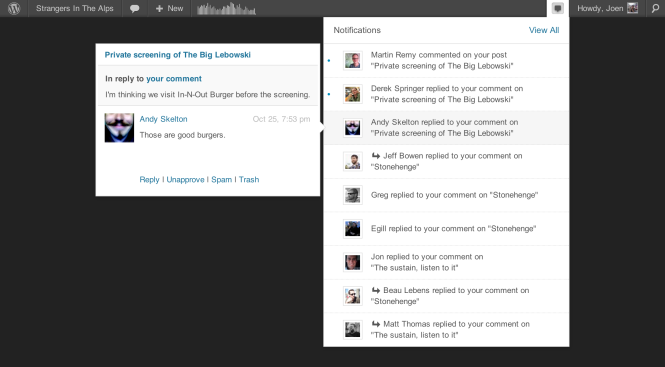 Forum: Fixing WordPress
In risposta a: [SOLVED] Errore caricamento CSS e JS: la path è diventata HTTPSCiao medariox, ho lasciato il sito verso le 15 che funzionava perfettamente, un paio d’ore dopo mi è stato fatto notare il problema dal cliente.
Ho ricevuto la notifica dell’aggiornamento di WP ma non ho aggiornato (non lo faccio quasi mai subito a meno che non si tratti si installazioni molto semplici), però vedo sul forum internazionale che altri hanno avuto lo stesso problema proprio oggi… può la sola notifica dell’aggiornamento WP causare disfunzioni?
https://wordpress.org/support/topic/css-and-js-using-https?replies=4 per esempio, ma leggo di altri a cui non carica immagini, slide, ecc.
-
Questa risposta è stata modificata 10 anni, 2 mesi fa da


