Risultati della ricerca per 'Icon wordpress plugin'
-
-
[ Risoluzione dei problemi | Segnala un Bug ]
Hai aggiornato WordPress 6.9 “Gene”! ottimo! Ma, che succede? Qualcosa non funziona o hai avuto un errore critico? O forse hai semplicemente delle domande da porre? Questo articolo ti aiuterà a risolvere i problemi e le domande più comuni dopo il nuovo aggiornamento.
Se hai avuto un errore critico o qualcosa si è rotto: niente panico!
Prima di proseguire, assicurati di aver aggiornato i plugin e i temi alle versioni più recenti e che questi siano compatibili con la nuova versione, di aver cancellato la cache e i cookie del browser e di aver effettuato nuovamente l’accesso alla dashboard di WordPress. Se non riesci ad accedere alla tua are di amministrazione, controlla la tua email (quella che hai impostato come email amministratore nel sito). In caso di errore critico, la tua installazione WordPress ti manda una email automatica con le specifiche dell’errore e un link per entrare nell’area di amministrazione (recovery link).
Il problema persiste?
Prova a capire quale componente causa il problema. Qui trovi una guida alla risoluzione del problema (in inglese). Inoltre, cerca nel forum di WordPress qui (in italiano), o in quello internazionale se ci sono conflitti o problemi conosciuti con questa versione. Tieni presente che la lista dei problemi è sempre in aggiornamento, quindi ricontrolla più volte.
Se non ti piace la direzione del design di WordPress, ci spiace, però questo non è un bug.
Quindi, se non ti piace una funzione, non aprire un ticket per lamentartene. Piuttosto, cerca di vedere se qualcuno ha già proposto una modifica, e commenta lì. Inoltre, puoi considerare la possibilità di unirti al processo di rilascio della prossima versione (ad esempio in Beta o anche in test tramite SVN). Quello che vedi oggi è il risultato di migliaia di ore di lavoro e di test e, a meno che qualcosa non sia completamente rotto, è altamente improbabile che venga modificato.
In ogni caso, prima di aprire un ticket relativo al nuovo aggiornamento:
- Assicurati di aver letto l’intera discussione e l’articolo sulle nuove funzionalità della 6.9.
- Vai alla pagina informativa della tua installazione –
example.com/wp-admin/about.php(o fai clic sul logo di WordPress nell’angolo in alto a sinistra nell’area di amministrazione) – per vedere le novità. - Prova a diagnosticare il problema ripercorrendo i passaggi comuni per la risoluzione dei problemi.
Note
- Se hai tentato di utilizzare un database aggiornato alla versione 6.9 su una versione precedente, ogni persona che ha effettuato l’accesso dovrà reimpostare la propria password.
- Il link “Modifica sito” nella barra di amministrazione ora rimanda coerentemente alla schermata principale dell’editor del sito anziché al modello che si stava utilizzando.
Se hai ancora problemi dopo aver seguito le fasi di risoluzione dei problemi, allora apri un ticket qui nel forum di supporto e cercheremo di aiutarti al meglio!
(post originale, liberamente tradotto dal Team Support su base precedente di Laura Sacco)
-
Quando provo ad accedere al mio sito web mi da il seguente errore:
/** * WordPress environment setup class. * * @package WordPress * @since 2.0.0 */ #[AllowDynamicProperties] class WP { /** * Public query variables. * * Long list of public query variables. * * @since 2.0.0 * @var string[] */ public $public_query_vars = array( ‘m’, ‘p’, ‘posts’, ‘w’, ‘cat’, ‘withcomments’, ‘withoutcomments’, ‘s’, ‘search’, ‘exact’, ‘sentence’, ‘calendar’, ‘page’, ‘paged’, ‘more’, ‘tb’, ‘pb’, ‘author’, ‘order’, ‘orderby’, ‘year’, ‘monthnum’, ‘day’, ‘hour’, ‘minute’, ‘second’, ‘name’, ‘category_name’, ‘tag’, ‘feed’, ‘author_name’, ‘pagename’, ‘page_id’, ‘error’, ‘attachment’, ‘attachment_id’, ‘subpost’, ‘subpost_id’, ‘preview’, ‘robots’, ‘favicon’, ‘taxonomy’, ‘term’, ‘cpage’, ‘post_type’, ‘embed’ ); /** * Private query variables. * * Long list of private query variables. * * @since 2.0.0 * @var string[] */ public $private_query_vars = array( ‘offset’, ‘posts_per_page’, ‘posts_per_archive_page’, ‘showposts’, ‘nopaging’, ‘post_type’, ‘post_status’, ‘category__in’, ‘category__not_in’, ‘category__and’, ‘tag__in’, ‘tag__not_in’, ‘tag__and’, ‘tag_slug__in’, ‘tag_slug__and’, ‘tag_id’, ‘post_mime_type’, ‘perm’, ‘comments_per_page’, ‘post__in’, ‘post__not_in’, ‘post_parent’, ‘post_parent__in’, ‘post_parent__not_in’, ‘title’, ‘fields’ ); /** * Extra query variables set by the user. * * @since 2.1.0 * @var array */ public $extra_query_vars = array(); /** * Query variables for setting up the WordPress Query Loop. * * @since 2.0.0 * @var array */ public $query_vars = array(); /** * String parsed to set the query variables. * * @since 2.0.0 * @var string */ public $query_string = ”; /** * The request path, e.g. 2015/05/06. * * @since 2.0.0 * @var string */ public $request = ”; /** * Rewrite rule the request matched. * * @since 2.0.0 * @var string */ public $matched_rule = ”; /** * Rewrite query the request matched. * * @since 2.0.0 * @var string */ public $matched_query = ”; /** * Whether already did the permalink. * * @since 2.0.0 * @var bool */ public $did_permalink = false; /** * Adds a query variable to the list of public query variables. * * @since 2.1.0 * * @param string $qv Query variable name. */ public function add_query_var( $qv ) { if ( ! in_array( $qv, $this->public_query_vars, true ) ) { $this->public_query_vars[] = $qv; } } /** * Removes a query variable from a list of public query variables. * * @since 4.5.0 * * @param string $name Query variable name. */ public function remove_query_var( $name ) { $this->public_query_vars = array_diff( $this->public_query_vars, array( $name ) ); } /** * Sets the value of a query variable. * * @since 2.3.0 * * @param string $key Query variable name. * @param mixed $value Query variable value. */ public function set_query_var( $key, $value ) { $this->query_vars[ $key ] = $value; } /** * Parses the request to find the correct WordPress query. * * Sets up the query variables based on the request. There are also many * filters and actions that can be used to further manipulate the result. * * @since 2.0.0 * @since 6.0.0 A return value was added. * * @global WP_Rewrite $wp_rewrite WordPress rewrite component. * * @param array|string $extra_query_vars Set the extra query variables. * @return bool Whether the request was parsed. */ public function parse_request( $extra_query_vars = ” ) { global $wp_rewrite; /** * Filters whether to parse the request. * * @since 3.5.0 * * @param bool $bool Whether or not to parse the request. Default true. * @param WP $wp Current WordPress environment instance. * @param array|string $extra_query_vars Extra passed query variables. */ if ( ! apply_filters( ‘do_parse_request’, true, $this, $extra_query_vars ) ) { return false; } $this->query_vars = array(); $post_type_query_vars = array(); if ( is_array( $extra_query_vars ) ) { $this->extra_query_vars = & $extra_query_vars; } elseif ( ! empty( $extra_query_vars ) ) { parse_str( $extra_query_vars, $this->extra_query_vars ); } // Process PATH_INFO, REQUEST_URI, and 404 for permalinks. // Fetch the rewrite rules. $rewrite = $wp_rewrite->wp_rewrite_rules(); if ( ! empty( $rewrite ) ) { // If we match a rewrite rule, this will be cleared. $error = ‘404’; $this->did_permalink = true; $pathinfo = isset( $_SERVER[‘PATH_INFO’] ) ? $_SERVER[‘PATH_INFO’] : ”; list( $pathinfo ) = explode( ‘?’, $pathinfo ); $pathinfo = str_replace( ‘%’, ‘%25’, $pathinfo ); list( $req_uri ) = explode( ‘?’, $_SERVER[‘REQUEST_URI’] ); $self = $_SERVER[‘PHP_SELF’]; $home_path = parse_url( home_url(), PHP_URL_PATH ); $home_path_regex = ”; if ( is_string( $home_path ) && ” !== $home_path ) { $home_path = trim( $home_path, ‘/’ ); $home_path_regex = sprintf( ‘|^%s|i’, preg_quote( $home_path, ‘|’ ) ); } /* * Trim path info from the end and the leading home path from the front. * For path info requests, this leaves us with the requesting filename, if any. * For 404 requests, this leaves us with the requested permalink. */ $req_uri = str_replace( $pathinfo, ”, $req_uri ); $req_uri = trim( $req_uri, ‘/’ ); $pathinfo = trim( $pathinfo, ‘/’ ); $self = trim( $self, ‘/’ ); if ( ! empty( $home_path_regex ) ) { $req_uri = preg_replace( $home_path_regex, ”, $req_uri ); $req_uri = trim( $req_uri, ‘/’ ); $pathinfo = preg_replace( $home_path_regex, ”, $pathinfo ); $pathinfo = trim( $pathinfo, ‘/’ ); $self = preg_replace( $home_path_regex, ”, $self ); $self = trim( $self, ‘/’ ); } // The requested permalink is in $pathinfo for path info requests and $req_uri for other requests. if ( ! empty( $pathinfo ) && ! preg_match( ‘|^.*’ . $wp_rewrite->index . ‘$|’, $pathinfo ) ) { $requested_path = $pathinfo; } else { // If the request uri is the index, blank it out so that we don’t try to match it against a rule. if ( $req_uri === $wp_rewrite->index ) { $req_uri = ”; } $requested_path = $req_uri; } $requested_file = $req_uri; $this->request = $requested_path; // Look for matches. $request_match = $requested_path; if ( empty( $request_match ) ) { // An empty request could only match against ^$ regex. if ( isset( $rewrite[‘$’] ) ) { $this->matched_rule = ‘$’; $query = $rewrite[‘$’]; $matches = array( ” ); } } else { foreach ( (array) $rewrite as $match => $query ) { // If the requested file is the anchor of the match, prepend it to the path info. if ( ! empty( $requested_file ) && str_starts_with( $match, $requested_file ) && $requested_file !== $requested_path ) { $request_match = $requested_file . ‘/’ . $requested_path; } if ( preg_match( “#^$match#”, $request_match, $matches ) || preg_match( “#^$match#”, urldecode( $request_match ), $matches ) ) { if ( $wp_rewrite->use_verbose_page_rules && preg_match( ‘/pagename=\$matches\[([0-9]+)\]/’, $query, $varmatch ) ) { // This is a verbose page match, let’s check to be sure about it. $page = get_page_by_path( $matches[ $varmatch[1] ] ); if ( ! $page ) { continue; } $post_status_obj = get_post_status_object( $page->post_status ); if ( ! $post_status_obj->public && ! $post_status_obj->protected && ! $post_status_obj->private && $post_status_obj->exclude_from_search ) { continue; } } // Got a match. $this->matched_rule = $match; break; } } } if ( ! empty( $this->matched_rule ) ) { // Trim the query of everything up to the ‘?’. $query = preg_replace( ‘!^.+\?!’, ”, $query ); // Substitute the substring matches into the query. $query = addslashes( WP_MatchesMapRegex::apply( $query, $matches ) ); $this->matched_query = $query; // Parse the query. parse_str( $query, $perma_query_vars ); // If we’re processing a 404 request, clear the error var since we found something. if ( ‘404’ === $error ) { unset( $error, $_GET[‘error’] ); } } // If req_uri is empty or if it is a request for ourself, unset error. if ( empty( $requested_path ) || $requested_file === $self || str_contains( $_SERVER[‘PHP_SELF’], ‘wp-admin/’ ) ) { unset( $error, $_GET[‘error’] ); if ( isset( $perma_query_vars ) && str_contains( $_SERVER[‘PHP_SELF’], ‘wp-admin/’ ) ) { unset( $perma_query_vars ); } $this->did_permalink = false; } } /** * Filters the query variables allowed before processing. * * Allows (publicly allowed) query vars to be added, removed, or changed prior * to executing the query. Needed to allow custom rewrite rules using your own arguments * to work, or any other custom query variables you want to be publicly available. * * @since 1.5.0 * * @param string[] $public_query_vars The array of allowed query variable names. */ $this->public_query_vars = apply_filters( ‘query_vars’, $this->public_query_vars ); foreach ( get_post_types( array(), ‘objects’ ) as $post_type => $t ) { if ( is_post_type_viewable( $t ) && $t->query_var ) { $post_type_query_vars[ $t->query_var ] = $post_type; } } foreach ( $this->public_query_vars as $wpvar ) { if ( isset( $this->extra_query_vars[ $wpvar ] ) ) { $this->query_vars[ $wpvar ] = $this->extra_query_vars[ $wpvar ]; } elseif ( isset( $_GET[ $wpvar ] ) && isset( $_POST[ $wpvar ] ) && $_GET[ $wpvar ] !== $_POST[ $wpvar ] ) { wp_die( __( ‘A variable mismatch has been detected.’ ), __( ‘Sorry, you are not allowed to view this item.’ ), 400 ); } elseif ( isset( $_POST[ $wpvar ] ) ) { $this->query_vars[ $wpvar ] = $_POST[ $wpvar ]; } elseif ( isset( $_GET[ $wpvar ] ) ) { $this->query_vars[ $wpvar ] = $_GET[ $wpvar ]; } elseif ( isset( $perma_query_vars[ $wpvar ] ) ) { $this->query_vars[ $wpvar ] = $perma_query_vars[ $wpvar ]; } if ( ! empty( $this->query_vars[ $wpvar ] ) ) { if ( ! is_array( $this->query_vars[ $wpvar ] ) ) { $this->query_vars[ $wpvar ] = (string) $this->query_vars[ $wpvar ]; } else { foreach ( $this->query_vars[ $wpvar ] as $vkey => $v ) { if ( is_scalar( $v ) ) { $this->query_vars[ $wpvar ][ $vkey ] = (string) $v; } } } if ( isset( $post_type_query_vars[ $wpvar ] ) ) { $this->query_vars[‘post_type’] = $post_type_query_vars[ $wpvar ]; $this->query_vars[‘name’] = $this->query_vars[ $wpvar ]; } } } // Convert urldecoded spaces back into ‘+’. foreach ( get_taxonomies( array(), ‘objects’ ) as $taxonomy => $t ) { if ( $t->query_var && isset( $this->query_vars[ $t->query_var ] ) ) { $this->query_vars[ $t->query_var ] = str_replace( ‘ ‘, ‘+’, $this->query_vars[ $t->query_var ] ); } } // Don’t allow non-publicly queryable taxonomies to be queried from the front end. if ( ! is_admin() ) { foreach ( get_taxonomies( array( ‘publicly_queryable’ => false ), ‘objects’ ) as $taxonomy => $t ) { /* * Disallow when set to the ‘taxonomy’ query var. * Non-publicly queryable taxonomies cannot register custom query vars. See register_taxonomy(). */ if ( isset( $this->query_vars[‘taxonomy’] ) && $taxonomy === $this->query_vars[‘taxonomy’] ) { unset( $this->query_vars[‘taxonomy’], $this->query_vars[‘term’] ); } } } // Limit publicly queried post_types to those that are ‘publicly_queryable’. if ( isset( $this->query_vars[‘post_type’] ) ) { $queryable_post_types = get_post_types( array( ‘publicly_queryable’ => true ) ); if ( ! is_array( $this->query_vars[‘post_type’] ) ) { if ( ! in_array( $this->query_vars[‘post_type’], $queryable_post_types, true ) ) { unset( $this->query_vars[‘post_type’] ); } } else { $this->query_vars[‘post_type’] = array_intersect( $this->query_vars[‘post_type’], $queryable_post_types ); } } // Resolve conflicts between posts with numeric slugs and date archive queries. $this->query_vars = wp_resolve_numeric_slug_conflicts( $this->query_vars ); foreach ( (array) $this->private_query_vars as $var ) { if ( isset( $this->extra_query_vars[ $var ] ) ) { $this->query_vars[ $var ] = $this->extra_query_vars[ $var ]; } } if ( isset( $error ) ) { $this->query_vars[‘error’] = $error; } /** * Filters the array of parsed query variables. * * @since 2.1.0 * * @param array $query_vars The array of requested query variables. */ $this->query_vars = apply_filters( ‘request’, $this->query_vars ); /** * Fires once all query variables for the current request have been parsed. * * @since 2.1.0 * * @param WP $wp Current WordPress environment instance (passed by reference). */ do_action_ref_array( ‘parse_request’, array( &$this ) ); return true; } /** * Sends additional HTTP headers for caching, content type, etc. * * Sets the Content-Type header. Sets the ‘error’ status (if passed) and optionally exits. * If showing a feed, it will also send Last-Modified, ETag, and 304 status if needed. * * @since 2.0.0 * @since 4.4.0
X-Pingbackheader is added conditionally for single posts that allow pings. * @since 6.1.0 Runs after posts have been queried. * * @global WP_Query $wp_query WordPress Query object. */ public function send_headers() { global $wp_query; $headers = array(); $status = null; $exit_required = false; $date_format = ‘D, d M Y H:i:s’; if ( is_user_logged_in() ) { $headers = array_merge( $headers, wp_get_nocache_headers() ); } elseif ( ! empty( $_GET[‘unapproved’] ) && ! empty( $_GET[‘moderation-hash’] ) ) { // Unmoderated comments are only visible for 10 minutes via the moderation hash. $expires = 10 * MINUTE_IN_SECONDS; $headers[‘Expires’] = gmdate( $date_format, time() + $expires ); $headers[‘Cache-Control’] = sprintf( ‘max-age=%d, must-revalidate’, $expires ); } if ( ! empty( $this->query_vars[‘error’] ) ) { $status = (int) $this->query_vars[‘error’]; if ( 404 === $status ) { if ( ! is_user_logged_in() ) { $headers = array_merge( $headers, wp_get_nocache_headers() ); } $headers[‘Content-Type’] = get_option( ‘html_type’ ) . ‘; charset=’ . get_option( ‘blog_charset’ ); } elseif ( in_array( $status, array( 403, 500, 502, 503 ), true ) ) { $exit_required = true; } } elseif ( empty( $this->query_vars[‘feed’] ) ) { $headers[‘Content-Type’] = get_option( ‘html_type’ ) . ‘; charset=’ . get_option( ‘blog_charset’ ); } else { // Set the correct content type for feeds. $type = $this->query_vars[‘feed’]; if ( ‘feed’ === $this->query_vars[‘feed’] ) { $type = get_default_feed(); } $headers[‘Content-Type’] = feed_content_type( $type ) . ‘; charset=’ . get_option( ‘blog_charset’ ); // We’re showing a feed, so WP is indeed the only thing that last changed. if ( ! empty( $this->query_vars[‘withcomments’] ) || str_contains( $this->query_vars[‘feed’], ‘comments-‘ ) || ( empty( $this->query_vars[‘withoutcomments’] ) && ( ! empty( $this->query_vars[‘p’] ) || ! empty( $this->query_vars[‘name’] ) || ! empty( $this->query_vars[‘page_id’] ) || ! empty( $this->query_vars[‘pagename’] ) || ! empty( $this->query_vars[‘attachment’] ) || ! empty( $this->query_vars[‘attachment_id’] ) ) ) ) { $wp_last_modified_post = mysql2date( $date_format, get_lastpostmodified( ‘GMT’ ), false ); $wp_last_modified_comment = mysql2date( $date_format, get_lastcommentmodified( ‘GMT’ ), false ); if ( strtotime( $wp_last_modified_post ) > strtotime( $wp_last_modified_comment ) ) { $wp_last_modified = $wp_last_modified_post; } else { $wp_last_modified = $wp_last_modified_comment; } } else { $wp_last_modified = mysql2date( $date_format, get_lastpostmodified( ‘GMT’ ), false ); } if ( ! $wp_last_modified ) { $wp_last_modified = gmdate( $date_format ); } $wp_last_modified .= ‘ GMT’; $wp_etag = ‘”‘ . md5( $wp_last_modified ) . ‘”‘; $headers[‘Last-Modified’] = $wp_last_modified; $headers[‘ETag’] = $wp_etag; // Support for conditional GET. if ( isset( $_SERVER[‘HTTP_IF_NONE_MATCH’] ) ) { $client_etag = wp_unslash( $_SERVER[‘HTTP_IF_NONE_MATCH’] ); } else { $client_etag = ”; } if ( isset( $_SERVER[‘HTTP_IF_MODIFIED_SINCE’] ) ) { $client_last_modified = trim( $_SERVER[‘HTTP_IF_MODIFIED_SINCE’] ); } else { $client_last_modified = ”; } // If string is empty, return 0. If not, attempt to parse into a timestamp. $client_modified_timestamp = $client_last_modified ? strtotime( $client_last_modified ) : 0; // Make a timestamp for our most recent modification. $wp_modified_timestamp = strtotime( $wp_last_modified ); if ( ( $client_last_modified && $client_etag ) ? ( ( $client_modified_timestamp >= $wp_modified_timestamp ) && ( $client_etag === $wp_etag ) ) : ( ( $client_modified_timestamp >= $wp_modified_timestamp ) || ( $client_etag === $wp_etag ) ) ) { $status = 304; $exit_required = true; } } if ( is_singular() ) { $post = isset( $wp_query->post ) ? $wp_query->post : null; // Only set X-Pingback for single posts that allow pings. if ( $post && pings_open( $post ) ) { $headers[‘X-Pingback’] = get_bloginfo( ‘pingback_url’, ‘display’ ); } } /** * Filters the HTTP headers before they’re sent to the browser. * * @since 2.8.0 * * @param string[] $headers Associative array of headers to be sent. * @param WP $wp Current WordPress environment instance. */ $headers = apply_filters( ‘wp_headers’, $headers, $this ); if ( ! empty( $status ) ) { status_header( $status ); } // If Last-Modified is set to false, it should not be sent (no-cache situation). if ( isset( $headers[‘Last-Modified’] ) && false === $headers[‘Last-Modified’] ) { unset( $headers[‘Last-Modified’] ); if ( ! headers_sent() ) { header_remove( ‘Last-Modified’ ); } } if ( ! headers_sent() ) { foreach ( (array) $headers as $name => $field_value ) { header( “{$name}: {$field_value}” ); } } if ( $exit_required ) { exit; } /** * Fires once the requested HTTP headers for caching, content type, etc. have been sent. * * @since 2.1.0 * * @param WP $wp Current WordPress environment instance (passed by reference). */ do_action_ref_array( ‘send_headers’, array( &$this ) ); } /** * Sets the query string property based off of the query variable property. * * The {@see ‘query_string’} filter is deprecated, but still works. Plugins should * use the {@see ‘request’} filter instead. * * @since 2.0.0 */ public function build_query_string() { $this->query_string = ”; foreach ( (array) array_keys( $this->query_vars ) as $wpvar ) { if ( ” !== $this->query_vars[ $wpvar ] ) { $this->query_string .= ( strlen( $this->query_string ) < 1 ) ? ” : ‘&’; if ( ! is_scalar( $this->query_vars[ $wpvar ] ) ) { // Discard non-scalars. continue; } $this->query_string .= $wpvar . ‘=’ . rawurlencode( $this->query_vars[ $wpvar ] ); } } if ( has_filter( ‘query_string’ ) ) { // Don’t bother filtering and parsing if no plugins are hooked in. /** * Filters the query string before parsing. * * @since 1.5.0 * @deprecated 2.1.0 Use {@see ‘query_vars’} or {@see ‘request’} filters instead. * * @param string $query_string The query string to modify. */ $this->query_string = apply_filters_deprecated( ‘query_string’, array( $this->query_string ), ‘2.1.0’, ‘query_vars, request’ ); parse_str( $this->query_string, $this->query_vars ); } } /** * Set up the WordPress Globals. * * The query_vars property will be extracted to the GLOBALS. So care should * be taken when naming global variables that might interfere with the * WordPress environment. * * @since 2.0.0 * * @global WP_Query $wp_query WordPress Query object. * @global string $query_string Query string for the loop. * @global array $posts The found posts. * @global WP_Post|null $post The current post, if available. * @global string $request The SQL statement for the request. * @global int $more Only set, if single page or post. * @global int $single If single page or post. Only set, if single page or post. * @global WP_User $authordata Only set, if author archive. */ public function register_globals() { global $wp_query; // Extract updated query vars back into global namespace. foreach ( (array) $wp_query->query_vars as $key => $value ) { $GLOBALS[ $key ] = $value; } $GLOBALS[‘query_string’] = $this->query_string; $GLOBALS[‘posts’] = & $wp_query->posts; $GLOBALS[‘post’] = isset( $wp_query->post ) ? $wp_query->post : null; $GLOBALS[‘request’] = $wp_query->request; if ( $wp_query->is_single() || $wp_query->is_page() ) { $GLOBALS[‘more’] = 1; $GLOBALS[‘single’] = 1; } if ( $wp_query->is_author() ) { $GLOBALS[‘authordata’] = get_userdata( get_queried_object_id() ); } } /** * Set up the current user. * * @since 2.0.0 */ public function init() { wp_get_current_user(); } /** * Set up the Loop based on the query variables. * * @since 2.0.0 * * @global WP_Query $wp_the_query WordPress Query object. */ public function query_posts() { global $wp_the_query; $this->build_query_string(); $wp_the_query->query( $this->query_vars ); } /** * Set the Headers for 404, if nothing is found for requested URL. * * Issue a 404 if a request doesn’t match any posts and doesn’t match any object * (e.g. an existing-but-empty category, tag, author) and a 404 was not already issued, * and if the request was not a search or the homepage. * * Otherwise, issue a 200. * * This sets headers after posts have been queried. handle_404() really means “handle status”. * By inspecting the result of querying posts, seemingly successful requests can be switched to * a 404 so that canonical redirection logic can kick in. * * @since 2.0.0 * * @global WP_Query $wp_query WordPress Query object. */ public function handle_404() { global $wp_query; /** * Filters whether to short-circuit default header status handling. * * Returning a non-false value from the filter will short-circuit the handling * and return early. * * @since 4.5.0 * * @param bool $preempt Whether to short-circuit default header status handling. Default false. * @param WP_Query $wp_query WordPress Query object. */ if ( false !== apply_filters( ‘pre_handle_404’, false, $wp_query ) ) { return; } // If we’ve already issued a 404, bail. if ( is_404() ) { return; } $set_404 = true; // Never 404 for the admin, robots, or favicon. if ( is_admin() || is_robots() || is_favicon() ) { $set_404 = false; // If posts were found, check for paged content. } elseif ( $wp_query->posts ) { $content_found = true; if ( is_singular() ) { $post = isset( $wp_query->post ) ? $wp_query->post : null; $next = ”; // Check for paged content that exceeds the max number of pages. if ( $post && ! empty( $this->query_vars[‘page’] ) ) { // Check if content is actually intended to be paged. if ( str_contains( $post->post_content, $next ) ) { $page = trim( $this->query_vars[‘page’], ‘/’ ); $content_found = (int) $page <= ( substr_count( $post->post_content, $next ) + 1 ); } else { $content_found = false; } } } // The posts page does not support the pagination. if ( $wp_query->is_posts_page && ! empty( $this->query_vars[‘page’] ) ) { $content_found = false; } if ( $content_found ) { $set_404 = false; } // We will 404 for paged queries, as no posts were found. } elseif ( ! is_paged() ) { $author = get_query_var( ‘author’ ); // Don’t 404 for authors without posts as long as they matched an author on this site. if ( is_author() && is_numeric( $author ) && $author > 0 && is_user_member_of_blog( $author ) // Don’t 404 for these queries if they matched an object. || ( is_tag() || is_category() || is_tax() || is_post_type_archive() ) && get_queried_object() // Don’t 404 for these queries either. || is_home() || is_search() || is_feed() ) { $set_404 = false; } } if ( $set_404 ) { // Guess it’s time to 404. $wp_query->set_404(); status_header( 404 ); nocache_headers(); } else { status_header( 200 ); } } /** * Sets up all of the variables required by the WordPress environment. * * The action {@see ‘wp’} has one parameter that references the WP object. It * allows for accessing the properties and methods to further manipulate the * object. * * @since 2.0.0 * * @param string|array $query_args Passed to parse_request(). */ public function main( $query_args = ” ) { $this->init(); $parsed = $this->parse_request( $query_args ); if ( $parsed ) { $this->query_posts(); $this->handle_404(); $this->register_globals(); } $this->send_headers(); /** * Fires once the WordPress environment has been set up. * * @since 2.1.0 * * @param WP $wp Current WordPress environment instance (passed by reference). */ do_action_ref_array( ‘wp’, array( &$this ) ); } }
-
Buongiorno,
nella sezione relativa alla redazione degli articoli da inserire nel mio sito, c’è la possibilità di attivare il servizio premium del plugin di SEO (YOAST SEO). Ora, ho attivato il piano premium ma non riesco ad installarlo sulla pagina principale di wordpress in quanto non trovo l’icona plug-in, come posso fare? Nella sezione del sito dove posso redigere gli articoli, wordpress mi invita ad attivare tale plugin senza però darmi la possibilità di installarlo.
Grazie per chi vorrà aiutarmi.
Fabio
-
Buonasera,
Una delle mie installazioni di WordPress da qualche giorno a questa parte ha iniziato a segnalare nella barra di sinistra che c’è un plugin da aggiornare. Andando nella pagina dei plugin non risulta nessun plugin da aggiornare ed anche sulla pagina degli Aggiornamenti
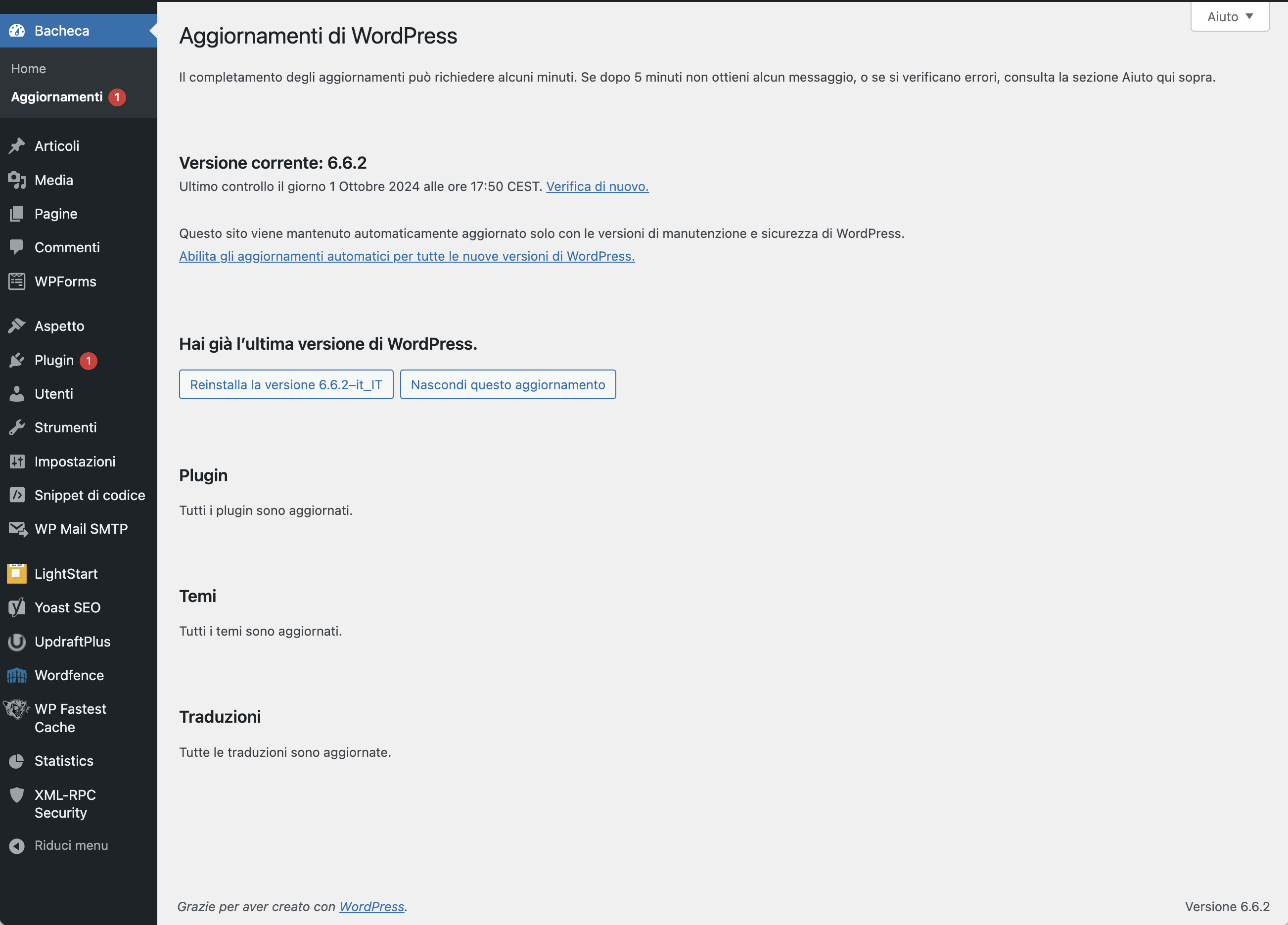
sebbene ci sia il badge rosso con “1”, viene riportato che è tutto aggiornato.
Ho tentato senza successo le seguenti operazioni:
- svuotato le cache (locali e su server)
- disattivato e riattivato i plugin
- cercato nella cartella plugin eventuali ‘cadaveri’ o cartelle non riconosciute
Non riesco a collegare il fatto a nessuna situazione particolare e non mi viene più in mente nulla, non che sia un problema grave ma quel pallino rosso esibizionista e fuori luogo mi innervosisce 😉
Un saluto a tutti e grazie per il supporto
Paolo
-
Sto iniziando ha creare un plugin iniziando con il menu in admin
<?php
namespace ex;
require_once EX_PLUGIN_PATH.'/include/class-info.php';
class Starter_plugin{
private  $versione;
private $prefix;
  function __construct()
 {
  $this->versione=Info::VERSIONE;
  $this->prefix=Info::PREFIX;
  //inserire gli hook
  add_action('admin_menu', array($this, 'ex_menu'));
 }
 public function ex_menu (){
   global $dati_menu, $submenu;

   //dashicon
   // add_menu_page( $page_title, $menu_title, $capability, $menu_slug, $callback = '', $icon_url = '', $position = null )

 $dati_menu =array(
   'menu_title' => 'Exalunni-mt', //obligatorio
   'page_title' => 'Exalunni.php',//obbigatorio
   'capability' => 'manage_options', //obbligatorio e specifico non personalizato
   'menu_slug' => 'ex',
   'callback'=>'all_ex',
  'icon_url'=>'dashicons-database',
  'position'=>25
);
 add_menu_page(
 $dati_menu['page_title'], $dati_menu['menu_title'], $dati_menu['capability'],
 $dati_menu['menu_slug'],  $dati_menu['callback'],
 $dati_menu['icon_url'], $dati_menu['position']
 );
 //add_submenu_page( string $parent_slug, string $page_title, string $menu_title, string $capability, string $menu_slug, callable $callback = ”, int|float $position = null ): string|false
 add_submenu_page(
   $parent_slug = 'ex',
   $page_title = 'Exalunni',
   $menu_title = 'ex1',
   $capability = 'read',
   $menu_slug  = 'ex', //per rinominare la prima voce stesso slug del menu_page
   $function = 'all_ex',
   $position = 0
 );
 add_submenu_page(
   $parent_slug = 'ex',
   $page_title = 'ex',
   $menu_title = 'ex2',
   $capability = 'read',
   $menu_slug  = 'impostazioni-del-tema',
   $function = 'ekw_settings1',
   $position = 1
 );
}
public function all_ex()
{
  echo 'ex';
}
}
?>
Fatal error: Uncaught TypeError: call_user_func_array(): Argument #1 ($callback) must be a valid callback, function "all_ex" not found or invalid function name in /var/www/html/wordpress/wp-includes/class-wp-hook.php:324 Stack trace: #0 /var/www/html/wordpress/wp-includes/class-wp-hook.php(348): WP_Hook->apply_filters() #1 /var/www/html/wordpress/wp-includes/plugin.php(517): WP_Hook->do_action() #2 /var/www/html/wordpress/wp-admin/admin.php(259): do_action() #3 {main} thrown in /var/www/html/wordpress/wp-includes/class-wp-hook.php on line 324
-
Salve,
ho riscontrato un problema con la visualizzazione dei media nel mio progetto WordPress (versione 6.5.3). Ho dei file media nella cartella
uploads > 2024 > 05che ho recuperato da un altro progetto. Inizialmente, questi media non venivano visualizzati nella sezione Media della dashboard. Successivamente, ho registrato i media utilizzando il plugin “Bulk Media Register” e ora sono presenti. Tuttavia, nonostante siano ancora fisicamente nella cartella di maggio (05), vengono visualizzati come appartenenti al mese di giugno nella sezione Media.Questo problema causa una disconnessione tra le pagine e gli articoli importati che fanno riferimento a questi media, poiché non vengono riconosciuti correttamente e non vengono visualizzati nelle pagine create a maggio. Inoltre, nel menu a tendina per la selezione del mese nella sezione Media, non è presente il mese di maggio.
Come posso fare in modo che questi media siano correttamente visualizzati sotto il mese di maggio nella sezione Media? Vi ringrazio anticipatamente per l’assistenza.
Cordiali saluti,
-
Buongiorno a tutti!
Ho cercato sul web qualche soluzione o se per caso qualcuno aveva avuto il mio stesso problema.
Su alcuni siti, se non quasi tutti, quelli che ho realizzato a dei clienti negli scorsi anni; hanno attaccato il sito inserendo utenti nuovi con privilegi amministrativi e articoli scritti in lingue straniere con link fraudolenti e spam vario.
Soro riuscito in tutti i siti ad eliminare gli utenti e gli articoli, cambiato le password di tutti i pannelli di accesso a WordPress e cambiato le password di tutti i database e hosting che ospitano i vari siti.
Il problema ora che si presenta su tutti i siti, tranne uno per fortuna, è che sono spariti tutti i tasti per aggiornare qualsiasi cosa. Nel menù plugin, passando con il mouse o cliccando, non appare più il sotto menù per aggiungere nuovi plugin. Nella sezione bacheca, non appare più alcun pulsante di aggiornamento in sotto menù. Se clicco qualsiasi plugin non esiste più il tasto aggiorna e nemmeno wordpress riconosce che ci sono degli aggiornamenti da fare.
Se provo a caricare plugin via ftp salta letteralmente ogni sito, o se provo a caricare senza che il sito salti, perché ogni tanto ha funzionato, appena apro la scheda plugin mi dice che non ho i permessi.
Il mio utente ha i permessi da amministratore e posso assicurarlo perchè ho verificato.
Sul Database i permessi sono attivi e ho comunque per sicurezza creato nuovi utenti con i permessi direttamente dal database e ritrovati nella dashboard di wordpress con i permessi corretti.
Ho già provato a verificare se in wp-config fossero state inibite alcune zioni come gli aggiornamenti, ma nulla da fare.
Ho davvero provato la qualunque ma non capisco come abbiano fatto negli attacchi a disattivare ogni cosa che richiamasse un aggiornamento.
Ho anche reinstallato wordpress manualmente scaricando nuova versione dal sito e caricandolo via ftp eliminando la cartella wp-content per non perdere tutto il sito.
Ho visto e notato che lo stesso problema si è presentato ad altri colleghi che sono stati attaccati in analogo modo ma anche loro non hanno trovato soluzioni.
Avete voi una soluzione in merito o vi è mai capitato e site riusciti a risolvere?
Attendendo un vostro gentile riscontro vi ringrazio e mi scuso per il messaggio lunghissimo.
Flavio
-
Buongiorno a tutti, dopo aggiornamento a WordPress 6.5.2 (hosting namehero e quic.cloud con tutti plugin e temi aggiornati )ogni qual volta modifico una galleria fotografica di un qualsiasi post e cerco di salvare il sito va in “errore 403” per alcuni minuti!!! Riparte dopo massimo 5 minuti senza che io faccia niente ma non ha salvato le modifiche, se modifico un testo e salvo funziona correttamente!
su consiglio namehero ho aggiornato il php a 8.1 ma non ha risolto! Mi dicono che superò le specifiche di ram e cpu del mio piano, ma io rispetto a prima dell’aggiornamento non ho cambiato niente!! e il mio sito non dovrebbe essere cosi invasivo da usare tante energie (non ho molti plugin installati e sono solo i necessari!) Sito http://www.buttinoni.it
Consigli?
La pagina su cui ho bisogno di aiuto: [devi essere connesso per vedere il link]
-
Buongiorno a tutti, dopo aggiornamento a WordPress 6.5 (hosting namehero e quic.cloud con tutti plugin e temi aggiornati )ogni qual volta modifico una galleria fotografica di un qualsiasi post e cerco di salvare il sito va in errore 403 per alcuni minuti!!! Riparte dopo massimo 5 minuti senza che io faccia niente ma non ha salvato le modifiche, se modifico un testo e salvo funziona correttamente!
su consiglio namehero ho aggiornato il php a 8.1 ma non ha risolto! Mi dicono che superò le specifiche di ram e cpu del mio piano, ma io rispetto a prima dell’aggiornamento non ho cambiato niente!! e il mio sito non dovrebbe essere cosi invasivo da usare tante energie (non ho molti plugin installati e sono solo i necessari!) Sito http://www.buttinoni.it
Consigli?
La pagina su cui ho bisogno di aiuto: [devi essere connesso per vedere il link]
-
Ciao a tutti,
dopo i due più recenti aggiornamenti di wordpress non mi funziona più un plugin che genera post di una determinata categoria derivante dalla compilazione di moduli di CF7.
L’ho controllato e ricontrollato eppure niente da fare, con il debug di wordpress mi esce il seguente errore:Fatal error: Uncaught TypeError: call_user_func_array(): Argument #1 ($callback) must be a valid callback, function “add_author_support_to_posts” not found or invalid function name in /var/www/virtual/mlnv.org/sportelodelsitadino/htdocs/wp-includes/class-wp-hook.php:324
Stack trace: 0 /var/www/virtual/mlnv.org/sportelodelsitadino/htdocs/wp-includes/class-wp-hook.php(348): WP_Hook->apply_filters() 1 /var/www/virtual/mlnv.org/sportelodelsitadino/htdocs/wp-includes/plugin.php(517): WP_Hook->do_action() 2 /var/www/virtual/mlnv.org/sportelodelsitadino/htdocs/wp-settings.php(643): do_action() 3 /var/www/virtual/mlnv.org/sportelodelsitadino/htdocs/wp-config.php(82): require_once(‘…’) 4 /var/www/virtual/mlnv.org/sportelodelsitadino/htdocs/wp-load.php(50): require_once(‘…’) 5 /var/www/virtual/mlnv.org/sportelodelsitadino/htdocs/wp-blog-header.php(13): require_once(‘…’) 6 /var/www/virtual/mlnv.org/sportelodelsitadino/htdocs/index.php(17): require(‘…’) 7 {main} thrown in /var/www/virtual/mlnv.org/sportelodelsitadino/htdocs/wp-includes/class-wp-hook.php on line 324
Questo di seguito alla fine è il codice php del plugin, so che è lunghetto ma se qualcuno gentilmente mi aiuta a trovar l’errore gliene sarei molto grato.
Grazie infinite
Enrico<?php if (!defined('ABSPATH')) { exit; } /** * Our main plugin class */ class CF7_To_WP { /** * The single instance of cf7_to_wp. * @var object */ private static $_instance = null; /** * Settings class object * @var object */ public $settings = null; /** * The version number. * @var string */ public $_version; /** * The token. * @var string */ public $_token; /** * The main plugin file. * @var string */ public $file; /** * The main plugin directory. * @var string */ public $dir; /** * The plugin assets directory. * @var string */ public $assets_dir; /** * The plugin assets URL. * @var string */ public $assets_url; /** * Our post type slug. * * @var string */ private $post_type = 'cf7_form_messages'; /** * Constructor function. * @access public */ public function __construct($file = '', $version = '0.1') { $this->_version = $version; $this->_token = 'cf7_to_wp'; // Load plugin environment variables $this->file = $file; $this->dir = dirname($this->file); $this->assets_dir = trailingslashit($this->dir) . 'assets'; $this->assets_url = esc_url(trailingslashit(plugins_url('/assets/', $this->file))); // Handle localization $this->load_plugin_textdomain(); add_action('init', array($this, 'load_localization'), 0); } /** * Initialize all the things! */ public function init() { // Register Messages post type. add_action('init', array($this, 'register_form_msg_post_type')); add_filter('add_menu_classes', array($this, 'menu_msg_form_bubble')); add_filter('post_row_actions', array($this, 'action_row_for_msg_posts'), 10, 2); add_action('admin_init', [$this, 'maybe_mark_form_message_as_read']); add_filter('wpcf7_verify_nonce', '__return_true'); // Hook into CF7 actions. add_filter('wpcf7_editor_panels', array($this, 'add_cf7_panel')); add_action('wpcf7_after_save', array($this, 'save_cf7_data'), 50, 1); add_action('wpcf7_mail_sent', array($this, 'create_post_on_form_submission'), 50, 1); add_action('wpcf7_mail_failed', array($this, 'create_post_on_form_submission'), 50, 1); add_action('init', 'add_author_support_to_posts'); add_filter('wpcf7_verify_nonce', '__return_true'); } /** * Load plugin localisation */ public function load_localization() { load_plugin_textdomain('cf7_to_wp', false, dirname(plugin_basename($this->file)) . '/lang/'); } /** * Load plugin textdomain */ public function load_plugin_textdomain() { $domain = 'cf7_to_wp'; $locale = apply_filters('plugin_locale', get_locale(), $domain); load_textdomain($domain, WP_LANG_DIR . '/' . $domain . '/' . $domain . '-' . $locale . '.mo'); load_plugin_textdomain($domain, false, dirname(plugin_basename($this->file)) . '/lang/'); } /** * Register our post type to store messages. */ public function register_form_msg_post_type() { register_post_type( $this->post_type, array( 'labels' => array( 'name' => __('Pratiche', 'cf7_to_wp'), 'singular_name' => __('Pratica', 'cf7_to_wp'), 'add_new' => __('Aggiungi nuova', 'cf7_to_wp'), 'add_new_item' => __('Aggiungi nuova pratica', 'cf7_to_wp'), 'edit' => __('Modifica', 'cf7_to_wp'), ), 'description' => 'Pratiche e Servizi', 'has_archive' => true, 'publicly_queryable' => true, 'capability_type' => 'post', 'menu_position' => 32, 'show_ui' => true, 'show_in_menu' => true, 'public' => true, 'query_var' => true, 'menu_icon' => 'dashicons-buddicons-pm', 'taxonomies' => array('category'), 'supports' => array( 'author', 'title', 'category', 'editor', 'excerpt', 'trackbacks', 'page-attributes', 'custom-fields', 'thumbnail', 'sticky', ), ) ); } /** * Add bubble to admin menu * * @param array $menu * @return array $menu */ public function menu_msg_form_bubble($menu) { $form_messages_count = wp_count_posts($this->post_type); $pending_count = $form_messages_count->draft + $form_messages_count->pending; foreach ($menu as $menu_key => $menu_data) { if ("edit.php?post_type={$this->post_type}" !== $menu_data[2]) { continue; } $menu[$menu_key][0] .= " <span class='update-plugins count-$pending_count'><span class='plugin-count'>" . number_format_i18n($pending_count) . '</span></span>'; } return $menu; } /** * Add "Mark as read" action for our post type * * @param array $actions * @param WP_Post $post * @return array $actions */ public function action_row_for_msg_posts($actions, $post) { if ($post->post_type === $this->post_type && $post->post_status !== 'publish') { $actions['mark_as_read'] = sprintf( '<a href="%s" class="aria-button-if-js" aria-label="%s">%s</a>', wp_nonce_url("edit.php?post_type={$this->post_type}&action=mark_as_read&message_id={$post->ID}", "mark_message_as_read_{$post->ID}"), esc_attr(__('Mark as read', 'cf7_to_wp')), __('Mark as read', 'cf7_to_wp') ); } return $actions; } /** * Mark form message as read */ public function maybe_mark_form_message_as_read() { if (isset($_GET['action']) && $_GET['action'] == 'mark_as_read' && isset($_GET['message_id'])) { $message_id = (int) $_GET['message_id']; if (isset($_GET['_wpnonce']) && wp_verify_nonce($_GET['_wpnonce'], "mark_message_as_read_{$message_id}")) { $updated_post = wp_update_post( array( 'ID' => $message_id, 'post_status' => 'publish', ) ); wp_redirect(wp_get_referer()); exit(); } } } /** * Add new panel to CF7 form settings * * @param array $panels * @return array */ public function add_cf7_panel($panels) { $panels['cf7-to-wp'] = array( 'title' => __('Salva messaggi', 'cf7_to_wp'), 'callback' => array($this, 'cf7_to_wp_form_metabox'), ); return $panels; } /** * Output the content of our panel/metabox * * @param WPCF7_ContactForm $post CF7 object */ public function cf7_to_wp_form_metabox($post) { $id = $post->id(); $cf7towp = get_post_meta($id, '_cf7towp', true); $cf7towp = wp_parse_args( $cf7towp, array( 'active' => 0, 'title' => '', 'content' => '', 'category' => 0, ) );?> <p style="margin-bottom:1em; font-size:1.25em;"> <?php _e('Abilitando la casella sottostante ogni modulo inviato compilato verrà pubblicato come nuovo articolo "Pratiche" privato.', 'cf7_to_wp');?> </p> <div class="mail-field" style="margin-bottom:1em;"> <label for="cf7towp-active"> <input type="checkbox" id="cf7towp-active" name="wpcf7-cf7towp-active" value="1" <?php checked($cf7towp['active'], 1);?> /> <strong><?php echo esc_html(__('Salvare i moduli compilati come articoli "Pratiche"?', 'cf7_to_wp')); ?></strong> </label> </div> <div class="pseudo-hr"></div> <div class="mail-field"> <p class="description"> <label for="cf7towp-category"><?php echo esc_html(__('Categoria dell\'articolo', 'cf7_to_wp')); ?></label> <select id="cf7towp-category" name="wpcf7-cf7towp-category"> <?php $this->get_category_options($id)?> </select> </p> </div> <div class="mail-field"> <p class="description"> <label for="cf7towp-title"><?php echo esc_html(__('Titolo dell\'articolo', 'cf7_to_wp')); ?></label> <input type="text" id="cf7towp-title" name="wpcf7-cf7towp-title" class="large-text" value="<?php echo esc_attr($cf7towp['title']); ?>" /> </p> </div> <div class="mail-field"> <p class="description"> <label for="cf7towp-content"><?php echo esc_html(__('Contenuto dell\'articolo', 'cf7_to_wp')); ?></label> <textarea id="cf7towp-content" name="wpcf7-cf7towp-content" cols="100" rows="10" class="large-text"><?php echo esc_attr($cf7towp['content']); ?></textarea> </p> </div> <hr> <p class="description" style="margin-top:.5em;"> <span style="float:left; width:60%;"> <?php _e('Usa i classici CF7 [mail-tag] per i contenuti dinamici nel titolo e nel contenuto (li trovi sulla tab Mail).', 'cf7_to_wp');?> </span> <span style="text-align:right; float:right; width:40%;"> <?php $credits_link = '<a target="_blank" href="https://github.com/psaikali/contact-form-to-wp-posts">Fonte</a>'; printf(__('A Contact Form 7 addon by %1$s', 'cf7_to_wp'), $credits_link); ?> </span> </p> <hr> <?php } /** * Get category field data */ public function get_category_options($id) { $cf7towp = get_post_meta($id, '_cf7towp', true); $cf7towp = wp_parse_args( $cf7towp, array( 'active' => 0, 'title' => '', 'content' => '', 'category' => 0, ) ); $args = array( 'taxonomy' => 'category', 'hide_empty' => false, ); $terms = get_terms($args); foreach ($terms as $term) { $options .= '<option value="' . $term->term_id . '" ' . selected($cf7towp['category'], $term->term_id, true) . '>' . $term->name . '</option>'; } echo $options; } /** * Save metabox/tab data when CF7 form settings page is saved. * * @param WPCF7_ContactForm $contact_form */ public function save_cf7_data($contact_form) { global $user_id; $user_id = get_current_user_id(); $id = $contact_form->id(); $cf7towp = array(); $cf7towp['active'] = (!empty($_POST['wpcf7-cf7towp-active'])); if (isset($_POST['wpcf7-cf7towp-title'])) { $cf7towp['title'] = sanitize_text_field($_POST['wpcf7-cf7towp-title']); } if (isset($_POST['wpcf7-cf7towp-content'])) { $cf7towp['content'] = wp_kses_post($_POST['wpcf7-cf7towp-content']); } if (isset($_POST['wpcf7-cf7towp-category'])) { $cf7towp['category'] = wp_kses_post($_POST['wpcf7-cf7towp-category']); } update_post_meta($id, '_cf7towp', $cf7towp); } /** * Create a Messages post when form is submitted * * @param WPCF7_ContactForm $contact_form */ public function get_current_user_id() { if (class_exists('Jwt_Auth_Public')) { $jwt = new \Jwt_Auth_Public('jwt-auth', '1.1.0'); $token = $jwt->validate_token(false); if (\is_wp_error($token)) { return false; } return $token->data->user->id; } else { return false; } } public function create_post_on_form_submission($contact_form) { $form_post = $contact_form->id(); $cf7towp_data = get_post_meta($form_post, '_cf7towp', true); if ($cf7towp_data['active'] === true) { $submission = WPCF7_Submission::get_instance(); if ($submission) { $meta = array(); $meta['ip'] = $submission->get_meta('remote_ip'); $meta['ua'] = $submission->get_meta('user_agent'); $meta['url'] = $submission->get_meta('url'); $meta['date'] = date_i18n(get_option('date_format'), $submission->get_meta('timestamp')); $meta['time'] = date_i18n(get_option('time_format'), $submission->get_meta('timestamp')); } $post_title_template = $cf7towp_data['title']; $post_content_template = $cf7towp_data['content']; $post_category[] = $cf7towp_data['category']; $post_title = wpcf7_mail_replace_tags( $post_title_template, array( 'html' => true, 'exclude_blank' => true, 'has_archive' => true, ) ); $post_content = wpcf7_mail_replace_tags( $post_content_template, array( 'html' => true, 'exclude_blank' => true, 'has_archive' => true, ) ); $new_form_msg = wp_insert_post( array( 'post_type' => $this->post_type, 'post_title' => $post_title, 'post_content' => $post_content, 'post_author' => $current_user -> ID, 'post_status' => 'private', 'has_archive' => true, 'post_category' => $post_category, ) ); if ($submission) { update_post_meta($new_form_msg, 'cf7towp_meta', $meta, ); } } } /** * Main cf7_to_wp singleton instance * * Ensures only one instance of cf7_to_wp is loaded or can be loaded. * * @static * @see cf7_to_wp() * @return Main cf7_to_wp instance */ public static function instance($file = '', $version = '0.1') { if (is_null(self::$_instance)) { self::$_instance = new self($file, $version); } return self::$_instance; } /** * Cloning is forbidden. * */ public function __clone() { _doing_it_wrong(__FUNCTION__, __('Cheatin’ huh?'), $this->_version); } /** * Unserializing instances of this class is forbidden. * */ public function __wakeup() { _doing_it_wrong(__FUNCTION__, __('Cheatin’ huh?'), $this->_version); } }
-
Buongiorno a tutti
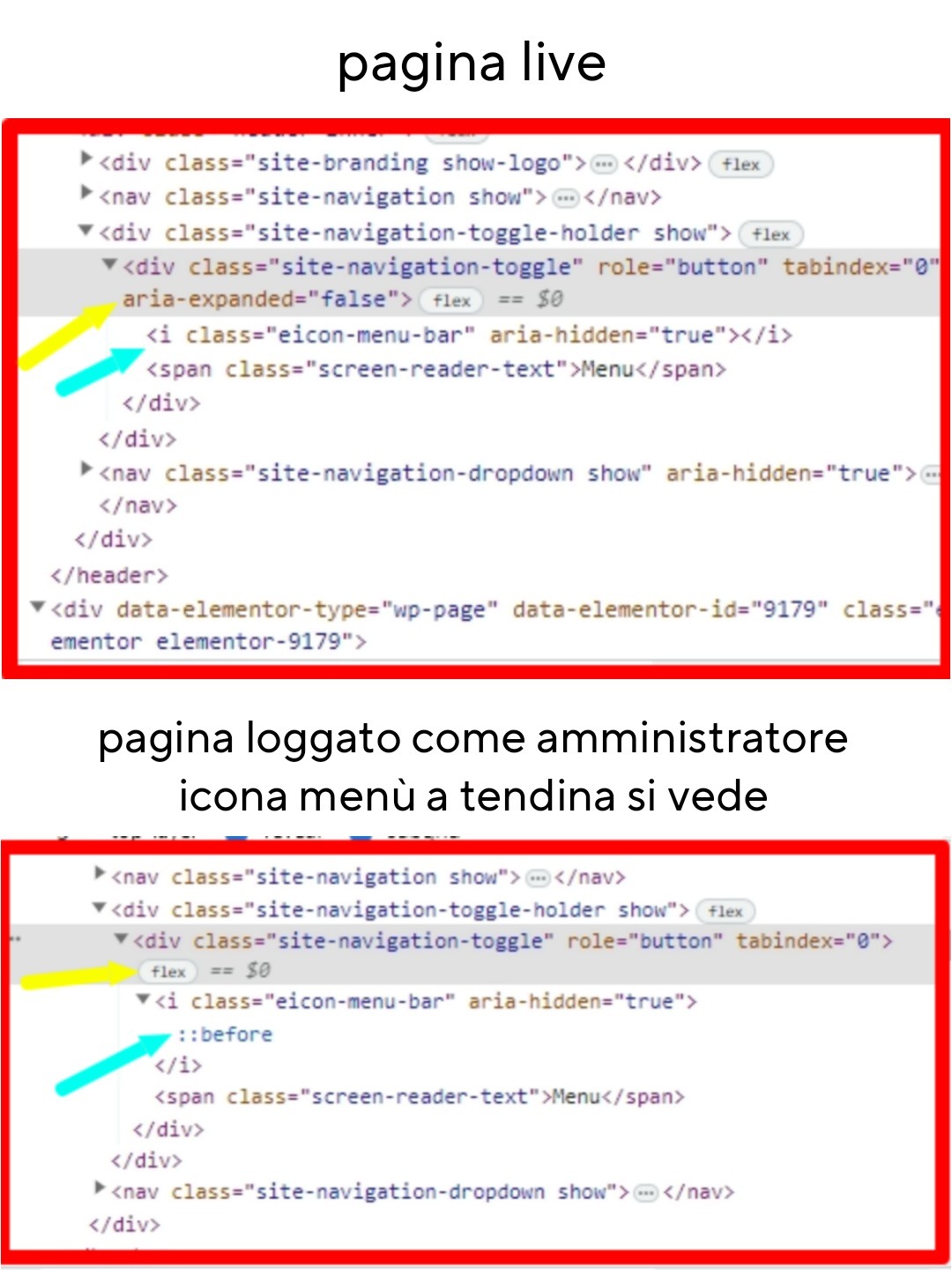
ho questo problema: l’icona del menù a tendina su mobile non viene visualizzata.
Questo capita solo sul sito “live”, se sono loggato in WordPress invece si vede. Il menù funziona, se vado sul punto esatto e clicco il menù si apre, ma chiaramente se qualcuno non lo sa è come se non ci fossa.
Ho provato a ispezionare con Chrome e ho riscontrato alcune differenze tra loggato e live nel punto dell’icona menù.
Lasciò il link con le differenze riscontrate.
Incollo anche le informazioni di sistema ricavate da Elementor. Utilizzo il tema Hello Elementor.
Grazie e buona giornata.https://psicologoautorevole.it/wp-content/uploads/2023/09/differenze-menu.jpg
Informazioni di sistema:
== Server Environment ==
Operating System: Linux
Software: Apache
MySQL version: Source distribution v5.7.39-42
PHP Version: 7.4.33
PHP Memory Limit: 768M
PHP Max Input Vars: 3000
PHP Max Post Size: 256M
GD Installed: Yes
ZIP Installed: Yes
Write Permissions: All right
Elementor Library: Connected== Theme ==
Name: Hello Elementor
Version: 2.8.1
Author: Elementor Team
Child Theme: No== Active Plugins ==
Elementor
Version: 3.16.3
Author: Elementor.comGTM4WP Version: 1.18.1 Author: Thomas Geiger iubenda | All-in-one Compliance for GDPR / CCPA Cookie Consent + more Version: 3.7.5 Author: iubenda Newsletter, SMTP, Email marketing and Subscribe forms by Brevo Version: 3.1.70 Author: Brevo SiteGround Central Version: 3.0.1 Author: SiteGround SiteGround Optimizer Version: 7.4.1 Author: SiteGround SiteGround Security Version: 1.4.5 Author: SiteGround Social Chat Version: 7.1.5 Author: QuadLayers Stop Spammers Version: 2023.4.1 Author: Trumani Xpro Elementor Addons Version: 1.3.8 Author: Xpro Yoast SEO Version: 21.1 Author: Team Yoast== Registro ==
JS: showing 11 of 11JS: 2023-08-21 15:31:07 [error X 155][https://psicologoautorevole.it/wp-content/plugins/elementor/assets/lib/pickr/pickr.min.js?ver=1.5.0:2:14799] Cannot read properties of null (reading ‘clone’)
JS: 2023-08-21 15:31:09 [error X 5][https://psicologoautorevole.it/wp-content/plugins/elementor/assets/lib/pickr/pickr.min.js?ver=1.5.0:2:19552] Cannot read properties of null (reading ‘changestop’)
JS: 2023-08-23 12:29:54 [error X 11][https://psicologoautorevole.it/wp-content/plugins/elementor/assets/js/editor.min.js?ver=3.15.3:3:917217] elementorFrontend is not defined
JS: 2023-08-30 08:44:09 [error X 6][https://psicologoautorevole.it/wp-includes/js/jquery/jquery.min.js?ver=3.7.0:2:28722] elementor_new_template_form_controls is not defined
JS: 2023-08-31 13:32:10 [error X 1][https://psicologoautorevole.it/wp-content/plugins/xpro-elementor-addons/assets/js/xpro-widgets.js?ver=1.3.8:1:21513] Cannot read properties of undefined (reading ‘size’)
JS: 2023-09-01 12:20:34 [error X 19][https://psicologoautorevole.it/wp-content/plugins/elementor/assets/js/frontend-modules.min.js?ver=3.15.3:2:12920] Cannot read properties of undefined (reading ‘attributes’)
JS: 2023-09-01 12:22:30 [error X 1][https://psicologoautorevole.it/wp-content/plugins/elementor/assets/js/editor.min.js?ver=3.15.3:3:642692] Cannot read properties of undefined (reading ‘isDesignable’)
JS: 2023-09-01 15:23:24 [error X 1][https://psicologoautorevole.it/wp-content/plugins/elementor/assets/js/editor.min.js?ver=3.15.3:3:670813] elementorFrontend.elements.window.jQuery is not a function
JS: 2023-09-10 23:47:55 [error X 3][https://psicologoautorevole.it/wp-content/plugins/elementor/assets/js/editor.min.js?ver=3.15.3:3:838767] Cannot convert undefined or null to object
JS: 2023-09-12 08:17:47 [error X 1][https://psicologoautorevole.it/wp-content/plugins/elementor/assets/js/responsive-bar.min.js?ver=3.15.3:2:5951] Cannot read properties of null (reading ‘config’)
JS: 2023-09-15 10:44:00 [error X 2][https://psicologoautorevole.it/wp-includes/js/jquery/jquery.min.js?ver=3.7.0:2:28722] Cannot read properties of undefined (reading ‘value’)== Elementor – Compatibility Tag ==
Xpro Elementor Addons: Compatibilità non specificata
-