Risultati della ricerca per 'Wordpress sql server'
-
-
Buongiorno,
Sto riscontrando un problema durante la visualizzazione del sito utilizzando il browser Microsoft Edge. Il sito non viene caricato correttamente e vengono mostrati i seguenti errori:
-Errore sul database di WordPress: (MySQL server has gone away)
Select option_name, option_value FROM wp_options WHERE option_name IN (‘_transient_frmformapi_request_lock’,’_transient_timeout_timeout_frmformapi_request_lock’?-Errore sul database di WordPress: (MySQL server has gone away)
Select ‘setting’FROM’wp_vikappointments_config’WHERE ‘param’ = ‘currencyname’ LIMIT 1Sapete quali potrebbero essere le cause di questo inconveniente e avete qualche suggerimento su come risolverlo?
Grazie
-
Quando provo ad accedere al mio sito web mi da il seguente errore:
/** * WordPress environment setup class. * * @package WordPress * @since 2.0.0 */ #[AllowDynamicProperties] class WP { /** * Public query variables. * * Long list of public query variables. * * @since 2.0.0 * @var string[] */ public $public_query_vars = array( ‘m’, ‘p’, ‘posts’, ‘w’, ‘cat’, ‘withcomments’, ‘withoutcomments’, ‘s’, ‘search’, ‘exact’, ‘sentence’, ‘calendar’, ‘page’, ‘paged’, ‘more’, ‘tb’, ‘pb’, ‘author’, ‘order’, ‘orderby’, ‘year’, ‘monthnum’, ‘day’, ‘hour’, ‘minute’, ‘second’, ‘name’, ‘category_name’, ‘tag’, ‘feed’, ‘author_name’, ‘pagename’, ‘page_id’, ‘error’, ‘attachment’, ‘attachment_id’, ‘subpost’, ‘subpost_id’, ‘preview’, ‘robots’, ‘favicon’, ‘taxonomy’, ‘term’, ‘cpage’, ‘post_type’, ‘embed’ ); /** * Private query variables. * * Long list of private query variables. * * @since 2.0.0 * @var string[] */ public $private_query_vars = array( ‘offset’, ‘posts_per_page’, ‘posts_per_archive_page’, ‘showposts’, ‘nopaging’, ‘post_type’, ‘post_status’, ‘category__in’, ‘category__not_in’, ‘category__and’, ‘tag__in’, ‘tag__not_in’, ‘tag__and’, ‘tag_slug__in’, ‘tag_slug__and’, ‘tag_id’, ‘post_mime_type’, ‘perm’, ‘comments_per_page’, ‘post__in’, ‘post__not_in’, ‘post_parent’, ‘post_parent__in’, ‘post_parent__not_in’, ‘title’, ‘fields’ ); /** * Extra query variables set by the user. * * @since 2.1.0 * @var array */ public $extra_query_vars = array(); /** * Query variables for setting up the WordPress Query Loop. * * @since 2.0.0 * @var array */ public $query_vars = array(); /** * String parsed to set the query variables. * * @since 2.0.0 * @var string */ public $query_string = ”; /** * The request path, e.g. 2015/05/06. * * @since 2.0.0 * @var string */ public $request = ”; /** * Rewrite rule the request matched. * * @since 2.0.0 * @var string */ public $matched_rule = ”; /** * Rewrite query the request matched. * * @since 2.0.0 * @var string */ public $matched_query = ”; /** * Whether already did the permalink. * * @since 2.0.0 * @var bool */ public $did_permalink = false; /** * Adds a query variable to the list of public query variables. * * @since 2.1.0 * * @param string $qv Query variable name. */ public function add_query_var( $qv ) { if ( ! in_array( $qv, $this->public_query_vars, true ) ) { $this->public_query_vars[] = $qv; } } /** * Removes a query variable from a list of public query variables. * * @since 4.5.0 * * @param string $name Query variable name. */ public function remove_query_var( $name ) { $this->public_query_vars = array_diff( $this->public_query_vars, array( $name ) ); } /** * Sets the value of a query variable. * * @since 2.3.0 * * @param string $key Query variable name. * @param mixed $value Query variable value. */ public function set_query_var( $key, $value ) { $this->query_vars[ $key ] = $value; } /** * Parses the request to find the correct WordPress query. * * Sets up the query variables based on the request. There are also many * filters and actions that can be used to further manipulate the result. * * @since 2.0.0 * @since 6.0.0 A return value was added. * * @global WP_Rewrite $wp_rewrite WordPress rewrite component. * * @param array|string $extra_query_vars Set the extra query variables. * @return bool Whether the request was parsed. */ public function parse_request( $extra_query_vars = ” ) { global $wp_rewrite; /** * Filters whether to parse the request. * * @since 3.5.0 * * @param bool $bool Whether or not to parse the request. Default true. * @param WP $wp Current WordPress environment instance. * @param array|string $extra_query_vars Extra passed query variables. */ if ( ! apply_filters( ‘do_parse_request’, true, $this, $extra_query_vars ) ) { return false; } $this->query_vars = array(); $post_type_query_vars = array(); if ( is_array( $extra_query_vars ) ) { $this->extra_query_vars = & $extra_query_vars; } elseif ( ! empty( $extra_query_vars ) ) { parse_str( $extra_query_vars, $this->extra_query_vars ); } // Process PATH_INFO, REQUEST_URI, and 404 for permalinks. // Fetch the rewrite rules. $rewrite = $wp_rewrite->wp_rewrite_rules(); if ( ! empty( $rewrite ) ) { // If we match a rewrite rule, this will be cleared. $error = ‘404’; $this->did_permalink = true; $pathinfo = isset( $_SERVER[‘PATH_INFO’] ) ? $_SERVER[‘PATH_INFO’] : ”; list( $pathinfo ) = explode( ‘?’, $pathinfo ); $pathinfo = str_replace( ‘%’, ‘%25’, $pathinfo ); list( $req_uri ) = explode( ‘?’, $_SERVER[‘REQUEST_URI’] ); $self = $_SERVER[‘PHP_SELF’]; $home_path = parse_url( home_url(), PHP_URL_PATH ); $home_path_regex = ”; if ( is_string( $home_path ) && ” !== $home_path ) { $home_path = trim( $home_path, ‘/’ ); $home_path_regex = sprintf( ‘|^%s|i’, preg_quote( $home_path, ‘|’ ) ); } /* * Trim path info from the end and the leading home path from the front. * For path info requests, this leaves us with the requesting filename, if any. * For 404 requests, this leaves us with the requested permalink. */ $req_uri = str_replace( $pathinfo, ”, $req_uri ); $req_uri = trim( $req_uri, ‘/’ ); $pathinfo = trim( $pathinfo, ‘/’ ); $self = trim( $self, ‘/’ ); if ( ! empty( $home_path_regex ) ) { $req_uri = preg_replace( $home_path_regex, ”, $req_uri ); $req_uri = trim( $req_uri, ‘/’ ); $pathinfo = preg_replace( $home_path_regex, ”, $pathinfo ); $pathinfo = trim( $pathinfo, ‘/’ ); $self = preg_replace( $home_path_regex, ”, $self ); $self = trim( $self, ‘/’ ); } // The requested permalink is in $pathinfo for path info requests and $req_uri for other requests. if ( ! empty( $pathinfo ) && ! preg_match( ‘|^.*’ . $wp_rewrite->index . ‘$|’, $pathinfo ) ) { $requested_path = $pathinfo; } else { // If the request uri is the index, blank it out so that we don’t try to match it against a rule. if ( $req_uri === $wp_rewrite->index ) { $req_uri = ”; } $requested_path = $req_uri; } $requested_file = $req_uri; $this->request = $requested_path; // Look for matches. $request_match = $requested_path; if ( empty( $request_match ) ) { // An empty request could only match against ^$ regex. if ( isset( $rewrite[‘$’] ) ) { $this->matched_rule = ‘$’; $query = $rewrite[‘$’]; $matches = array( ” ); } } else { foreach ( (array) $rewrite as $match => $query ) { // If the requested file is the anchor of the match, prepend it to the path info. if ( ! empty( $requested_file ) && str_starts_with( $match, $requested_file ) && $requested_file !== $requested_path ) { $request_match = $requested_file . ‘/’ . $requested_path; } if ( preg_match( “#^$match#”, $request_match, $matches ) || preg_match( “#^$match#”, urldecode( $request_match ), $matches ) ) { if ( $wp_rewrite->use_verbose_page_rules && preg_match( ‘/pagename=\$matches\[([0-9]+)\]/’, $query, $varmatch ) ) { // This is a verbose page match, let’s check to be sure about it. $page = get_page_by_path( $matches[ $varmatch[1] ] ); if ( ! $page ) { continue; } $post_status_obj = get_post_status_object( $page->post_status ); if ( ! $post_status_obj->public && ! $post_status_obj->protected && ! $post_status_obj->private && $post_status_obj->exclude_from_search ) { continue; } } // Got a match. $this->matched_rule = $match; break; } } } if ( ! empty( $this->matched_rule ) ) { // Trim the query of everything up to the ‘?’. $query = preg_replace( ‘!^.+\?!’, ”, $query ); // Substitute the substring matches into the query. $query = addslashes( WP_MatchesMapRegex::apply( $query, $matches ) ); $this->matched_query = $query; // Parse the query. parse_str( $query, $perma_query_vars ); // If we’re processing a 404 request, clear the error var since we found something. if ( ‘404’ === $error ) { unset( $error, $_GET[‘error’] ); } } // If req_uri is empty or if it is a request for ourself, unset error. if ( empty( $requested_path ) || $requested_file === $self || str_contains( $_SERVER[‘PHP_SELF’], ‘wp-admin/’ ) ) { unset( $error, $_GET[‘error’] ); if ( isset( $perma_query_vars ) && str_contains( $_SERVER[‘PHP_SELF’], ‘wp-admin/’ ) ) { unset( $perma_query_vars ); } $this->did_permalink = false; } } /** * Filters the query variables allowed before processing. * * Allows (publicly allowed) query vars to be added, removed, or changed prior * to executing the query. Needed to allow custom rewrite rules using your own arguments * to work, or any other custom query variables you want to be publicly available. * * @since 1.5.0 * * @param string[] $public_query_vars The array of allowed query variable names. */ $this->public_query_vars = apply_filters( ‘query_vars’, $this->public_query_vars ); foreach ( get_post_types( array(), ‘objects’ ) as $post_type => $t ) { if ( is_post_type_viewable( $t ) && $t->query_var ) { $post_type_query_vars[ $t->query_var ] = $post_type; } } foreach ( $this->public_query_vars as $wpvar ) { if ( isset( $this->extra_query_vars[ $wpvar ] ) ) { $this->query_vars[ $wpvar ] = $this->extra_query_vars[ $wpvar ]; } elseif ( isset( $_GET[ $wpvar ] ) && isset( $_POST[ $wpvar ] ) && $_GET[ $wpvar ] !== $_POST[ $wpvar ] ) { wp_die( __( ‘A variable mismatch has been detected.’ ), __( ‘Sorry, you are not allowed to view this item.’ ), 400 ); } elseif ( isset( $_POST[ $wpvar ] ) ) { $this->query_vars[ $wpvar ] = $_POST[ $wpvar ]; } elseif ( isset( $_GET[ $wpvar ] ) ) { $this->query_vars[ $wpvar ] = $_GET[ $wpvar ]; } elseif ( isset( $perma_query_vars[ $wpvar ] ) ) { $this->query_vars[ $wpvar ] = $perma_query_vars[ $wpvar ]; } if ( ! empty( $this->query_vars[ $wpvar ] ) ) { if ( ! is_array( $this->query_vars[ $wpvar ] ) ) { $this->query_vars[ $wpvar ] = (string) $this->query_vars[ $wpvar ]; } else { foreach ( $this->query_vars[ $wpvar ] as $vkey => $v ) { if ( is_scalar( $v ) ) { $this->query_vars[ $wpvar ][ $vkey ] = (string) $v; } } } if ( isset( $post_type_query_vars[ $wpvar ] ) ) { $this->query_vars[‘post_type’] = $post_type_query_vars[ $wpvar ]; $this->query_vars[‘name’] = $this->query_vars[ $wpvar ]; } } } // Convert urldecoded spaces back into ‘+’. foreach ( get_taxonomies( array(), ‘objects’ ) as $taxonomy => $t ) { if ( $t->query_var && isset( $this->query_vars[ $t->query_var ] ) ) { $this->query_vars[ $t->query_var ] = str_replace( ‘ ‘, ‘+’, $this->query_vars[ $t->query_var ] ); } } // Don’t allow non-publicly queryable taxonomies to be queried from the front end. if ( ! is_admin() ) { foreach ( get_taxonomies( array( ‘publicly_queryable’ => false ), ‘objects’ ) as $taxonomy => $t ) { /* * Disallow when set to the ‘taxonomy’ query var. * Non-publicly queryable taxonomies cannot register custom query vars. See register_taxonomy(). */ if ( isset( $this->query_vars[‘taxonomy’] ) && $taxonomy === $this->query_vars[‘taxonomy’] ) { unset( $this->query_vars[‘taxonomy’], $this->query_vars[‘term’] ); } } } // Limit publicly queried post_types to those that are ‘publicly_queryable’. if ( isset( $this->query_vars[‘post_type’] ) ) { $queryable_post_types = get_post_types( array( ‘publicly_queryable’ => true ) ); if ( ! is_array( $this->query_vars[‘post_type’] ) ) { if ( ! in_array( $this->query_vars[‘post_type’], $queryable_post_types, true ) ) { unset( $this->query_vars[‘post_type’] ); } } else { $this->query_vars[‘post_type’] = array_intersect( $this->query_vars[‘post_type’], $queryable_post_types ); } } // Resolve conflicts between posts with numeric slugs and date archive queries. $this->query_vars = wp_resolve_numeric_slug_conflicts( $this->query_vars ); foreach ( (array) $this->private_query_vars as $var ) { if ( isset( $this->extra_query_vars[ $var ] ) ) { $this->query_vars[ $var ] = $this->extra_query_vars[ $var ]; } } if ( isset( $error ) ) { $this->query_vars[‘error’] = $error; } /** * Filters the array of parsed query variables. * * @since 2.1.0 * * @param array $query_vars The array of requested query variables. */ $this->query_vars = apply_filters( ‘request’, $this->query_vars ); /** * Fires once all query variables for the current request have been parsed. * * @since 2.1.0 * * @param WP $wp Current WordPress environment instance (passed by reference). */ do_action_ref_array( ‘parse_request’, array( &$this ) ); return true; } /** * Sends additional HTTP headers for caching, content type, etc. * * Sets the Content-Type header. Sets the ‘error’ status (if passed) and optionally exits. * If showing a feed, it will also send Last-Modified, ETag, and 304 status if needed. * * @since 2.0.0 * @since 4.4.0
X-Pingbackheader is added conditionally for single posts that allow pings. * @since 6.1.0 Runs after posts have been queried. * * @global WP_Query $wp_query WordPress Query object. */ public function send_headers() { global $wp_query; $headers = array(); $status = null; $exit_required = false; $date_format = ‘D, d M Y H:i:s’; if ( is_user_logged_in() ) { $headers = array_merge( $headers, wp_get_nocache_headers() ); } elseif ( ! empty( $_GET[‘unapproved’] ) && ! empty( $_GET[‘moderation-hash’] ) ) { // Unmoderated comments are only visible for 10 minutes via the moderation hash. $expires = 10 * MINUTE_IN_SECONDS; $headers[‘Expires’] = gmdate( $date_format, time() + $expires ); $headers[‘Cache-Control’] = sprintf( ‘max-age=%d, must-revalidate’, $expires ); } if ( ! empty( $this->query_vars[‘error’] ) ) { $status = (int) $this->query_vars[‘error’]; if ( 404 === $status ) { if ( ! is_user_logged_in() ) { $headers = array_merge( $headers, wp_get_nocache_headers() ); } $headers[‘Content-Type’] = get_option( ‘html_type’ ) . ‘; charset=’ . get_option( ‘blog_charset’ ); } elseif ( in_array( $status, array( 403, 500, 502, 503 ), true ) ) { $exit_required = true; } } elseif ( empty( $this->query_vars[‘feed’] ) ) { $headers[‘Content-Type’] = get_option( ‘html_type’ ) . ‘; charset=’ . get_option( ‘blog_charset’ ); } else { // Set the correct content type for feeds. $type = $this->query_vars[‘feed’]; if ( ‘feed’ === $this->query_vars[‘feed’] ) { $type = get_default_feed(); } $headers[‘Content-Type’] = feed_content_type( $type ) . ‘; charset=’ . get_option( ‘blog_charset’ ); // We’re showing a feed, so WP is indeed the only thing that last changed. if ( ! empty( $this->query_vars[‘withcomments’] ) || str_contains( $this->query_vars[‘feed’], ‘comments-‘ ) || ( empty( $this->query_vars[‘withoutcomments’] ) && ( ! empty( $this->query_vars[‘p’] ) || ! empty( $this->query_vars[‘name’] ) || ! empty( $this->query_vars[‘page_id’] ) || ! empty( $this->query_vars[‘pagename’] ) || ! empty( $this->query_vars[‘attachment’] ) || ! empty( $this->query_vars[‘attachment_id’] ) ) ) ) { $wp_last_modified_post = mysql2date( $date_format, get_lastpostmodified( ‘GMT’ ), false ); $wp_last_modified_comment = mysql2date( $date_format, get_lastcommentmodified( ‘GMT’ ), false ); if ( strtotime( $wp_last_modified_post ) > strtotime( $wp_last_modified_comment ) ) { $wp_last_modified = $wp_last_modified_post; } else { $wp_last_modified = $wp_last_modified_comment; } } else { $wp_last_modified = mysql2date( $date_format, get_lastpostmodified( ‘GMT’ ), false ); } if ( ! $wp_last_modified ) { $wp_last_modified = gmdate( $date_format ); } $wp_last_modified .= ‘ GMT’; $wp_etag = ‘”‘ . md5( $wp_last_modified ) . ‘”‘; $headers[‘Last-Modified’] = $wp_last_modified; $headers[‘ETag’] = $wp_etag; // Support for conditional GET. if ( isset( $_SERVER[‘HTTP_IF_NONE_MATCH’] ) ) { $client_etag = wp_unslash( $_SERVER[‘HTTP_IF_NONE_MATCH’] ); } else { $client_etag = ”; } if ( isset( $_SERVER[‘HTTP_IF_MODIFIED_SINCE’] ) ) { $client_last_modified = trim( $_SERVER[‘HTTP_IF_MODIFIED_SINCE’] ); } else { $client_last_modified = ”; } // If string is empty, return 0. If not, attempt to parse into a timestamp. $client_modified_timestamp = $client_last_modified ? strtotime( $client_last_modified ) : 0; // Make a timestamp for our most recent modification. $wp_modified_timestamp = strtotime( $wp_last_modified ); if ( ( $client_last_modified && $client_etag ) ? ( ( $client_modified_timestamp >= $wp_modified_timestamp ) && ( $client_etag === $wp_etag ) ) : ( ( $client_modified_timestamp >= $wp_modified_timestamp ) || ( $client_etag === $wp_etag ) ) ) { $status = 304; $exit_required = true; } } if ( is_singular() ) { $post = isset( $wp_query->post ) ? $wp_query->post : null; // Only set X-Pingback for single posts that allow pings. if ( $post && pings_open( $post ) ) { $headers[‘X-Pingback’] = get_bloginfo( ‘pingback_url’, ‘display’ ); } } /** * Filters the HTTP headers before they’re sent to the browser. * * @since 2.8.0 * * @param string[] $headers Associative array of headers to be sent. * @param WP $wp Current WordPress environment instance. */ $headers = apply_filters( ‘wp_headers’, $headers, $this ); if ( ! empty( $status ) ) { status_header( $status ); } // If Last-Modified is set to false, it should not be sent (no-cache situation). if ( isset( $headers[‘Last-Modified’] ) && false === $headers[‘Last-Modified’] ) { unset( $headers[‘Last-Modified’] ); if ( ! headers_sent() ) { header_remove( ‘Last-Modified’ ); } } if ( ! headers_sent() ) { foreach ( (array) $headers as $name => $field_value ) { header( “{$name}: {$field_value}” ); } } if ( $exit_required ) { exit; } /** * Fires once the requested HTTP headers for caching, content type, etc. have been sent. * * @since 2.1.0 * * @param WP $wp Current WordPress environment instance (passed by reference). */ do_action_ref_array( ‘send_headers’, array( &$this ) ); } /** * Sets the query string property based off of the query variable property. * * The {@see ‘query_string’} filter is deprecated, but still works. Plugins should * use the {@see ‘request’} filter instead. * * @since 2.0.0 */ public function build_query_string() { $this->query_string = ”; foreach ( (array) array_keys( $this->query_vars ) as $wpvar ) { if ( ” !== $this->query_vars[ $wpvar ] ) { $this->query_string .= ( strlen( $this->query_string ) < 1 ) ? ” : ‘&’; if ( ! is_scalar( $this->query_vars[ $wpvar ] ) ) { // Discard non-scalars. continue; } $this->query_string .= $wpvar . ‘=’ . rawurlencode( $this->query_vars[ $wpvar ] ); } } if ( has_filter( ‘query_string’ ) ) { // Don’t bother filtering and parsing if no plugins are hooked in. /** * Filters the query string before parsing. * * @since 1.5.0 * @deprecated 2.1.0 Use {@see ‘query_vars’} or {@see ‘request’} filters instead. * * @param string $query_string The query string to modify. */ $this->query_string = apply_filters_deprecated( ‘query_string’, array( $this->query_string ), ‘2.1.0’, ‘query_vars, request’ ); parse_str( $this->query_string, $this->query_vars ); } } /** * Set up the WordPress Globals. * * The query_vars property will be extracted to the GLOBALS. So care should * be taken when naming global variables that might interfere with the * WordPress environment. * * @since 2.0.0 * * @global WP_Query $wp_query WordPress Query object. * @global string $query_string Query string for the loop. * @global array $posts The found posts. * @global WP_Post|null $post The current post, if available. * @global string $request The SQL statement for the request. * @global int $more Only set, if single page or post. * @global int $single If single page or post. Only set, if single page or post. * @global WP_User $authordata Only set, if author archive. */ public function register_globals() { global $wp_query; // Extract updated query vars back into global namespace. foreach ( (array) $wp_query->query_vars as $key => $value ) { $GLOBALS[ $key ] = $value; } $GLOBALS[‘query_string’] = $this->query_string; $GLOBALS[‘posts’] = & $wp_query->posts; $GLOBALS[‘post’] = isset( $wp_query->post ) ? $wp_query->post : null; $GLOBALS[‘request’] = $wp_query->request; if ( $wp_query->is_single() || $wp_query->is_page() ) { $GLOBALS[‘more’] = 1; $GLOBALS[‘single’] = 1; } if ( $wp_query->is_author() ) { $GLOBALS[‘authordata’] = get_userdata( get_queried_object_id() ); } } /** * Set up the current user. * * @since 2.0.0 */ public function init() { wp_get_current_user(); } /** * Set up the Loop based on the query variables. * * @since 2.0.0 * * @global WP_Query $wp_the_query WordPress Query object. */ public function query_posts() { global $wp_the_query; $this->build_query_string(); $wp_the_query->query( $this->query_vars ); } /** * Set the Headers for 404, if nothing is found for requested URL. * * Issue a 404 if a request doesn’t match any posts and doesn’t match any object * (e.g. an existing-but-empty category, tag, author) and a 404 was not already issued, * and if the request was not a search or the homepage. * * Otherwise, issue a 200. * * This sets headers after posts have been queried. handle_404() really means “handle status”. * By inspecting the result of querying posts, seemingly successful requests can be switched to * a 404 so that canonical redirection logic can kick in. * * @since 2.0.0 * * @global WP_Query $wp_query WordPress Query object. */ public function handle_404() { global $wp_query; /** * Filters whether to short-circuit default header status handling. * * Returning a non-false value from the filter will short-circuit the handling * and return early. * * @since 4.5.0 * * @param bool $preempt Whether to short-circuit default header status handling. Default false. * @param WP_Query $wp_query WordPress Query object. */ if ( false !== apply_filters( ‘pre_handle_404’, false, $wp_query ) ) { return; } // If we’ve already issued a 404, bail. if ( is_404() ) { return; } $set_404 = true; // Never 404 for the admin, robots, or favicon. if ( is_admin() || is_robots() || is_favicon() ) { $set_404 = false; // If posts were found, check for paged content. } elseif ( $wp_query->posts ) { $content_found = true; if ( is_singular() ) { $post = isset( $wp_query->post ) ? $wp_query->post : null; $next = ”; // Check for paged content that exceeds the max number of pages. if ( $post && ! empty( $this->query_vars[‘page’] ) ) { // Check if content is actually intended to be paged. if ( str_contains( $post->post_content, $next ) ) { $page = trim( $this->query_vars[‘page’], ‘/’ ); $content_found = (int) $page <= ( substr_count( $post->post_content, $next ) + 1 ); } else { $content_found = false; } } } // The posts page does not support the pagination. if ( $wp_query->is_posts_page && ! empty( $this->query_vars[‘page’] ) ) { $content_found = false; } if ( $content_found ) { $set_404 = false; } // We will 404 for paged queries, as no posts were found. } elseif ( ! is_paged() ) { $author = get_query_var( ‘author’ ); // Don’t 404 for authors without posts as long as they matched an author on this site. if ( is_author() && is_numeric( $author ) && $author > 0 && is_user_member_of_blog( $author ) // Don’t 404 for these queries if they matched an object. || ( is_tag() || is_category() || is_tax() || is_post_type_archive() ) && get_queried_object() // Don’t 404 for these queries either. || is_home() || is_search() || is_feed() ) { $set_404 = false; } } if ( $set_404 ) { // Guess it’s time to 404. $wp_query->set_404(); status_header( 404 ); nocache_headers(); } else { status_header( 200 ); } } /** * Sets up all of the variables required by the WordPress environment. * * The action {@see ‘wp’} has one parameter that references the WP object. It * allows for accessing the properties and methods to further manipulate the * object. * * @since 2.0.0 * * @param string|array $query_args Passed to parse_request(). */ public function main( $query_args = ” ) { $this->init(); $parsed = $this->parse_request( $query_args ); if ( $parsed ) { $this->query_posts(); $this->handle_404(); $this->register_globals(); } $this->send_headers(); /** * Fires once the WordPress environment has been set up. * * @since 2.1.0 * * @param WP $wp Current WordPress environment instance (passed by reference). */ do_action_ref_array( ‘wp’, array( &$this ) ); } }
-
Ho appena installato su server windows 2019 server XAMPP versione 8.2.12, lanciato correttamente mysql e apache, creato il database ed eseguita l’installazione di WP ver 6.7.2 it. La pagina iniziale si apre regolarmente, chiaramente utilizzo il tema di base fornito alla prima istallazione, sono andato dunque a premere il link nel sotto menu “PlugIn” -> “Aggiungi un nuovo plugin“, ma non apriva nulla, sono pertanto andatoa cliccare il link superiore “Plugin” per la pagina che mostra i plugin installati di default (inattivi). Da lì ho premuto il tasto “Aggiungi un nuovo plugin” e finalmente ha aperto la pagina dove si effettua l’installazione dei plugin. Qui appaiono due messaggi identici uno a metà pagina ed un altro alla base che recitano:
Si è verificato un errore inaspettato. C’è qualche cosa di sbagliato con WordPress.org o con la configurazione di questo server. Se continui ad avere problemi, chiedi aiuto sul forum di supporto.
Riprova
Tag più popolariPuoi anche sfogliare in base ai tag più popolari nella directory dei plugin:
Si è verificato un errore inaspettato. C’è qualche cosa di sbagliato con WordPress.org o con la configurazione di questo server. Se continui ad avere problemi, chiedi aiuto sul forum di supporto.
Questo è chiaramente accaduto al primissimo tentativo di installazione che non è stato eseguito.
WordPress ha la possibilità di vedere la rete esterna tramite un proxy che non blocca wordpress.org
Non ho altri errori visibili che possano aiutarmi
Altri dati:
Apache/2.4.58 (Win64)
OpenSSL/3.1.3
PHP/8.2.12
Versione del client del database:
libmysql – mysqlnd 8.2.12
Estensione PHP: mysqli, curl, mbstring
Versione PHP: 8.2.12
Codifica caratteri del server: UTF-8 Unicode (utf8mb4)
Il server è interno ad una rete locale, non accessibile dall’esterno.La pagina su cui ho bisogno di aiuto: [devi essere connesso per vedere il link]
-
Ciao,
sto riscontrando un problema con WooCommerce riguardo l’invio delle email e la configurazione del campo “Email mittente”. Ecco una descrizione dettagliata del problema e le azioni già intraprese:Problema:
- Le email generate da WooCommerce, come quelle per “Nuovo account cliente”, non vengono inviate. Tuttavia:
- Le email di test inviate tramite WP Mail SMTP funzionano correttamente.
- Altre email del sito (es. recupero password di WordPress) vengono inviate correttamente.
- Il campo “Email mittente” nelle impostazioni delle email di WooCommerce rimane sempre vuoto, anche dopo aver inserito un indirizzo valido e salvato. Ad ogni aggiornamento, il valore sparisce.
Azioni già intraprese:
- Reinstallazione di WooCommerce:
Ho disattivato ed eliminato il plugin, poi l’ho reinstallato. Il problema persiste. - Disattivazione di tutti i plugin:
Ho disattivato tutti i plugin tranne WooCommerce e WP Mail SMTP per escludere conflitti, ma non è cambiato nulla. - Cambio temporaneo di tema:
Ho testato con un tema predefinito di WordPress (Twenty Twenty-Two), ma il problema si presenta ugualmente. - Configurazione di WP Mail SMTP:
- Le email di test funzionano perfettamente.
- Ho verificato che il server SMTP sia configurato correttamente e funzioni.
- Log di WooCommerce:
Non ci sono errori evidenti nei log delle email o negli strumenti diagnostici forniti da WooCommerce.
Ulteriori Informazioni:
- Il sito usa la versione più recente di WordPress e WooCommerce.
- Ho provato anche a disabilitare temporaneamente la cache, senza risultati.
Vi chiedo gentilmente di aiutarmi a identificare la causa di questo problema. Può essere legato a:
- Una configurazione anomala nel database?
- Un bug del plugin?
- Un problema di compatibilità non rilevato?
Allego il report dello stato del sistema per aiutarvi nella diagnosi.
Grazie mille per l’aiuto!
Stato del Sistema
WordPress Environment<br><br>WordPress address (URL): https://www.anekecandles.com<br>Site address (URL): https://www.anekecandles.com<br>WC Version: 9.4.3<br>Legacy REST API Package Version: Il plugin API REST legacy non è installato in questo sito.<br>Action Scheduler Version: ✔ 3.8.2<br>Log Directory Writable: ✔<br>WP Version: 6.7.1<br>WP Multisite: –<br>WP Memory Limit: 1 GB<br>WP Debug Mode: –<br>WP Cron: ✔<br>Language: it_IT<br>External object cache: – Server Environment<br><br>Server Info: Apache<br>PHP Version: 8.0.30<br>PHP Post Max Size: 128 MB<br>PHP Time Limit: 900<br>PHP Max Input Vars: 3000<br>cURL Version: 7.68.0<br>OpenSSL/1.1.1f<br><br>SUHOSIN Installed: –<br>MySQL Version: 8.0.36-28<br>Max Upload Size: 128 MB<br>Default Timezone is UTC: ✔<br>fsockopen/cURL: ✔<br>SoapClient: Active Plugins (21)<br><br>Advanced Custom Fields: di WP Engine – 6.3.11<br>Akismet Anti-spam: Spam Protection: di Automattic – Squadra antispam – 5.3.5<br>Aruba HiSpeed Cache: di Aruba.it – 2.0.20<br>Backuply: di Softaculous – 1.4.1<br>Contact Form 7: di Takayuki Miyoshi – 6.0.1<br>Elementor Pro: di Elementor.com – 3.25.4<br>Elementor: di Elementor.com – 3.25.10<br>Essential Addons for Elementor: di WPDeveloper – 6.0.10<br>Flexible Checkout Fields: di WP Desk – 4.1.15<br>GetResponseOfficial: di GetResponse – 1.3.9<br>Ultimate Addons for Elementor Lite: di Brainstorm Force<br>Nikhil Chavan – 2.0.0<br><br>Health Check & Troubleshooting: di The WordPress.org community – 1.7.1<br>Jetpack: di Automattic – 14.0<br>Checkout Field Editor for WooCommerce: di ThemeHigh – 2.0.6<br>Widgets for WooCommerce Products on Elementor: di Themelocation – 2.0.4<br>WooCommerce: di Automattic – 9.4.3<br>ShopLentor – WooCommerce Builder for Elementor & Gutenberg: di HasThemes – 3.0.1<br>Yoast SEO: di Team Yoast – 23.9<br>WP Mail SMTP: di WP Mail SMTP – 4.3.0<br>WPForms Lite: di WPForms – 1.9.2.3<br>YayMail – WooCommerce Email Customizer: di YayCommerce – 3.5.7 Inactive Plugins (2)<br><br>Softaculous Pro: di Softaculous – 2.1.5<br>WP Login and Logout Redirect: di Aminur Islam – 3.0 Must Use Plugins (1)<br><br>Health Check Troubleshooting Mode: di – 1.9.2 Settings<br><br>Legacy API Enabled: –<br>Force SSL: –<br>Currency: EUR (€)<br>Currency Position: right_space<br>Thousand Separator: .<br>Decimal Separator: ,<br>Number of Decimals: 2<br>Taxonomies: Product Types: external (external)<br>grouped (grouped)<br>simple (simple)<br>variable (variable)<br><br>Taxonomies: Product Visibility: exclude-from-catalog (exclude-from-catalog)<br>exclude-from-search (exclude-from-search)<br>featured (featured)<br>outofstock (outofstock)<br>rated-1 (rated-1)<br>rated-2 (rated-2)<br>rated-3 (rated-3)<br>rated-4 (rated-4)<br>rated-5 (rated-5)<br><br>Connected to WooCommerce.com: –<br>Enforce Approved Product Download Directories: ✔<br>HPOS feature enabled: ✔<br>Order datastore: Automattic\WooCommerce\Internal\DataStores\Orders\OrdersTableDataStore<br>HPOS data sync enabled: – Logging<br><br>Enabled: ✔<br>Handler: Automattic\WooCommerce\Internal\Admin\Logging\LogHandlerFileV2<br>Retention period: 30 giorni<br>Level threshold: –<br>Log directory size: 553 KB WC Pages<br><br>Shop base: #79 – /negozio/<br>Carrello: #80 – /carrello/ – Contiene il blocco woocommerce/cart<br>Pagamento: ❌ La pagina non contiene lo shortcode [woocommerce_checkout] o il blocco woocommerce/checkout.<br>Il mio account: ❌ La pagina non contiene lo shortcode [woocommerce_my_account].<br>Termini e condizioni: ❌ La pagina non è impostata Theme<br><br>Name: Hello Elementor Child<br>Version: 2.0.0<br>Author URL: https://elementor.com/<br>Child Theme: ✔<br>Parent Theme Name: Hello Elementor<br>Parent Theme Version: 3.1.1 – 3.2.0 è disponibile<br>Parent Theme Author URL: https://elementor.com/?utm_source=wp-themes&utm_campaign=author-uri&utm_medium=wp-dash<br>WooCommerce Support: ✔ Templates<br><br>Overrides: – Admin<br><br>Enabled Features: activity-panels<br>analytics<br>product-block-editor<br>coupons<br>core-profiler<br>customize-store<br>customer-effort-score-tracks<br>import-products-task<br>experimental-fashion-sample-products<br>shipping-smart-defaults<br>shipping-setting-tour<br>homescreen<br>marketing<br>mobile-app-banner<br>navigation<br>onboarding<br>onboarding-tasks<br>pattern-toolkit-full-composability<br>product-custom-fields<br>remote-inbox-notifications<br>remote-free-extensions<br>payment-gateway-suggestions<br>printful<br>shipping-label-banner<br>subscriptions<br>store-alerts<br>transient-notices<br>woo-mobile-welcome<br>wc-pay-promotion<br>wc-pay-welcome-page<br>launch-your-store<br><br>Disabled Features: product-data-views<br>experimental-blocks<br>minified-js<br>product-pre-publish-modal<br>settings<br>async-product-editor-category-field<br>product-editor-template-system<br>blueprint<br>reactify-classic-payments-settings<br>use-wp-horizon<br><br>Daily Cron: ✔ Next scheduled: 2024-12-16 15:09:51 +00:00<br>Options: ✔<br>Notes: 64<br>Onboarding: completed Action Scheduler<br><br>Completato: 5.078<br>Oldest: 2024-11-21 15:10:01 +0000<br>Newest: 2024-12-16 10:12:33 +0000<br><br>Operazione non riuscita: 16<br>Oldest: 2024-11-21 15:15:52 +0000<br>Newest: 2024-12-15 22:05:04 +0000<br><br>In attesa: 7<br>Oldest: 2024-12-16 22:05:04 +0000<br>Newest: 2024-12-23 14:00:00 +0000 Status report information<br><br>Generated at: 2024-12-16 11:37:19 +00:00<br>
- Le email generate da WooCommerce, come quelle per “Nuovo account cliente”, non vengono inviate. Tuttavia:
-
Auguri tutti dal Forum. Ho intenzione di creare un sito in locle con WordPress. Dopo aver installato un web server XAMPP. ho lanciato il server utilizzando per Apache la porta 888, poichè quella 80 di default è occupata. Una volta avviato Apache e MySql, ho digitato l’URL: localhost:888 e si è aperta la dashboard che mi fa capire che il server funziona correttamente. Succevvivamente ho installato WordPress nella cartella htdocs presente nella cartella di XAMPP. Durante l’installazione mi si chiede di sostituire il file index.php già presente nella citata cartella htdocs, cosa che faccio. Fatto ciò creo con MySql il DB denominato SITO. Vado poi a modificare il file di WP wp-config.php all’occorrenza rinominato. Procedo alla configurazione come di seguito indicato:
// ** Impostazioni database – È possibile ottenere queste informazioni dal proprio fornitore di hosting ** //
/** Il nome del database di WordPress */
define( ‘DB_NAME’, ‘sito’ );
/** Nome utente del database */
define( ‘DB_USER’, ‘root’ );
/** Password del database */
define( ‘DB_PASSWORD’, ” ); /**senza password
/** Hostname del database */
define( ‘DB_HOST’, ‘localhost:888’ );Fatto ciò, l’URL diventa localhost:888/sito/wp-admin/install.php.
Nonostante ciò non riesco ad installare wordpress rilasciandomi errore dei paramentro di configurazione o altri messaggi
Dove sbaglio?
-
Buongiorno a tutti
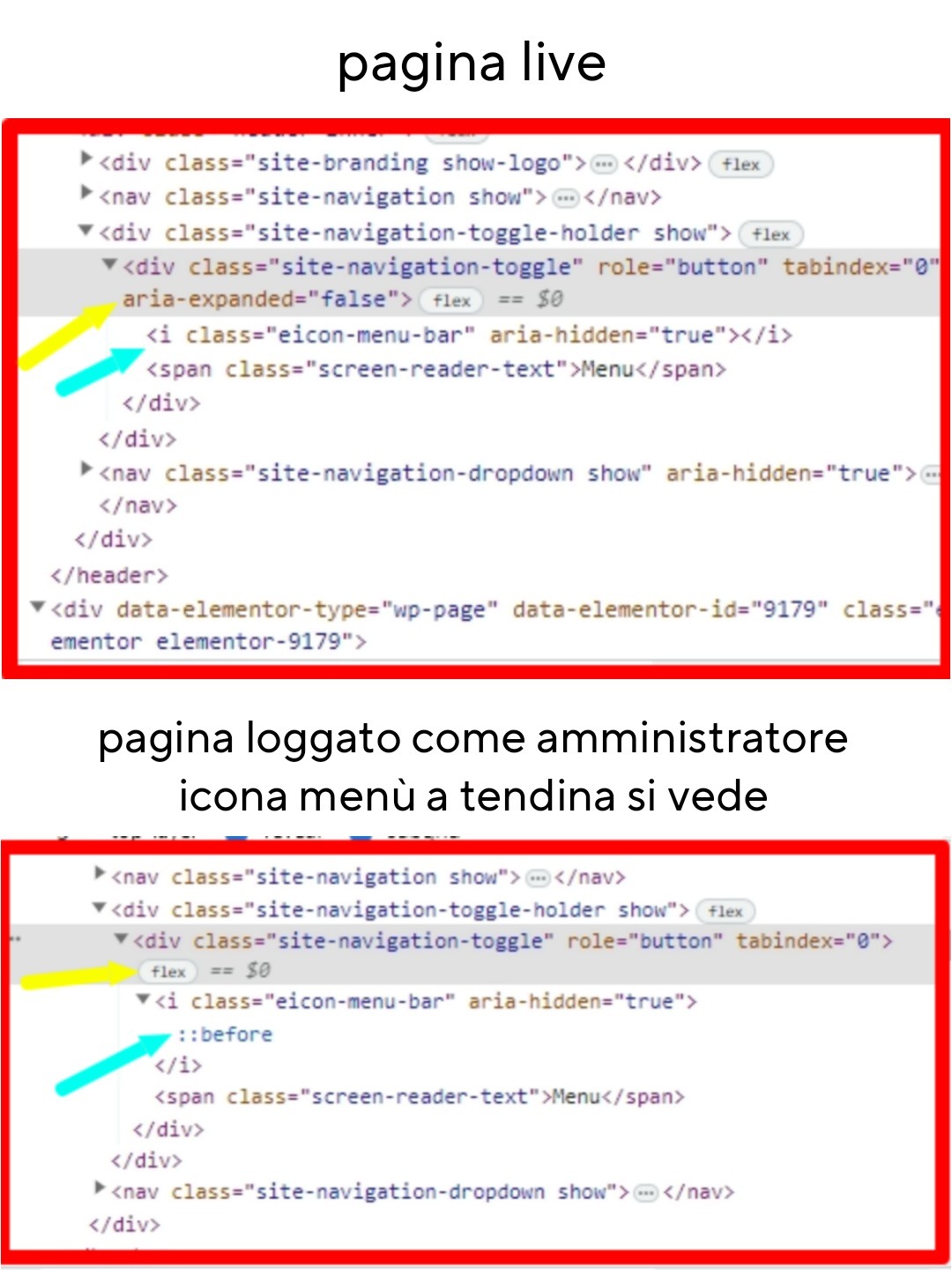
ho questo problema: l’icona del menù a tendina su mobile non viene visualizzata.
Questo capita solo sul sito “live”, se sono loggato in WordPress invece si vede. Il menù funziona, se vado sul punto esatto e clicco il menù si apre, ma chiaramente se qualcuno non lo sa è come se non ci fossa.
Ho provato a ispezionare con Chrome e ho riscontrato alcune differenze tra loggato e live nel punto dell’icona menù.
Lasciò il link con le differenze riscontrate.
Incollo anche le informazioni di sistema ricavate da Elementor. Utilizzo il tema Hello Elementor.
Grazie e buona giornata.https://psicologoautorevole.it/wp-content/uploads/2023/09/differenze-menu.jpg
Informazioni di sistema:
== Server Environment ==
Operating System: Linux
Software: Apache
MySQL version: Source distribution v5.7.39-42
PHP Version: 7.4.33
PHP Memory Limit: 768M
PHP Max Input Vars: 3000
PHP Max Post Size: 256M
GD Installed: Yes
ZIP Installed: Yes
Write Permissions: All right
Elementor Library: Connected== Theme ==
Name: Hello Elementor
Version: 2.8.1
Author: Elementor Team
Child Theme: No== Active Plugins ==
Elementor
Version: 3.16.3
Author: Elementor.comGTM4WP Version: 1.18.1 Author: Thomas Geiger iubenda | All-in-one Compliance for GDPR / CCPA Cookie Consent + more Version: 3.7.5 Author: iubenda Newsletter, SMTP, Email marketing and Subscribe forms by Brevo Version: 3.1.70 Author: Brevo SiteGround Central Version: 3.0.1 Author: SiteGround SiteGround Optimizer Version: 7.4.1 Author: SiteGround SiteGround Security Version: 1.4.5 Author: SiteGround Social Chat Version: 7.1.5 Author: QuadLayers Stop Spammers Version: 2023.4.1 Author: Trumani Xpro Elementor Addons Version: 1.3.8 Author: Xpro Yoast SEO Version: 21.1 Author: Team Yoast== Registro ==
JS: showing 11 of 11JS: 2023-08-21 15:31:07 [error X 155][https://psicologoautorevole.it/wp-content/plugins/elementor/assets/lib/pickr/pickr.min.js?ver=1.5.0:2:14799] Cannot read properties of null (reading ‘clone’)
JS: 2023-08-21 15:31:09 [error X 5][https://psicologoautorevole.it/wp-content/plugins/elementor/assets/lib/pickr/pickr.min.js?ver=1.5.0:2:19552] Cannot read properties of null (reading ‘changestop’)
JS: 2023-08-23 12:29:54 [error X 11][https://psicologoautorevole.it/wp-content/plugins/elementor/assets/js/editor.min.js?ver=3.15.3:3:917217] elementorFrontend is not defined
JS: 2023-08-30 08:44:09 [error X 6][https://psicologoautorevole.it/wp-includes/js/jquery/jquery.min.js?ver=3.7.0:2:28722] elementor_new_template_form_controls is not defined
JS: 2023-08-31 13:32:10 [error X 1][https://psicologoautorevole.it/wp-content/plugins/xpro-elementor-addons/assets/js/xpro-widgets.js?ver=1.3.8:1:21513] Cannot read properties of undefined (reading ‘size’)
JS: 2023-09-01 12:20:34 [error X 19][https://psicologoautorevole.it/wp-content/plugins/elementor/assets/js/frontend-modules.min.js?ver=3.15.3:2:12920] Cannot read properties of undefined (reading ‘attributes’)
JS: 2023-09-01 12:22:30 [error X 1][https://psicologoautorevole.it/wp-content/plugins/elementor/assets/js/editor.min.js?ver=3.15.3:3:642692] Cannot read properties of undefined (reading ‘isDesignable’)
JS: 2023-09-01 15:23:24 [error X 1][https://psicologoautorevole.it/wp-content/plugins/elementor/assets/js/editor.min.js?ver=3.15.3:3:670813] elementorFrontend.elements.window.jQuery is not a function
JS: 2023-09-10 23:47:55 [error X 3][https://psicologoautorevole.it/wp-content/plugins/elementor/assets/js/editor.min.js?ver=3.15.3:3:838767] Cannot convert undefined or null to object
JS: 2023-09-12 08:17:47 [error X 1][https://psicologoautorevole.it/wp-content/plugins/elementor/assets/js/responsive-bar.min.js?ver=3.15.3:2:5951] Cannot read properties of null (reading ‘config’)
JS: 2023-09-15 10:44:00 [error X 2][https://psicologoautorevole.it/wp-includes/js/jquery/jquery.min.js?ver=3.7.0:2:28722] Cannot read properties of undefined (reading ‘value’)== Elementor – Compatibility Tag ==
Xpro Elementor Addons: Compatibilità non specificata
-
Non riesco a fare un backup con Duplicator. Il processo arriva al 59.7% e poi si interrompe fornendomi i seguenti errori. Il plugin mi informa che il mio sito occupa 5GB mentre il DB 12MB.
Fase 1
Scansionando il sito
Attendi…
Mantieni questa finestra aperta durante il processo di scansione.
Potrebbero servire diversi minuti.
Fase 2
Compilazione pacchetto 59.7%
Attendi…
Tieni aperta questa finestra e non chiuderla durante il processo di creazione.
Il completamento dell’operazione potrebbe richiedere diversi minuti.
Fase 3
Si blocca a 59.7% per molto tempo.
Fase 4
Stato della compilazione
Compilazione interrotta dall’host
This server cannot complete the build due to host setup constraints, see the error message for more details.
If the error details are not specific consider the options below by clicking each section.******************************************************************************** DUPLICATOR-LITE PACKAGE-LOG: 5 February 2023 22:22 NOTICE: Do NOT post to public sites or forums ******************************************************************************** VERSION: 1.5.2.1 WORDPRESS: 5.9.5 PHP INFO: 5.6.40 | SAPI: cgi-fcgi SERVER: Apache PHP TIME LIMIT: (0) no time limit imposed PHP MAX MEMORY: 4294967296 (1024M default) MEMORY STACK: 81.25MB ******************************************************************************** DATABASE: ******************************************************************************** BUILD MODE: PHP(query limit - 100) MYSQLTIMEOUT: 5000 MYSQLDUMP: Not Supported TABLES: total:22 | filtered:0 | create:22 FILTERED: [] SQL CREATED: 20230205_xxxxxxxxxxx_af3938eced030e1d8652_20230205222046_database.sql SQL FILE SIZE: 9.74MB (10209995) SQL FILE TIME: 2023-02-05 22:22:05 SQL RUNTIME: 2.70 sec. ******************************************************************************** ARCHIVE (ZIP): ******************************************************************************** ARCHIVE DIR: /web/htdocs/www.nomeadominio.it/home ARCHIVE FILE: 20230205_xxxxxxxxxxx_af3938eced030e1d8652_20230205222046_archive.zip FILTERS: *OFF* DIRS: not set FILES: not set EXTS: not set ---------------------------------------- COMPRESSING SIZE: 5.06GB STATS: Dirs 2,677 | Files 29,397 SQL ADDED: 20230205_xxxxxxxxxxx_af3938eced030e1d8652_20230205222046_database.sql [PHP ERR][WARN] MSG:filesize(): stat failed for /web/htdocs/www.nomeadominio.it/home/ikkanews/----.mht [CODE:2|FILE:/web/htdocs/www.nomeadominio.it/home/wp-content/plugins/duplicator/classes/package/class.pack.archive.zip.php|LINE:172] do_action('wp_ajax_duplicator_package_build'), WP_Hook->do_action, WP_Hook->apply_filters, call_user_func_array, duplicator_package_build, DUP_Package->runZipBuild, DUP_Archive->build, DUP_Zip::create, filesize, DUP_Handler::error, DUP_Handler::getMessage [PHP ERR][WARN] MSG:filesize(): stat failed for /web/htdocs/www.nomeadominio.it/home/----.mht [CODE:2|FILE:/web/htdocs/www.nomeadominio.it/home/wp-content/plugins/duplicator/classes/package/class.pack.archive.zip.php|LINE:172] do_action('wp_ajax_duplicator_package_build'), WP_Hook->do_action, WP_Hook->apply_filters, call_user_func_array, duplicator_package_build, DUP_Package->runZipBuild, DUP_Archive->build, DUP_Zip::create, filesize, DUP_Handler::error, DUP_Handler::getMessage WARNING: Unable to zip files: FILE: [/web/htdocs/www.nomeadominio.it/home/ikkanews/----.mht] FILE: [/web/htdocs/www.nomeadominio.it/home/----.mht] ZipArchive Object ( [status] => 0 [statusSys] => 0 [numFiles] => 32072 [filename] => /web/htdocs/www.nomeadominio.it/home/wp-content/backups-dup-lite/tmp/20230205_xxxxxxxxxxx_af3938eced030e1d8652_20230205222046_archive.zip [comment] => ) FILE ADDED TO ZIP: 32071 COMPRESSION RESULT: '1' COMPRESSED SIZE: 4.25GB ARCHIVE RUNTIME: 436.76 sec. MEMORY STACK: 94.75MB building installer [PHP ERR][WARN] MSG:No valid encoded path found in value '' for ioncube.loader.encoded_paths. [CODE:2|FILE:Unknown|LINE:0] DUP_Handler::shutdown, DUP_Handler::error, DUP_Handler::getMessageIl mio hosting mi permette di editare i seguenti parametri (max_execution_time è già al massimo, memory_limit anche):
PHP 8.1
PHP 8.0
PHP 7.4 (obsoleta)
PHP 7.3 (obsoleta)
PHP 7.2 (obsoleta)
PHP 7.1 (obsoleta)
PHP 7.0 (obsoleta)
PHP 5.6 (attualmente in uso ma obsoleta)
PHP 5.5 (obsoleta)
PHP 5.4 (obsoleta)
PHP 5.3 (obsoleta)
PHP 5.2 (obsoleta)
PHP 4.4 (obsoleta)
Nascondi versioni obsolete
display_errors Off
max_input_time 60
max_input_vars 1000
post_max_size 25M
zlib.output_compression Off
allow_url_fopen Off
opcache.jit Off
max_execution_time 900
memory_limit 1024M
output_buffering 4096
upload_max_filesize 25M
short_open_tag Off
mysqli.allow_local_infile Off
ioncube Off
Togliendo quei file ottengo questo log:
********************************************************************************
DUPLICATOR-LITE PACKAGE-LOG: 5 February 2023 23:05
NOTICE: Do NOT post to public sites or forums
********************************************************************************
VERSION:	1.5.2.1
WORDPRESS:	5.9.5
PHP INFO:	5.6.40 | SAPI: cgi-fcgi
SERVER:		Apache
PHP TIME LIMIT: (0) no time limit imposed
PHP MAX MEMORY: 4294967296 (1024M default)
MEMORY STACK: 80.75MB

********************************************************************************
DATABASE:
********************************************************************************
BUILD MODE:   PHP(query limit - 100)
MYSQLTIMEOUT: 5000
MYSQLDUMP:    Not Supported
TABLES: total:22 | filtered:0 | create:22
FILTERED: []
SQL CREATED: 20230205_xxxxxxxx_00bacebb0a0a153c8817_20230205230513_database.sql
SQL FILE SIZE: 9.72MB (10189462)
SQL FILE TIME: 2023-02-05 23:05:51
SQL RUNTIME: 2.35 sec.

********************************************************************************
ARCHIVE (ZIP):
********************************************************************************
ARCHIVE DIR:  /web/htdocs/www.nomeadominio.it/home
ARCHIVE FILE: 20230205_xxxxxxxx_00bacebb0a0a153c8817_20230205230513_archive.zip
FILTERS: *OFF*
DIRS:
	not set
FILES:
	not set
EXTS:  not set
----------------------------------------
COMPRESSING
SIZE:	5.06GB
STATS:	Dirs 2,676 | Files 29,395
SQL ADDED: 20230205_xxxxxxxx_00bacebb0a0a153c8817_20230205230513_database.sql
ZipArchive Object
(
    [status] => 0
    [statusSys] => 0
    [numFiles] => 32071
    [filename] => /web/htdocs/www.nomeadominio.it/home/wp-content/backups-dup-lite/tmp/20230205_xxxxxxxx_00bacebb0a0a153c8817_20230205230513_archive.zip
    [comment] =>
)

FILE ADDED TO ZIP: 32070
-
Salve a tutti … è da pochissimo che uso WordPress e quindi non sono un esperto e mi scuserete se magari il mio problema è banale … ma non riesco ad uscirne.
Premesso ciò dettaglio un pò i passi precedenti al verificarsi del problema.
Ho attivato un hosting con WordPress per un mio Cliente e mi è stato creato un DB ed una installazione WordPress sul dominio scelto con una pagina di benvenuto temporanea.
Usando per la prima volta WordPress, ho pensato di scaricare localmente MAMP per avere un server virtuale completo di MySql ed ho scaricato ed installato WordPress localmente per iniziare a creare il sito (non un blog) in tutta tranquillità senza toccare il server on line.
Localmente : ho creato un DB MySql con lo stesso nome assegnato dall’hosting e poi ho cominciato a lavorare su WordPress.
Una volta completato almeno quasi la totalità del sito, ho deciso di spostarlo on line per poi continuare a lavorare direttamente sull’hosting in modo che il Cliente potesse valutare velocemente il lavoro che stavo svolgendo.
Per fare ciò ho seguito i passi che normalmente sono indicati anche su vari forum cioè l’esportazione del DB e la copia della cartella WordPress da locale all’hosting tramite FileZilla e l’importazione nel DB sull’hosting del file precedentemente esportato da locale.
Ovviamente ho modificato il wp-config.php con i paramentri giusti dell’hosting (es. nome utente e password e localizzazione del DB) e il tutto ha funzionato perfettamente; cioè potevo accedere alla dashboard di WordPress con il mio sito funzionante, potevo accedere alla dashboard phpmyadmin per operare sul DB MySql ed il sito richiamato on line funziona perfettamente.
Altra premessa prima di indicare il problema, è che essendo già stato creato dall’hosting il DB, non potevo crearlo da capo per poi farne l’importazione; quindi ho eliminato tutte le tabelle già create tranne wp_users dove erano scritte le info specifiche dell’hosting ovviamente aggiornandola però nel campo dell’url del sito che ovviamente non era più localhost.
Detto questo …
Se provo a creare una nuova pagina … mi si apre una pagina completamente bianca e quindi non posso creare nuove pagine … senza alcuna indicazione di errore.
Se provo a caricare una immagine … compare l’immagine sfocata e la rotellina che gira all’infinito senza riuscire a caricare niente … devo uscire fuori e mi ritrovo per esempio una galleria con le foto da me caricate soltanto come elemento ma senza la foto … però se clicco su indica url … riesco da caricarla dando la posizione dei media che mi ha caricato correttamente nella cartella on line … ma che non riesce a far vedere nella pagina dopo il caricamento.
Anche se vado in Media e voglio caricare nuove foto … fa lo stesso problema però mi dice anche “Problemi nel caricamento … provare più tardi”.
Il tema che uso è uno standard Twenty-Twentythree e provato già a disabilitare tutti i plugin … ma non cambia nulla.
Ovviamente lavorando in locale tutto funziona perfettamente.
Spero di non essere sato troppo prolisso … ma era necessario indicare tutti i passaggi da me effettuati.Un Saluti
Roberto
-